1. הקדמה
Thank you for choosing the Nexxt Indoor Smart Camera. This manual provides essential information for the safe and efficient use of your new device. Please read it thoroughly before installation and operation, and retain it for future reference.
This 1080p HD fixed room camera is designed to provide reliable indoor surveillance with features such as night vision, two-way audio communication, motion detection, and seamless integration with smart home ecosystems like Amazon Alexa and Google Assistant.
2. זיכערקייַט אינפֿאָרמאַציע
- Ensure the camera is powered by the provided power adapter. Using unauthorized adapters may damage the device and void the warranty.
- Do not expose the camera to water, moisture, or extreme temperatures. It is designed for indoor use only.
- פֿאַרמײַדט צו שטעלן די קאַמעראַ אין דירעקטער זון אָדער לעבן היץ־קוואַלן.
- פרובירט נישט צו צענעמען אדער פאררעכטן די קאמערא אליין. לאָזט איבער אלע סערוויסעס צו קוואַליפֿיצירטע פּערסאָנעל.
- Keep the camera and its accessories out of reach of children and pets.
- Ensure stable Wi-Fi connectivity for optimal performance.
3. פּעקל אינהאַלט
באַשטעטיקן אַז אַלע זאכן זענען פאַראַן אין פּעקל:
- NEXXT Indoor Smart Camera (NHC-I710)
- מאַכט אַדאַפּטער
- שטיין
- באַניצער מאַנואַל (דעם דאָקומענט)

Image: The retail packaging of the NEXXT Indoor Smart Camera, showing the camera and key features.
4. פּראָדוקט איבערview
The Nexxt Indoor Smart Camera offers a range of features for comprehensive home monitoring:
- גאַנץ הד 1080 פּ האַכלאָטע: גיט קלאָר און דיטיילד ווידעא פאָאָtage.
- אויטאָמאַטישע נאַכט זעאונג: Integrated infrared LEDs enable clear monitoring in low-light conditions up to 30 feet.
- צוויי-וועג קאָמוניקאַציע: Built-in microphone and speaker allow for real-time audio interaction.
- באַוועגונג דעטעקשאַן: Alerts you to detected movement within the camera's field of view.
- לאקאלע און קלאָוד סטאָרידזש: Supports microSD cards (sold separately) and Microsoft Azure cloud storage (subscription sold separately) for recording.
- סמאַרט היים ינטעגראַטיאָן: Compatible with Amazon Alexa and Google Assistant for voice control and integration into smart routines.
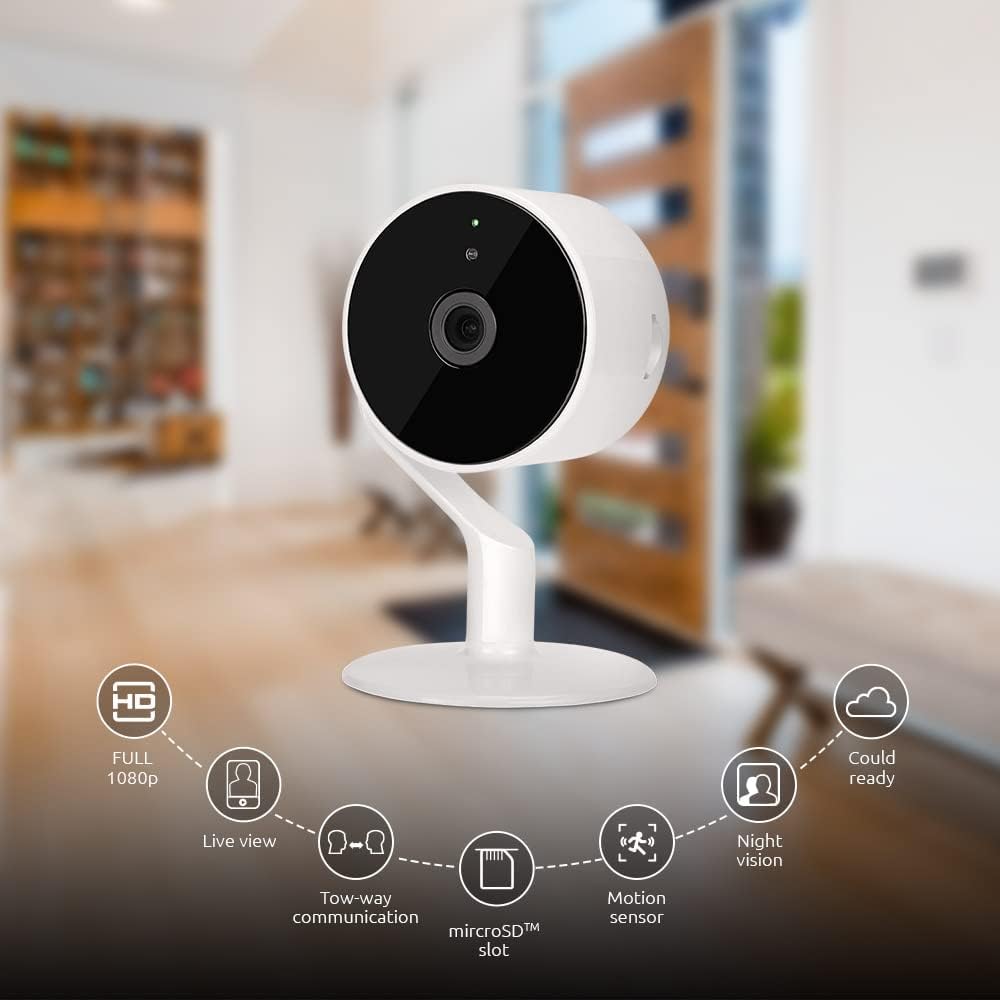
Image: The NEXXT Indoor Smart Camera highlighting its key features: Full HD 1080p, Live View, Two-way communication, microSD slot, Motion sensor, Night vision, and Cloud ready.
5. סעטאַפּ
5.1 מאַכט אויף
- Place the camera on a stable, flat surface or mount it using appropriate hardware (not included).
- פֿאַרבינדט דעם מאַכט אַדאַפּטער צום קאַמעראַ'ס מאַכט אַרייַנגאַנג פּאָרט.
- Plug the power adapter into a standard electrical outlet. The camera will power on and its indicator light will begin to flash, indicating it's ready for pairing.
5.2 אַפּ אינסטאַלאַציע און פּערינג
To control and monitor your camera, you need to download the Nexxt Home App:
- אָפּלאָדירן די Nexxt היים אַפּ פון די Google פּלייַ סטאָר (for Android devices) or the עפּל אַפּ סטאָר (for iOS devices).
- Open the Nexxt Home App and create a new account or log in if you already have one.
- Tap the "+" icon or "Add Device" to begin the pairing process.
- Select "Camera" or the specific camera model from the list of devices.
- Follow the on-screen instructions in the app to connect the camera to your home Wi-Fi network. This typically involves scanning a QR code displayed on your phone with the camera.
- Once connected, the camera's indicator light will turn solid, and you will see the camera added to your app.

Image: Illustration showing the NEXXT Indoor Smart Camera being set up to function as a webcam, connecting to a laptop.
6. אַפּערייטינג ינסטרוקטיאָנס
6.1 לעבן View
From the Nexxt Home App, tap on your camera's name to access the live video feed. You can view פאַקטיש-צייט פאָאָtage of your monitored area.

Image: The NEXXT Indoor Smart Camera on a desk, with text indicating "Full HD resolution" and its ability to provide 1080p high-quality video day or night.
6.2 צוויי-וועגיקע שמועס
בשעת אין לעבן view, tap the microphone icon in the app to enable two-way audio. You can speak through your phone, and your voice will be projected through the camera's speaker. Tap the icon again to end communication.

Image: An illustration depicting communication between a person using a phone and another person near the camera, symbolizing the two-way talk feature.
6.3 נאַכט זעאונג
The camera automatically switches to night vision mode in low-light conditions. You can also manually toggle night vision on/off within the app settings for the camera.

Image: A split image showing a room in daylight on one side and the same room in night vision on the other, demonstrating the camera's night vision capability.

Image: A smartphone screen displaying the Nexxt Home app interface with a night vision toggle switch, overlaid on a room scene, indicating active night vision monitoring.
6.4 באַוועגונג דעטעקציע און וואָרענונגען
Configure motion detection sensitivity and alert preferences in the app. When motion is detected, you will receive notifications on your smartphone.

Image: A person sleeping in bed with a motion detection icon overlaid, indicating advanced motion detection with an effective range of up to 30 feet.

Image: A woman holding a smartphone displaying the Nexxt Home app, with text indicating that advanced human identification technology helps reduce false alarms and unwanted notifications.
6.5 רעקאָרדינג און סטאָרידזש
The camera supports local storage via a microSD card (up to 128GB, not included) and cloud storage via Microsoft Azure (subscription required, sold separately). Insert the microSD card into the designated slot on the camera. Manage recording settings and view רעקאָרדעד פוtage through the Nexxt Home App.
6.6 טיילן צוטריט
You can securely share your camera's security feed with multiple approved devices, allowing family members or trusted individuals to also monitor your home.

Image: Two smartphones displaying the Nexxt Home app, with text stating "Everyone Can Keep Watch" and explaining that the security feed can be securely shared with multiple approved devices.
6.7 קלוגע היים אינטעגראַציע
The Nexxt Indoor Smart Camera is compatible with Amazon Alexa and Google Assistant. Follow the instructions in your Alexa or Google Home app to link your Nexxt Home account and enable voice commands for your camera.
7. וישאַלט
- רייניקונג: ניצט אַ ווייכע, טרוקענע שטאָף צו רייניקן די קאַמעראַ לינזע און קערפּער. ניצט נישט פליסיקע רייניגער אָדער אַעראָזאָלן.
- סטאָרידזש: אויב איר לייגט די קאַמעראַ אַוועק פֿאַר אַ לענגערע צייט, זאָלט איר עס אָפּשטעקן פֿון עלעקטרישן נעץ און עס אַוועקלייגן אין אַ קילן, טרוקענעם אָרט.
- Firmware דערהייַנטיקונגען: Regularly check the Nexxt Home App for available firmware updates to ensure optimal performance and security.
8. טראָובלעשאָאָטינג
- קאַמעראַ פֿאַרבינדט זיך נישט צו Wi-Fi:
- זיכער מאַכן אַז אייער Wi-Fi נעץ איז 2.4GHz. די קאַמעראַ שטיצט נישט 5GHz Wi-Fi.
- קאָנטראָלירט אייער Wi-Fi פּאַראָל פֿאַר אַקיעראַסי.
- ריקט די קאַמעראַ נענטער צו אייער Wi-Fi ראַוטער.
- ריסטאַרט דיין ראַוטער און די קאַמעראַ.
- ניט לעבן view or choppy video:
- קאָנטראָלירט אייער אינטערנעט פֿאַרבינדונג גיכקייט.
- זיכער מאַכן אַז די קאַמעראַ האט אַ שטאַרק Wi-Fi סיגנאַל.
- Close and reopen the Nexxt Home App.
- באַוועגונג וואָרענונגען נישט באַקומען:
- Verify that motion detection is enabled in the app settings.
- Check your phone's notification settings for the Nexxt Home App.
- אַדזשאַסטירן באַוועגונג דעטעקשאַן סענסיטיוויטי.
- צוויי-וועג אודיאָ אַרבעט נישט:
- Ensure your phone's microphone is enabled for the Nexxt Home App.
- Check the volume settings on your phone and within the app.
9. ספּעסאַפאַקיישאַנז
| שטריך | באַשרייַבונג |
|---|---|
| מאָדעל נאָמען | NHC-I710 |
| ווידעא קאַפּטורע רעסאָלוטיאָן | 1080 פּ הד |
| דרינענדיק / דרויסנדיק באַניץ | דרינענדיק |
| קאַנעקטיוויטי טעכנאָלאָגיע | ווירעלעסס (ווי-פי) |
| קאַנעקטיוויטי פּראָטאָקאָל | ווי-פי (2.4 גהז) |
| מאַכט מקור | קאָרדעד עלעקטריק |
| נאַכט וויזשאַן ראַנגע | 30 פֿיס |
| קאָנטראָללער טיפּ | אַמאַזאָן אַלעקסאַ, Google אַססיסטאַנט |
| מאַונטינג טיפּ | טאַבלעטאָפּ בארג |
| נומער דימענשאַנז (L X W X H) | 3 X 7 X 3 אינטשעס |
| פּונקט וואָג | 6.7 אונס (0.19 קילאָגראַמס) |
| UPC | 798302056152 |
| אינטערנאַציאָנאַלע פּראַטעקשאַן שאַץ | IP65 |
10. וואָראַנטי און שטיצן
The Nexxt Indoor Smart Camera comes with a 2 יאָר וואָראַנטי פֿון דעם קויף־דאַטום. ביטע באַהאַלטן אייער קויף־באַווייַז פֿאַר גאַראַנטיע־קליימז.
For technical support, troubleshooting assistance, or warranty inquiries, please visit the official Nexxt Solutions website or contact their customer support through the Nexxt Home App.
נעקסקסט סאַלושאַנז Webפּלאַץ: www.nexxtsolutions.com


