הקדמה
This manual provides detailed instructions for the Strex Bluetooth 2-in-1 Transmitter and Receiver, Model SP173. This versatile device allows you to wirelessly transmit or receive audio signals, enhancing your audio experience with various devices.
The Strex Bluetooth adapter supports both טראַנסמיטער (טקס) און ופנעמער (RX) modes, utilizing Bluetooth 5.0 technology for stable, high-quality audio transmission.
פּעקל אינהאַלט
- Strex Bluetooth 2-in-1 Audio Transmitter/Receiver
- מיקראָ וסב מאַכט קאַבלע
- 3.5 מם AUX אַודיאָ קאַבלע
- 3.5 מם צו RCA קאַבלע
- באַניצער מאַנואַל (דעם דאָקומענט)

מיטל איבערview
Familiarize yourself with the various components and ports of your Strex Bluetooth adapter.

- אָנ / אַוועק באַשטימען: מאַכט אָן אָדער אויס דעם אַפּאַראַט.
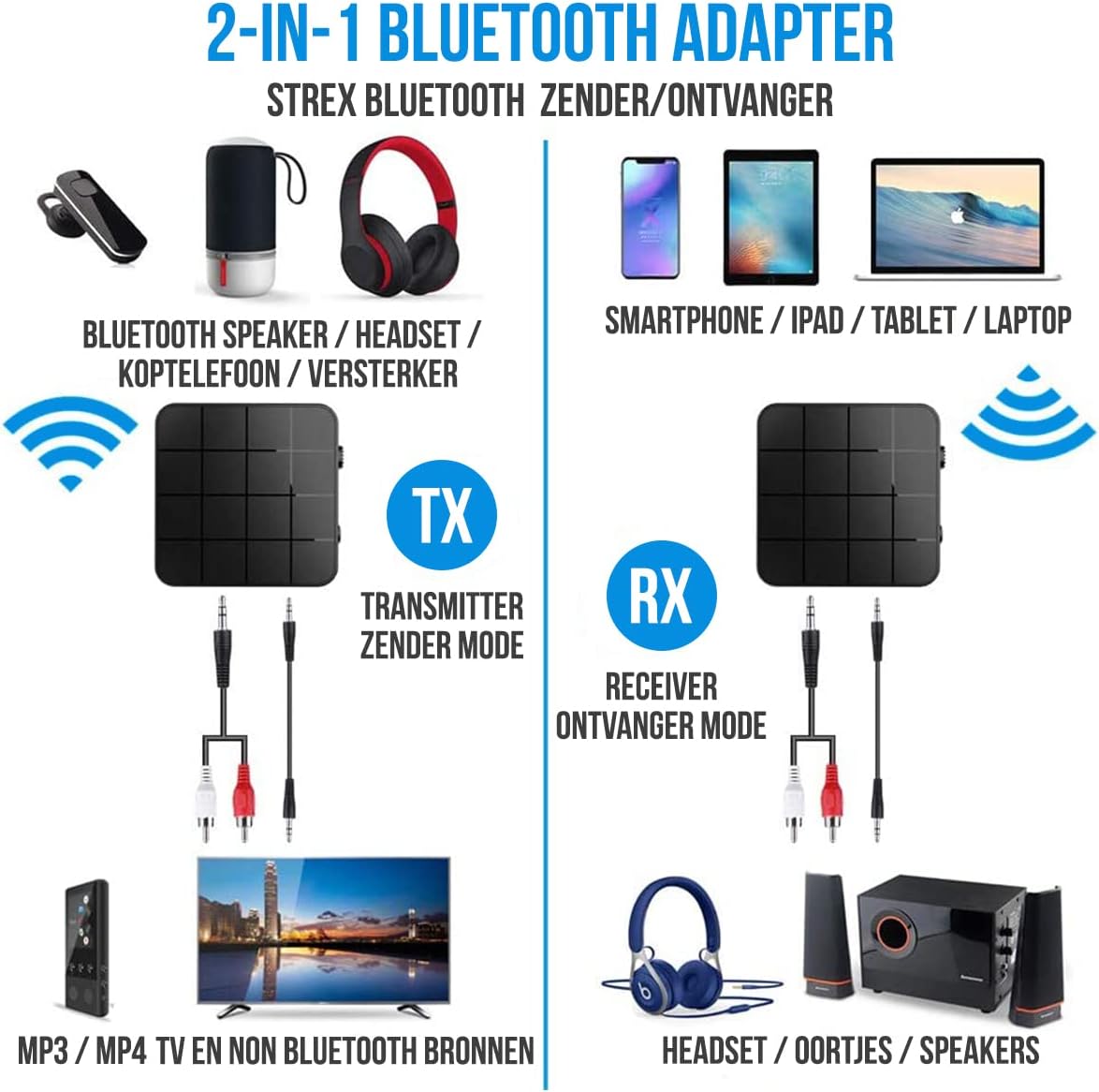
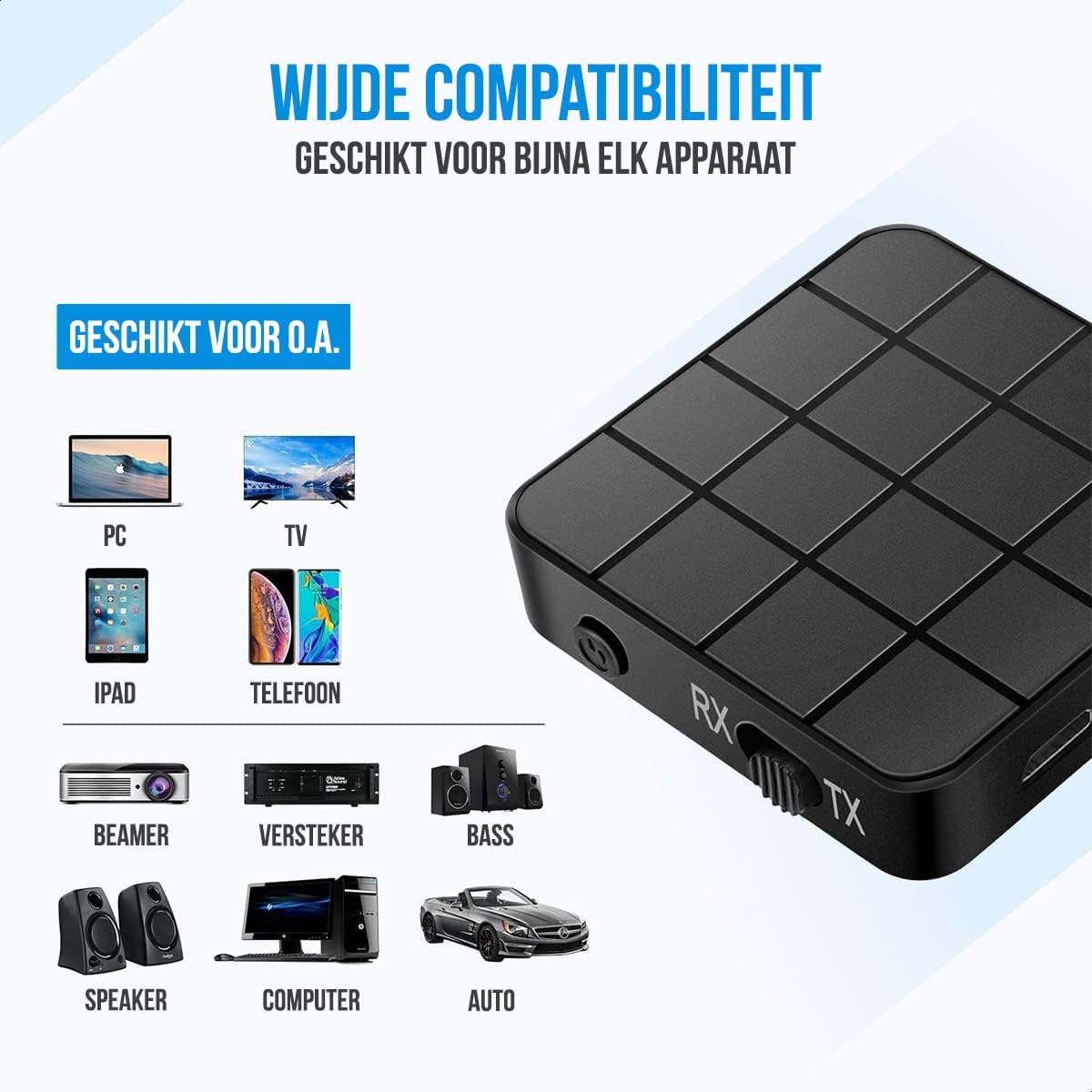
- מאָדע סוויטש (RX/TX): Selects between Receiver (RX) and Transmitter (TX) modes.
- סטאַטוס געפירט: Indicates power, pairing, and connection status.
- מיקראָ וסב טשאַרדזשינג פּאָרט: פֿאַר אָפּלאָדן די אינעווייניקסטע באַטאַרייע.
- 3.5mm Audio Input/Output: Connects to audio sources or output devices using the provided cables.
סעטאַפּ און אָפּעראַציע
טשאַרדזשינג די מיטל
Before first use, ensure the device is fully charged. Connect the Micro USB power cable to the charging port on the adapter and the other end to a USB power source (e.g., computer USB port, USB wall adapter).
- א פולע אויפלאדונג נעמט בערך קסנומקס מינוט.
- The device provides up to 6-8 שעה of continuous playtime on a single charge.

ופנעמער (רקס) מאָדע
In RX mode, the Strex adapter receives audio wirelessly from a Bluetooth-enabled device (e.g., smartphone, tablet) and outputs it to a non-Bluetooth audio system (e.g., wired speakers, car stereo).
- טוישן דעם אפאראט צו RX מאָדע using the mode selector switch.
- Connect the Strex adapter to your non-Bluetooth audio system using either the 3.5 מם AUX קאַבלע אָדער די 3.5 מם צו רקאַ קאַבלע.
- Power on the Strex adapter. The Status LED will indicate pairing mode (typically blinking blue).
- On your Bluetooth-enabled device (e.g., smartphone), go to Bluetooth settings and search for available devices. Select "Strex" (or similar name) to pair.
- Once paired, the Status LED will show a solid blue light. You can now stream audio from your device to your audio system.

טראַנסמיטער (טקס) מאָדע
In TX mode, the Strex adapter transmits audio wirelessly from a non-Bluetooth audio source (e.g., TV, PC, old stereo system) to a Bluetooth-enabled receiving device (e.g., Bluetooth headphones, Bluetooth speakers).
- טוישן דעם אפאראט צו טקס מאָדע using the mode selector switch.
- Connect the Strex adapter to your non-Bluetooth audio source (e.g., TV's audio output) using either the 3.5 מם AUX קאַבלע אָדער די 3.5 מם צו רקאַ קאַבלע.
- Power on the Strex adapter. The Status LED will indicate pairing mode.
- שטעלט אייערע בלועטוט כעדפאָונז אדער רעדנער אין פּערינג מאָדע.
- The Strex adapter will automatically search for and connect to nearby Bluetooth receiving devices. Once connected, the Status LED will show a solid light.
- Ensure your Bluetooth headphones/speakers are unpaired from any other devices (e.g., smartphone) before attempting to pair with the Strex adapter in TX mode.

Important Notes on Operation:
- The adapter cannot simultaneously send and receive audio. It must be set to either TX or RX mode.
- For optimal performance, ensure the adapter is within 10 meters (33 feet) of the connected Bluetooth device.
- Bluetooth 5.0 provides HD Audio with minimal latency, but some older Bluetooth devices may experience slight synchronization differences.
וישאַלט
- רייניקונג: ניצט אַ ווייכע, טרוקענע שטאָף צו רייניקן דעם אַפּאַראַט. ניצט נישט קיין פליסיקע רייניגער אָדער אַעראָזאָלן.
- סטאָרידזש: האַלט דעם אַפּאַראַט אין אַ קיל, טרוקן אָרט אַוועק פון דירעקט זונשייַן און עקסטרעמע טעמפּעראַטורן.
- באַטערי זאָרגן: כדי צו פארלענגערן די לעבן פון די באַטעריע, זאָלט איר נישט אָפט אויסלאָדן די באַטעריע. לאָדט דאָס אַפּאַראַט רעגולער אויף, אפילו אויב עס ווערט נישט גענוצט פֿאַר לענגערע צייטן.
טראָובלעשאָאָטינג
- קיין מאַכט:
Ensure the device is charged. Connect it to a power source using the Micro USB cable and allow it to charge for at least 15 minutes before attempting to power on.
- Cannot Pair in RX Mode:
Make sure the adapter is in RX mode. Ensure your smartphone/tablet's Bluetooth is enabled and it is searching for new devices. If previously paired, try unpairing and re-pairing. Keep the devices within 10 meters.
- Cannot Pair in TX Mode:
Verify the adapter is in TX mode. Ensure your Bluetooth headphones/speakers are in pairing mode and are not connected to any other device. Some devices may require you to manually initiate pairing on the adapter (refer to Status LED indications).
- קיין אַודיאָ אַרויסגאַנג/אַרייַנגאַנג:
Check all cable connections (3.5mm AUX or RCA) are secure. Ensure the volume on both the adapter and the connected audio device is turned up. Confirm the correct input/output source is selected on your audio system/TV.
- Audio Lag/Poor Quality:
Ensure devices are within range and there are no significant obstructions. Reduce interference from other wireless devices. While Bluetooth 5.0 minimizes lag, some older audio sources or receiving devices might introduce slight delays.
ספּעסאַפאַקיישאַנז
| מאָדעל נומער | SP173 |
| בלועטאָאָטה ווערסיע | Bluetooth 5.0 (A2DP, AVRCP in Receiver mode) |
| אַפּערייטינג מאָדעס | טראַנסמיטער (טקס) און ופנעמער (רקס) |
| קאַנעקטיוויטי | 3.5mm AUX, RCA (via 3.5mm to RCA cable) |
| ווירעלעסס ראַנגע | אַרויף צו 10 מעטער (33 פֿיס) |
| באַטערי טיפּ | לי-פּאָלימער |
| באַטאַרייע קאַפּאַציטעט | 200 מאַה |
| פּלייַטימע | בעערעך 6-8 שעה |
| טשאַרדזשינג צייט | בעערעך 90 מינוט |
| דימענסיעס (L X W X H) | 4.4 X 4.4 X 1.2 סענטימעטער (1.73 X 1.73 X 0.47 אינטשעס) |
| וואָג | 18 גראַמז (0.63 אונסעס) |
| מאַטעריאַל | פּלאַסטיק |
| קאַמפּאַטאַבאַל דעוויסעס | Smartphones, Tablets, PCs, TVs, Audio Systems, Headphones, Speakers |

זיכערקייַט אינפֿאָרמאַציע
- Do not dispose of batteries in fire. Batteries may explode.
- האַלט דעם אַפּאַראַט אַוועק פון וואַסער און איבערגעטריבענער הומידיטי.
- דו זאלסט נישט באַשולדיקן די מיטל לעבן ברענעוודיק מאַטעריאַלס.
- The device has an operating range of 10 meters and may interfere with other wireless devices within this range.
- Always adhere to local regulations for the disposal of electronic waste.
וואָראַנטי און שטיצן
Specific warranty details are not provided in this manual. For warranty information or technical support, please refer to the product packaging or contact Strex customer service through their official webפּלאַץ אָדער די זיצער ווו די פּראָדוקט איז פּערטשאַסט.


