1. הקדמה
The TP-Link Archer AX80/A is a high-performance AX6000 WiFi 6 router designed to deliver ultra-fast wireless speeds and enhanced network capacity. Featuring advanced technologies like OFDMA, MU-MIMO, and 8-stream connectivity, it ensures a stable and efficient network experience for numerous connected devices, including smartphones, tablets, and IoT devices. This manual provides detailed instructions for setting up, operating, and maintaining your Archer AX80/A router.


2. פּעקל אינהאַלט
באַשטעטיקן אַז דיין פּעקל כּולל די פאלגענדע זאכן:
- TP-Link Archer AX80/A AX6000 WiFi 6 Router
- מאַכט אַדאַפּטער
- עטהערנעט קאַבלע
- שנעל ינסטאַללאַטיאָן גייד
3. פיזישע איבערview
3.1 פּאָרטן און קנעפּלעך
The Archer AX80/A router features various ports and buttons for connectivity and control.

- 2.5Gbps WAN/LAN Port: One port for high-speed internet connection or LAN device.
- גיגאַביט WAN/LAN פּאָרט: One port for standard internet connection or LAN device.
- גיגאַביט לאַן פּאָרץ: Three ports for connecting wired devices.
- וסב 3.0 פּאָרט: One port for connecting external storage devices for network sharing.
- מאַכט אויף / אַוועק קנעפּל: To power the router on or off.
- באַשטעטיק קנעפּל: צו צוריקשטעלן די פאַבריק דיפאָלט סעטטינגס (ניצט אַ שפּילקע צו דריקן און האַלטן).

3.2 פּלאַצירונג אָפּציעס
The Archer AX80/A offers flexible placement options to suit your environment.

4. סעטאַפּ גייד
4.1 האַרדוואַרע קאַנעקשאַן
- Power off your modem and remove the backup battery if it has one.
- Connect the modem to the router's WAN port (usually the 2.5Gbps port) using an Ethernet cable.
- Power on the modem, then power on the router.
- Wait for the router's LED indicators to stabilize, indicating a successful connection.
4.2 Easy Setup via TP-Link Tether App
The TP-Link Tether app provides an intuitive way to set up and manage your router from your smartphone or tablet.
- דאַונלאָוד די TP-Link Tether אַפּ פֿון די אַפּ סטאָר אָדער גוגל פּליי.
- פֿאַרבינדט אייער מאָביל דעווייס צום ראַוטער'ס פעליקייט Wi-Fi נעץ (SSID און פּאַראָל זענען אויף דעם ראַוטער'ס עטיקעט).
- Open the Tether app and follow the on-screen instructions to complete the initial setup, including creating a TP-Link ID, setting up your Wi-Fi name and password, and configuring internet settings.

5. אַפּערייטינג ינסטרוקטיאָנס
5.1 קאַנעקטינג דעוויסעס
- ווירעלעסס קשר: זוכן פֿאַר your Wi-Fi network name (SSID) on your device and enter the password you set during setup.
- ווייערד קשר: Connect your computer or other wired devices to the router's LAN ports using Ethernet cables.

5.2 פאַרוואַלטן דיין נעץ
You can manage your router settings through the TP-Link Tether app or by accessing the web פאַרוואַלטונג צובינד דורך אַ web browser (typically at http://tplinkwifi.net or http://192.168.0.1).
- Change Wi-Fi settings (SSID, password, security type).
- מאָניטאָרירן פֿאַרבונדענע דעוויסעס.
- Configure advanced network settings.
6. אַוואַנסירטע פֿעיִקייטן
6.1 OneMesh™ Support
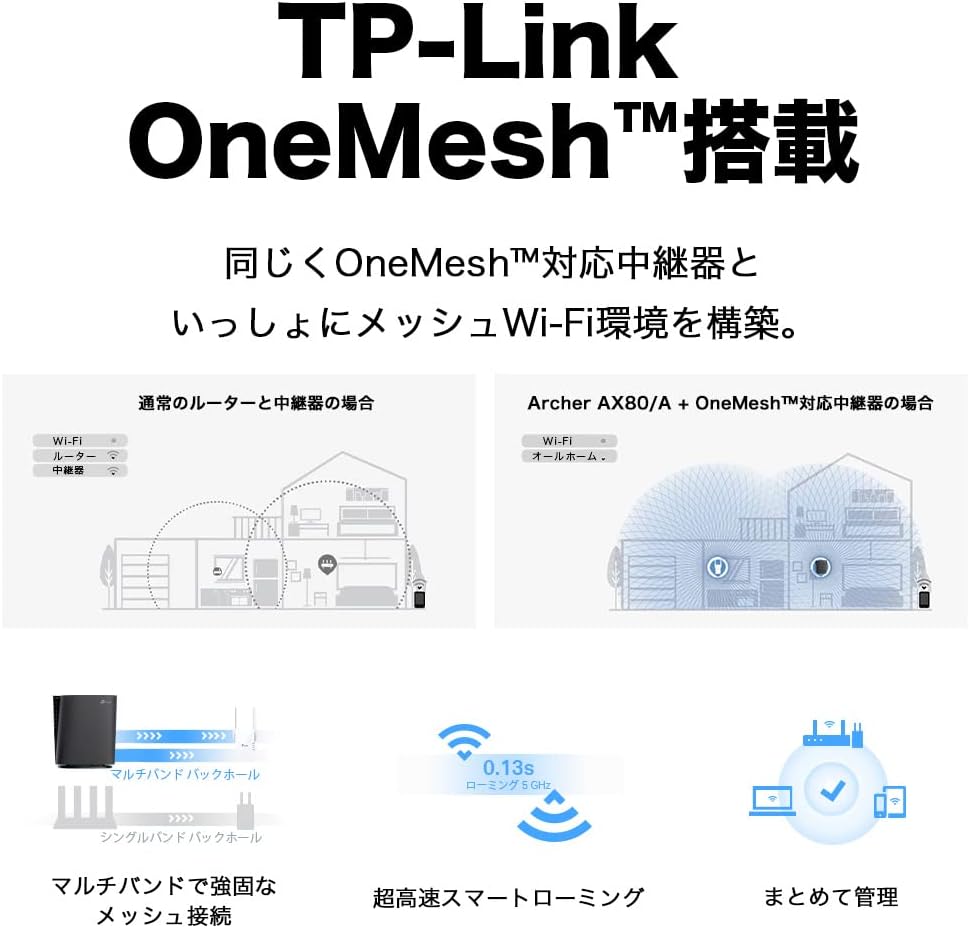
The Archer AX80/A supports TP-Link OneMesh™, allowing you to create a seamless whole-home Wi-Fi network by connecting to OneMesh-compatible range extenders. This eliminates Wi-Fi dead zones and provides uninterrupted roaming.
6.2 VPN Client Functionality
The router includes VPN client functionality, enabling you to establish a secure VPN connection without needing additional VPN software on each device. It supports OpenVPN, PPTP VPN, and L2TP VPN protocols.

6.3 IPv6 IPoE Support
The Archer AX80/A supports IPv6 IPoE (IPv4 over IPv6), including v6 Plus, OCN Virtual Connect, and DS-Lite, ensuring compatibility with modern internet service provider configurations for optimal performance.
6.4 פּערענטאַל קאָנטראָלס
Manage and control internet access for family members with robust parental control features available through the Tether app. Set time limits, block inappropriate content, and monitor usage.

6.5 WPA3 Security
The router supports WPA3, the latest Wi-Fi security protocol, providing enhanced encryption and protection against cyber threats for a more secure home network.

6.6 US-Based Security Standards
TP-Link adheres to US government cybersecurity and infrastructure security agency (CISA) promoted "Secure-by-Design" principles, ensuring high-level security throughout design, development, and maintenance.

7. וישאַלט
7.1 פירמוואַרע דערהייַנטיקונגען
רעגולער אַפּדייט דיין ראַוטער'ס פירמווער צו ענשור אָפּטימאַל פאָרשטעלונג, זיכערהייט און צוטריט צו נייַע פֿעיִקייטן. פירמווער אַפּדייץ קענען דורכגעפירט ווערן דורך די טעטהער אַפּ אָדער די web פאַרוואַלטונג צובינד.
- Open the Tether app or log in to the web פאַרוואַלטונג צובינד.
- Navigate to System Tools > Firmware Upgrade.
- Follow the instructions to check for and install available updates.
7.2 Rebooting the Router
If you experience network issues, a simple reboot can often resolve them. You can reboot the router through the Tether app, web management interface, or by unplugging and replugging the power adapter.
8. טראָובלעשאָאָטינג
8.1 קיין אינטערנעט צוטריט
- קוק אויב דיין מאָדעם אַרבעט ריכטיק.
- Ensure all cables are securely connected to the correct ports.
- ריסטאַרט ביידע דיין מאָדעם און ראַוטער.
- Verify your internet settings in the router's management interface.
8.2 שוואַך Wi-Fi סיגנאַל
- Relocate the router to a central location, away from obstructions and interference sources.
- Consider adding a TP-Link OneMesh™ compatible range extender to expand coverage.
- Adjust Wi-Fi channel settings in the router's management interface to avoid interference.
8.3 Forgotten Wi-Fi Password or Login Password
- דער פעליקייט Wi-Fi פּאַראָל איז געדרוקט אויף דער עטיקעט אין דער אונטערשטער טייל פון די ראַוטער.
- If you changed it and forgot, you can retrieve or reset it via the Tether app or web פאַרוואַלטונג צובינד.
- If you forgot the router's login password, you may need to perform a factory reset (see Section 3.1) and reconfigure the router.
9. ספּעסאַפאַקיישאַנז
| שטריך | באַשרייַבונג |
|---|---|
| סאָרט | טפּ-לינק |
| מאָדעל נאָמען | Archer AX80/A |
| ווירעלעסס סטאַנדאַרד | 802.11 אַקס (ווי-פי 6) |
| אָפטקייַט באַנד קלאַס | צווייענדיק-באַנד |
| דאַטאַ אַריבערפירן קורס | AX6000 (4804 Mbps on 5GHz + 1148 Mbps on 2.4GHz) |
| פּאָרץ | 1x 2.5Gbps WAN/LAN, 1x Gigabit WAN/LAN, 3x Gigabit LAN, 1x USB 3.0 |
| אַנטענע טיפּ | אינערלעכער |
| זיכערהייט פּראָטאָקאָל | WPA3 |
| מאַנאַגעמענט מעטאַד | טעאַטער אַפּ, Web UI |
| קאַמפּאַטאַבאַל דעוויסעס | סמאַרטפאָונז, טאַבלעטן, לאַפּטאָפּס |
| דימענסיעס (L X W X H) | 18.9 סענטימעטער X 5.9 סענטימעטער X 20 סענטימעטער |
10. וואָראַנטי און שטיצן
10.1 וואָראַנטי אינפֿאָרמאַציע
The TP-Link Archer AX80/A router comes with a 3-יאָר פאַבריקאַנט ס וואָראַנטיביטע באַהאַלטן אייער קויפן-באַווייַז פֿאַר וואָראַנטי-קליימז. די וואָראַנטי דעקט חסרונות אין מאַטעריאַלן און אַרבעט אונטער נאָרמאַל נוצן.
10.2 טעכניש שטיצן
For technical support, firmware updates, and additional resources, please visit the official TP-Link website or contact TP-Link customer support. You can find contact information and FAQs on the TP-Link support page:


