1. הקדמה
This manual provides essential instructions for the setup, operation, maintenance, and troubleshooting of your White Shark GK-2102 LEGIONNAIRE-X RGB USB Keyboard. Please read this manual thoroughly before using the product to ensure proper functionality and longevity.

בילד 1.1: אויבן view of the White Shark GK-2102 LEGIONNAIRE-X RGB USB Keyboard, showcasinג זײַן פולער אויסלייג און RGB לייטינג.
2. סעטאַפּ
Follow these steps to connect your White Shark GK-2102 LEGIONNAIRE-X RGB USB Keyboard to your computer.
- ופשליסן די קלאַוויאַטור: Carefully remove the keyboard and its USB cable from the packaging.
- פאַרבינדן די וסב קאַבלע: שטעקט אריין דעם USB קאַנעקטאָר פֿון דער קלאַוויאַטור אין אַ פֿאַראַן USB פּאָרט אויף אייער קאָמפּיוטער.

Image 2.1: Close-up of the USB connector, which is used to connect the keyboard to a computer.
- דרייווער ינסטאַלירונג: די קלאַוויאַטור איז פּלאַג-און-פּליי. אייער אָפּערייטינג סיסטעם זאָל אויטאָמאַטיש דעטעקטירן און אינסטאַלירן די נייטיקע דרייווערס. קיין נאָך ווייכווארג אינסטאַלאַציע איז טיפּיש נישט נויטיק.
- אַדזשאַסטירן קלאַוויאַטור פֿיס: For ergonomic comfort, you may extend the adjustable feet located on the underside of the keyboard.

בילד 2.2: View of the adjustable feet on the keyboard's underside, allowing users to modify the typing angle.
3. אַפּערייטינג ינסטרוקטיאָנס
The White Shark GK-2102 LEGIONNAIRE-X is a standard USB keyboard with RGB lighting features. Below are general operating guidelines.
3.1 גרונטלעכע קלאַוויאַטור פונקציעס
The keyboard functions as a standard QWERTY layout device. All keys perform their indicated character or function when pressed. Special function keys (F1-F12) may require the 'Fn' key to be held down simultaneously for their secondary functions, depending on your operating system and specific keyboard model configuration.
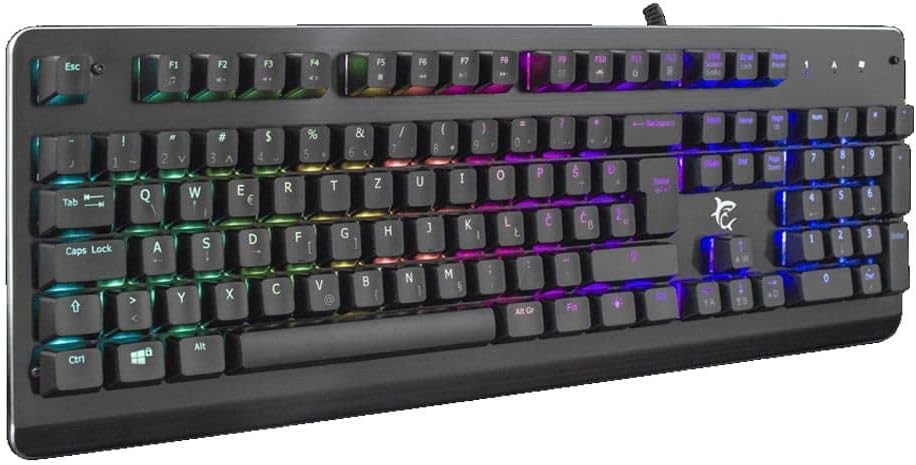
בילד 3.1: ווינקלדיק view of the keyboard, highlighting the key layout and illuminated RGB backlighting.
3.2 RGB לייטינג קאָנטראָל
This keyboard features RGB lighting. Specific key combinations, often involving the 'Fn' key and other designated keys (e.g., arrow keys, Ins, Home, PgUp, Del, End, PgDn), are typically used to cycle through lighting modes, adjust brightness, or change colors. Refer to the quick start guide or manufacturer's website for detailed RGB control commands specific to this model.
4. וישאַלט
געהעריגע אויפהאלטונג גאראנטירט די לאנגעוויטי און עפעקטיווקייט פון אייער קלאַוויאַטור.
- רייניקונג: Disconnect the keyboard from your computer before cleaning. Use a soft, dry cloth to wipe the surface. For stubborn dirt, a slightly damp cloth with mild soap can be used, ensuring no liquid enters the keyboard. Compressed air can be used to remove dust and debris from between the keys.
- ויסמיידן ליקווידס: Do not spill liquids on the keyboard. Liquid damage can cause permanent malfunction.
- סטאָרידזש: האַלט די קלאַוויאַטור אין אַ קיל, טרוקן אָרט אַוועק פון דירעקט זונשייַן און עקסטרעמע טעמפּעראַטורן ווען נישט אין באַנוץ פֿאַר לענגערע פּעריאָדן.
5. טראָובלעשאָאָטינג
אויב איר טרעפט פּראָבלעמען מיט אייער קלאַוויאַטור, פּרוּווט די פאלגענדע לייזונגען:
- קלאַוויאַטור ניט ריספּאַנדינג:
- זיכער מאַכן אַז דער USB קאַבל איז זיכער פארבונדן צו ביידע די קלאַוויאַטור און דעם קאָמפּיוטער.
- פרובירט צו קאנעקטן די קלאַוויאַטור צו אַן אַנדער USB פּאָרט אויף אייער קאָמפּיוטער.
- פּרובירט די קלאַוויאַטור אויף אַן אַנדער קאָמפּיוטער צו באַשטימען צי די פּראָבלעם איז מיטן קלאַוויאַטור אָדער מיטן קאָמפּיוטער'ס פּאָרט/דרייווערס.
- ריסטאַרט דיין קאָמפּיוטער.
- שליסלען ניט ארבעטן:
- Check for any physical obstructions under the keycaps.
- רייניקט די קלאַוויאַטור ווי באַשריבן אין דער וישאַלט סעקציע.
- RGB לייטינג ארבעט נישט/נישט ריכטיג:
- זייט זיכער אז די קלאַוויאַטור איז ריכטיק פארבונדן און באַקומט מאַכט.
- Refer to the manufacturer's specific instructions for RGB control key combinations.
6. ספּעסאַפאַקיישאַנז
Below are the technical specifications for the White Shark GK-2102 LEGIONNAIRE-X RGB USB Keyboard:

בילד 6.1: זייט פּראָfile of the keyboard, illustrating its physical dimensions and keycap height.
| שטריך | דעטאַל |
|---|---|
| סאָרט | ווייסע שאַרק |
| מאָדעל | GK-2102 LEGIONNAIRE-X |
| קאַנעקטיוויטי | וסב |
| פּראָדוקט דימענשאַנז | 50 X 50 X 28 סענטימעטער |
| וואָג | 1.06 קג |
| מאַטעריאַל | פּלאַסטיק |
| ספּעציעלע פֿעיִקייטן | RGB לייטינג |
| באַטעריז פארלאנגט | ניין |
7. וואָראַנטי אינפֿאָרמאַציע
For detailed warranty information regarding your White Shark GK-2102 LEGIONNAIRE-X RGB USB Keyboard, please refer to the warranty card included with your product or visit the official White Shark webזייטל. גאַראַנטיע טערמינען און באדינגונגען קענען זיין אַנדערש לויט געגנט און הענדלער.
8. שטיצן
If you require further assistance or have questions not covered in this manual, please contact White Shark customer support through their official website or the contact information provided with your purchase. Please have your product model (GK-2102 LEGIONNAIRE-X) and purchase details ready when contacting support.


