1. הקדמה
Thank you for choosing the White Shark GK-2022 SHINOBI Mechanical Keyboard. This compact 61-key keyboard is designed for optimal performance and durability, featuring OUTEMU Red mechanical switches and vibrant RGB backlighting. This manual provides detailed instructions for setup, operation, maintenance, and troubleshooting to ensure you get the most out of your new keyboard.
2. פּעקל אינהאַלט
ביטע טשעק די פּאַקעט פֿאַר די פאלגענדע זאכן:
- White Shark GK-2022 SHINOBI Mechanical Keyboard
- וסב-א צו וסב-C קאַבלע (1.8 ם)
- באַניצער מאַנואַל (דעם דאָקומענט)
3. פּראָדוקט איבערview
The White Shark GK-2022 SHINOBI is a 61-key compact mechanical keyboard, ideal for users seeking a minimalist design without compromising on functionality. It features durable mechanical switches and customizable backlighting.

פיגורע 3.1: שפּיץ view of the White Shark GK-2022 SHINOBI keyboard, showcasing its compact 61-key layout and vibrant RGB backlighting.

פיגור 3.2: ווינקלדיק view of the keyboard, highlighting its ergonomic profile און קלאַוויאַטור פּלאַן.
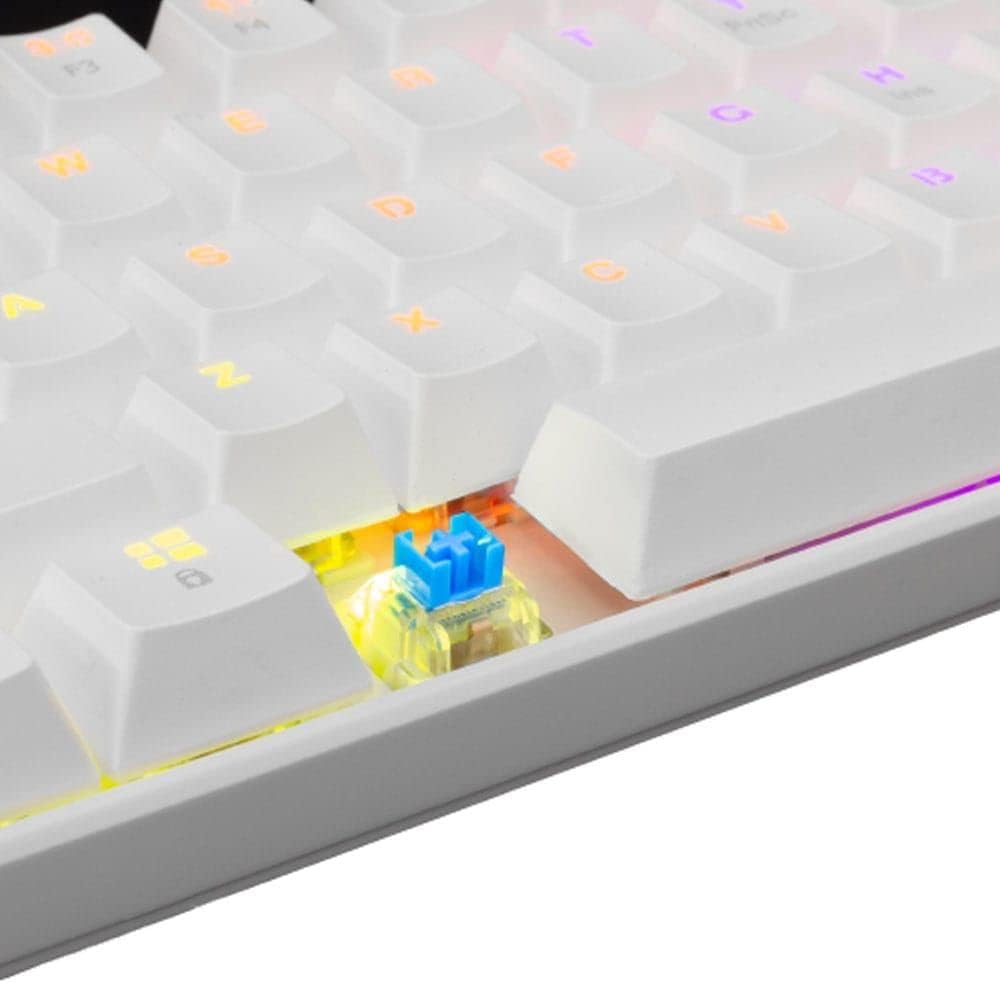
פיגור 3.3: א נאנטע בילד view of an OUTEMU Red mechanical switch, known for its linear and quiet operation.
4. סעטאַפּ
Follow these steps to set up your White Shark GK-2022 SHINOBI keyboard:
- Unpack the keyboard and the USB cable from the box.
- געפינט דעם USB-C פּאָרט אויף דער קלאַוויאַטור.
- Insert the USB-C end of the cable into the keyboard's port.
- Connect the USB-A end of the cable to an available USB 2.0 port on your computer (PC, Laptop, etc.).
- די קלאַוויאַטור איז פּלאַג-און-פּלעי און זאָל אויטאָמאַטיש דערקענט ווערן דורך אייער אָפּערירן סיסטעם. קיין נאָך דרייווערס זענען טיפּיש נישט נויטיק.

Figure 4.1: Connecting the USB-C cable to the keyboard's port for power and data transmission.
5. אַפּערייטינג ינסטרוקטיאָנס
5.1 יקערדיק אָפּעראַציע
Once connected, the keyboard is ready for immediate use. Type as you would on any standard keyboard.
5.2 Function Keys and Shortcuts
Due to its compact 61-key layout, many standard functions are accessed via a combination of the Function (Fn) key and other keys. Refer to the keycaps for specific Fn layer markings.
- Fn + [קנעפל]: Access secondary functions printed on the keycaps (e.g., F1-F12, multimedia controls, navigation keys).
- באַקלייטונג קאָנטראָל: The keyboard features single-color backlighting. Use Fn key combinations to cycle through lighting modes or adjust brightness. Specific combinations are usually marked on the keys (e.g., Fn + \ for lighting modes, Fn + arrow keys for brightness/speed).
5.3 אַנטי-גאָוסטינג
The GK-2022 SHINOBI supports full 61-key anti-ghosting, ensuring that every key press is registered accurately, even during rapid, simultaneous keystrokes, which is beneficial for gaming and fast typing.
6. וישאַלט
Proper maintenance will extend the lifespan of your keyboard:
- רייניקונג: Use a soft, dry cloth to wipe the surface of the keyboard. For deeper cleaning, you may use compressed air to remove dust and debris from between the keycaps.
- ספּילז: In case of liquid spills, immediately unplug the keyboard from your computer. Turn it upside down to drain any liquid and allow it to dry completely before reconnecting. Do not use a hairdryer as excessive heat can damage components.
- סטאָרידזשהאַלט די קלאַוויאַטור אין אַ קיל, טרוקן אָרט אַוועק פון דירעקט זונשייַן און עקסטרעמע טעמפּעראַטורן.
7. טראָובלעשאָאָטינג
אויב איר טרעפט פּראָבלעמען מיט אייער קלאַוויאַטור, פּרוּווט די פאלגענדע לייזונגען:
- קלאַוויאַטור ניט ריספּאַנדינג:
- זיכער מאַכן אַז דער USB קאַבל איז זיכער פארבונדן צו ביידע די קלאַוויאַטור און דעם קאָמפּיוטער.
- פרובירט צו קאנעקטן די קלאַוויאַטור צו אַן אַנדער USB פּאָרט אויף אייער קאָמפּיוטער.
- ריסטאַרט דיין קאָמפּיוטער.
- פּרובירט די קלאַוויאַטור אויף אַן אַנדער קאָמפּיוטער צו באַשטימען צי די פּראָבלעם איז מיט דער קלאַוויאַטור אָדער מיט אייער סיסטעם.
- שליסלען רעגיסטרירן זיך נישט אדער טייפן זיך צוויי מאל:
- Check for any debris or foreign objects under the affected keycap.
- זייט זיכער אז די קאפ איז ריכטיק אײַנגעזעצט אויפן סוויטש.
- באַקלייטונג אַרבעט נישט:
- זייט זיכער אז די קלאַוויאַטור איז ריכטיק אָנגעטריבן.
- Try cycling through the lighting modes using the Fn key combinations.
- אַדזשאַסטירן די העלקייט סעטטינגס.
If the problem persists after trying these steps, please contact White Shark customer support.
8. ספּעסאַפאַקיישאַנז
| שטריך | באַשרייַבונג |
|---|---|
| מאָדעל | GK-2022 SHINOBI |
| סאָרט | ווייסע שאַרק |
| נומער פון קיז | 61 |
| באַשטימען טיפּ | Mechanical - OUTEMU (Red) |
| שליסל דרוק | 60 ג +/- 15 ג |
| אַנטי-גהאָסטינג | 61 keys (Full Anti-Ghosting) |
| קאָליר | ווייַס |
| צובינד | וסב 2.0 |
| קאַבלע לענג | 1.8 מעטער |
| קאַמפּאַטאַבאַל דעוויסעס | PC, Laptop, Tablet, Smartphone (via USB) |
| רעקאָממענדעד ניצט | Gaming, Office Work, Multimedia Editing |
| קלאַוויאַטור באַקלייט | Single Color (RGB effects) |
| מאַטעריאַל | פּלאַסטיק |
| פּונקט וואָג | 556 ג |
| פּעקל דימענשאַנז | 31 X 13 X 5 סענטימעטער |
9. וואָראַנטי און שטיצן
White Shark products are manufactured to the highest quality standards. For information regarding warranty coverage, technical support, or service inquiries, please refer to the warranty card included with your product or visit the official White Shark webזייטל. ביטע באַהאַלטן אייער קויפן באַווייַז פֿאַר וואָראַנטי קליימז.
For further assistance, you may contact White Shark customer support through their official channels.


