הקדמה
The PENTAX KF offers outstanding imaging performance in a compact body. Featuring dustproof, weather-resistant construction and dependable cold-proof performance down to temperatures as low as -10°C, it’s optimized for all types of outdoor photography. It incorporates a host of advanced functions and user-friendly features including a pentaprism-type optical viewfinder with a nearly 100% field of view and 0.95-times magnification and an in-body shake-reduction system with a 4.5-shutter-step compensation. Built with the photographer in mind, the grip, control buttons on the back panel and mode dials are contoured to offer optimum comfort and operability. The high-definition vari-angle LCD monitor makes it easier to compose images in a wide variety of applications, while the unique Night Vision Red Light LCD function minimizes eye strain and fatigue for nightscape and astrophotography.
וואָס איז אין די קעסטל
Your PENTAX KF camera kit includes the following items:
- וסב קאַבלע
- ליטהיום-יאָן באַטערי
- באַטערי טשאַרדזשער
- רימען
- Software (CD ROM)
- אַק צאַפּן
- וסב מאַכט אַדאַפּטער
- ייעקופּ
- Hotshoe cover
- Body mount cover
סעטאַפּ
Follow these steps to prepare your PENTAX KF camera for first use:
- טשאַרדזשינג די באַטאַרייע: Insert the provided Lithium-ion Battery into the battery charger and connect it to a power source using the AC plug or USB power adapter. Ensure the battery is fully charged before first use.
- אַרייַנלייגן די באַטערי: Open the battery compartment cover on the camera body and insert the fully charged battery, ensuring correct orientation.
- Insert an SD Card: Open the SD card slot cover and insert a compatible SD, SDHC, or SDXC memory card. Ensure the card is inserted correctly until it clicks into place.
- צוטשעפּען די לינז: Remove the body mount cover from the camera and the rear cap from the lens. Align the red dot on the lens with the red dot on the camera body, then twist the lens clockwise until it clicks securely into place.
- צוטשעפּען די רימען: Thread the camera strap through the strap lugs on the camera body for secure carrying.

Figure 1: PENTAX KF camera with the 18-55mm WR kit lens attached, showcasinג זײַן קאָמפּאַקטן דיזײַן.
אַפּערייטינג ינסטראַקשאַנז
Familiarize yourself with the basic operation of your PENTAX KF camera:
- מאַכט אויף / אַוועק: Use the power switch located near the shutter button to turn the camera on or off.
- מאָדע רעדל: Rotate the mode dial on the top of the camera to select various shooting modes such as Auto, Program (P), Shutter Priority (Tv), Aperture Priority (Av), Manual (M), and Scene modes.
- לאָדן קנעפּל: דריק דעם שאטער קנעפל האלבוועגס צו פאקוסירן, און דערנאך דריק אינגאנצן צו נעמען א בילד.
- Using the Vari-Angle LCD Monitor: The high-definition vari-angle LCD monitor can be rotated and tilted to compose shots from various angles, including low-angle, high-angle, and selfie positions. This is particularly useful for creative compositions and video recording.
- Autofocus (AF) Modes: The camera features various AF modes. Use the AF/MF switch on the lens or camera body to select between autofocus and manual focus. The camera's advanced autofocus system ensures sharp images.
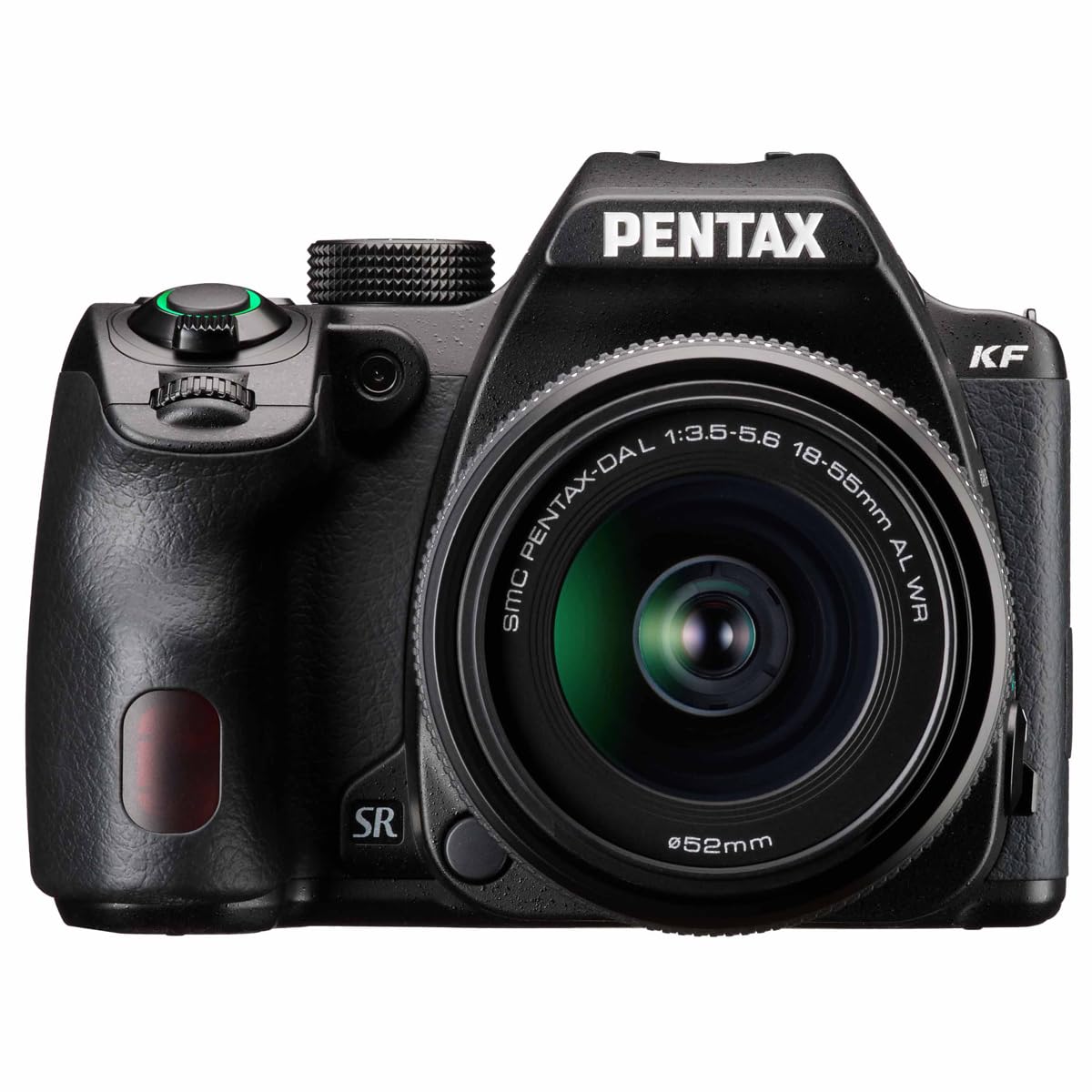
פיגורע 2: דערציען view of the PENTAX KF, showing the vari-angle LCD monitor and control buttons for easy access to settings.

Figure 3: PENTAX KF camera with its built-in flash deployed, ready for low-light photography.
שליסל פֿעיִקייטן
- High-Resolution APS-C CMOS Sensor: Equipped with a 24.24 effective megapixel AA-filter-less APS-C CMOS sensor, the PENTAX KF delivers high-resolution images with fine detail. The wide ISO range from 100 to 102400 ensures excellent performance across various lighting conditions.
- Robust Dustproof and Weather-Resistant Design: The camera features a compact, dustproof, and weather-resistant construction, making it ideal for outdoor photography. Its dependable cold-proof performance down to -10°C (14°F) allows for reliable operation in harsh environments.
- אָפּטיש Viewfinder with Glass Pentaprism: Experience clear and bright viewing through the optical viewfinder, which utilizes a glass pentaprism. It offers approximately 100% field-of-view and 0.95-times magnification for precise framing and focus confirmation.
- In-Body Shake Reduction (SR): The integrated SR mechanism provides a compensation effect of 4.5 shutter steps, effectively reducing camera shake. This system works with all PENTAX interchangeable lenses, ensuring sharp images even in challenging conditions.
- ASTROTRACER Functionality: When paired with the optional O-GPS2 GPS unit, the PENTAX KF can perform ASTROTRACER functions, enabling automatic tracking of celestial bodies for astrophotography without the need for an equatorial device.
- High-Definition Vari-Angle LCD Monitor: The vari-angle LCD monitor enhances usability by allowing flexible composition from various angles. It also includes a unique Night Vision Red Light LCD function, which minimizes eye strain during nightscape and astrophotography sessions.

פיגורע 4: איבערview of PENTAX KF's robust features, including cold-proof performance, weather-resistant body, optical viewfinder, and dustproof construction.
ווידעא 1: אפיציעלע פּראָדוקט ווידעא ווייַזונגasing the PENTAX KF APS-C Digital SLR Camera's design and features, including its optical viewfinder, weather-resistant body, and shake reduction system.
ספּעסאַפאַקיישאַנז
| שטריך | באַשרייַבונג |
|---|---|
| קאַמפּאַטאַבאַל מאַונטינגז | Pentax K |
| פאָטאָ סענסאָר טעכנאָלאָגיע | קמאָס |
| פאָטאָ סענסאָר האַכלאָטע | 24 מפּ |
| פאָטאָ סענסאָר גרייס | APS-C |
| ISO קייט | 100-102400 |
| בילד סטאַביליזאַטיאָן | Digital (In-body SR) |
| ווידעא האַכלאָטע | Full HD (1920x1080, 60i/50i/30p/25p/24p) |
| פאַרשטעלן גרייס | 3 אינטשעס |
| ווייַז טיפּ | LCD, Articulating |
| Viewגעפֿינען | Optical (Glass Pentaprism) |
| אַוטאָ פאָקוס פּאָינץ | 39 |
| קעסיידערדיק שיסערייַ | 4.5 FPS |
| קאַנעקטיוויטי טעכנאָלאָגיע | ווי-פי |
| פּונקט וואָג | 1.47 קילאָגראַמס |
| מאָדעל נומער | 01203 |
וישאַלט
Proper maintenance ensures the longevity and optimal performance of your PENTAX KF camera:
- רייניקונג פון די קאַמעראַ גוף: ניצט אַ ווייכע, טרוקענע שטאָף צו ווישן דעם קאַמעראַ קערפּער. פֿאַר שווערע שמוץ, לייכט ווישןampen the cloth with water and wipe gently. Avoid using organic solvents.
- רייניקונג די לענס: Use a lens brush to remove dust from the lens surface. For smudges, use a lens cleaning solution and a microfiber cloth, wiping gently in a circular motion from the center outwards.
- רייניקונג פון דעם סענסאר: Sensor cleaning should be performed with extreme care. If dust spots appear on your images, use the camera's built-in sensor cleaning function or consult a professional service center.
- באַטערי זאָרגן: Store batteries in a cool, dry place when not in use. Avoid fully discharging the battery frequently to prolong its lifespan.
- סטאָרידזש: When storing the camera for extended periods, remove the battery and memory card. Store the camera in a dry, well-ventilated area, preferably in a camera bag with desiccant to prevent mold and mildew.
טראָובלעשאָאָטינג
דאָ זענען לייזונגען צו געוויינטלעכע פּראָבלעמען וואָס איר קענט באַגעגענען:
- Camera Does Not Power On: זיכער מאַכן אַז די באַטאַרייע איז גאָר אויפגעלאָדן און ריכטיק אַרײַנגעשטעלט. קאָנטראָלירט צי די באַטאַרייע קאָנטאַקטן זענען ריין.
- בילדער זענען פארשוואומען: Check the focus mode (Autofocus/Manual Focus) and ensure the lens is clean. Verify that the shutter speed is appropriate for the lighting conditions and subject movement. Utilize the in-body Shake Reduction.
- זכּרון קאַרטל טעות: Ensure the memory card is inserted correctly. Try reformatting the card (this will erase all data) or use a different card.
- Flash Does Not Fire: Check the flash mode settings. Ensure the flash is not disabled or in a mode that prevents it from firing (e.g., Silent Mode).
- על-סי-די מאָניטאָר ווײַזט נישט: Check the display settings. Ensure the monitor is not turned off or in viewfinder-only mode.
וואָראַנטי און שטיצן
The PENTAX KF camera comes with a 1 יאָר וואָראַנטי from the manufacturer, RICOH. For warranty claims, technical support, or service inquiries, please refer to the contact information provided in your product packaging or visit the official Pentax support webפּלאַץ.


