1. הקדמה
The AUTOPHIX 7360 is a professional full systems diagnostic scan tool designed specifically for Toyota, Lexus, and Scion vehicles manufactured after 1996. This device provides comprehensive diagnostic capabilities, allowing users to read and clear fault codes, view live data streams, and perform various special functions across all major vehicle systems. Its user-friendly interface and robust features make it an essential tool for vehicle maintenance and troubleshooting.

Image 1.1: The AUTOPHIX 7360 diagnostic scan tool, featuring its display screen, navigation buttons, and OBDII connector cable.
2. סעטאַפּ
2.1 פּעקל אינהאַלט
באַשטעטיקן אַז אַלע קאָמפּאָנענטן זענען פאַראַן אין דער פּאַקעט:
- AUTOPHIX 7360 Diagnostic Scan Tool
- OBDII קאַבל (אינטעגרירט)
- באַניצער מאַנואַל (דעם דאָקומענט)
- USB Cable (for updates, if applicable)
2.2 פֿאַרבינדן זיך צום פֿאָרמיטל
- געפינט דעם אויטאָ'ס 16-פּין דאַטן לינק קאַנעקטאָר (DLC). דאָס געפינט זיך טיפּיש אונטערן דאַשבאָרד אויף דער דרייווער'ס זייט.
- זיכער מאַכן אַז די איגנישאַן פונעם אויטאָ איז אין דער אויסגעלאָשן פּאָזיציע.
- Firmly plug the AUTOPHIX 7360's OBDII cable into the vehicle's DLC.
- Turn the vehicle's ignition to the ON position (engine off). The device will power on automatically.
3. אַפּערייטינג ינסטרוקטיאָנס
3.1 Basic OBDII Functions
The AUTOPHIX 7360 provides comprehensive OBDII diagnosis for all OBDII compliant vehicles (after 1996). Navigate to the 'OBDII' menu option on the device.

Image 3.1: Screen illustrating the full OBDII functions, including Read & Erase Error Codes, Data Stream, EVAP System, DTC Lookup, Vehicle Information, I/M Readiness, Turn Off MIL, and System Status.
- Read & Erase Error Codes: Retrieve Diagnostic Trouble Codes (DTCs) and clear them from the vehicle's ECU.
- לעבעדיקע דאַטן סטרים: View real-time sensor data from the vehicle's various systems.
- איך/עם גרייטקייט טעסט: Check the readiness of the emission-related monitors.
- EVAP סיסטעם טעסט: דורכפירן טעסץ אויף די עוואַפּאָראַטיווע ימישאַן קאָנטראָל סיסטעם.
- פאָרמיטל אינפֿאָרמאַציע: Display the vehicle's VIN, Calibration ID, and Calibration Verification Number.
- DTC זוכן: Provides definitions for generic and manufacturer-specific trouble codes.
3.2 Advanced Diagnostic Functions (Full Systems)
This tool can access and diagnose all major systems in Toyota, Lexus, and Scion vehicles. Select the 'For Toyota' menu option to begin a full system scan.

Image 3.2: Display showing the range of full system diagnostics, including Transmission, Air Conditioner, Front Radar Sensor, Immobilizer, Central Gateway, Tire Pressure Monitor, Engine System, SRS Airbag, Navigation System, TMPS System, Audio System, Cruise Control, Active Noise Control, Theft Deterrent, Power Source Control, Steering Pad Switch, Combination Master Switch, Road Sign Assist, and Clearance Warning.
געשטיצטע סיסטעמען אַרייַננעמען, אָבער זענען נישט לימיטעד צו:
- מאָטאָר סיסטעם
- אַנטי-לאַק ברייקינג סיסטעם (ABS)
- Supplemental Restraint System (SRS/Airbag)
- סטירינג ווינקל סענסאָר (SAS)
- באַטערי מאַנאַגעמענט סיסטעם (BMS)
- עלעקטראָניש פּאַרקינג טאָרמאָז (EPB)
- רייַף דרוק מאָניטאָרינג סיסטעם (TPMS)
- טראַנסמיסיע
- לופטקילונג
- פראָנט ראַדאַר סענסאָר
- יממאָביליזער
- נאַוויגאַציע סיסטעם
- אַודיאָ סיסטעם
- קרוז קאָנטראָל
- Hybrid Control (as shown in Image 3.3)
- Smart Key System (as shown in Image 3.3)

בילד 3.3: עקס.amples of professional diagnostic functions, including Air Bleeding, Reset Memory, Initialization, Hybrid Control, Sliding Roof, Steering Angle Adjust, Smart Key, Electronic Parking Brake, Steering Angle Learning, AFS, Sound System, and Interior Monitoring.
3.3 ספּעציעלע סערוויס פונקציעס
The AUTOPHIX 7360 supports a wide array of special functions for maintenance and service resets. Navigate to the 'Special Functions' menu.

בילד 3.4: איבערview of advanced full functions, including Service Reset, TMPS Reset, SAS Reset, Battery Registration, Throttle Learning, Airbag Reset, Oil Reset, DPF Reset, ABS Bleeding, EPB Reset, BMS Reset, SRS Reset, ETCS Reset, Injector Coding, DPF Regeneration, and CBS Reset.
- אָיל באַשטעטיק: באַשטעטיק די אויל סערוויס ליכט נאָך אַן אויל וועקסל.
- Throttle Learning: לערן ווידער די פּאָזיציע פון דער טראָטל גוף.
- EPB (עלעקטראָנישע פּאַרקינג ברעיק) ריסעט: Deactivate and reactivate the brake control system, assist with brake fluid control, open and close brake pads, and set brakes after disc or pad replacement.
- TPMS (טייער דרוק מאָניטאָרינג סיסטעם) באַשטעטיק: Reset tire pressure values after tire rotation or sensor replacement.
- Injector Quantity Adjustment: Adjust injector coding after replacement.
- DPF (Diesel Particulate Filter) Reset/Regeneration: Perform DPF regeneration and reset the DPF light.
- באַטעריע רעגיסטראַציע: Register a new battery to the vehicle's Battery Management System (BMS).
- לופטזאַק צוריקשטעלן: Clear airbag crash data.
- Steering Angle Sensor (SAS) Learning: קאַליברירן דעם סטירינג ווינקל סענסאָר.
- ABS בלוטונג: Perform brake bleeding procedures.
- BMS צוריקשטעלן: Reset the Battery Management System.
- ETCS איבערשטעלן: Electronic Throttle Control System reset.
3.4 באַטערי מאַנאַגעמענט
The device offers accurate battery health checks and a professional battery registration function.

Image 3.5: Visual guide for accurate battery check, showing voltage ranges for Too Low, Normal, Slightly Low, and Too High conditions before and after starting the car.
באַטערי טשעק: The tool can display the current battery status, indicating voltage levels before and after starting the vehicle to assess battery health.
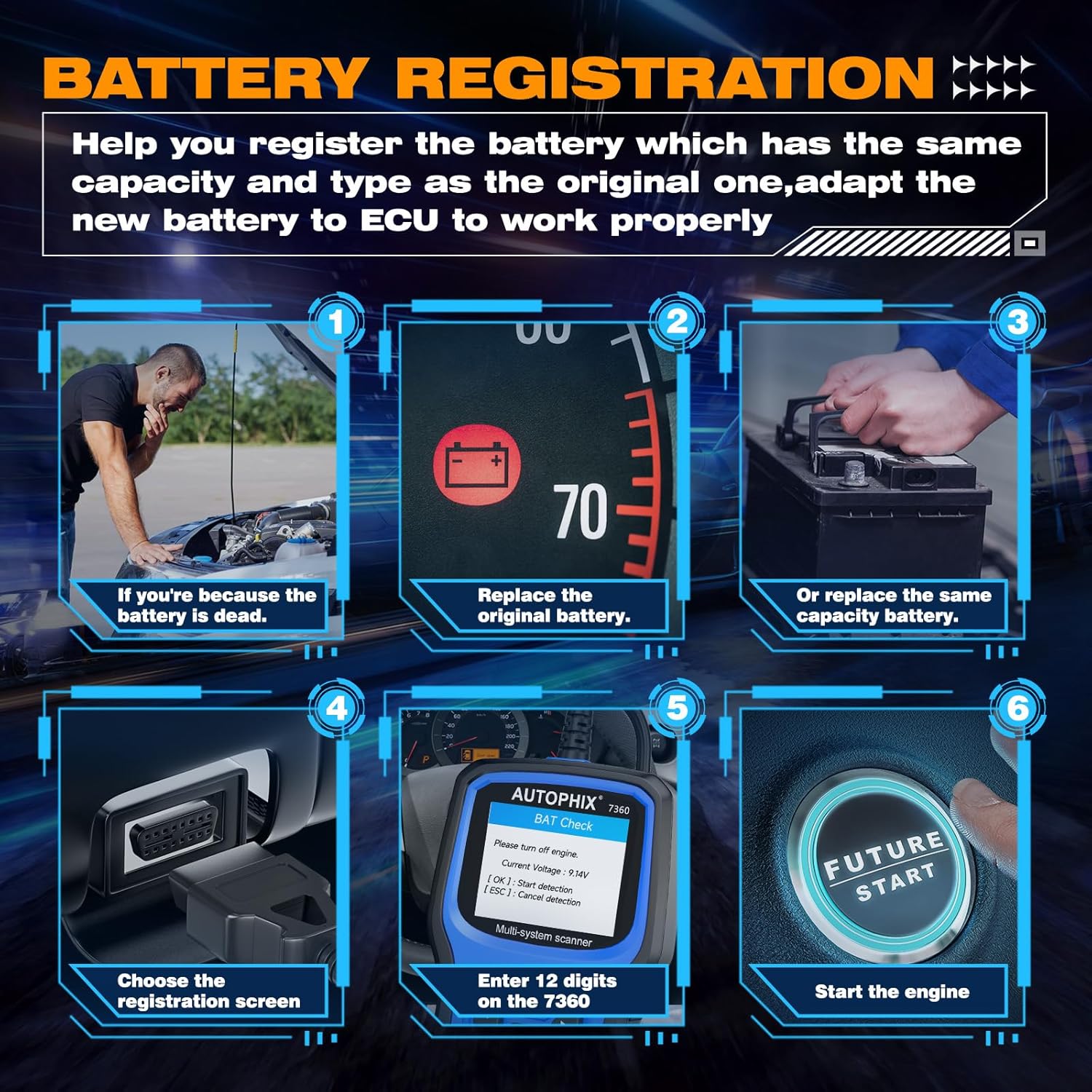
Image 3.6: Step-by-step guide for battery registration, including scenarios for dead battery, replacing original battery, replacing with same capacity battery, choosing registration screen, entering 12 digits, and starting the engine.
באַטעריע רעגיסטראַציע: When replacing a vehicle battery, it is crucial to register the new battery with the vehicle's ECU to ensure proper charging and battery life. The 7360 allows you to:
- Store current battery and mileage readings for replacement records.
- Delete stored measurement values (charge state, current, voltagE, טעמפּעראַטור, אאז"ו ו).
- Initialize the battery management system for the new battery.
4. Compatibility and Language Support
The AUTOPHIX 7360 is designed for broad compatibility with Toyota, Lexus, and Scion vehicles from 1996 onwards.

Image 4.1: Visual representation of broad compatibility for Lexus, Toyota, and Scion models, along with flags indicating 12 supported languages.
4.1 פאָרמיטל קאָמפּאַטאַביליטי
The tool supports a wide range of models within the Toyota, Lexus, and Scion families, including but not limited to:
- Lexus: CT, ES, GS, GX, HS, IS, LC, LFA, LM, LS, LX, NX, RC, RX, SC, UX.
- טויאָטאַ: Rav4, Camry, Corolla, 4Runner, Highlander, C-HR, Aqua, Alphard, Corolla Cross, Crown, FJ Cruiser, Avalon, Land Cruiser, Mirai, Prius, Sequoia, Sienna, Supra, Tacoma, Tundra, Venza, Yaris.
- Scion: FR-S, iA, iM, iQ, iQ EV, tC, xA, xB, xD.
4.2 שפּראַך שטיצע
The device supports 12 languages, allowing users from various regions to operate the tool comfortably:
- ענגליש
- דײַטש
- פראנצויזיש
- איטאַליעניש
- שפּאַניש
- פּאָרטוגעזיש
- פויליש
- רוסיש
- נאָרוועגיש
- דאַניש
- שוועדיש
- Finnish (Suomalainen)
5. וישאַלט
5.1 רייניקונג
To maintain the device's performance and appearance, clean it regularly with a soft, damp שטאָף. דו זאלסט נישט נוצן אַברייסיוו קלינערז אָדער סאָלוואַנץ.
5.2 סטאָרידזש
When not in use, store the AUTOPHIX 7360 in a dry, cool environment, away from direct sunlight and extreme temperatures. Keep it in its original packaging or a protective case to prevent damage.
5.3 ווייכווארג דערהייַנטיקונגען
Periodically check the official AUTOPHIX website for software updates. Updates may include new vehicle models, bug fixes, and improved functionalities. Follow the instructions provided on the website for the update process, typically involving connecting the device to a computer via USB.
6. טראָובלעשאָאָטינג
If you encounter issues with your AUTOPHIX 7360, refer to the following common troubleshooting steps:
- אַפּאַראַט אַרבעט נישט אָן: Ensure the OBDII cable is securely connected to the vehicle's DLC and the vehicle's ignition is in the ON position. Check the vehicle's battery voltage.
- קאָמוניקאַציע טעות: Verify that the vehicle supports the OBDII protocol. Ensure the ignition is ON. Try connecting to a different vehicle to rule out a vehicle-specific issue.
- Screen freezes or device is unresponsive: אָפּשטעקן דעם מיטל פֿון דעם פֿאָרמיטל, וואַרטן אַ פּאָר סעקונדעס, און דערנאָך עס ווידער פֿאַרבינדן. אויב די פּראָבלעם בלייבט, דורכפֿירן אַ ווייכווארג אַפּדייט.
- Incorrect readings or functions: Ensure the device software is up to date. Verify that the correct vehicle make/model is selected if prompted.
7. ספּעסאַפאַקיישאַנז
| שטריך | באַשרייַבונג |
|---|---|
| סאָרט | AUTOPHIX |
| מאָדעל נומער | 7360 |
| פּראָדוקט דימענשאַנז | 26.49 X 19.99 X 5 סענטימעטער |
| פּונקט וואָג | 540 ג |
| קאָליר | בלוי |
| פאַרשטעלן גרייס | 2.8 אינטשעס |
| מאַכט מקור | Battery Powered (via OBDII connection) |
| אָפּערייטינג סיסטעם | Windows XP (for PC connection/updates) |
| ערשטער בנימצא טאָג | 2 נאוועמבער 2022 |
8. וואָראַנטי און שטיצן
For warranty information and technical support, please refer to the official AUTOPHIX webזייטל אדער קאנטאקט זייער קאסטומער סערוויס גלייך. האלט אייער קויף קוויטל אלס באווייז פון קויפן פאר יעדע גאראנטיע טענות.


