הקדמה
The ToolkitRC M7AC is a versatile multi-function smart balance charger designed for various battery types and applications. It features dual AC/DC input and supports 2-6S batteries. Beyond its primary charging capabilities, the M7AC integrates several useful tools, including a power supply, multimeter, signal source, drone charger, and signal tester, making it an indispensable tool for hobbyists and professionals alike.
שליסל פֿעיִקייטן אַרייַננעמען:
- Dual AC/DC Input for flexible power options.
- XT30/XT60 Output for broad compatibility.
- Supports 2-6S LiPo, LiHV, LiFe, Lion, LTO batteries, 1-16S NiMh, and 1-10S Pb batteries.
- Integrated functions: Power supply, multimeter, signal source, drone charger, and signal tester.
- IPS 2.4 inch LCD display for clear information.
זיכערקייַט אינפֿאָרמאַציע
Please read and understand all safety warnings and instructions before using the M7AC charger. Improper use can lead to property damage, injury, or death.
- Always operate the charger in a well-ventilated area, away from flammable materials.
- דו זאלסט נישט לאָזן די טשאַרדזשער אַנאַטענדיד בעשאַס אָפּעראַציע.
- Ensure correct battery type and cell count settings before charging.
- Use only compatible power sources and cables.
- האַלטן די מיטל אַוועק פון וואַסער, נעץ און עקסטרעם טעמפּעראַטורעס.
- דו זאלסט נישט פּרווון צו דיסאַסעמבאַל אָדער מאָדיפיצירן די טשאַרדזשער.
פּראָדוקט איבערview
Familiarize yourself with the components and interfaces of your M7AC charger.

פיגורע 1: פראָנט View. This image displays the front of the M7AC charger, highlighting its 2.4-inch IPS LCD screen. The screen shows real-time charging data, including voltage, current, capacity, and individual cell voltages. To the right of the screen are the navigation button and scroll wheel for menu interaction.

פיגורע 2: זייַט View (Ports). This image shows the side of the M7AC charger where various input and output ports are located. Visible ports include a USB-A output (5.0V 2.1A), a balance port (2-6S), and dual XT60 output ports labeled "OUTPUT".

Figure 3: Signal Output Display. This image captures the M7AC's screen displaying the "Signal Output" function, specifically for SBUS. It shows multiple channels with adjustable pulse widths, demonstrating the device's capability as a signal source or tester.
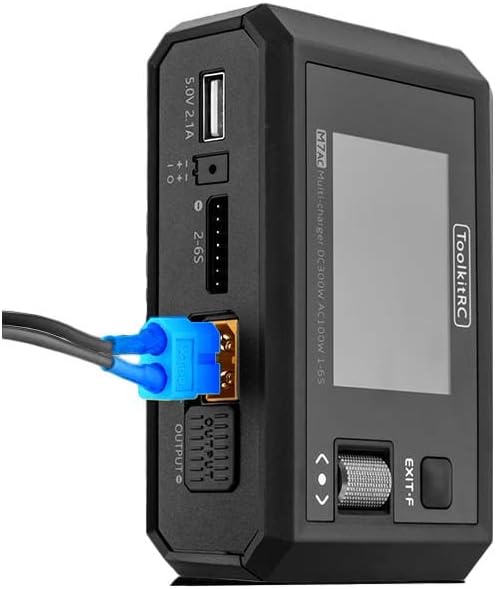
Figure 4: XT60 Output in Use. This image illustrates an XT60 connector plugged into one of the M7AC's output ports, demonstrating how a battery or device would connect for charging or power supply functions.
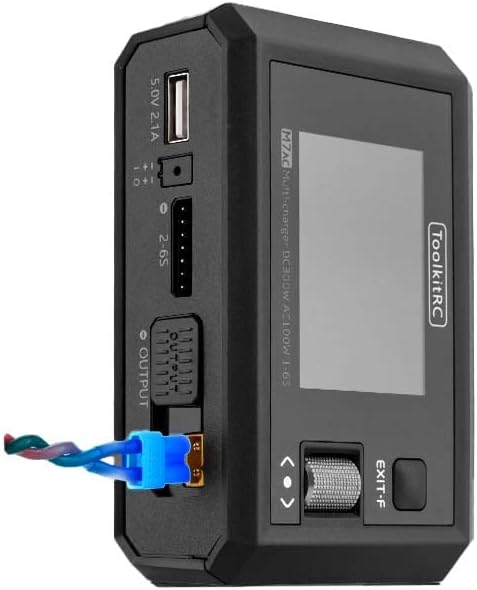
Figure 5: XT60 and Balance Lead Connected. This image provides another perspective of the M7AC with an XT60 connector and a balance lead connected, showing the typical setup for balanced charging of a multi-cell battery pack.
סעטאַפּ
- מאַכט קשר:
- For AC input, connect the provided AC power cable to the charger's AC input port and then to a standard wall outlet (AC 100-240V).
- For DC input, connect a DC power source (7.0-28.0V) to the charger's DC input port. Ensure correct polarity.
- ערשט מאַכט אויף: Once connected to power, the charger will automatically power on and display the main menu on the IPS LCD screen.
- נאַוויגאַציע: Use the scroll wheel and button on the right side of the charger to navigate through menus and select options.
אַפּערייטינג ינסטראַקשאַנז
1. באַטערי טשאַרדזשינג
- קאָננעקט באַטערי: Connect your battery's main discharge lead to one of the XT60 output ports. For multi-cell batteries, also connect the balance lead to the appropriate balance port (2-6S).
- אויסקלייַבן באַטאַרייע טיפּ: From the main menu, navigate to the "Charger" function. Select the correct battery type (LiPo, LiHV, LiFe, Lion, LTO, NiMh, Pb) and cell count (e.g., 3S, 6S).
- Set Charging Parameters: Adjust the charging current (up to 15A) and mode (e.g., Balance Charge, Fast Charge, Storage Charge) as required for your battery. The maximum charging power is 300W.
- אָנהייב טשאַרדזשינג: Confirm settings and start the charging process. The screen will display real-time charging status, including total voltage, current, charged capacity, and individual cell voltages.
2. באַטערי דיסטשאַרדזשינג
The M7AC supports discharging batteries with a power of up to 300W in Recycle mode or 15W in Normal mode.
- קאָננעקט באַטערי: Connect the battery to the XT60 output and balance port.
- Select Discharge Function: Navigate to the "Discharge" function in the menu.
- שטעלן פּאַראַמעטערס: Set the discharge current and target voltage.
- Start Discharging: Initiate the discharge process. Monitor the battery temperature and voltagE בעשאַס אָפּזאָגן.
3. Power Supply Function
The M7AC can act as a regulated DC power supply (1.0-28.0V, 0.5-15A).
- Access Power Supply Mode: Select the "Power Supply" option from the main menu.
- שטעלן רעזולטאַט וואָלtage און קראַנט: סטרויערן די געוואלט רעזולטאַט וואָלtage and current limit using the scroll wheel.
- קאָננעקט דיווייס: Connect your device requiring power to the XT60 output port.
- אַקטאַווייט רעזולטאַט: Enable the power supply output.
4. Multimeter Function
מאָס וואָלtage and internal resistance of batteries.
- Voltage מעזשערמאַנט: Connect the battery to the balance port to measure individual cell voltages (1.0-5.0V per cell, 1-6S).
- Internal Resistance Measurement: The charger can measure internal resistance from 0.1 mR to 99mR for 1-6S batteries.
5. Signal Source / Tester
The M7AC can generate and test various signals.
- PWM רעזולטאַט: Generate PWM signals (500-2500us @ 20-1000Hz).
- PPM Output: Generate PPM signals (880-2200us * 8CH @ 20-50Hz).
- SBUS Output: Generate SBUS signals (880-2200us * 16CH @ 20-100Hz).
6. וסב-א רעזולטאַט
The USB-A port provides 5.0V at 2.1A, suitable for charging mobile devices or powering small electronics.
וישאַלט
- רייניקונג: ניצט אַ ווייכע, טרוקענע שטאָף צו רייניקן די אויסערלעכע זייט פון דעם טשאַרדזשער. ניצט נישט קיין סאָלווענטן אָדער אַברייסיוו רייניגער.
- סטאָרידזש: סטאָר די טשאַרדזשער אין אַ קיל, טרוקן אָרט אַוועק פון דירעקט זונשייַן און עקסטרעם טעמפּעראַטורעס.
- קאַבלע דורכקוק: Regularly inspect all cables and connectors for signs of wear or damage. Replace damaged cables immediately.
- Firmware דערהייַנטיקונגען: Check the ToolkitRC official website periodically for firmware updates to ensure optimal performance and access to new features. The TF Card slot (128MB-16GB) is used for updates.
טראָובלעשאָאָטינג
| פּראָבלעם | מעגלעך סיבה | לייזונג |
|---|---|---|
| דער טשאַרדזשער גייט נישט אָן. | No power input or faulty cable. | Check AC/DC power connection. Ensure power source is active. Try a different power cable. |
| באַטעריע נישט דעטעקטירט. | Incorrect connection or damaged battery. | Ensure main and balance leads are securely connected. Verify battery is not severely over-discharged or damaged. |
| Charging error message. | Incorrect battery settings (type, cell count) or battery fault. | Double-check battery type and cell count settings. Inspect battery for swelling or damage. |
| די פאַרשטעלן איז ניט ריספּאַנדאַבאַל. | צייטווייליגע ווייכווארג פראבלעם. | Disconnect power, wait a few seconds, then reconnect to restart the device. |
ספּעסאַפאַקיישאַנז
| קאַטעגאָריע | פּאַראַמעטער | ווערט |
|---|---|---|
| טשאַרדזשער | אַרייַנשרייַב וואָלtage | AC 100-240V MAX 100W 1.5A / DC 7.0-28.0V @MAX 20A |
| באַטעריע טיפּ שטיצע | Lipo LiHV LiFe Lion LTO@1-6S / NiMh @1-16S Pb @1-10S | |
| טשאַרדזשינג מאַכט | 300W @MAX 15A | |
| אָפּזאָגן מאַכט | 300W @MAX 15A Recycle mode / 15W@3A Normal mode | |
| וואָג קראַנט | 800 מאַ @ 4.2 וו | |
| וסב-א רעזולטאַט | 10 וו @ 5.0 וו | |
| אַלגעמיינע | לקד | IPS 2.4 inch LCD 320*240 resolution |
| פּראָדוקט גרייס | 112 קס 73 קס 38 מם | |
| פּראָדוקט וואָג | 245ג | |
| TF קאַרטל שטיצע | 128MB-16GB | |
| קאָליר | שוואַרץ | |
| מעזשערמאַנט | אינערלעכער קעגנשטעל | 0.1 mR-99mR @ 1-6S |
| Voltage | 1.0-5.0V @ 1-6S | |
| SBUS | 880-2200us * 16CH @ 20-100Hz | |
| PPM | 880-2200us * 8CH @ 20-50Hz | |
| PWM | 880-2200us @ 20-400Hz | |
| רעזולטאַט | מאַכט צושטעלן | 1.0-28.0V @0.5-15A mode: CC CVSBUS |
| SBUS | 880-2200us * 16CH @ 20-100Hz | |
| PPM | 880-2200us * 8CH @ 20-50Hz | |
| PWM | 500-2500us @ 20-1000Hz | |
| אנדערע | פּונקט וואָג | 12.96 אונסעס (בעערעך 367 ג) |
| פאַבריקאַנט רעקאַמענדיד עלטער | 14 יאר און העכער | |
| באַשרייַבונג באגעגנט | UL |
וואָראַנטי און שטיצן
ToolkitRC products are manufactured to high quality standards. For warranty information and technical support, please refer to the official ToolkitRC webזייטל אדער קאנטאקט זייער קאסטומער סערוויס גלייך. האלט אייער קויף קוויטל אלס באווייז פון קויפן פאר יעדע גאראנטיע טענות.
פֿאַר ווייַטער הילף, באַזוכן די ToolkitRC Official Webפּלאַץ.


