1. הקדמה
This manual provides detailed instructions for the safe and efficient use of your Intenso Video Scooter BT MP3 Player. Please read this manual thoroughly before operating the device and retain it for future reference. This device allows you to play music (MP3), videos (MP4), and view images on its 1.8-inch color display, with the added convenience of Bluetooth connectivity.
2. פּראָדוקט איבערview
The Intenso Video Scooter BT is a compact and portable media player designed for on-the-go entertainment. It features a 1.8-inch color display, 16 GB of internal storage, and Bluetooth for wireless audio streaming.

פיגורע 2.1: The Intenso Video Scooter BT MP3 Player in blue, shown with the included headphones connected. The microUSB port for charging and data transfer, and the microSD card slot for expandable storage, are visible on the side.
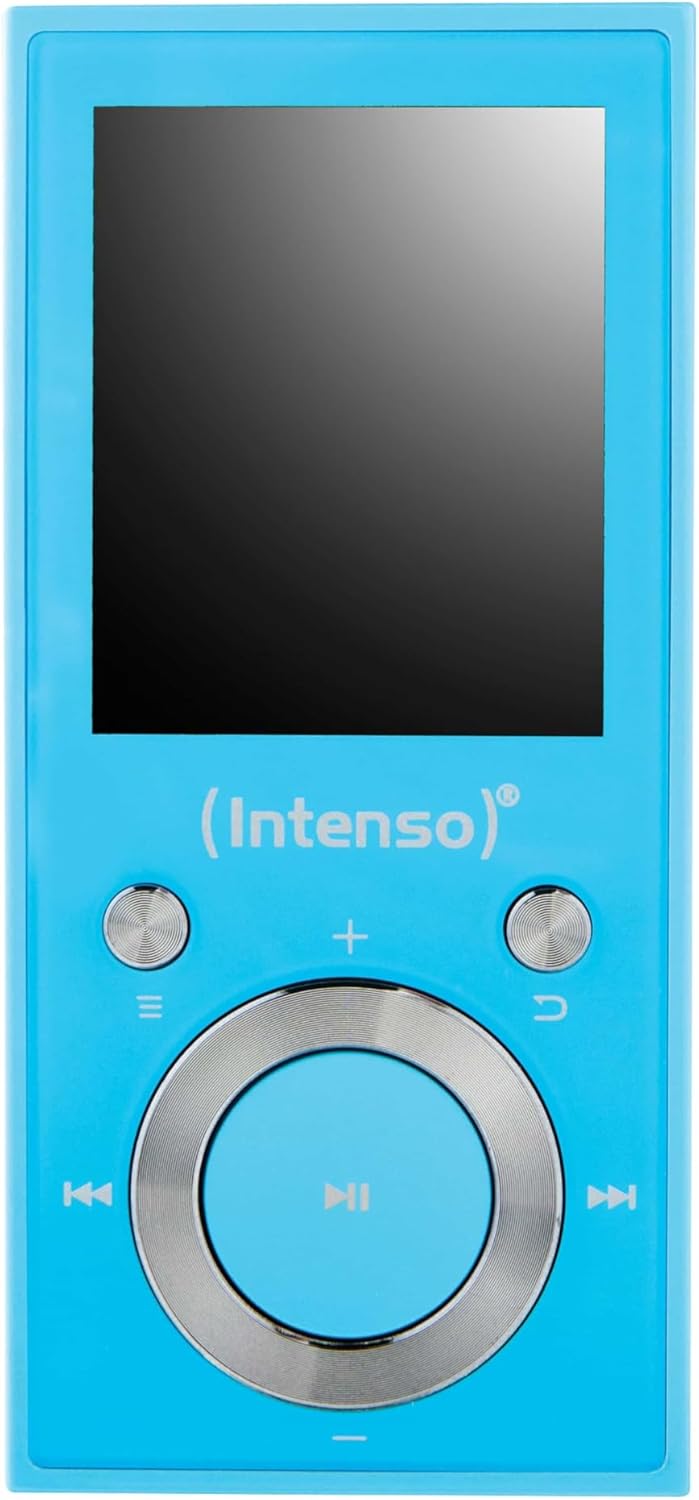
פיגורע 2.2: אַ נאָענט-אַרויף view of the Intenso Video Scooter BT MP3 Player's front panel, displaying the 1.8-inch screen and the navigation buttons. The central button is for play/pause/confirm, surrounded by directional controls, and dedicated buttons for menu, back, and volume.
פּעקל אינהאַלט:
- Intenso Video Scooter BT MP3 Player
- כעדפאָונז
- וסב קאַבלע
- באַניצער מאַנואַל (דעם דאָקומענט)
3. סעטאַפּ
3.1 טשאַרדזשינג די מיטל
- Connect the small end of the included USB cable to the microUSB port on the player.
- Connect the large end of the USB cable to a powered USB port on a computer or a compatible USB wall adapter (not included).
- דער באַטעריע אינדיקאַטאָר אויפן עקראַן וועט ווײַזן דעם טשאַרדזשינג סטאַטוס. א פולע טשאַרדזשינג נעמט טיפּיש אַרום 2-3 שעה.
3.2 אריינשטעלן א מיקראָSD קאַרטל
The device supports microSDHC cards for expanded storage. To insert a card:
- Locate the microSD card slot on the side of the player.
- Gently insert the microSD card into the slot with the gold contacts facing down until it clicks into place.
- צו אַרויסנעמען, שטופּ די קאַרטל אַ ביסל אַרײַן ביז זי שפּרינגט אַרויס.
3.3 Connecting to a Computer and Transferring Files
- פאַרזיכערן אַז די שפּילער איז פּאַוערד אויף.
- Connect the player to your computer using the supplied USB cable.
- דער שפּילער וועט דערשייַנען ווי אַ אַרויסנעמבאַר דיסק דרייוו אויף דיין קאָמפּיוטער.
- Drag and drop your desired MP3 music, MP4 videos, or image files into the appropriate folders on the player or inserted microSD card.
- אַרויסוואַרפן דאָס דעווייס זיכער פֿון אייער קאָמפּיוטער איידער איר אָפּטיילט דעם USB קאַבל.
4. אַפּערייטינג ינסטרוקטיאָנס
4.1 מאַכט אויף / אַוועק
- צו מאַכט אויף: Press and hold the power button (often integrated with the play/pause button or a dedicated side button) for a few seconds until the screen illuminates.
- צו מאַכט אַוועק: דריק און האלט דעם מאַכט קנעפּל ווידער ביז די דעווייס שליסט זיך אויס.
4.2 מעניו נאַוויגאַציע
Use the directional buttons around the central 'Play/Pause/Confirm' button to navigate through menus. The 'Menu' button (often represented by three horizontal lines) typically brings up options or returns to the main menu. The 'Back' button (often a curved arrow) returns to the previous screen.
4.3 מוזיק פּלייבאַק
- פֿון הויפּט מעניו, אויסקלײַבן 'מוזיק'.
- Browse through your music library by artist, album, genre, or all songs.
- Select a song and press the central 'Play/Pause' button to begin playback.
- Use the left/right directional buttons to skip tracks.
- Use the volume buttons (often '+' and '-') to adjust the audio level.
- Press the 'Play/Pause' button to pause or resume playback.
4.4 ווידעא פּלייַבאַקק
- From the main menu, select 'Video'.
- Browse and select the desired video file.
- Press the central 'Play/Pause' button to start playback.
4.5 בלועטוט קאָנעקטיוויטי
To pair your Intenso Video Scooter BT with Bluetooth headphones or speakers:
- From the main menu, navigate to 'Bluetooth'.
- זיכער מאַכן אַז אייער בלוטוט אַודיאָ מיטל איז אין פּערינג מאָדע.
- אויסקלייבן 'זוכן פֿאַר Devices' on the player.
- Once your device appears in the list, select it to pair.
- After successful pairing, audio will be routed to the connected Bluetooth device.
5. וישאַלט
- רייניקונג: Use a soft, dry cloth to clean the device. Do not use liquid cleaners or solvents.
- סטאָרידזש: האַלט דעם שפּילער אין אַ קיל, טרוקן אָרט אַוועק פון דירעקט זונשייַן און עקסטרעמע טעמפּעראַטורן.
- באַטערי זאָרגן: כדי צו פארלענגערן די לעבן פון די באַטעריע, זאָלט איר נישט אָפט אויסלאָדן די באַטעריע. לאָדט דאָס אַפּאַראַט רעגולער אויף, אפילו אויב עס ווערט נישט גענוצט פֿאַר לענגערע צייטן.
- ווייכווארג דערהייַנטיקונגען: Check the official Intenso webזוכט דעם וועבזייטל פון צייט צו צייט פאר אלע פארהאן פירמווער דערהייַנטיקונגען צו זיכער מאכן אפטימאלע פאָרשטעלונג.
6. טראָובלעשאָאָטינג
Device Does Not Turn On:
- Ensure the battery is charged. Connect the player to a power source and allow it to charge for at least 30 minutes before attempting to power on again.
- If the device is unresponsive, locate the 'RESET' pinhole (if present, often on the side or back) and gently press it with a thin object (e.g., a paperclip) to restart the device.
קיין קול:
- קאָנטראָלירן די באַנד מדרגה.
- Ensure headphones are properly connected or that Bluetooth headphones/speakers are paired and connected.
- Test with different headphones to rule out a faulty pair.
בלועטאָאָטה קאַנעקשאַן ישוז:
- Ensure both the player and the Bluetooth audio device are sufficiently charged.
- Make sure both devices are within close proximity (typically within 10 meters) and free from obstructions.
- פרובירט אפצופּאַרן און ווידער צופּאַרן די דעווייסעס.
- Restart both the player and the Bluetooth audio device.
Files Not Appearing or Playing:
- באַשטעטיקן אַז די files are in a supported format (MP3 for audio, MP4 for video).
- פאַרזיכערן files were transferred correctly to the device's internal storage or the microSD card.
- If using a microSD card, ensure it is properly inserted and not corrupted.
7. ספּעסאַפאַקיישאַנז
| מאָדעל נאָמען | ווידעא סקוטער בט |
| נומער מאָדעל נומער | 3717474 |
| סאָרט | ינטענסאָ |
| זכּרון סטאָרידזש קאַפּאַסיטי | 16 גיגאבייט |
| פאַרשטעלן גרייס | 1.8 אינטשעס |
| קאַנעקטיוויטי טעכנאָלאָגיע | וסב, בלועטאָאָטה |
| קאַמפּאַטאַבאַל דעוויסעס | בלועטאָאָטה דעוויסעס |
| מעדיע טיפּ | MP3, MP4 |
| ספּעציעלע שטריך | MP3 Playback, Video Playback |
| פּראָדוקט דימענשאַנז | 6.3 X 3.54 X 1.97 אינטשעס |
| פּונקט וואָג | 0.917 אונסעס |
| באַטעריז | 1 ליטהיום פּאָלימער באַטאַרייע (אַרייַנגערעכנט) |
8. וואָראַנטי און שטיצן
For warranty information and technical support, please refer to the documentation included with your product or visit the official Intenso webזייטל. האַלט דיין קויפן באַווייַז פֿאַר וואָראַנטי קליימז.


