הקדמה
This manual provides detailed instructions for the EasySMX KW75 75% Mechanical Gaming Keyboard. It covers setup, operation, maintenance, and technical specifications to ensure optimal performance and user experience. Please read this manual thoroughly before using the product.

Image: The EasySMX KW75 mechanical keyboard, showcasing its compact 75% layout with RGB backlighting.
שליסל פֿעיִקייטן
- 75% קאָמפּאַקט אויסלייג: An 81-key design that balances functionality with a space-saving form factor.
- טריפּל מאָדע קאָנעקטיוויטי: Supports Bluetooth 5.0, 2.4GHz wireless, and wired (Type-C) connections for versatile use across multiple devices.
- הייס-סוואַפּאַבל פּקב: Compatible with most 3-pin and 5-pin MX-style mechanical switches, allowing for easy customization without soldering.
- גאַסקעט-מאָונטעד סטרוקטור: Provides a softer typing feel and a cleaner sound profile by cushioning keypresses.
- RGB באַקלייטונג: Customizable RGB lighting effects for personalized aesthetics.
- Multimedia Rotary Knob: A dedicated knob for convenient volume control and play/pause functions.
- לאנג באַטאַרייע לעבן: Equipped with a 4000mAh battery, offering extended usage in wireless modes.
- קרייַז-פּלאַטפאָרמע קאַמפּאַטאַבילאַטי: שטיצט ביידע ווינדאָוז און מעק אָפּערייטינג סיסטעמען.

בילד: אן איבערview highlighting the 81-key 75% compact layout and key features such as 3 modes connection, hot-swappable switches, RGB backlight, gasket mounted structure, Windows/Mac support, and multimedia rotary knob.
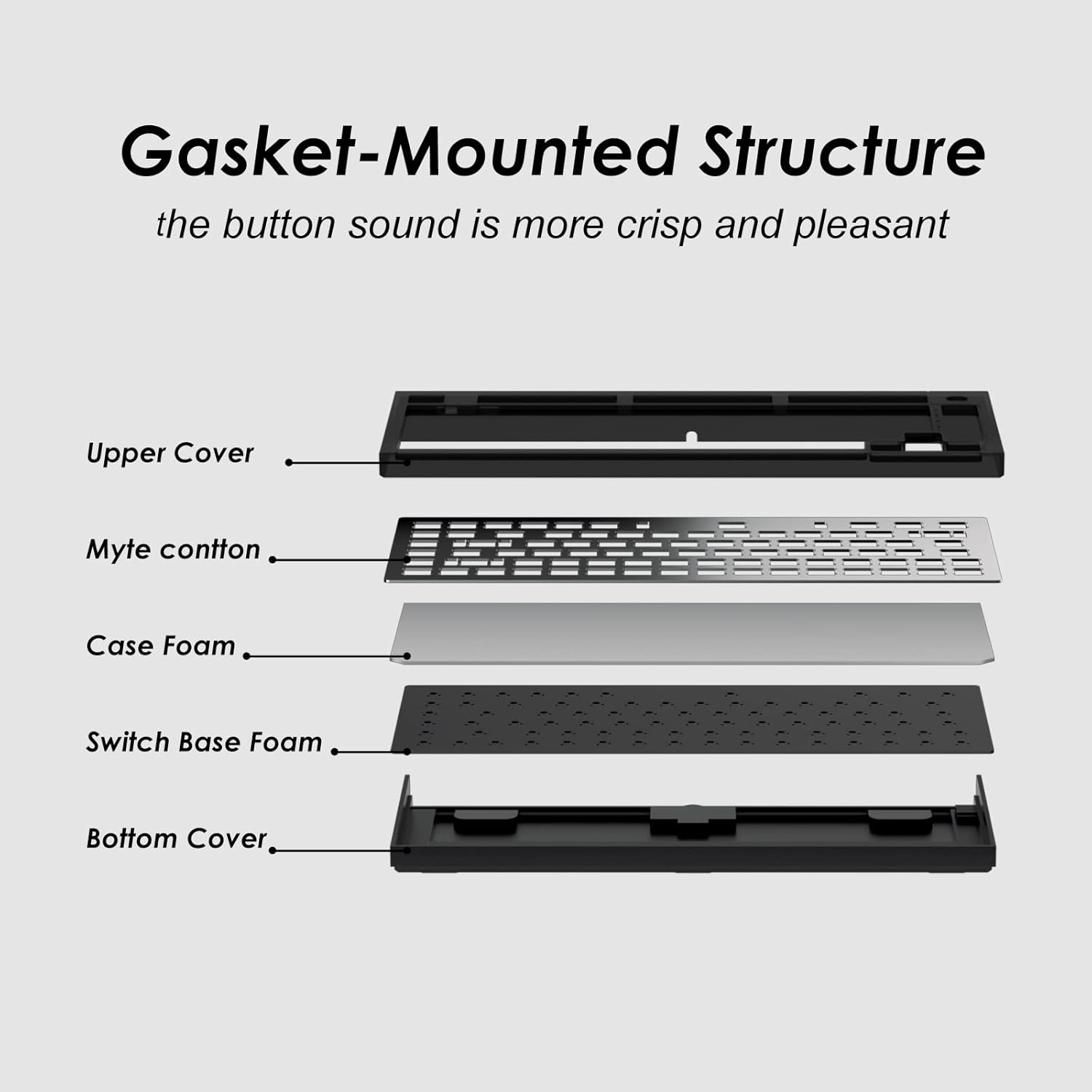
Image: An exploded diagram illustrating the components of the gasket-mounted structure, including the upper cover, Myte cotton, case foam, switch base foam, and bottom cover, designed for improved sound and feel.

Image: A graphic indicating the 4000mAh battery capacity, suggesting over 30 days of continuous use on a full charge.
סעטאַפּ אינסטרוקציעס
ערשט טשאַרדזשינג
Before first use, connect the keyboard to a USB power source using the provided Type-C cable to fully charge the internal battery. The charging indicator will show the charging status.
קאַנעקטינג די קלאַוויאַטור
The EasySMX KW75 supports three connection modes:
- ווייערד מאָדע: Connect the keyboard directly to your computer using the supplied USB Type-C cable. The keyboard will automatically switch to wired mode.
- 2.4GHz ווירעלעסס מאָדע:
- Locate the 2.4GHz USB receiver, usually stored in a compartment on the keyboard.
- צאַפּן די וסב ופנעמער אין אַ בנימצא וסב פּאָרט אויף דיין קאָמפּיוטער.
- Switch the keyboard to 2.4GHz mode (refer to the keyboard's physical switch or key combination for mode selection). The keyboard should connect automatically.
- בלועטאָאָטה מאָדע:
- באַשטימען די קלאַוויאַטור צו בלועטאָאָטה מאָדע.
- Activate Bluetooth on your device (computer, tablet, etc.).
- On your device, search for new Bluetooth devices. The keyboard should appear as "EasySMX KW75" or similar.
- Select the keyboard to pair. If prompted, enter the pairing code displayed on your screen.

Image: A diagram illustrating the wireless 2.4G, Bluetooth, and wired Type-C connection options, along with compatibility icons for Windows and Mac devices.
אַפּערייטינג ינסטראַקשאַנז
Switching Operating Systems
The keyboard supports both Windows and Mac layouts. Use the designated key combination (e.g., Fn + A for Windows, Fn + S for Mac) to switch between operating system modes. Refer to the keyboard's specific keycap legends or included quick start guide for exact combinations.
RGB באַקלייטונג קאָנטראָל
The keyboard features customizable RGB backlighting. Use the Fn key in combination with other keys (e.g., Fn + \ for lighting modes, Fn + arrow keys for brightness/speed) to adjust lighting effects, colors, and intensity. Specific key combinations may vary; consult the quick start guide.
Multimedia Rotary Knob
The rotary knob located on the top right of the keyboard provides convenient multimedia control:
- זייגערווייז ראָוטיישאַן: ינקריסאַז באַנד.
- Counter-Clockwise Rotation: דיקריסיז באַנד.
- Pressing the Knob: טוישט שפּיל/פּויזע פֿאַר מעדיע.

בילד: א נאָענטע בילד view of the rotary knob, illustrating its functions: clockwise rotation for volume increase, counter-clockwise for volume decrease, and pressing the knob for play/pause.
פּראָגראַמירבאַרע שליסלען און מאַקראָס
The EasySMX KW75 keyboard supports programmable keys and macros. Utilize the dedicated software (available for download from the EasySMX official website) to customize key assignments, create macros, and further personalize RGB lighting effects.
וישאַלט
רייניקונג די קלאַוויאַטור
- טרענט אפ די קלאַוויאַטור פון אַלע מאַכט קוועלער איידער רייניקונג.
- ניצט אַ ווייכן, טרוקענעם שטאָף צו ווישן די ייבערפלאַך פון דער קלאַוויאַטור.
- פֿאַר שווערן שמוץ, אַ ביסל דamp א שטאָף מיט מילדן זייף קען גענוצט ווערן, זיכער מאַכנדיק אַז קיין פליסיקייט וועט נישט אַרײַן אין דער קלאַוויאַטור.
- ניצט קאמפרעסט לופט צו באַזײַטיקן שטויב און שמוץ פון צווישן די קלאַוויאַטורן.
- ויסמיידן ניצן האַרב קעמיקאַלז אָדער אַברייסיוו מאַטעריאַלס.
הייס-סוואַפּינג סוויטשיז
The KW75 features a hot-swappable PCB, allowing you to change mechanical switches without soldering.
- Gently remove the keycap using a keycap puller.
- Use a switch puller to carefully extract the switch from the PCB. Apply even pressure to avoid bending the pins.
- Align the pins of the new 3-pin or 5-pin MX-style switch with the holes on the PCB.
- Press the new switch firmly into place until it clicks. Ensure it is seated correctly and functions properly before replacing the keycap.

בילד: א נאָענטע בילד view demonstrating the hot-swappable switch feature, showing a switch being inserted into the PCB, compatible with both 3-pin and 5-pin switches for easy customization.
טראָובלעשאָאָטינג
- קלאַוויאַטור ניט ריספּאַנדינג:
- זייט זיכער אַז די קלאַוויאַטור איז אויפגעלאָדן.
- קאָנטראָלירט דעם פֿאַרבינדונג־מאָדוס (מיט דראָט, 2.4GHz, בלועטוט) און זיכערט זיך אַז עס שטימט מיט דער פֿאַרבינדונג פֿון אייער דעווייס.
- For 2.4GHz, ensure the USB receiver is securely plugged in.
- פֿאַר בלועטוט, זאָרגט אַז די קלאַוויאַטור איז געפּאָרט און אויסגעקליבן אויף אייער מיטל. פּרוּווט ווידער צו פּאָרן אויב נייטיק.
- Try connecting via the USB-C cable to rule out wireless issues.
- שליסלען רעגיסטרירן זיך נישט אדער טייפן צוויי מאל:
- This could indicate a faulty switch. Due to the hot-swappable design, try replacing the problematic switch.
- זיכער מאַכן אַז דער סוויטש איז גאָר אַרײַנגעזעצט אין דער פּקב.
- Clean around the keycap and switch to remove any debris.
- RGB לייטינג נישט ארבעטן:
- Check if the lighting is turned off or set to minimum brightness using the Fn key combinations.
- Ensure the keyboard firmware is up to date via the official software.
- בלוטוט דיסקאנעקשאַן פּראָבלעמען:
- זיכער מאַכן אַז די קלאַוויאַטור איז אין דער ראַנגע פון דיין מיטל.
- קוק פֿאַר ינטערפיראַנס פון אנדערע וויירליס דעוויסעס.
- Re-pair the keyboard with your device.
- זיכער מאַכן אַז די קלאַוויאַטור באַטאַרייע איז גענוג אויפגעלאָדן.
ספּעסאַפאַקיישאַנז
| סאָרט | EasySMX |
| מאָדעל נומער | KW75 |
| אויסלייג | 75% (81 שליסלען) |
| קאַנעקטיוויטי | בלועטוט 5.0, 2.4GHz ווירעלעס, USB טיפּ-C ווייערד |
| באַשטימען קאַמפּאַטאַבילאַטי | 3-pin/5-pin MX-style Hot-Swappable |
| באַקלייט | RGB |
| באַטאַרייע קאַפּאַציטעט | 4000 מאַה |
| אַפּערייטינג סיסטעם שטיצן | Windows, Mac |
| מאַטעריאַל | פּלאַסטיק |
| אַרייַנגערעכנט קאַמפּאָונאַנץ | וסב קאַבלע |
| דימענסיעס (בעערעך) | 36.19 X 17.7 X 5.21 סענטימעטער |
| וואָג (בעערעך) | 880 ג |
וואָראַנטי און שטיצן
For warranty information and technical support, please refer to the official EasySMX webזייטל אדער קאנטאקט זייער קאסטומער סערוויס גלייך. האלט אייער קויף קוויטל אלס באווייז פון קויפן.


