1. פּראָדוקט איבערview
The Cecotec DrumFit Cycle Compact Pro is a versatile mini exercise bike designed for convenient leg and arm workouts. Its ultra-compact size and intuitive operation make it suitable for various users, including those with reduced mobility. The device features manually adjustable resistance levels, an LCD display for tracking workout metrics, and a remote control for ease of use.
שליסל פֿעיִקייטן:
- Compact design for easy storage and transport.
- Manual resistance adjustment for varied intensity.
- High-visibility LCD display showing time, speed, calories, distance, mode, and RPM.
- Remote control for convenient operation without bending.
- Silence Fit system for quiet operation.
- Anti-slip mat and pedals with straps for safety and comfort.
- Supports user weight up to 100 kg.
2. וויכטיק סאַפעטי אינסטרוקציעס
Before using the Cecotec DrumFit Cycle Compact Pro, please read and understand all safety instructions. Failure to follow these instructions may result in injury or damage to the product.
- באַראַטן זיך מיט אַ דאָקטער איידער איר אָנהייבן קיין געניטונג פּראָגראַם, ספּעציעל אויב איר האָט שוין פאַר-עקסיסטירנדיקע געזונטהייט פּראָבלעמען.
- Place the exercise bike on a flat, stable surface. Use the included anti-slip mat to prevent movement during use.
- Ensure adequate space around the device during operation.
- האַלטן קינדער און פּעץ אַוועק פון די מיטל בעשאַס נוצן.
- The maximum user weight supported is 100 kg. Do not exceed this limit.
- טראָגט פּאַסיקע אַטלעטישע שיך בעת באַניץ.
- ניצט נישט דעם אפאראט אויב עס איז געשעדיגט אדער ארבעט נישט גוט. קאנטאקטירט קאסטומער סופארט פאר הילף.
- Always secure your feet or hands with the pedal straps to prevent slipping.
- הער אויף צו טאָן געניטונגען גלייך אויב איר פילט ווייטיק, שווינדל, אדער קורצע אָטעם.
- Unplug the device from the power source when not in use or before cleaning.
3. פּראָדוקט קאַמפּאָונאַנץ
Familiarize yourself with the main parts of your DrumFit Cycle Compact Pro:
- הויפּט אַפּאַראַט: Houses the motor, resistance mechanism, and display.
- פּעדאַלז מיט סטראַפּס: For securing feet or hands during exercise.
- LCD ווייַז: Shows workout data.
- קאָנטראָל פּאַנעל: Buttons for manual operation and settings.
- ווייַט קאָנטראָל: For convenient adjustment of settings.
- אַנטי-גליטש מאַטע: Provides stability and protects flooring.
- מאַכט אַדאַפּטער: Connects the unit to an electrical outlet.

בילד: נאָענט-אַרויף view of the main unit's LCD display and control buttons.

Image: The remote control for the exercise bike, showing power, mode, and resistance buttons.
4. סעטאַפּ גייד
The DrumFit Cycle Compact Pro requires minimal setup to get started.
- אַנפּאַק: נעמט פֿאָרזיכטיק אַרויס אַלע קאָמפּאָנענטן פֿון דער פּאַקאַדזשינג. האַלט די פּאַקאַדזשינג פֿאַר צוקונפֿטיקע סטאָרידזש אָדער טראַנספּאָרט.
- שטעלע: Place the anti-slip mat on a flat, stable surface where you intend to exercise. Position the main unit on the mat.
- פאַרבינדן מאַכט: Plug the power adapter into the designated port on the exercise bike, then plug the other end into a suitable electrical outlet.
- סטרויערן סטראַפּס: Ensure the pedal straps are adjusted to comfortably and securely fit your feet or hands.
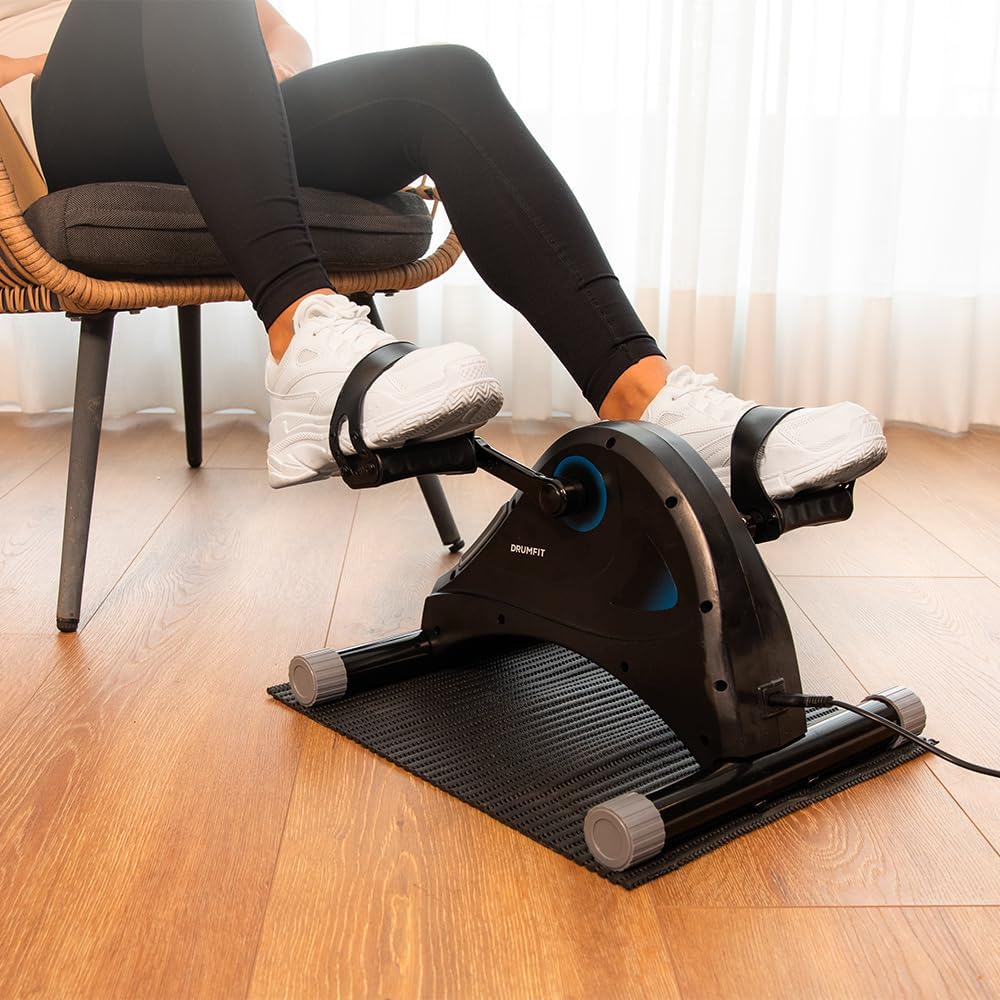
Image: Proper setup for a leg workout, showing the bike on the anti-slip mat.
5. אַפּערייטינג ינסטרוקטיאָנס
5.1 אָנהייבן אַ וואָרקאַוט
- מאַכט אויף: Press the power button on the main unit or the remote control. The LCD display will illuminate.
- שטעלן זיך: For leg exercises, sit comfortably in a chair and place your feet securely in the pedal straps. For arm exercises, place the unit on a stable table and secure your hands in the pedal straps.
- אויסקלייַבן מאָדע: Use the 'MODE' button on the control panel or remote to cycle through display functions (Time, Speed, Calories, Distance, RPM).
- סטרויערן קעגנשטעל: Use the '+' and '-' buttons on the control panel or remote to increase or decrease the resistance level. There are 5 levels of resistance.
- Begin Exercise: Start pedaling smoothly. The display will begin tracking your workout metrics.
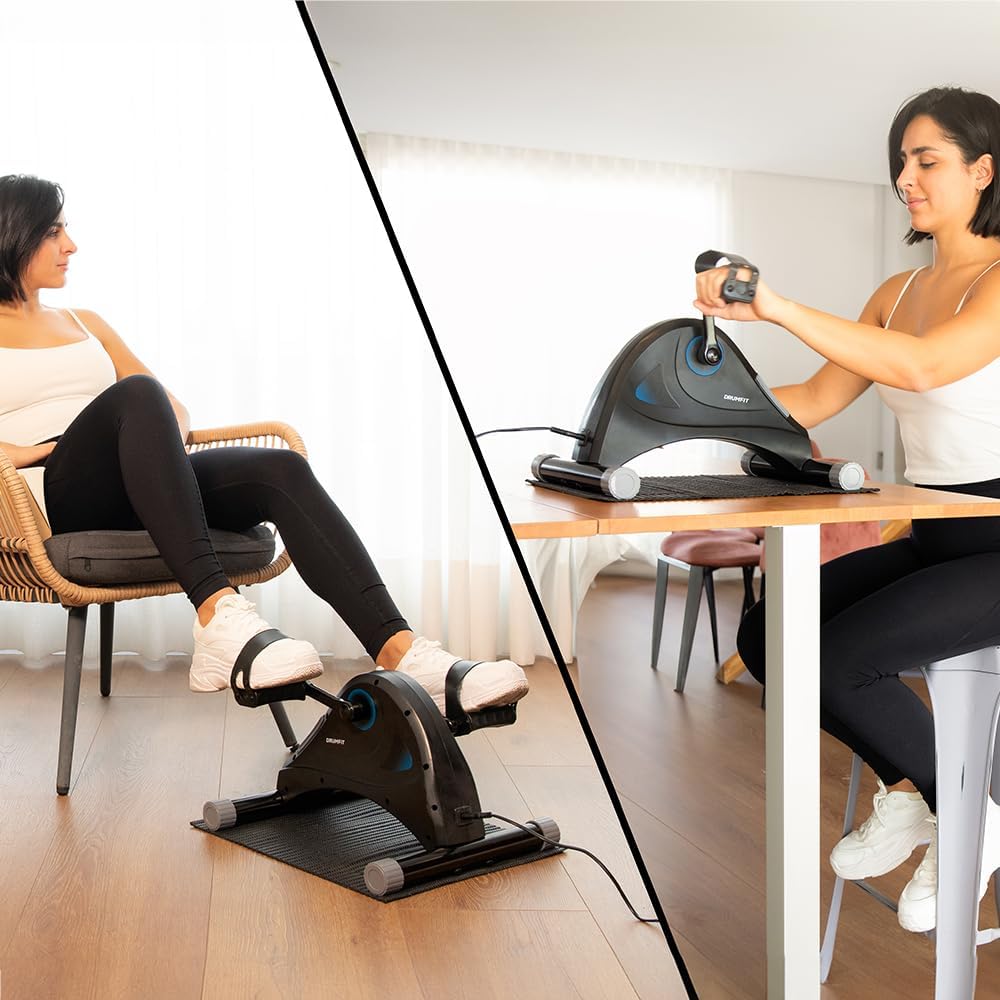
Image: Demonstrates both leg and arm exercise positions with the device.
5.2 לקד ווייַז פאַנגקשאַנז
The LCD display provides real-time feedback on your workout:
- צייט: די געדויער פון אייער איצטיגע טרענירונג סעסיע.
- SPEED: איצטיקע פּעדאַלינג גיכקייט.
- קאַלאָריעס: געשאצטע קאַלאָריעס פארברענט בעת דער סעסיע.
- AFSTAND: געשאצטע דיסטאַנץ באדעקט.
- רפּם: Revolutions Per Minute, indicating pedaling cadence.
- יבערקוקן: גייט אויטאָמאַטיש דורך אַלע דיספּליי פונקציעס.
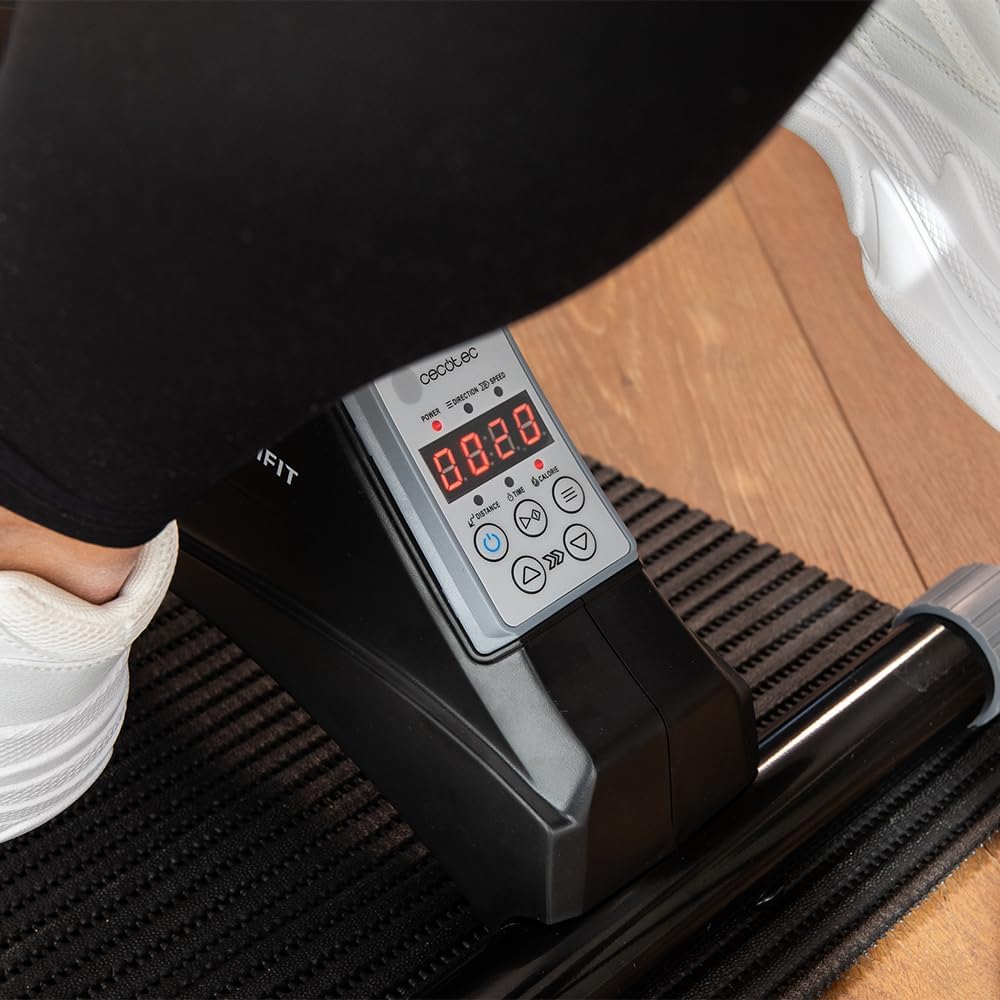
בילד: דעטאַלירט view of the LCD screen displaying various workout data points.
5.3 ניצן די רימאָוט קאָנטראָל
The remote control allows you to adjust settings without reaching down to the unit:
- מאַכט קנעפּל: טורנס די אַפּאַראַט אויף/אַוועק.
- מאָדע קנעפּל: Changes the displayed metric on the LCD.
- '+' / '-' קנעפּלעך: Adjusts the resistance level.
6. וישאַלט
רעגולערע אויפהאלטונג גאראנטירט די לאנגעוויטי און אפטימאלע פאָרשטעלונג פון אייער געניטונג בייק.
6.1 רייניקונג
- שטענדיק אָפּשטויסן די מיטל איידער רייניקונג.
- ווישן די אַפּאַראַט מיט אַ ווייך, דamp שטאָף. דו זאלסט נישט נוצן אַברייסיוו קלינערז אָדער סאָלוואַנץ.
- Avoid getting moisture into the display or control panel.
6.2 סטאָרידזש
- Store the exercise bike in a cool, dry place, away from direct sunlight and extreme temperatures.
- If storing for an extended period, cover the unit to protect it from dust.
7. טראָובלעשאָאָטינג
If you encounter issues with your DrumFit Cycle Compact Pro, refer to the following common problems and solutions:
| פּראָבלעם | מעגלעך סיבה | לייזונג |
|---|---|---|
| דער אַפּאַראַט טוט נישט מאַכט אויף. | שטראָם אַדאַפּטער נישט פארבונדן אדער אַ דעפעקטיווע אַוטלעט. | Ensure power adapter is securely plugged into the unit and a working electrical outlet. |
| Display is not showing data. | Unit is not powered on or sensor issue. | Press the power button. Ensure you are pedaling to activate sensors. |
| Resistance adjustment not working. | Remote control battery low or internal mechanism issue. | Try adjusting resistance using the buttons on the main unit. Replace remote batteries if necessary. |
| Unit moves during exercise. | Not placed on anti-slip mat or uneven surface. | Ensure the unit is placed on the anti-slip mat on a flat, stable surface. |
אויב די פראבלעם בלייבט נאך פרובירן די לייזונגען, ביטע קאנטאקטירט סעקאטעק קאסטומער סופארט.
8. טעכניש ספּעסאַפאַקיישאַנז
- מאָדעל נומער: 07155
- סאָרט: סעקאָטעק
- מאַקסימום רעקאָמענדירטע וואָג: 100 קילאָגראַמס
- קאָנטראָל טיפּ: ווייַט קאָנטראָל
- ווייַז טיפּ: לקד
- נומער פון קעגנשטעל לעוועלס: 5
- אַפּערייטינג מאָדע: מאַנואַל
- מאַכט מקור: Manual (via pedaling) / Electrical (for display/motor assistance)
- הויפּט מאַטעריאַל: אַלומינום
- קאָליר: שוואַרץ
- פּראָדוקט דימענשאַנז (L x W x H): 40 X 39 X 30 סענטימעטער
- נומער וואָג: 5 קילאָגראַמס
9. וואָראַנטי און שטיצן
Cecotec products are manufactured to high-quality standards. This product comes with a standard manufacturer's warranty. Please refer to your purchase documentation for specific warranty terms and conditions.
ספּער פּאַרץ אַוויילאַביליטי:
Spare parts for this model are available for up to 10 years within the EU.
קונה שטיצן:
For technical assistance, warranty claims, or inquiries regarding spare parts, please contact Cecotec customer service through their official webזייטל אדער דעם פארקויפער וואו דער פראדוקט איז געקויפט געווארן. ביטע האלט גרייט אייער מאדעל נומער (07155) און באווייז פון קויפן.


