הקדמה
The FitNation by Echelon Pedal Pro Plus is a motorized seated elliptical designed to provide a convenient and effective way to exercise and aid in rehabilitation. It allows users to improve circulation, decrease joint pain, and engage in physical activity from the comfort of a chair, whether working, watching TV, or reading. This manual provides essential information for the setup, operation, maintenance, and troubleshooting of your device.
שליסל פֿעיִקייטן
- Exercise and Rehab: Designed to improve circulation, decrease joint pain, and facilitate exercise while seated.
- Auto and Manual Settings: Easily switch between automated programs and manual control for varied workout intensity.
- Improve Range of Motion: Features two-directional movement (forward and reverse) for enhanced flexibility and strength building.
- Preset Training Programs: Built-in display allows for the creation of three separate preset training programs for consistent exercise routines.
- רימאָוט קאָנטראָל אַרייַנגערעכנט: A convenient remote control is provided for effortless adjustment of settings and programs.
- LCD ווייַז: A clear digital display tracks key metrics including Speed, Time, Distance, Steps, and Calories burned.
פּראָדוקט קאַמפּאָונאַנץ
Your FitNation Pedal Pro Plus package includes the following items:
- FitNation Pedal Pro Plus Unit
- מאַכט שנור
- Remote Control (requires 2x AAA batteries, included)
- ינסטרוקטיאָן מאַנואַל (דעם דאָקומענט)
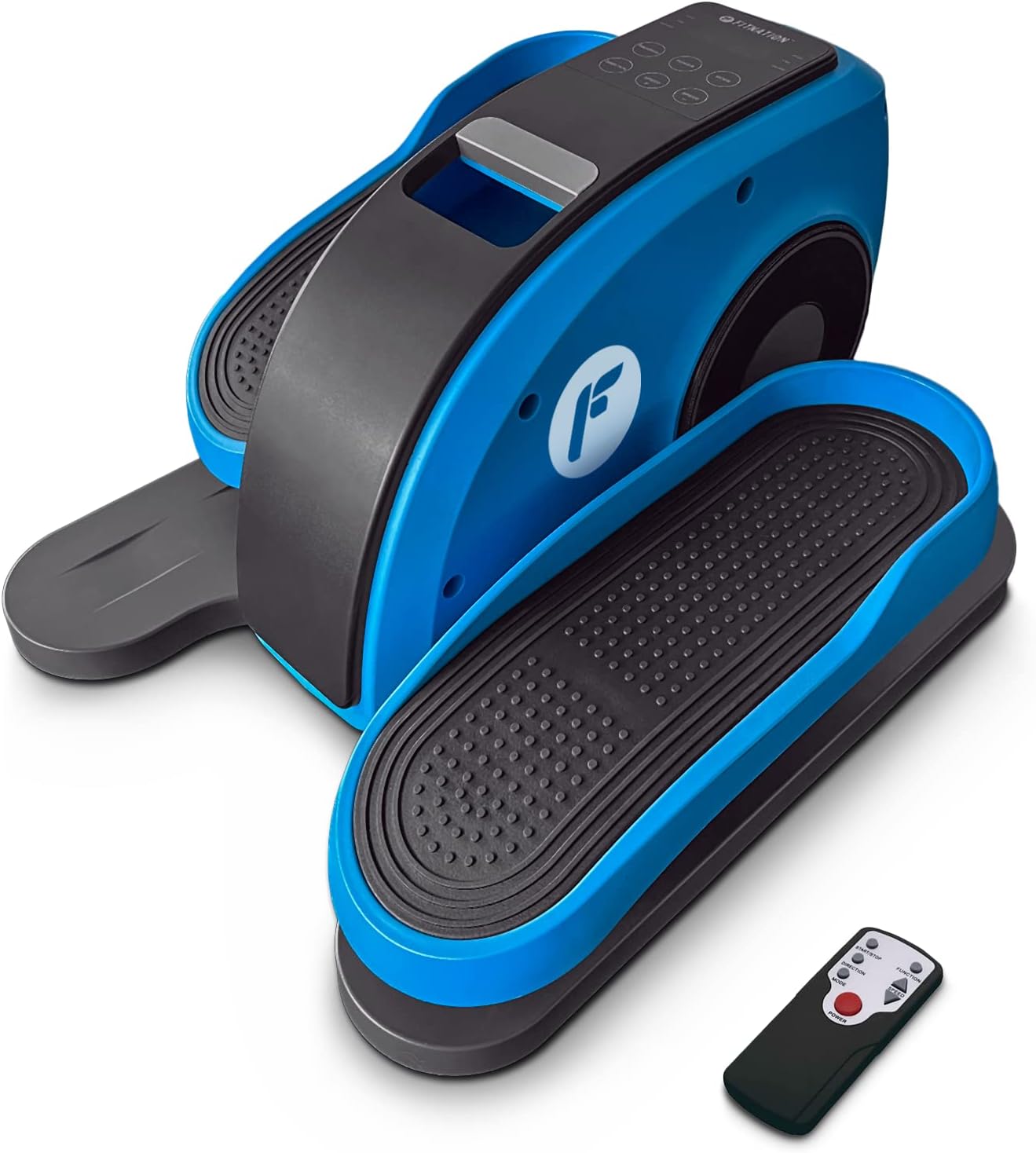
Figure 1: The FitNation Pedal Pro Plus unit with its remote control.
סעטאַפּ
- ופשליסן די אַפּאַראַט: נעמט פֿאָרזיכטיק אַרויס אַלע קאָמפּאָנענטן פֿון דער פּאַקאַדזשינג. האַלט די פּאַקאַדזשינג פֿאַר צוקונפֿטיקע סטאָרידזש אָדער טראַנספּאָרט.
- שטעלט די איינהייט: Position the Pedal Pro Plus on a flat, stable surface near a power outlet. Ensure there is enough space for comfortable leg movement. It can be placed under a desk or in front of a chair.
- פאַרבינדן מאַכט: Insert the power cord into the power input port located at the back of the unit. Plug the other end into a standard electrical outlet.

פיגורע 2: דערציען view of the unit, highlighting the power input.
- אַרײַנשטעלן באַטעריעס פֿון דער ווײַט־ראַם: עפֿנט דעם באַטעריע־אָפּטייל אויף דער הינטערשטער זײַט פֿון דער ווײַטקאָנטראָל און אַרײַנשטעלט די צוויי AAA באַטעריעס, און זאָרגט אַז די פּאָלאַריטעט איז ריכטיק.

Figure 3: The remote control used to operate the elliptical.
אַפּערייטינג ינסטראַקשאַנז
The Pedal Pro Plus can be operated using the control panel on the unit or the included remote control.
קאָנטראָל פּאַנעל און ווייַז

Figure 4: The main control panel and LCD display.
- LCD ווייַז: Shows Speed, Time, Distance, Steps, and Calories.
- POWER קנעפּל: טורנס די אַפּאַראַט אויף אָדער אַוועק.
- מאָדע קנעפּל: Cycles through display metrics (Time, Distance, Steps, Calories).
- פּראָגראַם קנעפּל: Selects between preset training programs (P1, P2, P3) or manual mode.
- DIRECTION Button: Changes the direction of pedal rotation (forward or reverse).
- גיכקייט +/- קנעפּלעך: Adjusts the speed level (1-10).
ווייַט קאָנטראָל פאַנגקשאַנז
The remote control mirrors most functions of the main control panel for convenience.

פיגור 5: אויסלייג און פונקציעס פון די ווײַטקאָנטראָל קנעפּל.
- אָנהייב/האַלטן קנעפּל: Initiates or pauses the elliptical movement.
- פֿונקציע קנעפּל: Toggles between Auto and Manual programs.
- ריכטונג קנעפּל: Reverses the pedal movement.
- ספּיד אַדזשאַסטמאַנט קנעפּלעך: Increases or decreases the speed level (1-10).
- מאַכט קנעפּל: טורנס די אַפּאַראַט אויף אָדער אַוועק.
ניצן די יליפּטיקאַל
- Ensure the unit is plugged in and the remote has batteries.
- Sit comfortably in a chair with the Pedal Pro Plus positioned in front of you. Place your feet securely on the pedals.
- דרוק די מאַכט button on the unit or remote to turn it on. The LCD display will illuminate.
- אויסקלייבן אייער געוואונטשענעם מאָדע:
- מאַנואַל מאָדע: דרוק די פּראָגראַם button until no program number (P1, P2, P3) is displayed. Use the גיכקייַט +/- buttons to set your desired speed.
- פּריסעט מגילה: דרוק די פּראָגראַם button to cycle through P1, P2, or P3. These programs have pre-defined speed variations.
- To change the direction of pedal movement, press the DIRECTION קנעפּל.
- Begin pedaling. The display will show your workout metrics.
- צו אפשטעלן די טרענירונג, דריק די אָנהייב / האַלטן button on the remote or the מאַכט קנעפּל אויף די אַפּאַראַט.
- ווען פאַרטיק, דריקן די מאַכט button to turn off the unit and unplug it from the wall outlet if not in use for an extended period.

Figure 6: The elliptical can be used discreetly under a desk.
וישאַלט
- רייניקונג: ווישן די אַפּאַראַט מיט אַ ווייך, דamp טוך נאך יעדן באַניץ. ניצט נישט קיין שרײַבנדיקע רייניגערס אדער סאָלווענטן.
- סטאָרידזש: האַלט דעם אַפּאַראַט אין אַ קיל, טרוקן אָרט אַוועק פון דירעקט זונשייַן און עקסטרעמע טעמפּעראַטורן.
- דורכקוק: Periodically check all connections and moving parts for any signs of wear or damage. If any issues are found, discontinue use and contact customer support.
טראָובלעשאָאָטינג
| פּראָבלעם | מעגלעך סיבה | לייזונג |
|---|---|---|
| דער אַפּאַראַט טוט נישט מאַכט אויף. | Power cord not properly connected; No power from outlet; Remote batteries dead or incorrectly inserted. | Ensure power cord is securely plugged into unit and outlet. Test outlet with another device. Replace remote batteries, checking polarity. |
| די פּעדאַלן רירן זיך נישט גלאַט. | Unit placed on uneven surface; Obstruction; Internal issue. | Ensure unit is on a flat, stable surface. Check for any objects obstructing pedal movement. If problem persists, contact customer support. |
| די ווײַטקאָנטראָל רעאַגירט נישט. | Dead or incorrectly inserted batteries; Obstruction between remote and unit; Remote out of range. | Replace remote batteries, checking polarity. Ensure clear line of sight to the unit's sensor. Move closer to the unit. |
| Display not showing correct metrics. | אומרעכטע מאָדע אויסגעקליבן. | דרוק די מאָדע button to cycle through the display metrics. |
ספּעסאַפאַקיישאַנז

Figure 7: Product dimensions and weight for easy reference.
| אַטריביוט | דעטאַל |
|---|---|
| מאָדעל נאָמען | Pedal Pro Plus Blue |
| סאָרט | FITNATION |
| קאָליר | בלוי |
| פּראָדוקט דימענשאַנז (ד רענטגענ וו רענטגענ ה) | 17.5"ד רענטגענ 14.5"וו רענטגענ 10.5"ה |
| מאַטעריאַל | Steel, Plastic, Synthetic Leather |
| קעגנשטעל מעקאַניזאַם | מאַגנעטיק |
| מאַקסימום וואָג רעקאָממענדאַטיאָן | 100 קילאָגראַמס (220 לבס) |
| פּונקט וואָג | 15.8 פונט (7.17 קג) |
| נומער פון קעגנשטעל לעוועלס | 8 |
| UPC | 810091983218 |
| מאָדעל נומער (טייל נומער) | PPP-FN-BLUE |
וואָראַנטי און שטיצן
The FitNation Pedal Pro Plus comes with a 1-יאָר פאַבריקאַנט ס וואָראַנטי. די וואָראַנטי קאָווערס חסרונות אין מאַטעריאַלס און ווערקמאַנשיפּ אונטער נאָרמאַל נוצן.
For warranty claims, technical assistance, or any questions regarding your product, please contact FitNation customer support. Refer to the contact information provided on the product packaging or the official FitNation webפּלאַץ.
Please have your model number (PPP-FN-BLUE) and proof of purchase ready when contacting support.


