1. הקדמה
This manual provides detailed instructions for the operation and maintenance of your Soundmaster DAB280SW Portable DAB+ and FM RDS Digital Radio. The DAB280SW is a versatile portable radio featuring DAB+ and FM RDS reception, a headphone jack, and a practical carrying handle. It offers excellent sound quality and user-friendly controls, including preset station memory and alarm functions.
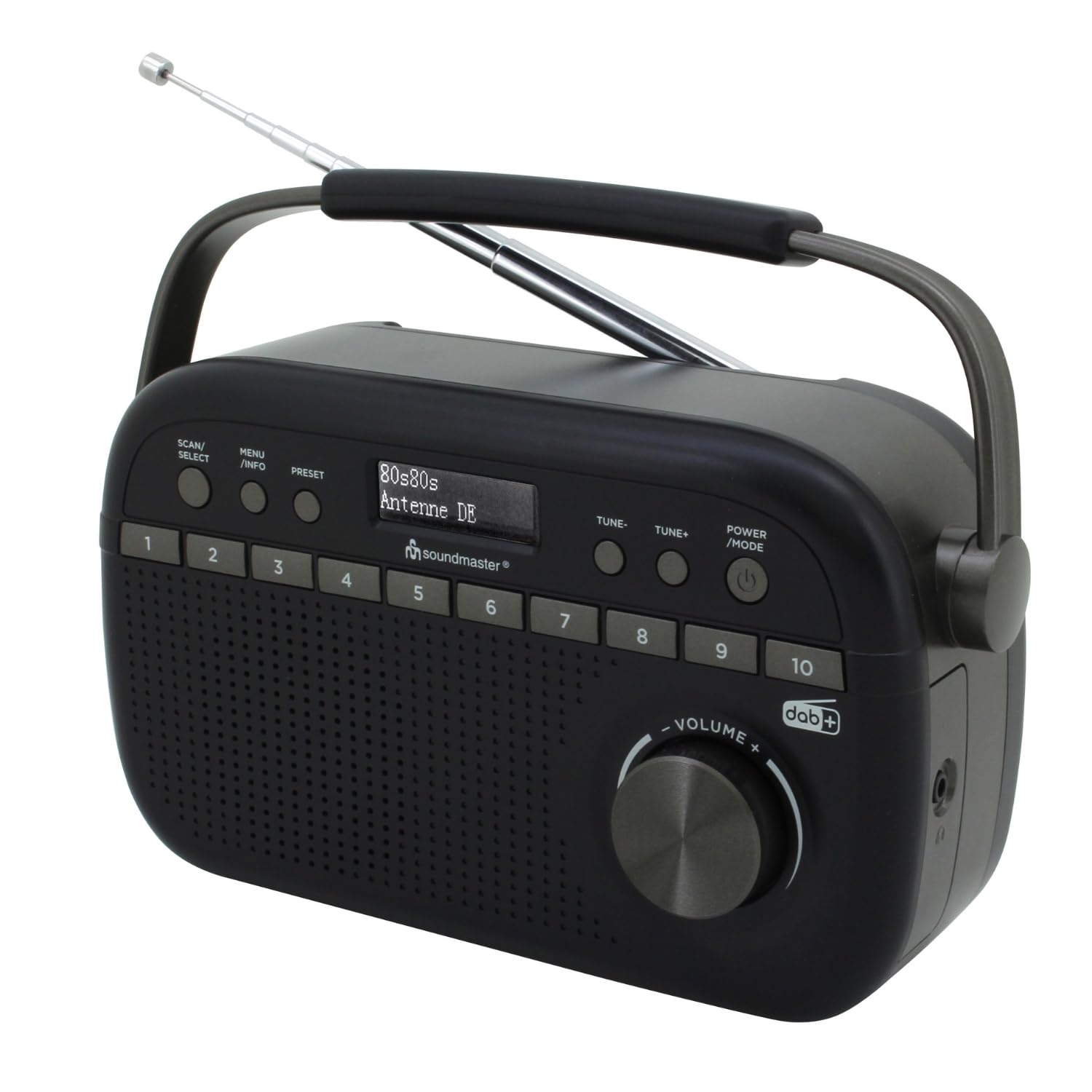
Image 1.1: The Soundmaster DAB280SW Portable DAB+ and FM RDS Digital Radio, showcasing its compact design and carrying handle.
2. זיכערקייַט אינפֿאָרמאַציע
- לייענען אַלע ינסטראַקשאַנז קערפאַלי איידער איר נוצן די מיטל.
- שטעלט נישט אויס דעם אַפּאַראַט צו רעגן אָדער פייכטקייט כּדי צו פאַרמייַדן פייער אָדער עלעקטרישע קלאַפּן.
- זיכער מאַכן אַז די ווענטילאַציע איז געהעריק אַרום דעם אַפּאַראַט. נישט פאַרשפּאַרן די ווענטילאַציע עפענונגען.
- ניצט נאָר די ספּעציפֿישע מאַכט אַדאַפּטער אָדער באַטעריעס.
- נישט עפענען דעם סיasinז. איבערגעבן אלע סערוויסינג צו קוואַליפֿיצירטע פּערסאָנעל.
- האַלט דעם אַפּאַראַט אַוועק פון דירעקטער זונשייַן, היץ קוועלער און שטאַרקע מאַגנעטישע פעלדער.
- אַוועקוואַרפן באַטעריעס פאַראַנטוואָרטלעך לויט די לאָקאַלע רעגולאַציעס.
3. פּעקל אינהאַלט
ביטע קאָנטראָלירט אַז אַלע זאכן זענען פאַראַן:
- Soundmaster DAB280SW Portable Radio
- AC Power Adapter (if included)
- באַניצער מאַנואַל
4. פּראָדוקט פֿעיִקייטן
- DAB+ Digital Radio Tuner
- FM - RDS Radio Tuner
- 10 preset station memory buttons for quick access
- Total of 40 presets available (20 DAB+, 20 FM)
- Dual alarm times
- Sleep and Snooze functions
- 3.5 מם כעדפאָון דזשאַק
- Portable design with carrying handle
- Battery or AC powered operation
5. קאָנטראָלן און אַרויסווייַזונג
Familiarize yourself with the controls on your radio:
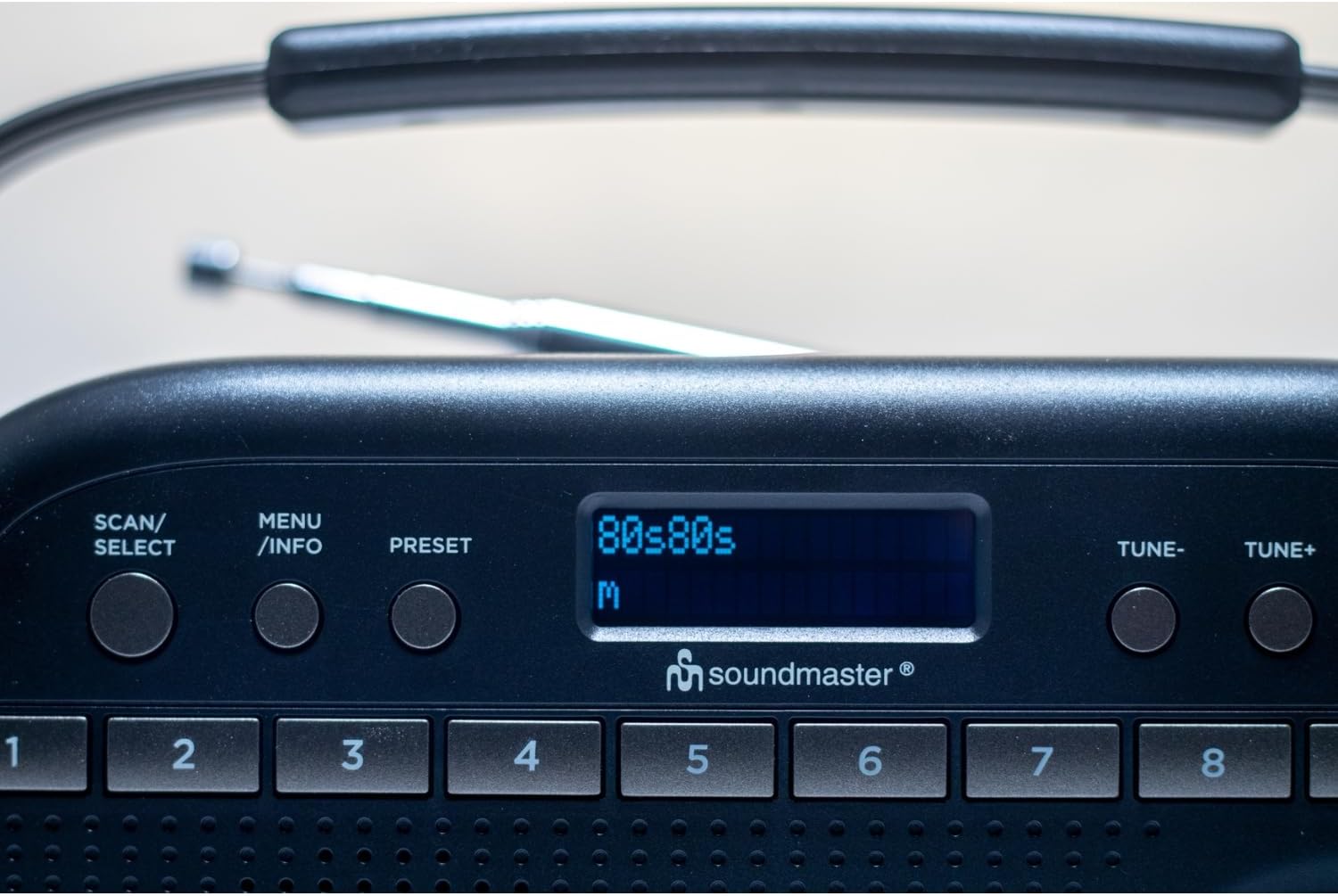
בילד 5.1: אויבן view of the radio showing the display, SCAN/SELECT, MENU/INFO, PRESET buttons, and preset buttons 1-8.
- מאַכט/מאָדוס קנעפּל: Press to turn the unit on or off. Press repeatedly to switch between DAB+ and FM modes.
- TUNE- / TUNE+ Buttons: Used to manually tune frequencies in FM mode or navigate through DAB+ stations/menu options.
- SCAN/SELECT Button: Initiates a scan for stations in DAB+ or FM mode. Also confirms selections in menu.
- מעניו/אינפֿאָ קנעפּל: Accesses the menu settings. Press repeatedly to cycle through information display (e.g., program type, signal strength).
- PRESET קנעפּל: Used to save and recall favorite stations.
- פאָראויסגעשטעלטע קנעפּלעך (1-10): Direct access buttons for your stored favorite stations.
- VOLUME קנופּ: דרייען צו סטרויערן די אַודיאָ רעזולטאַט מדרגה.
- ווייַז: Shows station information, time, menu options, and other relevant data.
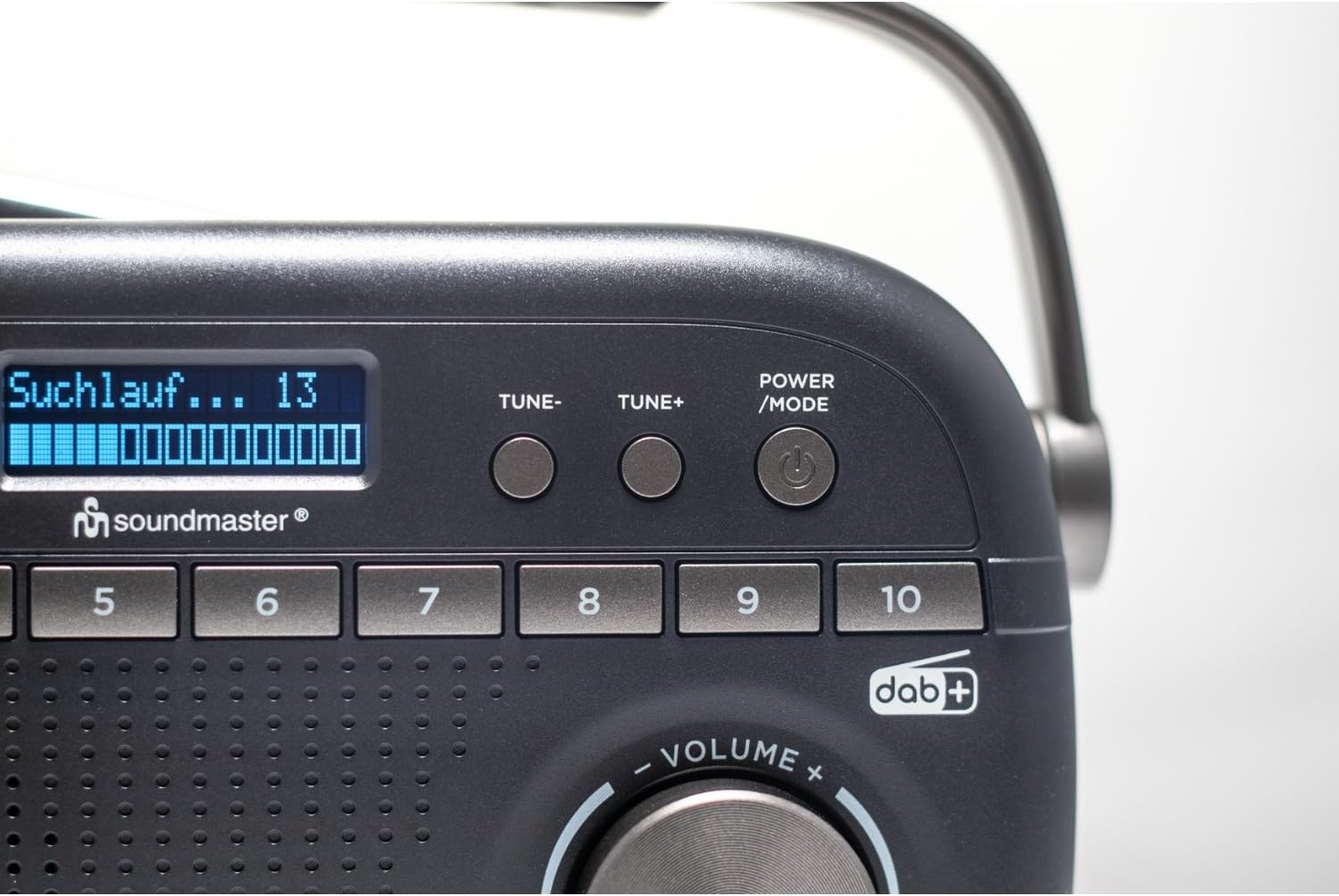
Image 5.2: Close-up of the radio display showing a 'Suchlauf...' (scanning) message, indicating station search in progress.
6. סעטאַפּ
6.1 אנשטעלן דעם איינהייט
The DAB280SW can be powered by either the included AC power adapter or batteries.
- AC מאַכט: Connect the AC power adapter to the DC IN jack on the rear of the unit and plug the other end into a standard wall outlet.
- באַטאַרייע מאַכט: Open the battery compartment on the rear of the unit. Insert the required number of batteries (type not specified, typically C or AA) ensuring correct polarity (+/-). Close the battery compartment securely.

בילד 6.1: דערציען view of the radio, illustrating the battery compartment cover and the AC power input socket.
6.2 אַנטענע אַדזשאַסטמענט
For optimal reception, fully extend the telescopic antenna located on the rear of the unit. Adjust its position and angle to achieve the best signal quality for both DAB+ and FM broadcasts.
7. אַפּערייטינג ינסטרוקטיאָנס
7.1 מאַכט אויף / אַוועק
דרוק די מאַכט / מאָדע button to turn the radio on. Press and hold the מאַכט / מאָדע קנעפּל צו קער די ראַדיאָ אַוועק.
7.2 Selecting DAB+ or FM Mode
מיטן ראַדיאָ אנגעצונדן, דריק די מאַכט / מאָדע button repeatedly to cycle between DAB+ and FM radio modes. The current mode will be displayed on the screen.
7.3 DAB+ ראַדיאָ אָפּעראַציע
- ערשטער מאָל סעטאַפּ: When you first power on the radio in DAB+ mode, it will automatically perform a full scan for available stations. This may take a few minutes.
- מאַנואַל סקאַן: To initiate a full scan at any time, press the יבערקוקן / סעלעקטירן קנעפּל.
- אויסקלייבן סטאַנציעס: After a scan, use the טון- or TUNE+ buttons to scroll through the list of available DAB+ stations. Press יבערקוקן / סעלעקטירן צו באַשטעטיקן דיין סעלעקציע.

Image 7.1: The official DAB+ digital radio logo, indicating support for digital audio broadcasting.
7.4 FM ראַדיאָ אָפּעראַציע
- אַוטאָ סקאַן: אין FM מאָדע, דריקן די יבערקוקן / סעלעקטירן button to automatically scan for and stop at the next available strong station.
- מאַנואַל טונינג: ניצן די טון- or TUNE+ buttons to manually adjust the frequency in small increments. Press and hold these buttons for faster tuning.
7.5 שפּאָרן און צוריקרופן פאָרגעשטעלטע סעטטינגס
The radio allows you to store up to 20 DAB+ and 20 FM stations as presets.
- צו ראַטעווען אַ פאָרסעט: שטעלט איין צו דער געוואונטשענער סטאנציע. דריקט און האלט די קנעפל PRESET button until 'Preset Store' appears on the display. Use the טון- or TUNE+ buttons to select a preset number (1-10 for direct access, or 11-20 via menu). Press יבערקוקן / סעלעקטירן to confirm. Alternatively, for direct access presets (1-10), press and hold the desired numbered preset button.
- צו צוריקרופן אַ פּריסעט: דריקן קורץ אויף די PRESET קנעפּל, דעמאָלט נוצן טון- or TUNE+ to select the desired preset number and press יבערקוקן / סעלעקטירן. For direct access presets (1-10), simply press the corresponding numbered preset button.
7.6 Alarm, Sleep, and Snooze Functions
The DAB280SW includes dual alarm times, a sleep timer, and a snooze function. Refer to the detailed menu options for setting these features:
- באַשטעטיקן אַלאַרמס: דרוק די מעניו / אינפֿאָרמאַציע button to enter the menu. Navigate to the 'Alarm' option using טון- or TUNE+ און דריקן יבערקוקן / סעלעקטירן. Follow the on-screen prompts to set Alarm 1 and Alarm 2, including time, source (DAB/FM/Buzzer), and duration.
- שלאָפן טימער: In the menu, select 'Sleep'. Choose a duration (e.g., 15, 30, 60 minutes) after which the radio will automatically turn off.
- סנוז: When an alarm sounds, press any button (except POWER/MODE) to activate the snooze function, which will temporarily silence the alarm for a short period.
7.7 נוצן פון כעדפאָונז
To listen privately, plug 3.5mm stereo headphones into the headphone jack located on the side of the unit. The internal speaker will automatically mute.
8. וישאַלט
- רייניקונג: ווישט אָפּ דעם אַפּאַראַט מיט אַ ווייכן, טרוקענעם שטאָף. ניצט נישט קיין שרײַבנדיקע רייניגער אָדער סאָלווענטן.
- באַטערי פאַרבייַט: If using batteries, replace them when the low battery indicator appears on the display or when performance degrades. Ensure to use fresh batteries of the correct type and dispose of old batteries properly.
- סטאָרידזש: אויב איר לייגט אַוועק דעם ראַדיאָ פֿאַר אַ לענגערע צייט, נעמט אַרויס די באַטעריעס כּדי צו פֿאַרמייַדן ליקאַדזש.
9. טראָובלעשאָאָטינג
- קיין מאַכט: Check if the AC adapter is securely connected or if batteries are inserted correctly and are not depleted.
- שלעכטע אויפנאמע: Fully extend and adjust the telescopic antenna. Try moving the radio to a different location, away from other electronic devices that may cause interference. Perform a full scan for stations.
- קיין קול: קאָנטראָלירט דעם וואָלומען לעוועל. מאַכט זיכער אַז די כעדפאָונז זענען נישט איינגעשלאָסן אויב איר פּלאַנירט צו נוצן דעם רעדנער.
- DAB+ Stations Missing: Perform a full DAB+ scan. DAB+ coverage may vary by location; check local availability.
- ווייַז ניט ארבעטן: Try turning the unit off and on again. If the issue persists, contact customer support.
10. ספּעסאַפאַקיישאַנז
| שטריך | באַשרייַבונג |
|---|---|
| מאָדעל | DAB280SW |
| טונער טעכנאָלאָגיע | DAB+, FM RDS |
| ראַדיאָ באַנדס געשטיצט | FM (up to 108 MHz) |
| פּריסעט סטיישאַנז | 40 (20 דאַב+, 20 עפעם) |
| אַודיאָ רעזולטאַט | 3.5 מם כעדפאָון דזשאַק |
| מאַכט מקור | AC Power Adapter, Battery Powered |
| פּראָדוקט דימענשאַנז (L x W x H) | 25 X 6 X 12 סענטימעטער |
| פּונקט וואָג | 0.6 קילאָגראַמס |
| ספּעציעלע פֿעיִקייטן | Portable, Dual Alarm, Sleep/Snooze |

Image 10.1: The Soundmaster DAB280SW radio with its approximate dimensions (25cm length, 6cm width, 12cm height) indicated.
11. וואָראַנטי און שטיצן
Your Soundmaster DAB280SW radio comes with a standard manufacturer's warranty. Please refer to the warranty card included in your package for specific terms and conditions. For technical support, troubleshooting assistance, or warranty claims, please contact your retailer or the Soundmaster customer service department. Contact information can typically be found on the manufacturer's webוועבזייטל אדער אויף דער פּראָדוקט פּאַקאַדזשינג.