1. הקדמה
This manual provides essential information for setting up, operating, and maintaining your realme C30 smartphone. Please read it carefully to ensure optimal performance and longevity of your device.

Image: realme C30 smartphone in Lake Blue, showcasing its rear design and camera.
2. וואָס איז אין דער קעסטל
זיכער מאַכן אַז אַלע זאכן זענען פאַראַן אין פּעקל:
- Realme C30 Smartphone
- אַדאַפּטער
- וסב קאַבלע
- סים טרייַ עדזשעקטאָר
- שנעלער אויטאָ טשאַרדזשער
3. דיווייס איבערview
גשמיות קעראַקטעריסטיקס
- דימענסיעס: 1.97 X 3.31 X 6.65 אינטשעס
- נומער וואָג: 6 אונסעס
- קאָליר: בלויער אזערע
שליסל פֿעיִקייטן
- ווייַז: 6.5" HD+ Fullscreen with 88.7% Screen-to-body Ratio, 120Hz Touch Sampling Rate, 16.7M Screen Colors
- פּראַסעסער: Unisoc T612 Octa-core, 12nm, up to 1.82GHz, ARM Mali-G57 GPU
- באַראַן: 2 GB (Note: Some variants may have 4GB RAM)
- סטאָרידזש: 32 גיגאבייט
- דערציען אַפּאַראַט: 8MP AI Camera with f/2.0 aperture, 4P lens
- פראָנט אַפּאַראַט: 5MP
- באַטערי: 5000mAh (Typical) Massive Battery, 4890mAh (Minimum)
- אַפּערייטינג סיסטעם: realme UI R Edition Based on Android 11
מיטל אויסלייג
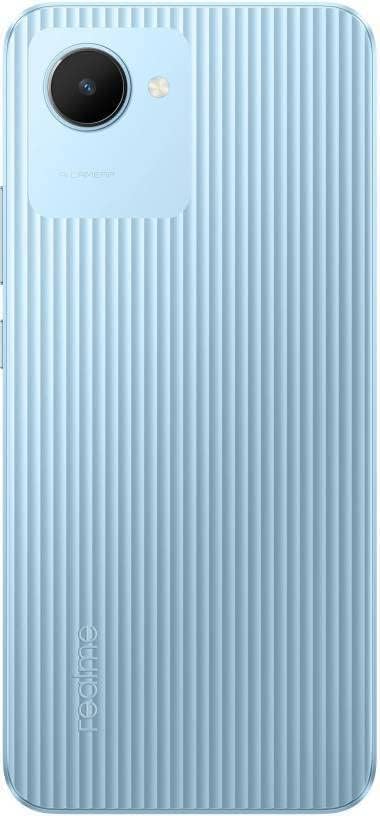
בילד: הינטערשטע view of the realme C30, highlighting the single camera and textured back panel.

Image: Top and bottom edges of the realme C30, showing the 3.5mm headset jack, Micro USB port, and speaker grille.

בילד: זייט views of the realme C30, illustrating the power button, volume rockers, and SIM tray slot.
4. סעטאַפּ
4.1. SIM Card and Micro SD Installation
- Locate the SIM tray slot on the side of your device.
- שטעקט אריין דעם סים טאץ ארויסווארף געצייג אין דעם קליינעם לאך לעבן דעם טאץ.
- דריק לײַכט ביז די טאַץ קומט אַרויס.
- Place your Nano SIM cards (supports Dual SIM) and Micro SD card into the designated slots on the tray.
- קערפאַלי ריינסערט די טאַץ אין די מיטל.
4.2. ערשטע איינשאַלטונג און קאָנפיגוראַציע
- דריק און האלט דעם פּאַוער קנעפּל ביז דער רעאַלמע לאָגאָ דערשיינט.
- פֿאָלגט די אינסטרוקציעס אויף דעם עקראַן צו אויסקלײַבן אײַער בילכער שפּראַך און ראַיאָן.
- פֿאַרבינדט זיך צו אַ Wi-Fi נעץ צו פאָרזעצן מיטן סעטאַפּ און דאַונלאָודן די נויטיקע דערהייַנטיקונגען.
- Review און אַקסעפּטירן די ענד באַניצער לייסאַנס העסקעם און פּריוואַטקייט פּאָליטיק.
- לאָג אַרײַן מיט אײַער גוגל אַקאַונט אָדער שאַפֿט אַ נײַעם.
- Set up your preferred screen lock method (PIN, Password, Pattern, Face recognition, or Fingerprints).
- Choose your display mode (Light or Dark).
- Complete the remaining setup steps to access your device's home screen.
5. אַפּערייטינג דיין מיטל
5.1. יקערדיק נאַוויגאַציע
Navigate your device using intuitive touch gestures. Swipe up, down, left, or right to move between screens and menus. Tap to select items, and long-press for additional options.
5.2. באַטערי מאַנאַגעמענט
Your realme C30 is equipped with a 5000mAh massive battery for extended usage. To optimize battery life:
- געבן Ultra Saving Mode from the Quick Settings panel for prolonged standby time at low power levels.
- Adjust screen brightness and screen timeout settings.
- Close background applications when not in use.
5.3. קאַמעראַ יוז
Launch the Camera app to capture photos and videos. The 8MP AI rear camera and 5MP front camera offer various modes and features.
- צאַפּן דעם שאַטער קנעפּל צו נעמען אַ פאָטאָ.
- באַשטימען צווישן פאָטאָ און ווידעא מאָדעס.
- Utilize AI features for enhanced image quality.
5.4. קאַנעקטיוויטי
אייער דעווייס שטיצט פארשידענע קאנעקטיוויטי אפציעס:
- 4G LTE: Enjoy fast mobile data speeds. (Note: Not for USA Market. Supports Latin Europe bands.)
- ווי-פי: פֿאַרבינדט זיך צו וויירלעסע נעטוואָרקס פֿאַר אינטערנעט אַקסעס.
- בלועטאָאָטה: Pair with compatible accessories like headphones or speakers.
- GPS/GLONASS/GALILEO: פֿאַר גענויע לאָקאַציע באַדינונגען.
- מיקראָ וסב: פֿאַר טשאַרדזשינג און דאַטן אַריבערפירן.
- 3.5 מם כעדסעט דזשאַק: פֿאַר דראָטיקע אַודיאָ אַקסעסאָריעס.
6. וישאַלט
6.1. טשאַרדזשינג
Use the provided 10W charging adapter and USB cable to charge your device. Connect the Micro USB end to your phone and the adapter to a power outlet.
6.2. ווייכווארג דערהייַנטיקונגען
האַלט דיין מיטל'ס ווייכווארג אַרויף צו דאַטע צו ענשור אָפּטימאַל פאָרשטעלונג און זיכערהייט. גייט צו Settings > About phone > realme UI version צו קאָנטראָלירן און אינסטאַלירן דערהייַנטיקונגען.
6.3. רייניקונג
Gently wipe your device with a soft, lint-free cloth. Avoid using harsh chemicals or abrasive materials that could damage the screen or body.
7. טראָובלעשאָאָטינג
7.1. דיווייס גייט נישט אן
- Ensure the battery is charged. Connect the device to the charger for at least 15 minutes before attempting to power on.
- דריק און האלט דעם פּאַוער קנעפּל פֿאַר 10-15 סעקונדעס צו דורכפירן אַ געצוואונגענע ריסטאַרט.
7.2. Apps Freezing or Crashing
- שליסט די פראבלעמאטישע אפליקאציע און עפנט זי ווידער.
- אויסמעקן די אַפּ'ס קאַש און דאַטן דורך סעטטינגס > אַפּפּס > [אַפּ נאָמען] > סטאָרידזש.
- Ensure your device's software and all apps are updated to their latest versions.
7.3. שלעכטע באַטאַרייע לעבן
- רעדוצירן דעם ברייטקייט פון דעם עקראַן און שטעלן אַ קירצערע טיימאַוט פון דעם עקראַן.
- דיאַקטיווירן Wi-Fi, בלועטוט, און GPS ווען נישט אין באַנוץ.
- Identify and close power-consuming background apps.
- Enable Ultra Saving Mode for critical situations.
8. ספּעסאַפאַקיישאַנז
| שטריך | באַשרייַבונג |
|---|---|
| מאָדעל נאָמען | RMX3511 |
| פּראָדוקט דימענשאַנז | 1.97 X 3.31 X 6.65 אינטשעס |
| פּונקט וואָג | 6 אונסעס |
| אָפּערייטינג סיסטעם | realme UI R Edition Based on Android 11 |
| קפּו ספּיד | 1820 MHz (1.82GHz) |
| באַראַן | 2 GB (Note: Some variants may have 4GB) |
| זכּרון סטאָרידזש קאַפּאַסיטי | 32 גיגאבייט |
| פאַרשטעלן גרייס | 6.5 אינטשעס |
| האַכלאָטע | 1280 x 720 (HD+) |
| באַטאַרייע קאַפּאַציטעט | 5000 מיליampעטלעכע שעה (מאַה) |
| טעלעפאָן רעדן צייט | 45.3 שעה |
| דערציען אַפּאַראַט | 8MP אַי אַפּאַראַט |
| פראָנט אַפּאַראַט | 5MP |
| ספּעציעלע פֿעיִקייטן | 4K Video Recording, Dual SIM, Fast Charging Support |
| קאַנעקטיוויטי טעכנאָלאָגיע | USB, Cellular (LTE) |
| אַודיאָ דזשאַק | 3.5 מם |
9. וואָראַנטי און שטיצן
For warranty information and customer support, please refer to the documentation included with your product or visit the official realme webפּלאַץ. איר קענט אויך באַזוכן די יו realme Store on Amazon פֿאַר נאָך פּראָדוקט דעטאַלן און שטיצע רעסורסן.


