הקדמה
This manual provides detailed instructions for the proper use and maintenance of your Cellularline FINE Transparent TWS Wireless In-Ear Earbuds. Please read this manual thoroughly before using the product to ensure optimal performance and longevity.
The Cellularline FINE Transparent TWS Wireless In-Ear Earbuds feature a distinctive transparent design, showcasing the internal components of both the earbuds and their charging case. Designed for comfort and high-quality audio, these earbuds offer up to 3.5 hours of playtime per charge, extended to a total of 10 hours with the charging case. They include intuitive touch controls for managing calls and music, and an auto-pairing function for effortless connection. The Double Master function allows for independent use of either earbud.
זיכערקייַט אינפֿאָרמאַציע
- שטעלט נישט אויס די אויערן-קנעפּלעך אדער טשאַרדזשינג קעסטל צו עקסטרעמע טעמפּעראַטורן, הומידיטי, אדער פליסיקייטן.
- פֿאַרמײַדט צו לאָזן פֿאַלן, קלאַפּן אָדער צענעמען דאָס אַפּאַראַט. דאָס קען בטל מאַכן די וואָראַנטי.
- האַלטן אויס פון דערגרייכן פון קינדער און פּעץ.
- ניצט נאָר דעם צוגעשטעלטן טשאַרדזשינג קאַבל אָדער אַ סערטיפיצירטן עקוויוואַלענט.
- הערט אויף מיטלמעסיגע קול לעוועלס צו פארמיידן הערן שאדן.
- ניצט נישט די אויערן-קנעפּלעך אין סיטואַציעס וואו די אוממעגלעכקייט צו הערן אַמביאַנטע קלאַנגען קען זיין געפערלעך (למשל, דרייווינג, וועלאָסיפּעד, גיין אין פאַרקער).
פּעקל אינהאַלט
ביטע טשעק די פּאַקעט פֿאַר די פאלגענדע זאכן:
- Cellularline FINE Transparent TWS Wireless In-Ear Earbuds (Left and Right)
- טשאַרדזשינג קאַסע
- וסב טשאַרדזשינג קאַבלע
- באַניצער מאַנואַל
פּראָדוקט איבערview
The Cellularline FINE earbuds are designed for ease of use and a distinctive aesthetic. Below is an overview of the main components.
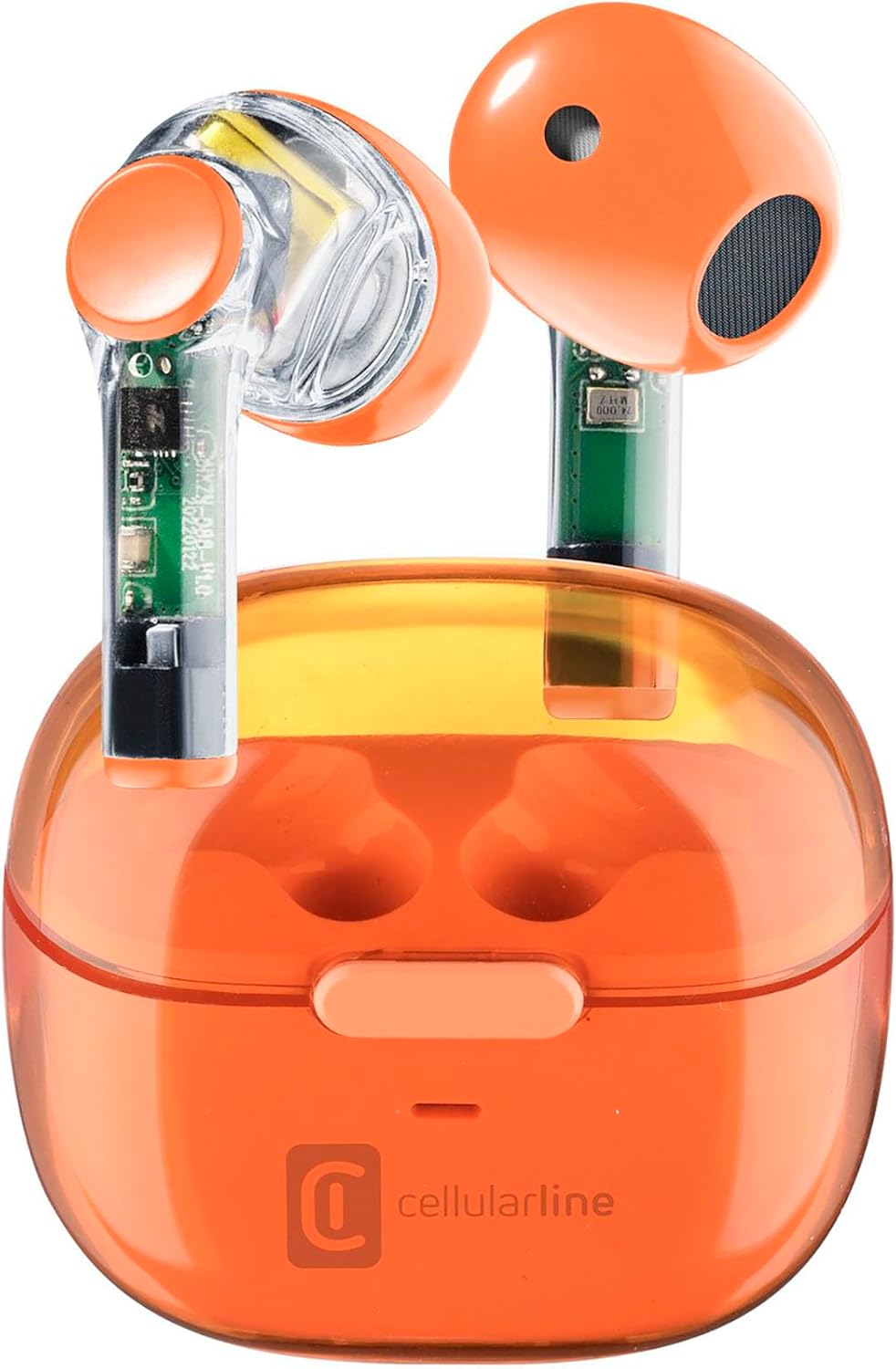
Image: Cellularline FINE Transparent TWS Wireless In-Ear Earbuds in their charging case. The earbuds and case feature a transparent orange design, revealing internal circuitry.

בילד: נאָענט-אַרויף view highlighting the transparent design of the Cellularline FINE earbuds, showing the internal components.
קאַמפּאָונאַנץ:
- עאַרבודז: Left and Right, with touch control surfaces and microphones.
- טשאַרדזשינג קאַסע: Houses and charges the earbuds, with a charging port and LED indicator.
- ריר קאָנטראָל שטח: געפינען זיך אויף דער אויסערליכער ייבערפלאך פון יעדן אויערקנעפל פאר פארשידענע פונקציעס.
- מיקראָפאָן: אינטעגרירט אין יעדן אויערקנעפל פאר רופן.
סעטאַפּ
1. אויפלאָדן די אויערקנעפּלעך און קעסטל
פארן ערשטן באַנוץ, לאָדן די אויערקנעפּלעך און די טשאַרדזשינג קעסטל גאָר אויף.
- לייגט ביידע אויערקנעפּלעך אין דעם טשאַרדזשינג קעסטל. מאַכט זיכער אַז זיי זענען ריכטיק אַרײַנגעזעצט.
- Connect the USB charging cable to the charging port on the case and to a compatible USB power source (e.g., computer, wall adapter).
- The LED indicator on the charging case will show the charging status. Once fully charged, the indicator will change or turn off.
- A full charge provides approximately 3.5 hours of playtime for the earbuds, and the case can provide up to 4 additional charges, totaling 10 hours of playtime.

Image: Illustration showing the earbuds and charging case, indicating 3.5 hours of playtime per single charge and 10 hours of total playtime with the charging case.
2. Pairing with Your Device (Auto-Pairing)
The earbuds feature an auto-pairing function for quick and easy connection.
- זיכער מאַכן אַז אייער מיטל'ס בלועטוט איז אנגעצינדן.
- עפֿנט דעם טשאַרדזשינג קעסטל און נעמט אַרויס ביידע אויערקנעפּלעך. זיי וועלן זיך אויטאָמאַטיש אָנצינדן און אַרײַן אין פּערינג מאָדע.
- On your device, search for Bluetooth devices and select "Cellularline FINE" (or similar name) from the list.
- אַמאָל פארבונדן, וועט איר הערן אַ קלאָרע באַשטעטיקונג, און די אויערקנעפּלעך וועלן זיין גרייט פֿאַר נוצן.
- פֿאַר ווייטערדיקע נוצן, וועלן די אויערקנעפּלעך זיך אויטאָמאַטיש פֿאַרבינדן צום לעצטן געפּאָרטן מיטל ווען זיי ווערן אַרויסגענומען פֿון דער קעסטל.

Image: A smartphone displaying a music player interface, with the Cellularline FINE earbuds and charging case nearby, illustrating the fast Bluetooth pairing process.
3. טראָגן די אויערקנעפּלעך
פֿאַר אָפּטימאַלער געזונט קוואַליטעט און באַקוועמלעכקייט, זאָרגט אַז די אויערקנעפּלעך זענען ריכטיק אַרײַנגעזעצט אין אײַערע אויערן.
- Gently insert each earbud into the corresponding ear (L for left, R for right).
- Adjust the earbud until it feels secure and comfortable.

Image: A woman smiling while wearing the Cellularline FINE earbuds, demonstrating comfort and stability during use.
אַפּערייטינג ינסטראַקשאַנז
ריר קאָנטראָלס
The Cellularline FINE earbuds feature intuitive touch controls on each earbud. The specific functions may vary slightly depending on your device and operating system.
| קאַמף | פֿונקציע |
|---|---|
| איין טאַפּ (לינקס אָדער רעכט עאַרבוד) | שפּיל / פּויזע מוזיק, ענטפֿערן / סוף רופן |
| טאָפּל צאַפּן (רעכט עאַרבוד) | ווייַטער שפּור |
| טאָפּל צאַפּן (לינקס עאַרבוד) | פֿריִערדיקע שפּירט |
| דרייַיק טאַפּ (לינקס אָדער רעכט עאַרבוד) | אַקטאַווייט די קול אַססיסטאַנט |
| לאנג דרוק (רעכט עאַרבוד) | פאַרגרעסערן באַנד |
| לאנג דרוק (לינקס עאַרבוד) | פאַרמינערן די באַנד |
| לאַנג דריקן (2 סעקונדעס) בעת אַן אַרײַנקומענדיקן רוף | אָפּוואַרפן רופן |
Single Earbud Use (Double Master Function)
The Double Master function allows you to use either the left or right earbud independently. This is useful for calls or when you need to be aware of your surroundings.
- Simply remove one earbud from the charging case. It will automatically connect to your device.
- The other earbud can remain in the case or be used later.
- To switch back to stereo mode, simply remove the second earbud from the case.
וישאַלט
רייניקונג
- רייניקט רעגולער די אויערקנעפּלעך און די טשאַרדזשינג קעסטל מיט אַ ווייכן, טרוקענעם, לינט-פֿרייע שטאָף.
- ניצט נישט קיין שרײַבנדיקע רייניגער, אַלקאָהאָל, אדער כעמישע סאָלווענטן.
- אַראָפּנעמען פֿאָרזיכטיק יעדן אויערוואַקס אָדער שמוץ פֿון די אויערקנעפּלעך און רעדנער מעש מיט אַ קליינעם, ווייכן באַרשט אָדער וואַטע שטעכל.
- Ensure the charging contacts on both the earbuds and the case are clean and free of dust.
סטאָרידזש
- ווען נישט אין באַנוץ, שטענדיק האַלטן די אויערן-קנעפּלעך אין זייער טשאַרדזשינג קעסטל צו באַשיצן זיי און האַלטן זיי טשאַרדזשד.
- האַלט דעם אַפּאַראַט אין אַ קיל, טרוקן אָרט, אַוועק פון דירעקט זונשייַן און עקסטרעמע טעמפּעראַטורן.
טראָובלעשאָאָטינג
If you encounter any issues with your Cellularline FINE earbuds, refer to the following common solutions:
| פּראָבלעם | מעגלעך לייזונג |
|---|---|
| אויערקנעפּלעך פאַרבינדן זיך נישט אָדער פאַרבינדן זיך נישט |
|
| בלויז איין עאַרבוד אַרבעט |
|
| נידעריקע באַנד אָדער שלעכטע געזונט קוואַליטעט |
|
| עאַרבודס נישט טשאַרדזשינג |
|
ספּעסאַפאַקיישאַנז
| שטריך | דעטאַל |
|---|---|
| סאָרט | סעללולאַרלינע |
| מאָדעל נומער | BTFINETWSO |
| קאָליר | טראַנספּעראַנט אָראַנדזש |
| אויער פּלייסמאַנט | אין אויער |
| פאָרם פאַקטאָר | אין אויער |
| ראַש אפגעזונדערטקייט | אַקוסטישע איזאָלאַציע |
| קאַנעקטיוויטי טעכנאָלאָגיע | ווירעלעסס (בלועטאָאָטה) |
| אַרייַנגערעכנט קאַמפּאָונאַנץ | עאַרבודז |
| קריקאָנלאָדלעך באַטערי | Yes (Lithium-ion) |
| ספּעציעלע פֿעיִקייטן | Volume Control, Microphone Included |
| קאָנטראָל מעטאָד | ריר |
| רעקאָממענדעד ניצט | Music Listening, Phone Calls, Sports, Outdoor Leisure |
| קאַמפּאַטאַבאַל דעוויסעס | Laptops, Tablets, Mobile Phones, Music Production Equipment |
| מאַטעריאַל | פּלאַסטיק |
| עאַרבוד פּלייַטיים | אַרויף צו 3.5 שעה |
| גאַנץ שפּילצייט (מיט קעסטל) | אַרויף צו 10 שעה |
וואָראַנטי און שטיצן
Cellularline products are designed and manufactured to the highest quality standards. For information regarding warranty coverage, technical support, or service, please refer to the official Cellularline webזייטל אדער קאנטאקט זייער קאסטומער סערוויס גלייך. האלט אייער באווייז פון קויפן פאר גאראנטיע פארלאנגען.
פֿאַר ווייַטער הילף, ביטע באַזוכן: www.cellularline.com


