הקדמה
Thank you for choosing the Sharp Big Bang Alarm Clock. This manual provides detailed instructions to help you set up, operate, and maintain your new alarm clock. Please read this manual thoroughly before use and retain it for future reference.
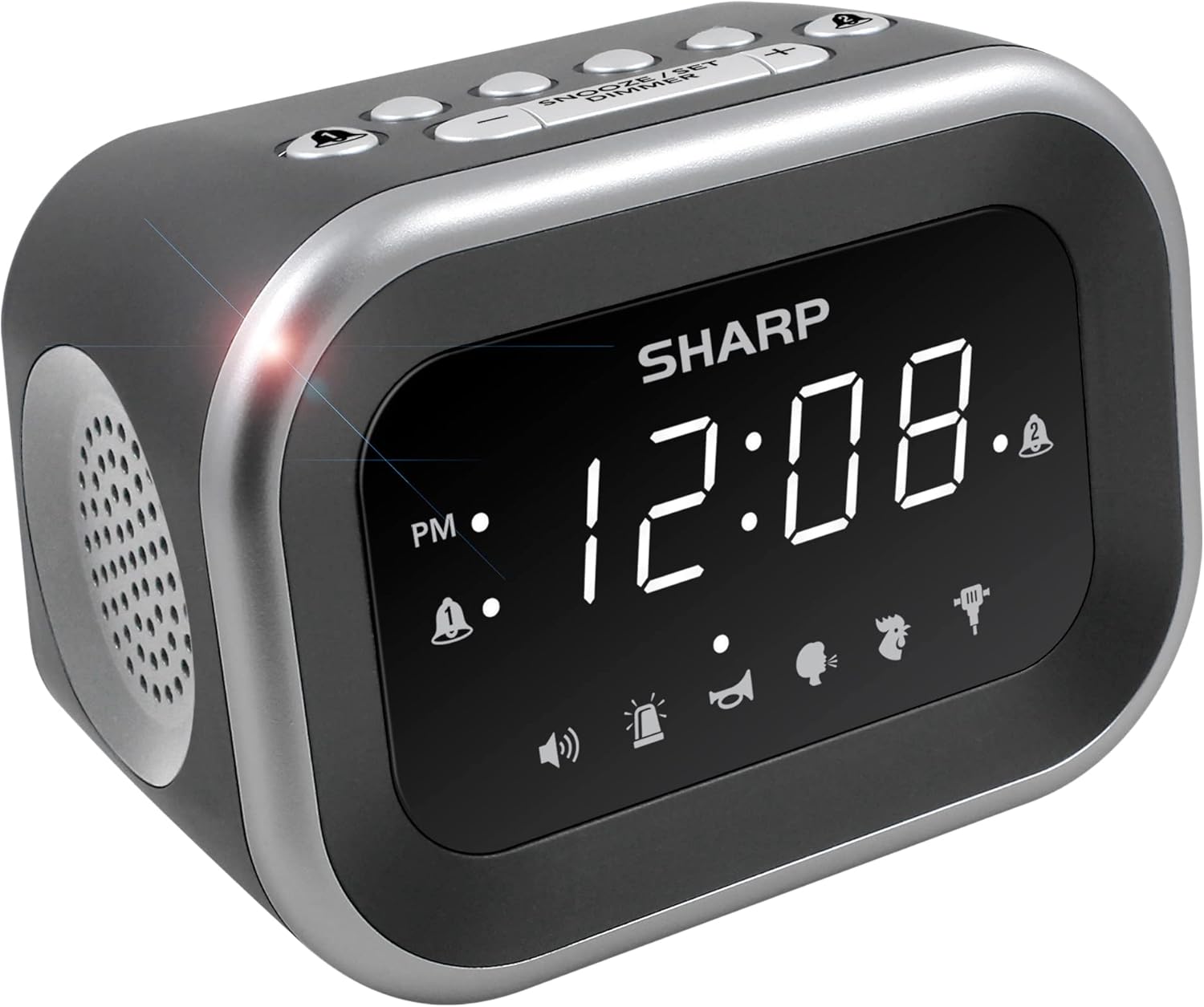
בילד: פראָנט view of the Sharp Big Bang Alarm Clock, showing the digital display and speaker grille.
זיכערקייַט אינפֿאָרמאַציע
- שטעלט נישט אויס דעם אַפּאַראַט צו עקסטרעמע טעמפּעראַטורן, דירעקטע זונשייַן, אדער הויכע הומידיטי.
- Keep the unit away from water or other liquids.
- ניצט נאָר דעם ספּעציפֿישן מאַכט אַדאַפּטער.
- דו זאלסט נישט פּרווון צו דיסאַסעמבאַל אָדער מאָדיפיצירן די אַפּאַראַט.
- האַלטן אויס פון דערגרייכן פון קינדער.
פּעקל אינהאַלט
- Sharp Big Bang Alarm Clock
- אַק מאַכט אַדאַפּטער
- באַניצער מאַנואַל (דעם דאָקומענט)
פּראָדוקט איבערview
Familiarize yourself with the various components and controls of your alarm clock.
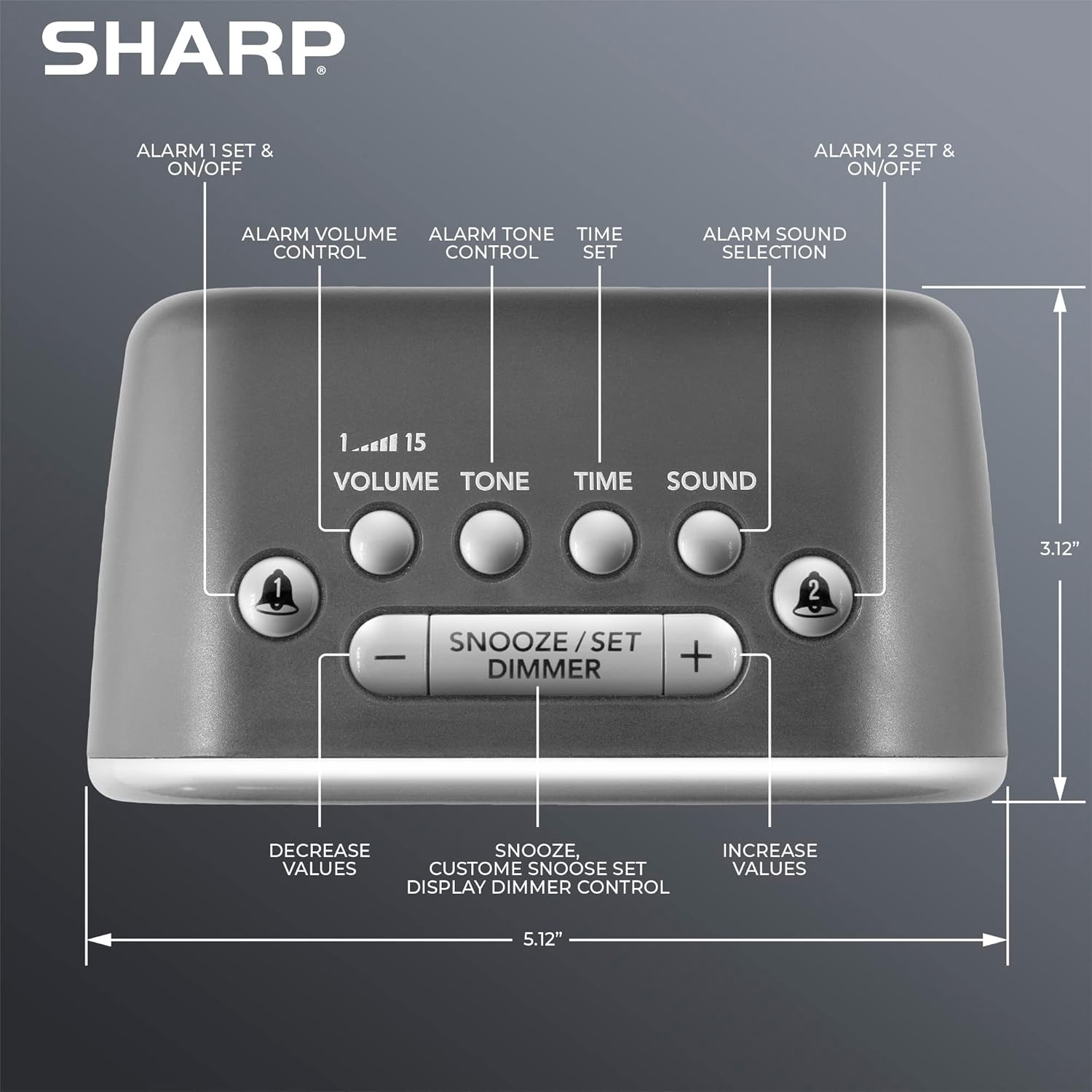
בילד: אויבן view of the alarm clock, highlighting buttons for Alarm 1, Alarm 2, Volume, Tone, Time, Sound, Snooze/Set/Dimmer, and +/- controls.
- ווייַז: Large white LED display for time and settings.
- Alarm 1 & 2 Buttons: Activate/deactivate and set individual alarms.
- באַנד קנעפּל: Adjusts alarm volume (levels 1-15).
- Tone Button: Adjusts alarm tone.
- צייט קנעפּל: געניצט צו שטעלן די איצטיקע צייט.
- Sound Button: Selects one of the six alarm sounds.
- Snooze/Set/Dimmer Button: Activates snooze, confirms settings, and adjusts display brightness.
- +/- קנעפּלעך: Adjust values for time, volume, tone, and snooze duration.
סעטאַפּ
1. מאַכט קאַנעקשאַן
- Plug the AC power adapter into the DC IN jack on the back of the alarm clock.
- Plug the other end of the adapter into a standard 110V/120V household wall outlet.
- The display will light up, indicating power is connected.
2. באַטאַרייע באַקקופּ ינסטאַלירונג
The alarm clock requires 2 x AAA batteries (not included) for battery backup. This feature stores your time and alarm settings during a power interruption. The display will not be lit during battery backup mode.
- עפֿנט דעם דעקל פֿונעם באַטעריע־אָפּטייל אויף דער אונטערשטער זײַט פֿונעם אַפּאַראַט.
- אַרײַנשטעלן 2 נײַע AAA באַטעריעס, באַמערקנדיק די ריכטיקע פּאָלאַריטעט (+ און -).
- פאַרמאַכן די באַטאַרייע אָפּטייל דעקן סיקיורלי.

Image: The alarm clock positioned on a nightstand, ready for use.
אַפּערייטינג ינסטראַקשאַנז
1. שטעלן די איצטיקע צייט
- דריקן און האַלטן די צייט קנעפּל ביז די שעה ציפערן בליצן.
- ניצן די + or - קנעפלעך צו סטרויערן די שעה. באאכטן דעם PM אינדיקאטאר.
- דרוק די צייט button again to confirm the hour, and the minute digits will flash.
- ניצן די + or - קנעפּלעך צו סטרויערן די מינוט.
- דרוק די צייט button once more to save the time setting.
2. שטעלן אַלאַרמס (אַלאַרם 1 און אַלאַרם 2)
This clock features two independent alarms.
- דריקן און האַלטן די שרעק 1 or שרעק 2 קנעפּל ביז די אַלאַרם שעה ציפערן בליצן.
- ניצן די + or - buttons to adjust the alarm hour. Observe the PM indicator.
- דריק די ריספּעקטיווע שרעק button again to confirm the hour, and the minute digits will flash.
- ניצן די + or - קנעפלעך צו סטרויערן די אַלאַרם מינוטן.
- דרוק די שרעק button once more to save the alarm time. The alarm indicator (bell icon) for the set alarm will appear on the display.
- To activate or deactivate an alarm, simply press the שרעק 1 or שרעק 2 button briefly. The bell icon indicates if the alarm is active.
3. אויסקלייבן אַלאַרם סאָונדס
The clock offers 6 distinct alarm sounds: Rooster, Bugle, Nagging Mom, Jackhammer, Siren, and Beep.

Image: Visual representation of the six available alarm sounds.
- With an alarm set, press the SOUND button. The current sound icon will flash.
- ניצן די + or - קנעפּלעך צו דורכגיין די פאַראַן קלאַנגען.
- דרוק די SOUND קנעפּל ווידער צו באַשטעטיקן דיין סעלעקציע.
4. אַדזשאַסטירן אַלאַרם באַנד און טאָן
You can customize the volume (up to 115dB) and tone of your chosen alarm sound.

Image: Decibel reference scale illustrating the loudness of the alarm clock compared to common sounds.
- דרוק די באַנד button. The current volume level (1-15) will flash.
- ניצן די + or - קנעפּלעך צו סטרויערן די באַנד.
- דרוק די באַנד קנעפּל ווידער צו באַשטעטיקן.
- דרוק די טאָן button. The current tone setting will flash.
- ניצן די + or - buttons to adjust the tone.
- דרוק די טאָן קנעפּל ווידער צו באַשטעטיקן.
5. שלאָף פונקציע
ווען דער אַלאַרם קלינגט, דריק די גרויסע קנעפּל SNOOZE/SET/DIMMER button on top of the clock to temporarily silence the alarm. The default snooze time is 9 minutes.
Customizing Snooze Duration:
- While the alarm is sounding, press and hold the SNOOZE/SET/DIMMER button until the snooze time flashes.
- ניצן די + or - buttons to set your desired snooze duration (1-59 minutes).
- דרוק די SNOOZE/SET/DIMMER button again to save the custom snooze time.
6. דיספּליי דימער קאָנטראָל
The display has 3 brightness levels (Off, Low, High).
- דריקן קורץ אויף די SNOOZE/SET/DIMMER button (when the alarm is not sounding) to cycle through the brightness levels: High > Low > Off.

בילד: איבערview of key features including display, volume, sounds, and controls.
וישאַלט
רייניקונג
- Unplug the alarm clock from the power outlet before cleaning.
- ווישט די אויסערליכע ייבערפלאַכן מיט אַ ווייכן, טרוקענעם שטאָף.
- ניצט נישט קיין אברייסיוו רייניגער, וואקס, אדער סאָלווענטן.
באַטערי פאַרבייַט
- אויב די זייגער פארלירט צייט אדער אַלאַרם סעטטינגס בעת אַן אויספאַל פון שטראָםtage, the AAA backup batteries may need replacement.
- Follow the battery installation steps in the Setup section to replace the batteries.
טראָובלעשאָאָטינג
| פּראָבלעם | מעגלעך סיבה | לייזונג |
|---|---|---|
| דער אַלאַרם קלינגט נישט אָדער איז צו שטיל. | Alarm is not activated; Volume is too low; Incorrect sound selected. | Ensure the alarm bell icon is displayed. Adjust the volume using the VOLUME button. Verify the selected alarm sound. |
| Display is off during a power outage. | Battery backup only retains settings, not display power. | This is normal operation. The display will relight when power is restored. Ensure backup batteries are fresh to retain settings. |
| Time or alarm settings are lost. | Power interruption and/or dead backup batteries. | Replace the 2 x AAA backup batteries. Reset the time and alarm settings. |
| די קנעפּלעך זענען נישט ריספּאַנדינג. | צייטווייליגע ווייכווארג פראבלעם. | Unplug the unit from the power outlet for a few minutes, then plug it back in. |
ספּעסאַפאַקיישאַנז
- סאָרט: שאַרף
- מאָדעל: B0BDPQNVMR
- מאַכט מקור: עלעקטריש מיט שנור (110V/120V קאָמפּאַטיבל)
- באַטאַרייע באַקאַפּ: 2 X AAA באַטעריז (ניט אַרייַנגערעכנט)
- אַלאַרם באַנד: אַרויף צו 115 דב
- שרעק סאָונדס: 6 (האַן, טרומייט, נאַגענדיקע מאַמע, דזשאַקהאַמער, סירענע, ביפּ)
- ווייַז: White LED with 3-level dimmer (High, Low, Off)
- דימענשאַנז (בעערעך): 5.12" (ברייט) x 3.12" (הייך) x 3.55" (טיפקייט)
- וואָג: 12.5 אונסעס
- מאַטעריאַל: אַקרילאָניטרילע בוטאַדיענע סטירענע (אַבס)
- UPC: 049353008608
וואָראַנטי און שטיצן
For warranty information and customer support, please refer to the documentation provided at the time of purchase or contact Sharp customer service directly. You can also visit the official Sharp store for more information:


