פּראָדוקט איבערview
The CYSSJF Queue Management System is designed to streamline customer flow and enhance service efficiency in various commercial and institutional settings. This system features a clear 3-digit LED display, waterproof call buttons, and a remote control, providing a reliable and user-friendly solution for managing queues.
It is ideal for use in restaurants, food trucks, clinics, bars, government offices, rehabilitation centers, churches, cafes, milk tea shops, and any other service location requiring efficient queue management.

Image: The complete CYSSJF Queue Management System, showing the main LED display, the remote control, and two waterproof call buttons.
פּעקל אינהאַלט
ביטע באַשטעטיקן אַז אַלע זאכן וואָס זענען ליסטעד אונטן זענען אַרייַנגערעכנט אין דיין פּעקל:
- 1 x 3-Digit LED Display Receiver Screen
- 2 x Waterproof Call Buttons (for calling the next customer)
- 1 x Remote Control (for Quick Zero and other functions)
- 1 x מאַכט אַדאַפּטער
- 1 x English User Manual (also available in French, Spanish, Italian, German)
- 1 x Sticker (for mounting or labeling)
סעטאַפּ
The CYSSJF Queue Management System is designed for ease of use and is ready out of the box without requiring an internet connection.
ווייַז פּלייסמאַנט
The LED display receiver can be placed on a tabletop or mounted on a wall for optimal visibility.
- טאַבלעטאָפּ אָרט: Use the integrated stand on the back of the display to position it securely on a flat surface.
- וואַנט מאָונטינג: The display features mounting holes on the back. Secure it to a wall using appropriate hardware (not included) to ensure stability.

Image: Illustrations demonstrating how the display can be placed on a table or mounted on a wall, highlighting the rear mounting features.
מאַכט קאַנעקשאַן
Connect the provided power adapter to the LED display and plug it into a standard electrical outlet. The display will power on automatically.
Battery Installation/Check
The call buttons and remote control come with built-in batteries. If replacement is needed, remove the back cover and replace with AAA alkaline batteries.

Image: The remote control with its battery compartment open, indicating the use of AAA batteries.
אַפּערייטינג ינסטראַקשאַנז
יקערדיק אָפּעראַציע
- The display shows a 3-digit service number ranging from 000 to 999.
- The default sound notification is "ding dong". This can be configured to English voice prompts if desired.
Calling the Next Number
To advance the queue to the next number:
- דרוק די NEXT קנעפּל אויף די ווייַט קאָנטראָל.
- Alternatively, press the large green NEXT button on one of the waterproof call buttons.
Quick Zero Function
To reset the displayed number to 000:
- On the remote control, simultaneously press the "↑" (Up) and "↓" (Down) keys for approximately 2 seconds. The display will reset to 000.
מאַכט-אַוועק זכּרון פֿונקציע
The system includes a power-off memory function. The last called number is automatically stored. When the display is powered back on, it will resume from the "last called number + 1", ensuring continuity in queue management.
ווייַט קאָנטראָל פאַנגקשאַנז

Image: A detailed diagram illustrating the functions of each button on the remote control.
- קער אויף / אַוועק: Press the power key to turn ON. To turn OFF, cumulatively press the power key 5 times.
- Call Last Number: דרוק די לעצטע שליסל.
- Re-call Current Number: דרוק די צוריקרופן שליסל.
- Call Next Number: דרוק די NEXT שליסל.
- Reset Number: דרוק די RESET ENT key 3 times consecutively to reset the display to 000.
אַדזשאַסטינג באַנד
The system features adjustable volume. External speakers can be connected to the display unit to further increase the volume if needed for larger spaces or noisy environments.
פֿעיִקייטן
לאנג טראַנסמיסיע דיסטאַנסע
The indoor transmission range of the queue management system is approximately 164-656 feet (50-200 meters). The signal can typically cover 1 to 2 floors, making it suitable for most small to medium-sized businesses. Please note that walls and other objects (such as metal or sound-absorbing materials) can reduce the effective operating distance, so actual range may vary.

Image: An illustration demonstrating the system's long-range capability in an open environment, such as a church.
Waterproof Call Buttons
The call buttons are designed with IP55 water resistance, making them durable and suitable for environments where splashes or moisture might be present.

בילד: א נאָענטע בילד view of the call button, highlighting its IP55 waterproof rating.
ווערסאַטאַל אַפּפּליקאַטיאָנס
The system's adaptability makes it suitable for a wide range of service industries:
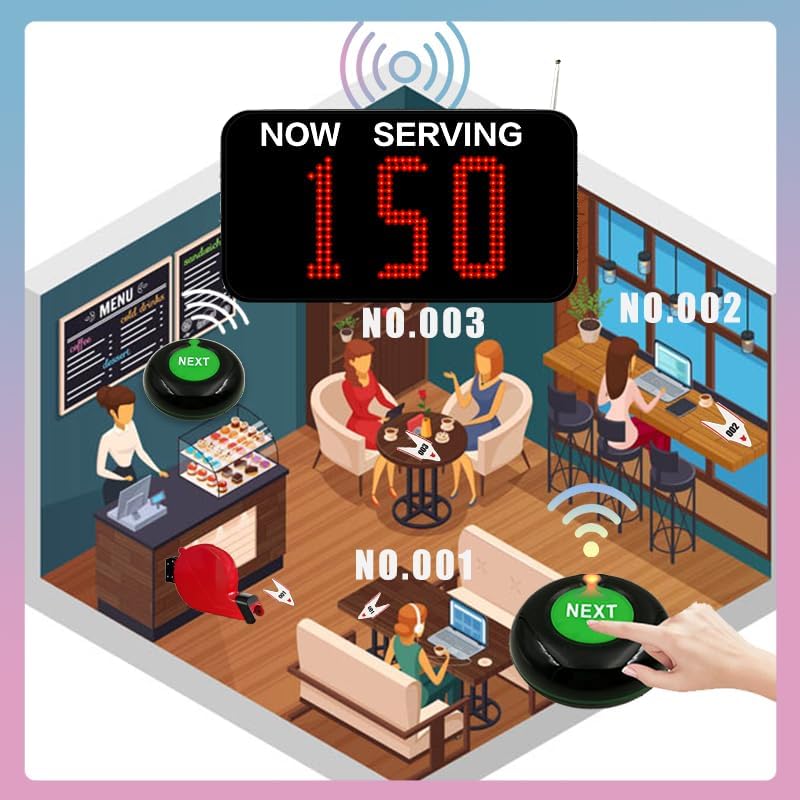
Image: The system in use within a cafe, demonstrating its application in food service environments.

Image: The system applied in a clinic or medical setting, showing its utility for patient calling.
ספּעסאַפאַקיישאַנז
| אַטריביוט | ווערט |
|---|---|
| מאָדעל נומער | SJ-C31+O1 |
| פאַבריקאַנט | Quanzhou Shuojiang Electronic Commerce Co., Ltd. |
| פּראָדוקט דימענשאַנז (L x W x H) | 29 X 15.5 X 4 סענטימעטער (11.4 X 6.1 X 1.6 אינטשעס) |
| פּראָדוקט וואָג | 890 גראַמז |
| ווייַז טיפּ | 3-ציפֿער געפירט |
| נומער ראַנגע | 000-999 |
| Indoor Transmission Range | 164-656 ft (50-200 עם) |
| Call Button Water Resistance | IP55 |
| Remote/Button Battery Type | AAA Alkaline (built-in) |
| מאַכט מקור | מאַכט אַדאַפּטער (אַרייַנגערעכנט) |

Image: Detailed dimensions of the display, remote control, and call button.
טראָובלעשאָאָטינג
If you encounter any issues during use, please refer to the common problems and solutions below. For further assistance, contact technical support.
- Issue: Display automatically skips numbers without button press.
לייזונג: This could indicate interference or a setting issue. Try resetting the display using the Quick Zero function. Ensure the system is not near strong electromagnetic fields. If the problem persists, contact technical support. - Issue: Display does not change number when button is pressed.
לייזונג: Check the batteries in the remote control and call buttons. Ensure they are correctly inserted and have sufficient charge. Verify that the remote or button is within the effective transmission range of the display. If the issue continues, contact technical support. - Issue: Need to connect multiple displays to work together.
לייזונג: This system supports multi-screen configurations. Please contact technical support for specific instructions and guidance on setting up multiple displays.
וישאַלט
To ensure the longevity and optimal performance of your CYSSJF Queue Management System, follow these maintenance guidelines:
- רייניקונג: Wipe the display and buttons with a soft, dry cloth. For stubborn dirt, use a slightly damp טוך מיט מילדער זייף, און דערנאך גוט טרוקן. פארמיידט שרײַבנדיקע רייניגערס אדער סאָלווענטן.
- באַטערי פאַרבייַט: If the remote control or call buttons become unresponsive, replace their AAA alkaline batteries. Open the back cover, remove old batteries, and insert new ones, observing polarity.
- סטאָרידזש: ווען נישט אין באַנוץ פֿאַר לענגערע פּעריאָדן, זאָל מען דאָס סיסטעם האַלטן אין אַ קיל, טרוקן אָרט, אַוועק פֿון דירעקטער זון און עקסטרעמע טעמפּעראַטורן.
- ענוויראָנמענטאַל קאַנסידעריישאַנז: While the call buttons are waterproof (IP55), the main display unit is not. Protect the display from liquids and excessive moisture.
וואָראַנטי און שטיצן
CYSSJF provides long-term technical support for this product. If you encounter any problems during use, require assistance with advanced setups (e.g., connecting multiple screens), or have any technical inquiries, please do not hesitate to contact us.
Our technical support team offers free guidance, which may include video tutorials or graphical instructions, to help you resolve any issues and maximize your system's functionality.
For contact information, please refer to the details provided in your product packaging or the official CYSSJF webפּלאַץ.


