פּראָדוקט איבערview
The SWISSTEN Elegant Bluetooth Headphones are designed for versatile audio playback, offering high-quality sound and multiple connectivity options. These headphones feature Bluetooth wireless connectivity, an integrated FM radio tuner, a microSD card slot for direct music playback, a 3.5mm AUX audio input, and a built-in hands-free microphone. The earcups are pivotable for enhanced comfort during use.

פיגורע 1: פראָנט view of the SWISSTEN Elegant Bluetooth Headphones, showcasing the sleek black design and earcups.
פּעקל אינהאַלט
ביים עפענען דעם פּעקל, זיכער מאַכן אַז אַלע קאָמפּאָנענטן זענען פאַראַן:
- SWISSTEN Elegant Bluetooth Headphones
- וסב טשאַרדזשינג קאַבלע
- 3.5 מ״מ אַודיאָ קאַבל (AUX)
- באַניצער מאַנואַל
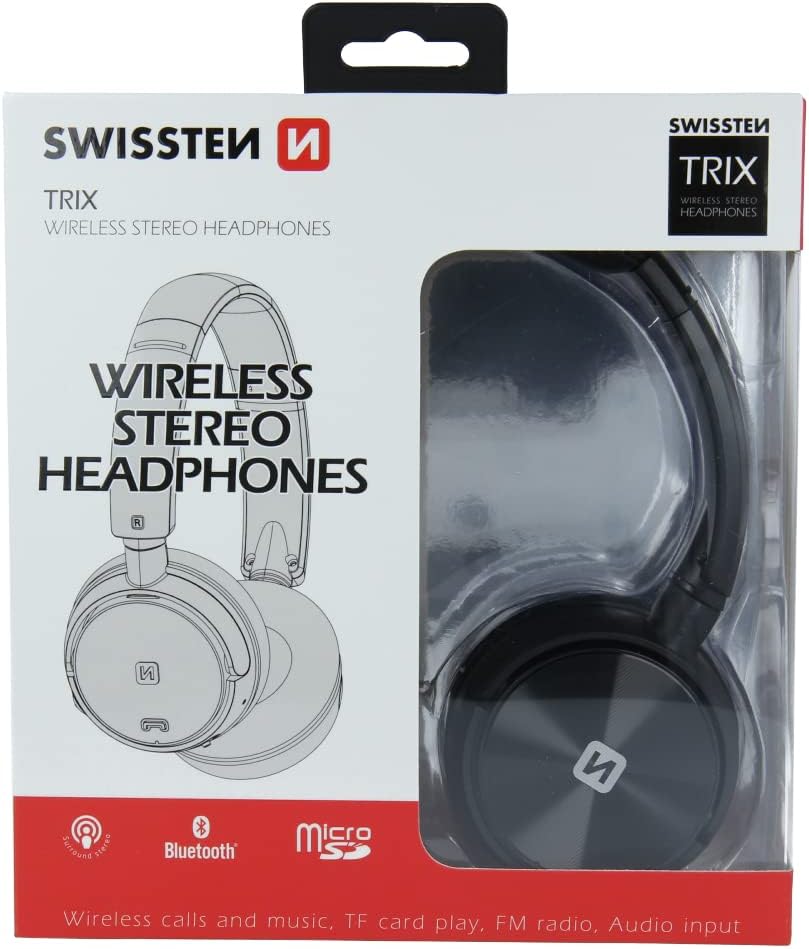
פיגורע 2: Retail packaging of the SWISSTEN Elegant Bluetooth Headphones, showing the product and key features.
סעטאַפּ
טשאַרדזשינג די כעדפאָונז
Before first use, fully charge the headphones. Connect the supplied USB charging cable to the micro USB port on the headphones and the other end to a USB power source (e.g., computer USB port, USB wall adapter). The charging indicator light will illuminate during charging and turn off when fully charged. A full charge takes approximately 2 hours.
מאַכט אויף / אַוועק
- צו מאַכט אויף: דריק און האַלט דעם פּאַוער קנעפּל ביז די אינדיקאַטאָר ליכט בלינקט.
- צו מאַכט אַוועק: דריק און האלט דעם פּאַוער קנעפּל ביז די אינדיקאַטאָר ליכט גייט אויס.

פיגורע 3: נאָענט-אַרויף view of the headphone earcup, highlighting the control buttons, charging port, and 3.5mm audio jack.
אַפּערייטינג ינסטראַקשאַנז
בלועטאָאָטה פּערינג
- מאַכן זיכער אַז די כעדפאָונז זענען פּאַוערד אַוועק.
- Press and hold the Power button for approximately 5-7 seconds until the indicator light flashes blue and red alternately, indicating pairing mode.
- אויף אייער דעווייס (סמאַרטפאָן, טאַבלעט, קאָמפּיוטער), אַקטיווירט בלועטוט און זוכט פֿאַר פֿאַראַן דעווייסעס.
- Select "SWISSTEN SW1010" (or similar name) from the list of found devices.
- אַמאָל פּערד, וועט די אינדיקאַטאָר ליכט בלינקען בלוי לאַנגזאַם.
די בלוטוט ראַנגע איז אַרום 10 מעטער (33 פֿיס).
Music Playback (Bluetooth/MicroSD/AUX)
- בלועטאָאָטה מאָדע: After successful pairing, play music from your connected device. Use the headphone controls for Play/Pause, Next/Previous Track, and Volume adjustment.
- מיקראָסד קאָרט מאָדע: Insert a microSD card (up to 32GB) with MP3, WMA, or WAV audio files into the designated slot. The headphones will automatically switch to microSD mode and begin playback.
- AUX מאָדע: Connect one end of the 3.5mm audio cable to the headphone's AUX port and the other end to your audio source. The headphones will automatically switch to AUX mode. Note: In AUX mode, controls on the headphones may be limited; control playback from your audio source.
עפעם ראַדיאָ אָפּעראַציע
- מאַכט אויף די כעדפאָונז.
- Press the Mode button (often labeled 'M' or similar) to switch to FM Radio mode.
- דריק דעם שפּיל/פּויזע קנעפּל איין מאָל צו אויטאָמאַטיש סקענען און ראַטעווען פאַראַן FM סטאנציעס.
- Use the Next/Previous Track buttons to navigate between saved stations.
The FM frequency range is 87.5-108 MHz.
הענט-פריי פאַך
- ענטפער רופן: דריקן די שפּיל / פּויזע קנעפּל אַמאָל.
- סוף רופן: דריק דעם שפּיל/פּויזע קנעפּל איין מאָל בעת אַ רוף.
- אָפּוואַרפן רופן: דריקן און האַלטן די שפּיל / פּויזע קנעפּל פֿאַר 2 סעקונדעס.
- ריאַל די לעצטע נומער: טאָפּל דריקן די שפּיל / פּויזע קנעפּל.

פיגורע 4: A person wearing the SWISSTEN Elegant Bluetooth Headphones, demonstrating their comfortable fit.
וישאַלט
- רייניקונג: ניצט אַ ווייכע, טרוקענע שטאָף צו רייניקן די כעדפאָונז. ניצט נישט קיין שרײַבנדיקע רייניגערס אדער סאָלווענטן.
- סטאָרידזש: האַלט די כעדפאָונז אין אַ קיל, טרוקן אָרט אַוועק פון דירעקט זונשייַן און עקסטרעמע טעמפּעראַטורן.
- באַטערי זאָרגן: כדי צו פארלענגערן די לעבן פון די באַטעריע, זאָלט איר נישט אָפט אויסלאָדן די באַטעריע. לאָדן די כעדפאָונז רעגולער, אפילו אויב זיי ווערן נישט גענוצט פאר לענגערע צייטן.
- וואַסער ויסשטעלן: די קאָפּהערער זענען נישט וואַסערפּרוף. פֿאַרמייַדן אויסשטעלונג צו וואַסער אָדער איבעריקע פֿײַכטקייט.
טראָובלעשאָאָטינג
| פּראָבלעם | מעגלעך סיבה | לייזונג |
|---|---|---|
| די קאָפּהערער ווערן נישט אנגעצינדן. | נידעריק באַטאַרייע. | טשאַרדזש די כעדפאָונז גאָר. |
| קען נישט פארבינדן דורך בלוטוט. | כעדפאָונז נישט אין פּערינג מאָדע; מיטל בלועטוט אויסגעלאָשן; צו ווייט פון מיטל. | Ensure headphones are in pairing mode (flashing blue/red). Turn on Bluetooth on your device. Move headphones closer to the device (within 10m). |
| קיין געזונט. | קול צו נידעריג; אומרעכטע מאָדע אויסגעקליבן; AUX קאַבל נישט גאָר אַרײַנגעשטעקט. | Increase volume on headphones and connected device. Ensure correct mode (Bluetooth, MicroSD, AUX, FM) is selected. Re-insert AUX cable firmly. |
| שלעכטע FM ראַדיאָ אָפּנאַם. | שוואַך סיגנאַל; שטערונג. | Move to an area with better signal. Re-scan stations. |
ספּעסאַפאַקיישאַנז
| שטריך | דעטאַל |
|---|---|
| מאָדעל נומער | SW1010 |
| בלועטאָאָטה ווערסיע | V4.2 |
| שטיצט בלועטאָאָטה פּראָfiles | A2DP, AVRCP |
| Supported Audio Formats (MicroSD) | MP3 (8-320 Kbps), WMA (5-320 Kbps), WAV (16-1536 Kbps) |
| עפעם ראַדיאָ אָפטקייַט קייט | 87.5-108 מהז |
| רעדנער דיאַמעטער | 40 מם |
| ימפּידאַנס | 32 אָום |
| סענסיטיוויטי | 108 +/- 3 דב |
| אָפטקייַט ענטפער | 20 – 20,000 הז |
| אַפּערייטינג קייט | 10 עם |
| טשאַרדזשינג צייט | 2 שעה |
| אַפּערייטינג צייט | 6-8 שעה |
| קאַנעקטיוויטי | Wireless Bluetooth, 3.5mm Jack |
| ספּעציעלע פֿעיִקייטן | Microphone included, FM Radio, MicroSD slot |
| פאָרם פאַקטאָר | Over-Ear (Supra-Auriculaire) |
| מאַטעריאַל | Faux Leather (Simili cuir) |
וואָראַנטי און שטיצן
For warranty information and technical support, please refer to the official SWISSTEN webזייטל אדער קאָנטאַקט אייער הענדלער. האַלט אייער קויפן באַווייַז פֿאַר וואָראַנטי קליימז.
פאַבריקאַנט: SWISSTEN
ASIN: B0BC9F9LWM


