1. הקדמה
The Safescan 155-S is an advanced automatic counterfeit banknote detector designed to protect your business from fraudulent currency. This device quickly and accurately verifies banknotes using multiple detection methods, ensuring only genuine currency is accepted. Its compact design makes it suitable for various retail environments, providing peace of mind and efficient cash handling.

Image: The Safescan 155-S is suitable for diverse business environments, including shops, supermarkets, bars, restaurants, kiosks, and gift shops, ensuring reliable banknote verification wherever cash is handled.
2. זיכערקייַט אינפֿאָרמאַציע
- לייענען אַלע ינסטראַקשאַנז איידער אַפּערייטינג די מיטל.
- האַלטן די מיטל אַוועק פון וואַסער און אנדערע ליקווידס.
- פרובירט נישט צו עפענען אדער פאררעכטן דעם אפאראט אליין. לאָזט איבער אלע סערוויסעס צו קוואַליפֿיצירטע פּערסאָנעל.
- ניצן בלויז די מאַכט אַדאַפּטער סאַפּלייד מיט די מיטל.
- זיכער מאַכן אַז די מיטל איז געשטעלט אויף אַ סטאַביל, פלאַך ייבערפלאַך בעת אָפּעראַציע.
- נעמט ארויס דעם אפאראט פון דער עלעקטרישער ווענטיל איידער איר רייניגט עס אדער ווען עס איז נישט אין באנוץ פאר לענגערע צייטן.
3. פּעקל אינהאַלט
באַשטעטיקן אַז אַלע זאכן זענען פאַראַן אין פּעקל:
- Safescan 155-S Counterfeit Banknote Detector
- מאַכט אַדאַפּטער
- באַניצער מאַנואַל (דעם דאָקומענט)
4. פּראָדוקט איבערview
The Safescan 155-S is designed for ease of use and reliable performance. It features a clear display, intuitive controls, and a compact form factor.
שליסל פֿעיִקייטן:
- Automatic banknote detection in less than 0.5 seconds.
- Checks up to seven security features: UV, Magnetic Ink (MG), Infrared (IR), Metallic Thread, Watermark, Size, and Thickness.
- Multi-currency support with downloadable updates.
- Banknote counting function.
- Large graphic LCD display.
- Compact design with unique banknote output guide for space-saving.

בילד: פראָנט view of the Safescan 155-S, showing the banknote insertion slot, control buttons, and LCD display. A 20 Euro banknote is partially inserted, demonstrating its readiness for detection.
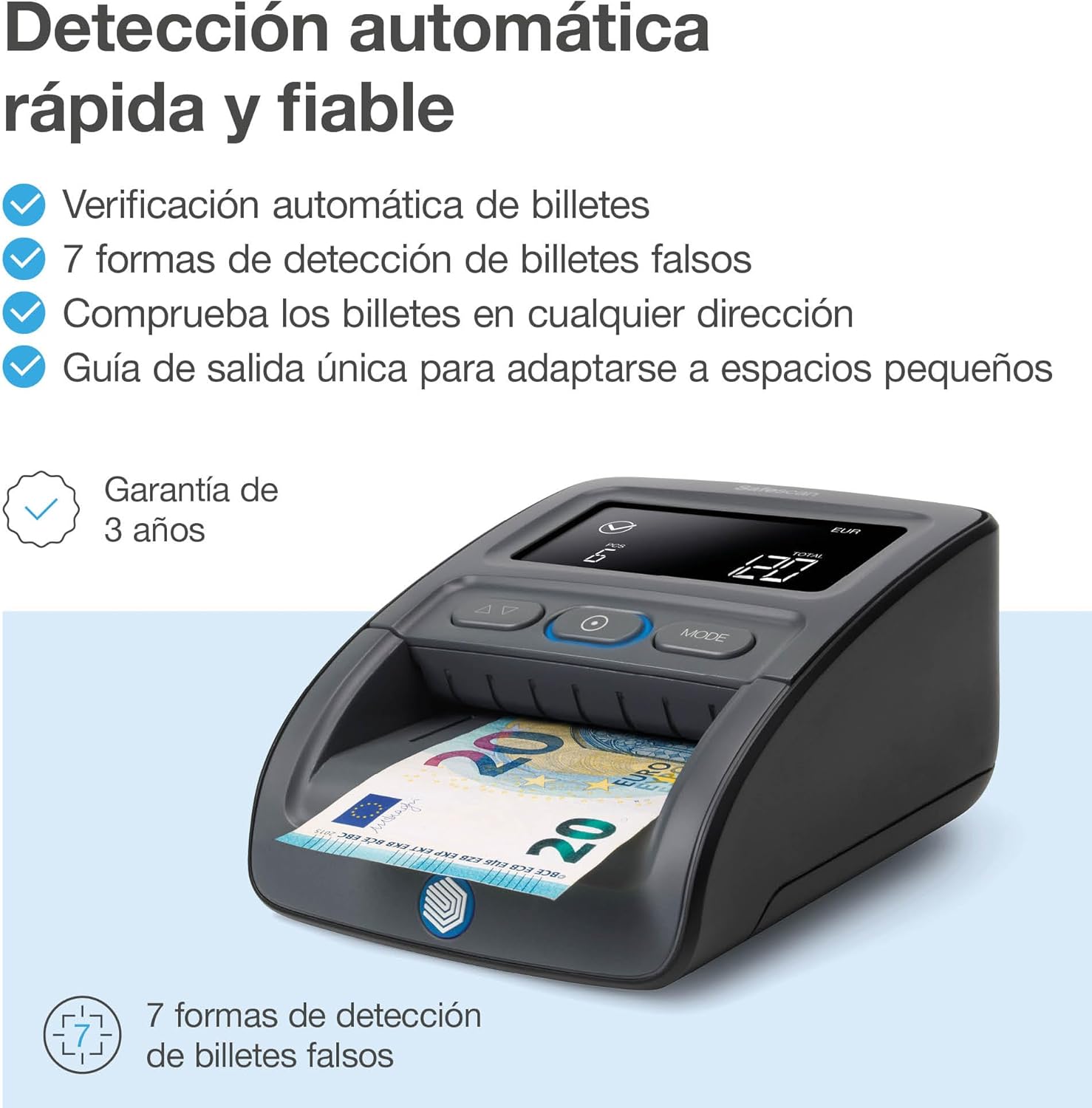
Image: This illustration emphasizes the fast and reliable automatic detection capabilities of the Safescan 155-S, including automatic banknote verification, 7 detection methods for fake bills, checking banknotes in any direction, and a unique output guide for small spaces. It also highlights a 3-year warranty.

Image: The Safescan 155-S is shown verifying multiple currencies, with features such as downloadable currency updates, a banknote counting function, the ability to check banknotes in any direction, and a large graphic LCD display. Various international banknotes are depicted alongside the device.

Image: A detailed diagram illustrating the 7 detection methods used by the Safescan 155-S for fake bills: Size, Thickness, Color, Metallic Thread, Watermark (WM), Infrared (IR), and Magnetic Ink (MG). The device's display shows an alert indicating a suspicious banknote.
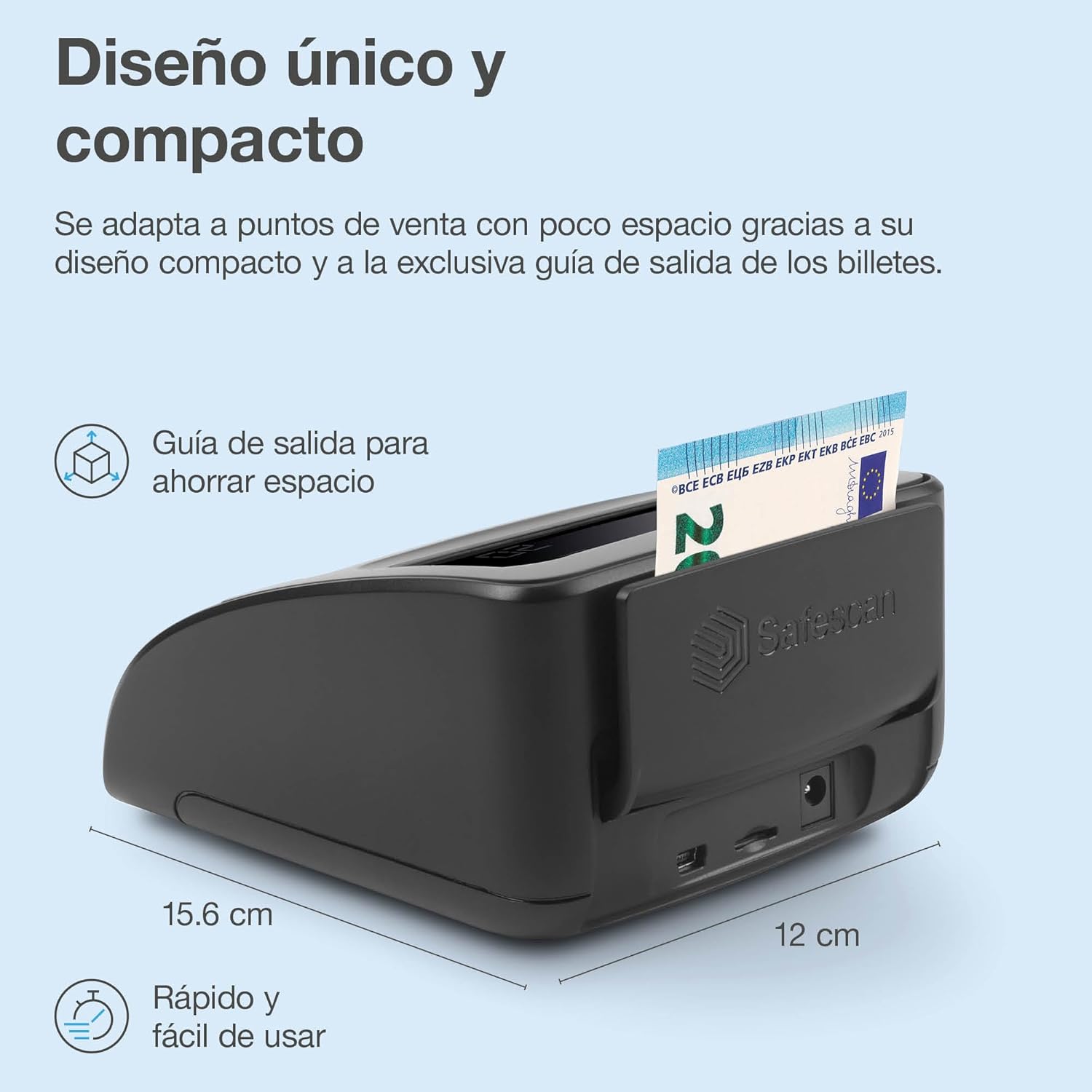
בילד: זייט view of the Safescan 155-S, highlighting its unique and compact design. Dimensions of 15.6 cm and 12 cm are indicated, along with text emphasizing its space-saving output guide and quick, easy usability.
5. סעטאַפּ
5.1 מאַכט קאַנעקשאַן
- Connect the supplied power adapter to the DC IN port on the back of the Safescan 155-S.
- צאַפּן די מאַכט אַדאַפּטער אין אַ פּאַסיק עלעקטריקאַל ווענטיל.
- The device will power on automatically or can be turned on using the power button (if available).
5.2 Battery Installation (Optional)
If your model includes a rechargeable battery for portable use:
- געפינען די באַטאַרייע אָפּטייל אויף די אַנדערסייד פון די מיטל.
- עפענען די באַטאַרייע אָפּטייל דעקן.
- אַרײַנשטעלן די באַטעריע, זיכער מאַכנדיק די ריכטיקע פּאָלאַריטעט.
- פאַרמאַכן די באַטאַרייע אָפּטייל דעקן סיקיורלי.
- Charge the battery fully before first use by connecting the device to power.
6. אַפּערייטינג ינסטרוקטיאָנס
6.1 Basic Banknote Verification
- מאַכן זיכער אַז די מיטל איז פּאַוערד אויף.
- Select the desired currency using the 'MODE' button if multiple currencies are supported. The current currency will be displayed on the screen.
- Insert a banknote into the feeding slot in any orientation. The device will automatically pull the banknote through.
- The display will show the denomination of the banknote and add it to the total count.
- If a suspicious banknote is detected, the device will emit an audible alert and display an error message (e.g., 'E.05'). Remove the banknote and inspect it manually.
6.2 Counting Function
The Safescan 155-S automatically keeps a running total of verified banknotes. The display shows the number of pieces (PCS) and the total value (TOTAL).
- To clear the count, press and hold the 'MODE' button for a few seconds until the display resets.
6.3 ווידעא דעמאַנסטראַציע
Video: This video demonstrates the practical use of the Safescan 155-S, showing how it quickly and reliably checks and counts banknotes. It highlights the device's ease of use and its ability to detect counterfeit bills, making it a useful tool for small businesses.
7. וישאַלט
7.1 רייניקונג
Regular cleaning ensures optimal performance and longevity of your device.
- עקסטעריע: ווישט אָפּ די אויסערלעכע זייט מיט אַ ווייכן, טרוקענעם שטאָף. ניצט נישט קיין שרײַבנדיקע רייניגער אָדער סאָלווענטן.
- סענסאָרס: Periodically clean the internal sensors using a soft brush or compressed air to remove dust and paper residue. Refer to the detailed cleaning instructions in the full manual for specific sensor locations.
7.2 ווייכווארג דערהייַנטיקונגען
To ensure your Safescan 155-S remains up-to-date with the latest currency designs and security features, regularly check for software updates.
- Visit the official Safescan webפּלאַץ (www.safescan.com) for the latest firmware and currency updates.
- גיי די אינסטרוקציעס צוגעשטעלט אויף די website for downloading and installing updates via the USB port.
8. טראָובלעשאָאָטינג
| פּראָבלעם | מעגלעך סיבה | לייזונג |
|---|---|---|
| די מיטל טוט נישט מאַכט אויף | No power connection; Faulty adapter | Check power cable connection; Try a different outlet; Contact support if adapter is faulty. |
| Error message (e.g., E.05) | Counterfeit banknote detected; Banknote inserted incorrectly; Dirty sensors | Remove and inspect the banknote; Re-insert the banknote correctly; Clean the sensors (see Maintenance). |
| Inaccurate counting/detection | Dirty sensors; Outdated software | Clean the sensors; Update the device software (see Maintenance). |
| Device not recognizing new currencies | אַוטדייטיד ווייכווארג | Update the device software with the latest currency package. |
9. ספּעסאַפאַקיישאַנז
| שטריך | דעטאַל |
|---|---|
| מאָדעל נומער | 112-0668 |
| דעטעקשאַן מעטהאָדס | UV, MG, IR, Metallic Thread, Watermark, Size, Thickness |
| דעטעקשאַן ספּיד | < 0.5 seconds per banknote |
| ווייַז | Large Graphic LCD |
| דימענסיעס (L X W X H) | 6.14 X 2.99 X 4.72 אינטשעס (15.6 X 7.6 X 12 סענטימעטער) |
| פּונקט וואָג | 2.03 פונט |
| קאָליר | שוואַרץ |
| מאַכט צושטעלן | AC/DC Adapter (specified by manufacturer) |
| Currency Updates | Via USB port |
10. וואָראַנטי און שטיצן
10.1 וואָראַנטי אינפֿאָרמאַציע
The Safescan 155-S typically comes with a 3-year warranty from the date of purchase, covering defects in materials and workmanship. Please retain your proof of purchase for warranty claims. For specific terms and conditions, refer to the warranty card included with your product or visit the official Safescan webפּלאַץ.
10.2 קונה שטיצן
For technical assistance, troubleshooting, or warranty inquiries, please contact Safescan customer support:
- Webפּלאַץ: www.safescan.com/support
- קאָנטאַקט אינפֿאָרמאַציע: Refer to the contact section on the Safescan website for regional phone numbers and email addresses.


