1. הקדמה
This manual provides detailed instructions for the installation, operation, and maintenance of your Tbest 9-inch Android Car GPS Navigation Multimedia Player. Please read this manual thoroughly before using the product to ensure proper function and safety.
2. זיכערקייַט אינפֿאָרמאַציע
- שטענדיק נוצן דעם מיטל פאַראַנטוואָרטלעך און לויט די לאָקאַלע פאַרקער געזעצן.
- Do not attempt to install or service the device if you are not qualified. Improper installation can lead to damage or injury.
- פֿאַרמײַדט אויסשטעלן דעם אַפּאַראַט צו עקסטרעמע טעמפּעראַטורן, דירעקטע זונשײַן פֿאַר פֿאַרלענגערטע פּעריאָדן, אָדער איבערגעטריבענע פֿײַכטקייט.
- זיכער מאַכן אַז אַלע וויירינג איז ריכטיק פארבונדן צו פאַרמייַדן קורץ קרייזן אָדער עלעקטרישע געפאַרן.
3. פּעקל אינהאַלט
באַשטעטיקט אַז אַלע זאכן וואָס זענען אויסגערעכנט אונטן זענען אַרייַנגערעכנט אין אייער פּעקל:
- 1 x Navigator Unit (9-inch Android Multimedia Player)
- 10 x Various Connection Cables
- 4 x Camera Units
- 1 רענטגענ גפּס אַנטענע
- 1 x באַניצער מאַנואַל
- 2 רענטגענ מאָונטינג בראַקאַץ
- 1 רענטגענ לאָך פּאַנטש
- 2 x Buffer Rings
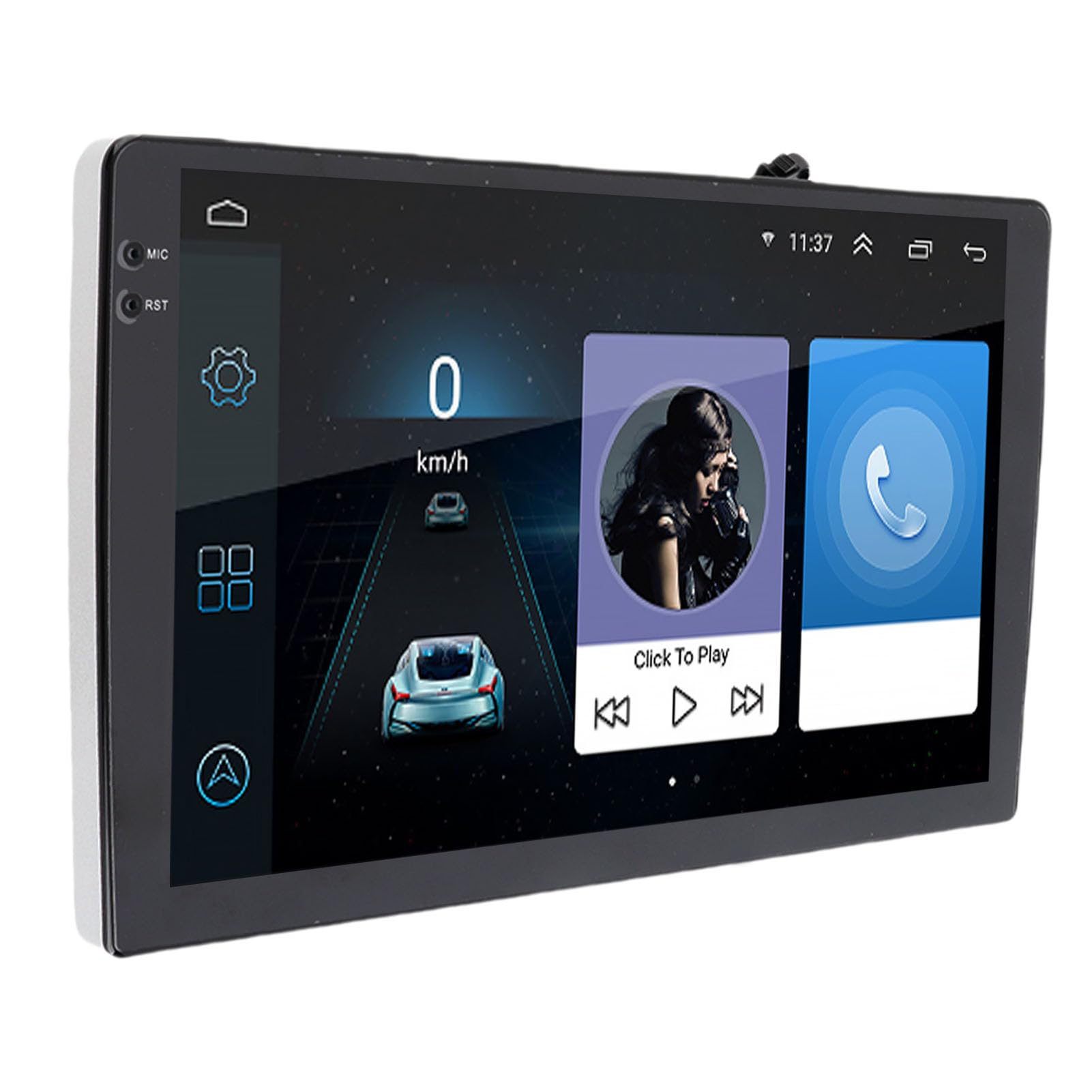
Image: The Tbest 9-inch Android Car GPS Navigation Multimedia Player unit shown with all accompanying cables, cameras, GPS antenna, mounting brackets, and other accessories.
4. סעטאַפּ און ייַנמאָנטירונג
4.1 אַלגעמיינע ינסטאַללאַטיאָן גיידליינז
The Tbest multimedia player is designed for universal fit in various car models. Due to variations in vehicle dashboards, professional installation is recommended. Ensure the mounting location allows for clear visibility and safe operation.
4.2 וויירינג קאַנעקשאַנז
Carefully connect all necessary cables. Refer to your vehicle's wiring diagram and the provided cable labels for correct connections. Key connections include:
- מאַכט קאַבלעס: Connect to the vehicle's power supply (ACC, B+, Ground).
- רעדנער קאַבלעס: Connect to your car's speaker system.
- RCA Terminals: For reverse input, video input, and audio output.
- וסב פּאָרץ: For external devices or media.
- גפּס אַנטענע: פֿאַרבינדט די דזשי-פּי-עס אַנטענע און שטעלט זי אין אַ אָרט מיט אַ קלאָרן view פון הימל פֿאַר אָפּטימאַל סיגנאַל אָפּנאַם.
- אַפּאַראַט קאַנעקשאַנז: Connect the four camera units to the designated camera inputs for panoramic view פאַנגקשאַנאַליטי.

בילד: א דעטאַלירטע view of the Tbest multimedia player's rear connections and the array of cables provided for power, audio, video, and peripheral devices.
5. אַפּערייטינג ינסטרוקטיאָנס
5.1 מאַכט אויף / אַוועק
The unit will typically power on automatically when the vehicle's ignition is turned on. To manually power off, press and hold the power button (if available) or turn off the vehicle's ignition.
5.2 ריר סקרין אָפּעראַציע
The device features a 9-inch capacitive touch screen. Navigate through menus, select applications, and control functions by tapping, swiping, and pinching gestures similar to a smartphone or tablet.
5.3 גפּס נאַוויגאַציע
The unit has built-in GPS reception. You can download navigation applications and maps directly from the Application Store for offline use. Ensure the GPS antenna is properly installed for accurate positioning.
5.4 בלועטאָאָטה פאַנגקשאַנז
The device includes Bluetooth 4.0 for hands-free calling and music streaming (A2DP).
- פּאָרינג: Go to the Bluetooth settings on the device, enable Bluetooth, and search for available devices. Select your phone from the list and confirm the pairing code.
- הענט-פריי רופן: Once paired, you can make and receive calls directly through the multimedia player. The phone book can be automatically loaded.
- בלועטאָאָטה מוזיק: Stream audio from your paired phone to the car's speakers.
5.5 מולטימעדיאַ ווידערשפּיל
The player supports various audio formats including MP3, FLAC, APE, WMA, WAV, AAC, AMR. Video playback is also supported. You can play media from USB drives or via Bluetooth streaming.
5.6 Panoramic Camera and Recorder
The integrated 360-degree panoramic camera system provides a comprehensive view around your vehicle, aiding in safe parking. The system also supports recording, allowing you to retain video evidence if needed. Playback functionality is available directly on the unit.
5.7 סטירינג ראָד קאָנטראָל
The unit supports steering wheel control functions, allowing you to manage audio and other features without taking your hands off the wheel. Configuration may be required in the settings menu.
5.8 Mobile Internet (Mirror Link)
The device supports screen mirroring for both iOS (one-way projection) and Android phones (two-way connection). This allows you to display your phone's screen on the multimedia player.
5.9 ראַדיאָ
Access FM, AM, and RDS radio bands. Use the touch screen interface to scan for stations and save presets.

Image: The Tbest multimedia player's 9-inch screen showing a typical user interface with navigation on the left and media playback controls on the right.
6. וישאַלט
6.1 רייניקן דעם עקראַן
ניצט אַ ווייכן, לינט-פֿרייע שטאָף צו פֿאָרזיכטיק ווישן דעם עקראַן. פֿאַר שווערע פֿלעקן, אַ ביסל ווישןampווישט דעם שטאָף מיט וואַסער אָדער אַ רייניקונג לייזונג פֿאַר עלעקטראָניק. פֿאַרמייַדט שטרענגע כעמיקאַלן אָדער אַברייסיוו מאַטעריאַלן.
6.2 ווייכווארג דערהייַנטיקונגען
Periodically check for software updates to ensure optimal performance and access to new features. Updates can usually be performed via a Wi-Fi connection or USB. Follow the on-screen prompts for any available updates.
7. טראָובלעשאָאָטינג
If you encounter issues with your Tbest multimedia player, refer to the following common problems and solutions:
| פּראָבלעם | מעגלעך סיבה | לייזונג |
|---|---|---|
| קיין מאַכט | נישט ריכטיגע וויירינג, צעבראכענע פיוז, פראבלעם מיט אויטא-קראפט. | Check power cable connections, inspect vehicle fuses, ensure ignition is on. |
| קיין גפּס סיגנאַל | GPS antenna not connected, antenna obstructed, poor satellite reception. | Ensure GPS antenna is securely connected and placed with a clear view פון הימל. גיי אריבער צו אן אפענעם ארט. |
| בלועטאָאָטה ניט קאַנעקטינג | Bluetooth off on device/phone, incorrect pairing, interference. | Ensure Bluetooth is enabled on both devices. Delete previous pairings and re-pair. Restart both devices. |
| ריר סקרין ניט ריספּאַנסיוו | ווייכווארג פראבלעם, עקראן שאדן. | Restart the unit. If issue persists, contact support. |
| אַפּאַראַט View Not Displaying | Camera cables loose, camera malfunction. | Check all camera connections. Ensure the vehicle is in reverse (if applicable for rear camera). |
אויב די פראבלעם בלייבט נאך פרובירן די לייזונגען, ביטע קאנטאקטירט קאסטומער סופארט.
8. ספּעסאַפאַקיישאַנז
| שטריך | באַשרייַבונג |
|---|---|
| פאַרשטעלן גרייס | 9 אינטשעס |
| אָפּערייטינג סיסטעם | אַנדרויד |
| פאַרשטעלן האַכלאָטע | 1024 X 600 |
| גפּס נאַוויגאַציע | Support (Offline maps via app store) |
| בלועטאָאָטה ווערסיע | 4.0 (A2DP, Hands-free, Phone Book) |
| ראַדיאָ באַנדס | FM, AM, RDS |
| מאַכט Ampליפיער טשיפּ | TDA7388 |
| Camera Host Chip | For HiSilicon 3520DV300 |
| אַפּאַראַט ווינקל | 181 דיגריז |
| קאַמעראַ פּיקסעל | 1MP (Resolution: 1280 x 720P) |
| ארבעטן חלקtage | DC9V-24V |
| אַרבעט קראַנט | 500mA (DC12V) |
| אַפּערייטינג טעמפּעראַטור | 35°C - 75°C (Host), -25°C - 90°C (Camera) |
| קאַנעקטיוויטי | וסב, ווי-פי |
| שטיצט אַודיאָ פֿאָרמאַטירונגען | MP3, FLAC, APE, WMA, WAV, AAC, AMR, etc. |
| ווידעא רעזולטאַט | CVBS, VGA |
| Waterproof Grade (Camera) | IP67 |
| פּראָדוקט דימענשאַנז | 9 X 9 X 9 אינטשעס |
| פּונקט וואָג | 3.38 פונט |
9. וואָראַנטי און שטיצן
Your Tbest multimedia player comes with a standard manufacturer's warranty. Please refer to the warranty card included in your package for specific terms and conditions. For technical support, troubleshooting assistance, or warranty claims, please contact your retailer or the Tbest customer service department.
קאָנטאַקט אינפֿאָרמאַציע: (Please refer to your purchase documentation or the official Tbest website for current contact details.)


