הקדמה
Thank you for choosing the HTC True Wireless Earbuds 7. This manual provides essential information for setting up, operating, maintaining, and troubleshooting your new earbuds. Please read it thoroughly before use to ensure optimal performance and longevity of your device.
פּעקל אינהאַלט
זיכער מאַכן אַז אַלע זאכן זענען פאַראַן אין פּעקל:
- 2 x HTC Wireless Earbuds (Left and Right)
- 1 רענטגענ טשאַרדזשינג קאַסע
- 1 קס וסב-C קאַבלע
- 2 Pairs x Silicone Earplugs (S, L) - Note: Medium size earplugs are pre-installed on the earbuds.
- 1 x ענגלישער מאַנואַל (דאָס דאָקומענט)

Image: HTC True Wireless Earbuds 7, charging case, and USB-C cable.
סעטאַפּ גייד
1. ערשטע אויפלאָדונג
פארן ערשטן באַנוץ, לאָדן די אויערקנעפּלעך און די טשאַרדזשינג קעסטל גאָר אויף.
- שטעלן ביידע עאַרבודז אין די טשאַרדזשינג פאַל.
- Connect the provided USB-C cable to the charging port on the case and a power source (e.g., USB wall adapter, computer USB port).
- The indicator lights on the charging case will illuminate to show charging status. All three indicator lights will show blue when fully charged.
טשאַרדזשינג צייט:
- אויערקנעפּלעך: בערך 40 מינוט
- טשאַרדזשינג קעסטל: בערך 1.5 שעה

Image: HTC True Wireless Earbuds 7 charging case showing battery indicator lights.
Video: Demonstrates charging the HTC True Wireless Earbuds 7 charging case using the USB-C cable.
2. Pairing with Your Device (One-Step Pairing)
The earbuds utilize advanced Bluetooth 5.3 technology for fast and stable connection.
- עפֿנט דעם טשאַרדזשינג קעסטל. די אויערקנעפּלעך וועלן אויטאָמאַטיש אַרײַן אין פּערינג מאָדע.
- אויף אייער דעווייס (סמאַרטפאָן, טאַבלעט, קאָמפּיוטער), אַקטיווירט בלועטוט.
- זוכן פֿאַר "HTC TWS7" in the list of available Bluetooth devices.
- Select "HTC TWS7" to connect. Once paired, the earbuds will automatically connect to your device in the future when taken out of the case.
Important Tip: When pairing for the first time, please take both earbuds out of the charging box for pairing.

Image: Illustrates the one-step pairing process with a smartphone.
3. Adjusting Earplugs for Best Fit
For optimal sound quality and comfort, choose the silicone earplugs that best fit your ears. The earbuds come with medium-sized earplugs pre-installed, and S/L sizes are included in the package.
- Gently remove the pre-installed earplug from the earbud.
- Select a different size (S or L) and carefully attach it to the earbud's nozzle, ensuring it is securely fastened.
- Test the fit and sound quality. A good seal will provide better bass and noise isolation.

Image: Close-up of an earbud highlighting the soft silicone eartips for a comfortable fit.
אַפּערייטינג ינסטראַקשאַנז
סמאַרט ריר קאָנטראָלס
The HTC True Wireless Earbuds 7 feature intuitive touch controls on each earbud. The touch-sensitive area is located on the outer surface of each earbud.
| פֿונקציע | קאַמף |
|---|---|
| שפּיל / פּויזע | צאַפּן איין עאַרבוד אַמאָל. |
| ענטפֿערן / הענגען אַרויף רופן | צאַפּן איין עאַרבוד אַמאָל. |
| פרייַערדיק ליד | טאָפּל צאַפּן אויף די לינקס עאַרבוד. |
| ווייַטער ליד | טאָפּל צאַפּן אויף די רעכט עאַרבוד. |
| קול אַססיסטאַנט | דריי מאָל צאַפּן אויף יעדער עאַרבוד. |
| אָפּוואַרפן רופן | צאַפּן און האַלטן פֿאַר 2 סעקונדעס. |
| שפּיל מאָדע אויף / אַוועק | צאַפּן און האַלטן פֿאַר 2 סעקונדעס. |
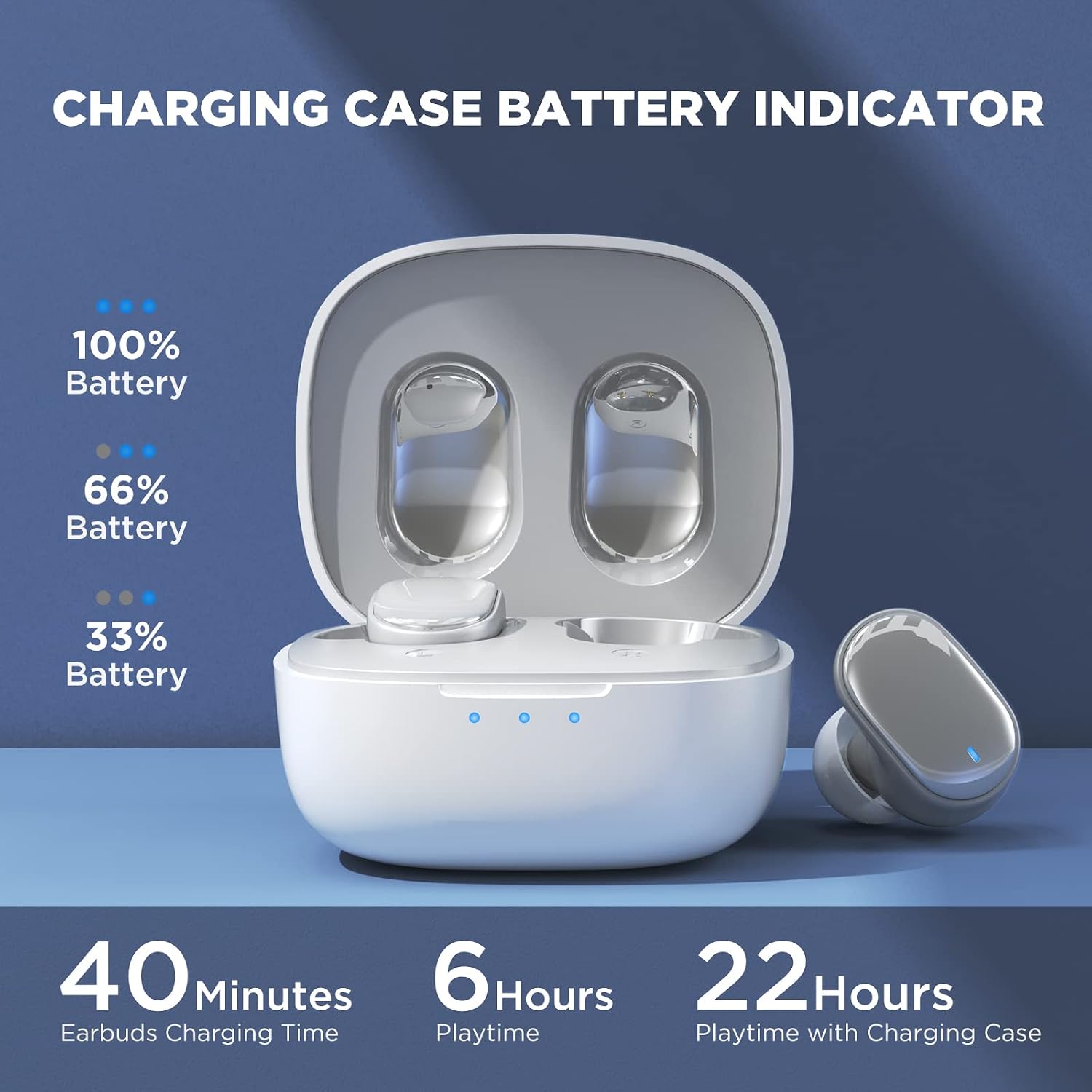
Image: Visual guide to the smart touch controls on the earbud.
שפּיל מאָדע
Designed specifically for gaming, Game Mode provides an ultra-low latency of 45ms, ensuring audio and video remain synchronized for a smoother gaming experience. To activate or deactivate Game Mode, tap and hold either earbud for 2 seconds.

Image: Earbuds shown in a gaming context, highlighting the 40ms ultra-low latency Game Mode.
אַודיאָ קוואַליטעט
The earbuds are equipped with 10mm drivers, producing powerful bass and stunning treble for a rich audio experience.

בילד: עקספּלאָדירט view diagram illustrating the 10mm speaker driver components.
וישאַלט און זאָרג
- רייניקונג: רייניקט רעגולער די אויערקנעפּלעך און די טשאַרדזשינג קעסטל מיט אַ ווייכן, טרוקענעם, לינט-פֿרייע שטאָף. ניצט נישט קיין שאַרפע כעמיקאַלן אדער אַברייסיוו מאַטעריאַלן.
- Earplug Care: Remove the silicone earplugs periodically and clean them with mild soap and water. Ensure they are completely dry before reattaching.
- וואַסער קעגנשטעל: The earbuds are IPX4 waterproof, meaning they are resistant to sweat and splashing water. Do not submerge them in water or expose them to heavy rain.
- סטאָרידזש: ווען נישט אין באַנוץ, לייגט די אויערקנעפּלעך אין זייער טשאַרדזשינג קעסטל צו באַשיצן זיי און האַלטן זיי טשאַרדזשד. לייגט זיי אין אַ קיל, טרוקן אָרט אַוועק פון עקסטרעמע טעמפּעראַטורן.
- באַטאַרייע לעבן: כדי צו פארלענגערן די לעבן פון די באַטעריע, זאָלט איר נישט אָפט אויסלאָדן די אויערקנעפּלעך און די טשאַרדזשינג קעסטל. לאָודט זיי רעגולער, אפילו אויב זיי ווערן נישט גענוצט פאר לענגערע צייטן.
טראָובלעשאָאָטינג
| פּראָבלעם | מעגלעך לייזונג |
|---|---|
| די אויערקנעפּלעך פאַרבינדן זיך נישט מיטן אַפּאַראַט. |
|
| בלויז איין עאַרבוד אַרבעט. |
|
| נידעריגע וואָלומען אָדער שלעכטע געזונט קוואַליטעט. |
|
| די אויערקנעפּלעך לאָדן זיך נישט אויף. |
|
| ריר קאָנטראָלס ריספּאַנד נישט. |
|
ספּעסאַפאַקיישאַנז
| שטריך | דעטאַל |
|---|---|
| מאָדעל נאָמען | טווס 7 |
| בלועטאָאָטה ווערסיע | 5.3 |
| קאַנעקטיוויטי טעכנאָלאָגיע | ווירעלעסס (בלועטאָאָטה) |
| אַודיאָ לייטאַנס | 45 מיליסעקונדעס (שפּיל מאָדע) |
| שפּילצייט (איינציקע אָפּצאָל) | איבער 6 שעה |
| גאַנץ שפּילצייט (מיט טשאַרדזשינג קעסטל) | אַרויף צו 22 שעה |
| טשאַרדזשינג צייט פֿאַר עאַרבודז | קסנומקס מינוט |
| טשאַרדזשינג קאַסע טשאַרדזשינג צייט | 1.5 שעה |
| דרייווער גרייס | 10 מם דינאַמיש דרייווער |
| וואַסער קעגנשטעל | IPX4 (שווייספּרוף) |
| קאָנטראָל טיפּ | ריר קאָנטראָל, שטימע קאָנטראָל |
| בלועטאָאָטה קייט | ביז 10 מעטער (32.8 פֿוס) |
| אָפטקייַט ראַנגע | 20 הערץ - 20,000 הערץ |
| קאַמפּאַטאַבאַל דעוויסעס | iOS, אַנדרויד, ווינדאָוז דעוויסעס |
וואָראַנטי אינפֿאָרמאַציע
Your HTC True Wireless Earbuds 7 come with a 360 Days Warranty Extension. Please retain your proof of purchase for warranty claims.
This warranty covers manufacturing defects and issues arising from normal use. It does not cover damage caused by misuse, accidents, unauthorized modifications, or improper maintenance.
קונה שטיצן
For any questions, concerns, or technical assistance, please contact HTC customer support:
- לעבן טשאַט שטיצן: Available 7 days a week, 24 hours a day. Refer to the product packaging or official HTC webוועבזייטל פֿאַר ספּעציפֿישע קאָנטאַקט דעטאַלן.
- אָנליין רעסורסן: Visit the official HTC webזייטל פֿאַר אָפֿט געשטעלטע פֿראַגעס, דערהייַנטיקטע מאַנואַלן, און נאָך שטיצע רעסורסן.
We are committed to ensuring your satisfaction with our in-ear headphones.


