הקדמה
This manual provides detailed instructions for the setup, operation, maintenance, and troubleshooting of your seenda IWG-FGM02 Rechargeable LED Wireless Mouse. Please read this manual thoroughly before using the product to ensure optimal performance and longevity.
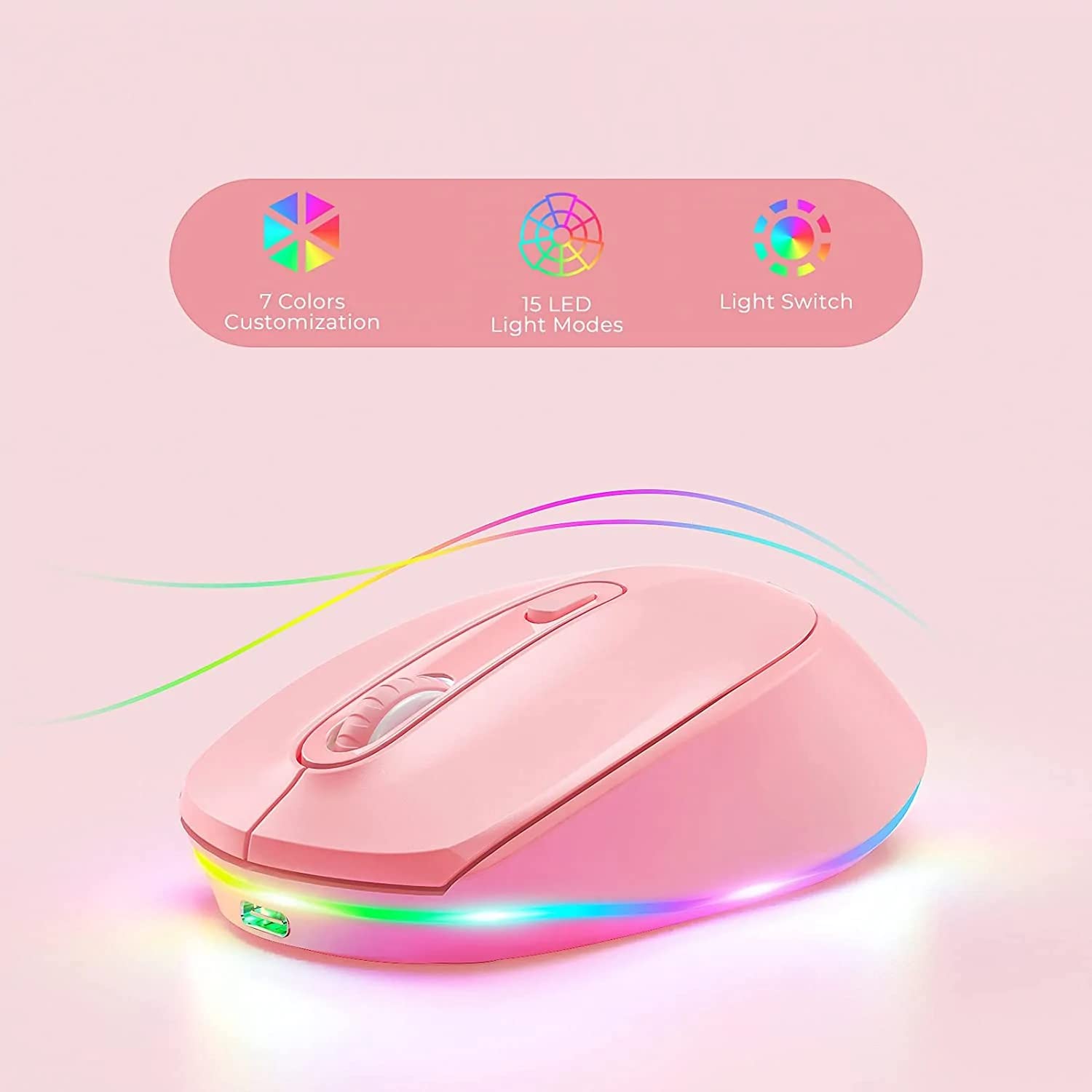
Figure 1: seenda IWG-FGM02 Rechargeable LED Wireless Mouse. This image displays the overall design of the mouse, highlighting its ergonomic shape and LED lighting.
פּעקל אינהאַלט
זיכער מאַכן אַז אַלע זאכן זענען פאַראַן אין פּעקל:
- seenda IWG-FGM02 Rechargeable LED Wireless Mouse
- USB Receiver (typically stored in the mouse's battery compartment)
- וסב טשאַרדזשינג קאַבלע
- באַניצער מאַנואַל (דעם דאָקומענט)
סעטאַפּ אינסטרוקציעס
1. אויפלאָדן די מויז
Before first use, fully charge the mouse. Connect the provided USB charging cable to the charging port on the front of the mouse and the other end to a USB power source (e.g., computer USB port, USB wall adapter).
- The LED indicator will typically show charging status (e.g., red light for charging, off when fully charged).
- A full charge usually takes 2-3 hours.
2. פֿאַרבינדן דעם USB ריסיווער
The mouse connects wirelessly via a 2.4 GHz USB receiver.
- Locate the USB receiver, usually stored in a slot on the bottom of the mouse.
- Remove the receiver and plug it into an available USB port on your computer.
- אייער קאָמפּיוטער זאָל אויטאָמאַטיש דעטעקטירן און אינסטאַלירן די נויטיקע דרייווערס. דאָס קען נעמען אַ פּאָר מינוט.
3. פּאָווערינג אויף / אויסגעלאשן
Locate the power switch on the bottom of the mouse. Slide the switch to the "ON" position to activate the mouse. Slide it to "OFF" when not in use to conserve battery life.
אַפּערייטינג ינסטראַקשאַנז
1. Basic Mouse Functions
The seenda IWG-FGM02 mouse features standard left-click, right-click, and scroll wheel functions. Use these for navigation and interaction with your computer's operating system and applications.
2. דפּי אַדזשאַסטמאַנט
The mouse typically includes a DPI (Dots Per Inch) button, often located near the scroll wheel, to adjust cursor sensitivity. Press this button to cycle through different DPI settings (e.g., 800, 1200, 1600 DPI). A higher DPI setting results in faster cursor movement across the screen.
3. LED Lighting Control
The mouse features LED lighting. Depending on the model, the lighting may be static, breathing, or switchable. Refer to the product packaging or specific model features for details on how to change or disable the LED effects. Some models may have a dedicated button for LED control, while others may integrate it with DPI or power functions.
וישאַלט
1. רייניקן די מויז
כּדי צו האַלטן אָפּטימאַלע פאָרשטעלונג און היגיענע, רייניקט אייער מויז רעגולער.
- ניצן אַ ווייך, לינט-פֿרייַ שטאָף אַ ביסל דampמיט וואַסער אָדער אַ מילד רייניקונג לייזונג.
- פֿאַרמײַדט די נוצן פֿון שאַרפֿע כעמיקאַלן, אַברייסיוו רייניגער, אָדער שפּריצן פֿליסיקייטן גלייך אויף דער מויז.
- Clean the optical sensor on the bottom of the mouse periodically to prevent tracking issues.
2. באַטערי קער
As a rechargeable mouse, proper battery care extends its lifespan.
- Avoid completely draining the battery frequently. Recharge when the low battery indicator appears.
- שטעלט נישט אויס די מויז צו עקסטרעמע טעמפּעראַטורן.
- אויב איר לייגט די מויז אַוועק פֿאַר אַ לענגערע צייט, זאָלט איר זי אויפֿלאָדן ביז 50% איידער איר לייגט זי אַוועק.
טראָובלעשאָאָטינג
If you encounter issues with your seenda IWG-FGM02 mouse, refer to the following common solutions:
1. מויז רעאַגירט נישט
- טשעק מאַכט: Ensure the mouse is switched "ON" and has sufficient battery charge. Recharge if necessary.
- טשעק USB ריסיווער: זיכער מאַכן אַז דער USB ריסיווער איז זיכער אַרײַנגעשטעקט אין אַ פֿונקציאָנירנדיקן USB פּאָרט אויף אײַער קאָמפּיוטער. פּרוּווט אַן אַנדער USB פּאָרט.
- ריפּער: In some cases, you may need to re-pair the mouse with its receiver. This usually involves turning the mouse off and on, or pressing a connect button on the mouse/receiver (if available).
- ינטערפיראַנס: Move the mouse closer to the receiver or away from other wireless devices that might cause interference.
2. Cursor Movement is Erratic or Jumpy
- ריין סענסער: רייניקט דעם אָפּטישן סענסאָר אויף דער אונטערשטער טייל פֿון דער מויז מיט אַ ווייכן שטאָף.
- ייבערפלאַך: Use the mouse on a clean, non-reflective, opaque surface. Avoid glass or highly reflective surfaces. A mouse pad is recommended.
- DPI באַשטעטיקן: אַדזשאַסטירן די DPI סעטינג צו אַ נידעריקער ווערט אויב דער קורסאָר איז צו סענסיטיוו.
3. LED ליכטער ארבעטן נישט
- באַטערי מדרגה: Ensure the mouse has enough charge. Low battery can sometimes affect LED functionality.
- געפֿירט קאָנטראָל: If your mouse has a dedicated LED control button, press it to cycle through modes or turn the lights on.
4. פּראָבלעמען מיטן אויפלאָדן
- קאַבלע טשעק: Ensure the USB charging cable is not damaged and is securely connected. Try a different USB cable if available.
- מאַכט מקור: פּרוּווט אַן אַנדערע USB מאַכט מקור (למשל, אַן אַנדער USB פּאָרט אויף אייער קאָמפּיוטער, אַן אַנדער וואַנט אַדאַפּטער).
ספּעסאַפאַקיישאַנז
| שטריך | דעטאַל |
|---|---|
| סאָרט | סעאַנדאַ |
| מאָדעל | IWG-FGM02 |
| קאַנעקטיוויטי טעכנאָלאָגיע | Wireless (2.4 GHz USB Receiver) |
| ספּעציעלע שטריך | Rechargeable, LED Lighting |
| האַנט אָריענטירונג | אַמבידעקסטראַס |
| אַפּערייטינג סיסטעם קאַמפּאַטאַבילאַטי | Linux, Windows 7, Windows XP (and generally newer Windows/macOS versions) |
| ייַזנוואַרג פּלאַטפאָרמע | לאַפּטאַפּ, פערזענלעכע קאָמפּיוטער |
| פּראָדוקט דימענשאַנז (LxWxH) | 10 X 6.5 X 6.5 סענטימעטער |
| פּונקט וואָג | 140 ג |
| דורכשניטלעך באַטאַרייע לעבן | Up to 12 Months (standby/usage dependent) |
וואָראַנטי אינפֿאָרמאַציע
The seenda IWG-FGM02 Rechargeable LED Wireless Mouse comes with a 1 יאָר וואָראַנטי פֿון דעם קויפֿדאַטום. די וואָראַנטי דעקט פֿאַבריקאַציע־דעפֿעקטן און מאַטעריאַל־פֿעלער אונטער נאָרמאַלן באַנוץ. עס דעקט נישט קיין שאָדן פֿאַראורזאַכט דורך אומרעכטן באַנוץ, אומגליקן, נישט־אָטעריזירטע מאָדיפֿיקאַציעס, אָדער נאָרמאַלן אָפּנוץ. ביטע באַהאַלטן אייער קויפֿבאַווייַז פֿאַר וואָראַנטי־קליימז.
שטיצן און קאָנטאַקט
For further assistance, technical support, or warranty inquiries, please contact the importer or manufacturer:
- אימפארטירער: דיגיטאַל פּעןtagבאַראַן
- בליצפּאָסט: ט.יאַדאַוו@דיגיטאַלפּעןtagram.com
- טעלעפֿאָן: 09999325592
- פאַבריקאַנט: Seenda, Shenzen Seenda, www.seenda.com
When contacting support, please have your product model (IWG-FGM02) and proof of purchase available.


