1. הקדמה
The FINGERS Lil’Clicks is a versatile mini keyboard designed for seamless connectivity across multiple devices and operating systems. It offers dual connectivity options: Bluetooth and 2.4 GHz Wireless, allowing you to switch between your laptop, tablet, or smartphone effortlessly. This manual provides detailed instructions for setup, operation, maintenance, and troubleshooting to ensure optimal use of your keyboard.

Image 1.1: The FINGERS Lil’Clicks Bluetooth Wireless Mini Keyboard, showcasinג זײַן קאָמפּאַקטן דיזײַן.
2. פּעקל אינהאַלט
ביטע אָפּהאַקן דאָס קעסטל פֿאַר די פֿאָלגנדיקע זאַכן:
- 1 x FINGERS Lil’Clicks Bluetooth Wireless Mini Keyboard
- 1 x Wireless USB Receiver (for 2.4 GHz connection)
- 1 x מיקראָ וסב טשאַרדזשינג קאַבלע
- 1 x שנעל באַניץ גייד
- 1 x בראַנד באַמערקונג

Image 2.1: Contents included in the FINGERS Lil’Clicks keyboard package.
3. סעטאַפּ און קאַנעקטיוויטי
The Lil’Clicks keyboard offers two primary connection methods: Bluetooth and 2.4 GHz Wireless.
3.1. אויפלאָדן די קלאַוויאַטור
Before initial use, ensure the keyboard is fully charged. Connect the provided Micro USB charging cable to the keyboard's charging port and the other end to a USB power source (e.g., computer USB port, USB wall adapter). The charging indicator light will show the charging status.
3.2. 2.4 GHz דראָטלאָזע פֿאַרבינדונג
- Locate the USB Wireless Receiver in the keyboard package.
- שטעקט אריין דעם USB ריסיווער אין א פאראן USB פארט אויף אייער קאמפיוטער אדער דעווייס.
- צינדט אן די קלאַוויאַטור מיטן מאַכט קנעפּל, וואָס געפינט זיך געוויינטלעך אויף דער זייט אָדער הינטן.
- The keyboard should automatically connect to your device. No additional drivers are typically required.
3.3. בלועטוט פֿאַרבינדונג (ביז 3 דעווייסעס)
The Lil’Clicks keyboard can connect to up to three Bluetooth devices simultaneously.
- קער אויף די קלאַוויאַטור ניצן די מאַכט באַשטימען.
- דריקן און האַלטן די Fn קנעפּל און איינער פון די בלוטוט קנעפּלעך (BT1, BT2, אָדער BT3) for 3-5 seconds until the corresponding Bluetooth indicator light starts blinking. This indicates the keyboard is in pairing mode.
- אויף אייער דעווייס (לאַפּטאַפּ, טאַבלעט, סמאַרטפאָון), גייט צו בלועטוט סעטטינגס און אַקטיווירט בלועטוט.
- זוכן פֿאַר available devices. You should see "FINGERS Lil’Clicks" or a similar name appear in the list.
- Select the keyboard to pair. If prompted, enter the displayed code on the keyboard and press אַרייַן.
- Once paired, the indicator light will stop blinking and remain solid for a few seconds before turning off.
- To connect another device, repeat steps 2-5 using a different Bluetooth key (BT2 or BT3).
3.4. וועקסלען צווישן פארבונדענע דעווייסעס
To switch between paired Bluetooth devices or the 2.4 GHz wireless connection:
- For Bluetooth devices: Briefly press the Fn key along with the desired Bluetooth key (BT1, BT2, אָדער BT3).
- For 2.4 GHz Wireless: Briefly press the Fn key along with the 2.4G key (if available, otherwise ensure the USB receiver is plugged in and no Bluetooth connection is active).

Image 3.1: The Lil’Clicks keyboard demonstrating multi-device connectivity with a laptop, monitor, phone, and tablet.
4. אפערירן די קלאַוויאַטור
4.1. גרונטלעכע טייפּינג
The keyboard features a standard QWERTY layout. Simply type as you would on any other keyboard.
4.2. Media Controls
The Lil’Clicks keyboard includes 12 soft-touch media control keys. These functions are typically accessed by pressing the Fn key simultaneously with the corresponding function key (F1-F12 or dedicated media keys).
- Fn+F1-F12: Access various media functions such as play/pause, volume control, track skipping, and more. Refer to the quick usage guide for specific key mappings.

בילד 4.1: נאָענט־אַרויף view of the keyboard layout, highlighting the media control keys and function row.
4.3. Using the Built-in Cradle
The keyboard features a built-in cradle designed to hold most phones and tablets up to 10 mm thick and 265 mm wide. This allows you to position your device at an optimal viewינג ווינקל פֿאַר באַקוועם טייפּינג.
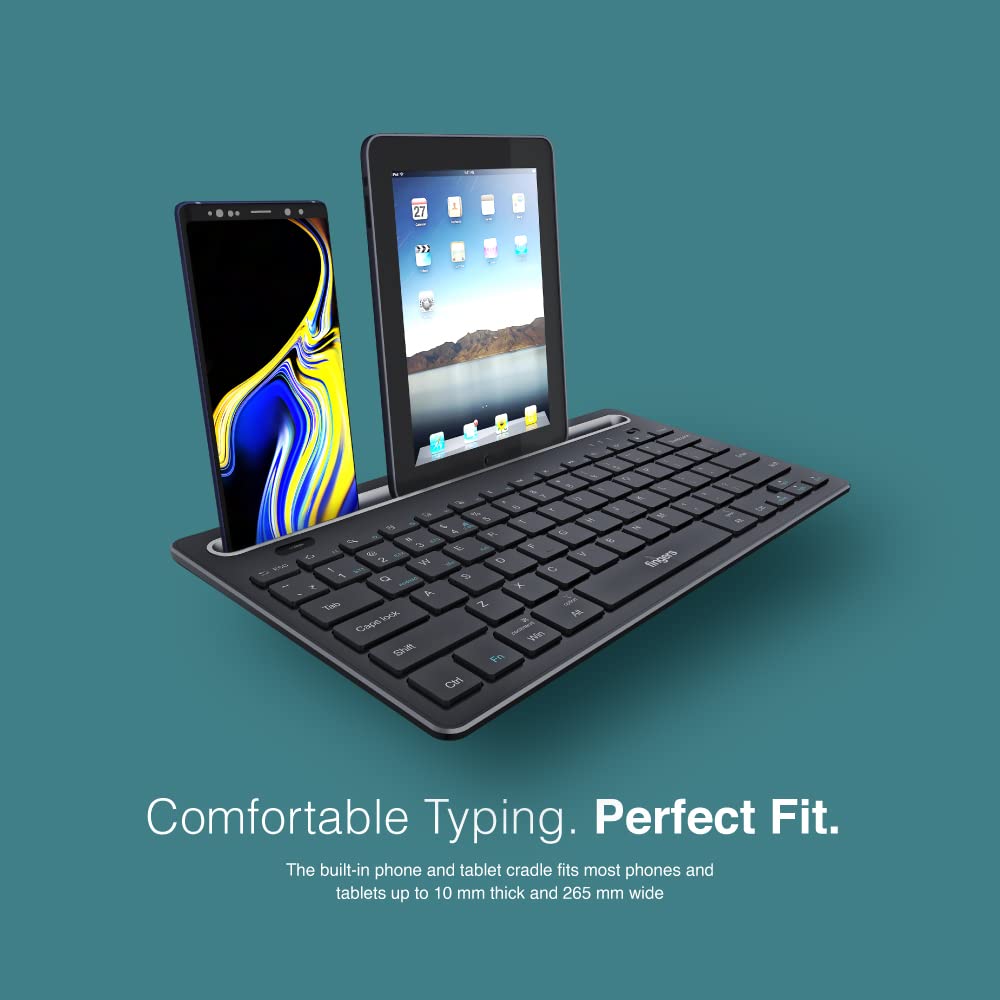
Image 4.2: The keyboard's integrated cradle holding a smartphone and a tablet for ergonomic viewing.
4.4. אַפּערייטינג סיסטעם קאָמפּאַטיביליטי
The Lil’Clicks keyboard is compatible with a wide range of operating systems:
- Windows
- macOS
- אַנדרויד
- לינוקס
- קראָום אַס
The keyboard automatically adapts to the connected operating system for optimal functionality. Some function key behaviors may vary slightly depending on the OS.
5. וישאַלט
5.1. רייניקונג
צו רייניקן אייער קלאַוויאַטור, ווישט אָפּ די ייבערפלאַך מיט אַ ווייכן, דamp, lint-free cloth. Avoid using harsh chemicals, abrasive cleaners, or excessive moisture, as these can damage the keyboard. The membrane-coated sheet beneath the keys helps protect against dust and minor spills.
5.2. באַטערי קער
The keyboard features a long-lasting battery, providing up to 45 days of usage on a single charge. To prolong battery life:
- טשאַרדזש די קלאַוויאַטור גאָר איידער ערשטער נוצן.
- פֿאַרמײַדט אָפֿט גאָר אויסצוליידיקן די באַטעריע.
- אויב איר לייגט אַוועק די קלאַוויאַטור פֿאַר אַ לענגערע צייט, לאָדט עס אויף צו אַרום 50% און לייגט עס אַוועק אין אַ קיל, טרוקן אָרט.
5.3. סטאָרידזש
When not in use, store the keyboard in a clean, dry environment away from extreme temperatures and direct sunlight. Its compact and lightweight design makes it easy to carry and store.

Image 5.1: The Lil’Clicks keyboard's portability, shown being carried and used in a cafe setting.
6. טראָובלעשאָאָטינג
If you encounter issues with your FINGERS Lil’Clicks keyboard, please refer to the following troubleshooting steps:
6.1. Keyboard Not Connecting/Pairing
- טשעק מאַכט: זייט זיכער אז די קלאַוויאַטור איז אנגעצינדן און האט גענוג באַטאַרייע אָפּצאָל.
- ווידער אריינגיין אין פּערינג מאָדע: For Bluetooth, press and hold Fn + BT1/BT2/BT3 until the indicator blinks. For 2.4 GHz, ensure the USB receiver is securely plugged in.
- מיטל בלועטוט: Make sure Bluetooth is enabled on your device and it's discoverable.
- Forget Device (Bluetooth): If previously paired, try removing/forgetting the keyboard from your device's Bluetooth list and then re-pairing.
- וסב ופנעמער: Try plugging the 2.4 GHz USB receiver into a different USB port on your device.
- ינטערפיראַנס: Move the keyboard closer to your device and away from other wireless devices that might cause interference.
6.2. Keys Not Responding or Typing Incorrectly
- באַטערי מדרגה: A low battery can affect key responsiveness. Charge the keyboard fully.
- פֿאַרבינדונג סטאַביליטעט: Ensure a stable connection. If using Bluetooth, try switching to a different Bluetooth channel (BT1, BT2, BT3) or re-pairing. If using 2.4 GHz, ensure the receiver is firmly connected.
- ינטערפיראַנס: Wireless interference can sometimes cause missed keystrokes. Try moving to a different location or reducing other wireless activity.
- ריינע שליסלען: Check for any debris or foreign objects under the keys that might be obstructing their movement.
- Operating System Mode: Ensure the keyboard is in the correct operating system mode if there are specific key combinations for OS switching (e.g., Fn + Android/Win/Mac keys).
6.3. באַטאַרייע ניט טשאַרדזשינג
- טשעק קאַבלע: Ensure the Micro USB charging cable is securely connected to both the keyboard and the power source.
- מאַכט מקור: Try a different USB power source (e.g., another USB port on your computer, a different wall adapter).
- קאַבלע אָרנטלעכקייַט: Inspect the charging cable for any signs of damage. Try using a different Micro USB cable if available.
7. ספּעסאַפאַקיישאַנז
| סאָרט | פינגערס |
| מאָדעל | Lil’Clicks |
| קאַנעקטיוויטי | בלועטוט, 2.4 גיגאהערץ ווירעלעס |
| קאַמפּאַטאַבילאַטי | Windows, macOS, Android, Linux, Chrome OS |
| קאָליר | שוואַרץ |
| דימענשאַנז (LxWxH) | 29 X 16 X 2 סענטימעטער |
| פּונקט וואָג | 400 ג |
| באַטערי לעבן | ביז 45 טעג (אויף איין אָפּצאָל) |
| קיסטראָוק לעבן | 5 מיליאָן קיסטראָוקס |
| Cradle Dimensions | Fits devices up to 10 mm thick and 265 mm wide |
| מאַכט מקור | באַטאַרייע פּאַוערד |
8. וואָראַנטי און שטיצן
8.1. וואָראַנטי אינפֿאָרמאַציע
The FINGERS Lil’Clicks Bluetooth Wireless Mini Keyboard comes with a 1 יאָר וואָראַנטי פֿון דעם קויפֿדאַטום. די וואָראַנטי דעקט פֿאַבריקאַציע־דעפֿעקטן אונטער נאָרמאַלן באַנוץ. ביטע באַהאַלטן אייער קויפֿ־קבלה ווי אַ באַווײַז פֿון קויפֿ פֿאַר וואָראַנטי־קליימז.
די וואָראַנטי טוט נישט דעקן דאַמידזשיז ריזאַלטינג פון:
- Accidental damage, misuse, abuse, or negligence.
- נישט-אויטאריזירטע רעפּאַראַטור אָדער מאָדיפיקאַציע.
- נאָרמאַל טראָגן און טרער.
8.2. Manufacturer and Importer Details
פאַבריקאַנט: Dynamic Conglomerate Pvt. Ltd., 329/330, GIDC Phase II, Near Sardar Chowk, Vapi, Dist. Valsad, Gujarat - 396195.
אימפארטירער: Dynamic Conglomerate Pvt. Ltd. 4th Floor, Simba Tower, Vishveshwar Nagar, Goregaon (E), Mumbai - 400063, Maharashtra
8.3. קונה שטיצן
For technical assistance, warranty claims, or any other inquiries, please contact FINGERS customer support through their official website or the contact information provided in your Quick Usage Guide.


