הקדמה
Thank you for choosing the Varmilo MA Series V2 Summit R2 Mechanical Keyboard. This manual provides essential information for setting up, operating, maintaining, and troubleshooting your new keyboard. Please read this manual thoroughly to ensure optimal performance and longevity of your device.
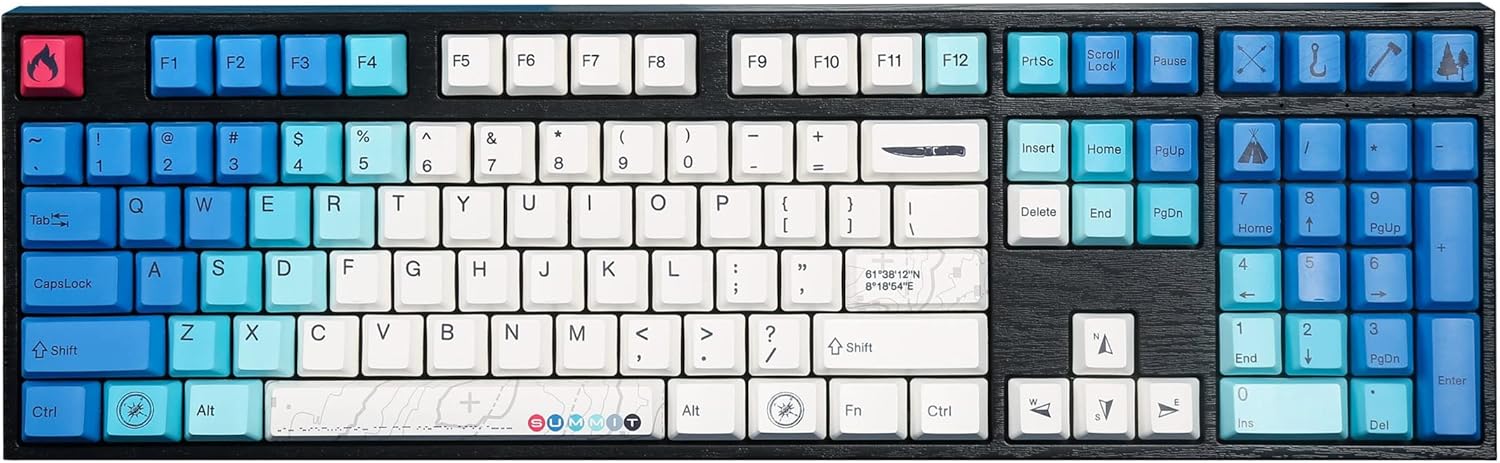
Image: The Varmilo MA Series V2 Summit R2 Mechanical Keyboard, showcasing its full layout and unique keycap design.
סעטאַפּ
1. ונבאָקסינג
Carefully remove the keyboard and all accessories from the packaging. Ensure the following items are present:
- Varmilo MA Series V2 Summit R2 Mechanical Keyboard
- וסב- C קאַבלע
- Keycap Puller (if included)
- באַניצער מאַנואַל (דעם דאָקומענט)
2. קאַנעקטינג די קלאַוויאַטור
- געפינט דעם USB-C פּאָרט אויף דער הינטערשטער זייט פון דער קלאַוויאַטור.
- פֿאַרבינדט איין עק פֿון דעם צוגעשטעלטן USB-C קאַבל צום קלאַוויאַטור.
- פֿאַרבינדט דעם אַנדערן עק פֿונעם USB-C קאַבל צו אַ פֿאַראַן USB פּאָרט אויף אײַער קאָמפּיוטער.
- די קלאַוויאַטור איז פּלאַג-און-פּליי און זאָל ווערן אויטאָמאַטיש דערקענט דורך אייער אָפּערייטינג סיסטעם.
3. אַדזשאַסטירן קלאַוויאַטור ווינקל
The Varmilo MA Series V2 features a double-section kickstand, allowing for two different typing angles. Gently flip out the desired sections of the kickstand located on the underside of the keyboard to adjust its height and angle for ergonomic comfort.

בילד: זייט פּראָfile of the Varmilo keyboard, illustrating the adjustable kickstand in an extended position.
אַפּערייטינג ינסטראַקשאַנז
1. גרונטלעכע שליסל פונקציעס
The keyboard features a standard full-size (104-key) layout. All alphanumeric and standard function keys operate as expected. The Varmilo EC Ivy V2 switches provide a smooth and responsive typing experience.
2. Function (Fn) Key Combinations
The Fn key (typically located near the right Alt key) allows access to secondary functions printed on certain keycaps. Hold down the Fn key and press the desired function key simultaneously.
- Fn + F1-F12: Multimedia controls (e.g., volume, play/pause, stop).
- Fn + פײַל קנעפּלעך: LED brightness or effect control (refer to specific keycap legends).
- Fn + געווינען: פֿאַרשליסן/אַנלאָקן ווינדאָוס קנעפּל.

בילד: א נאָענטע בילד view of the right side of the Varmilo keyboard, highlighting the special function keys and their legends.
3. LED Backlighting Control
The keyboard features White LED backlighting. Use the Fn key combinations to adjust the brightness and switch between various lighting effects. Specific key legends will indicate the corresponding functions for LED control.
וישאַלט
1. רייניקן די קלאַוויאַטור
כדי צו אויפהאלטן די קלאַוויאַטור'ס אויסזען און פונקציאָנאַליטעט:
- אָפּשטעקן די קלאַוויאַטור פֿון אייער קאָמפּיוטער איידער איר רייניקט.
- ניצן אַ ווייך, לינט-פֿרייַ שטאָף אַ ביסל דampגעוואשן מיט וואַסער אָדער אַ מילדער רייניקונג לייזונג צו ווישן די קלאַוויאַטור קאַפּס און קasing.
- פֿאַר שטויב און שמוץ צווישן די קלאַוויאַטורן, ניצט קאָמפּרעסירטע לופט.
- Avoid using harsh chemicals, abrasives, or solvents, as these can damage the PBT keycaps and finish.
2. Keycap Removal and Replacement
The keyboard features durable Dye Sub PBT keycaps. If you need to remove keycaps for deep cleaning or customization:
- Use the provided keycap puller (if applicable) or a similar tool.
- Gently attach the keycap puller to the keycap and pull straight up to remove it. Avoid twisting or excessive force.
- צו פארטרעטן, גלייכט אויס די קלאַוויאַטור מיטן סוויטש שטאַם און דריקט פעסט אַראָפּ ביז עס קליקט אין פּלאַץ.

Image: A collection of individual Varmilo keycaps, including special design keycaps, demonstrating their PBT material and dye-sublimated legends.
טראָובלעשאָאָטינג
If you encounter issues with your Varmilo keyboard, please refer to the following common solutions:
- קלאַוויאַטור ניט ריספּאַנדינג:
- זיכער מאַכן אַז דער USB-C קאַבל איז זיכער פארבונדן צו ביידע די קלאַוויאַטור און דעם קאָמפּיוטער.
- פרובירט צו קאנעקטן די קלאַוויאַטור צו אַן אַנדער USB פּאָרט אויף אייער קאָמפּיוטער.
- פּרובירט די קלאַוויאַטור אויף אַן אַנדער קאָמפּיוטער צו אויסשליסן סיסטעם-ספּעציפֿישע פּראָבלעמען.
- ריסטאַרט דיין קאָמפּיוטער.
- LEDs Not Working or Incorrect:
- Ensure the LED brightness is not set to the lowest level using Fn key combinations.
- Check if any specific lighting modes are active that might turn off certain LEDs.
- שליסלען רעגיסטרירט זיך נישט:
- Remove the keycap and inspect the switch for any obstructions.
- Clean around the switch stem with compressed air.
פאַבריק באַשטעטיק
If issues persist, a factory reset may resolve them. Consult the Varmilo official website or support for specific reset procedures for your model, as these can vary.
ספּעסאַפאַקיישאַנז
The following are the technical specifications for the Varmilo MA Series V2 Summit R2 Mechanical Keyboard:
| שטריך | דעטאַל |
|---|---|
| סאָרט | וואַרמילאָ |
| מאָדעל | MA Series V2 Summit R2 |
| אויסלייג | Full-size (104 + 4 keys) |
| באַשטימען טיפּ | Varmilo EC Ivy V2 Mechanical Switches |
| קייקאַפּ מאַטעריאַל | Dye Sub PBT |
| קאַנעקטיוויטי | וסב-C |
| באַקלייט | ווייַס געפירט |
| מאַטעריאַל | פּאָליבוטילען טעראַפטאַלאַט, סיליקאָן |
| מאַכט מקור | USB Powered |
| קאַמפּאַטאַבאַל דעוויסעס | קאָמפּיוטער (דורך וסב-C) |
וואָראַנטי און שטיצן
Varmilo products are manufactured to high-quality standards. For information regarding warranty coverage, technical support, or service inquiries, please visit the official Varmilo webזייטל אדער קאנטאקט זייער קאסטומער שטיצע גלייך. האלט אייער קויף קוויטל אלס באווייז פון קויפן פאר גאראנטיע קליימס.
Official Varmilo Store: Varmilo Store on Amazon


