1. הקדמה
The MeLE Quieter3C is a compact, fanless mini PC designed for quiet and stable operation. Featuring an Intel Celeron N5105 processor, 8GB of RAM, and 128GB of eMMC storage, it supports triple screen display and offers versatile connectivity options, including a full-function USB-C port. This manual provides essential information for setting up, operating, maintaining, and troubleshooting your device.

Figure 1: MeLE Quieter3C Fanless Mini PC
2. וואָס איז אין דער קעסטל
Upon unboxing your MeLE Quieter3C, please ensure all the following items are present:
- 1x Mini PC Quieter 3C 81E
- 1x Power Adapter 12V/2A
- 1x וועסאַ מאָונט
- 1x באַניצער מאַנואַל
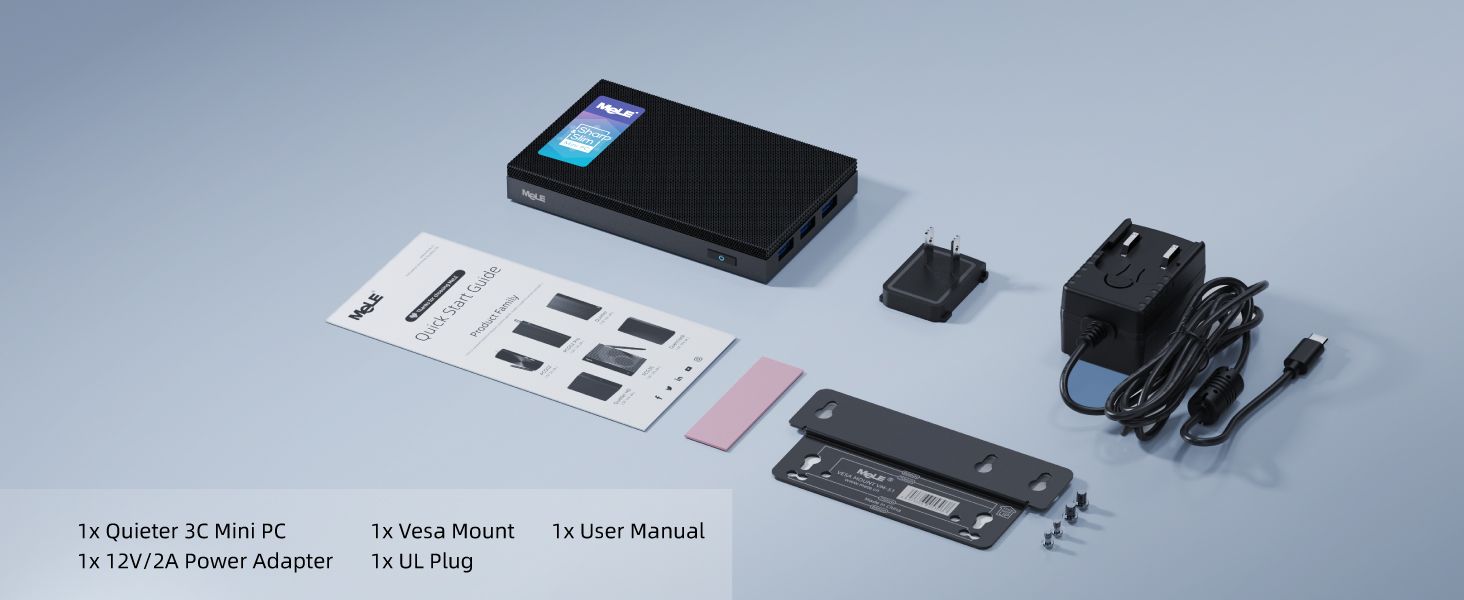
Figure 2: Package Contents of Quieter3C Mini PC
3. פּראָדוקט פֿעיִקייטן און איבערview
3.1 Rich I/O Ports
The Quieter3C offers a comprehensive set of input/output ports for various peripherals and displays.

פיגורע 3: דעטאַילעד view of the Quieter3C's input/output ports.
3.2 Full-Function USB-C Port
The device features a versatile USB Type-C port that supports power input, data transfer, and video output (DisplayPort 1.4) through a single connection. Ensure your monitor supports power delivery if you intend to power the PC via the monitor's USB-C port.

Figure 4: Illustration of the multi-functional USB-C port.
3.3 Fanless Cooling Design
The Quieter3C utilizes a passive cooling system, eliminating the need for a fan. This design ensures silent operation and dust resistance, making it suitable for 24/7 use. Due to its fanless nature, the surface temperature may reach 55°C to 70°C during intensive use, which is within safety standards (IEC62368-1:2018).

Figure 5: Fanless cooling mechanism and temperature range.
3.4 Compact and Portable Size
With dimensions of 5.12 x 3.15 x 0.79 inches and a weight of 8.1 ounces, the Quieter3C is designed for portability and minimal desk footprint.

Figure 6: Quieter3C's compact dimensions.
3.5 פּראַסעסאָר און זכּרון
The Quieter3C is powered by an Intel Celeron N5105 processor with 4 cores and 4 threads, boosting up to 2.90 GHz. It includes 8GB of LPDDR4X RAM for efficient multitasking.

Figure 7: Intel Celeron N5105 Processor.
3.6 סטאָרידזש
The device comes with 128GB of built-in eMMC 5.1 storage. It also supports expansion via a Micro SD card slot (up to 1TB) and an internal M.2 PCIe 3.0 x2 NVMe 2280 SSD slot (up to 4TB, not compatible with SATA interface).

Figure 8: Storage expansion capabilities.
3.7 Triple 4K Display Support
The Quieter3C can connect to up to three monitors simultaneously, supporting 4K resolution at 60Hz via its two HDMI 2.0 ports and one full-function USB-C port.

Figure 9: Triple 4K display connectivity.
4. סעטאַפּ
4.1 ערשט קאַנעקשאַן
To begin using your MeLE Quieter3C, connect the power adapter to the DC 12V/2A port. Connect your display(s) using the HDMI ports or the full-function USB-C port. Finally, connect your keyboard and mouse to the available USB ports.
4.2 וועסאַ מאָונט אינסטאַלאַציע
The included VESA mount allows you to attach the mini PC to the back of a compatible monitor, saving desk space.
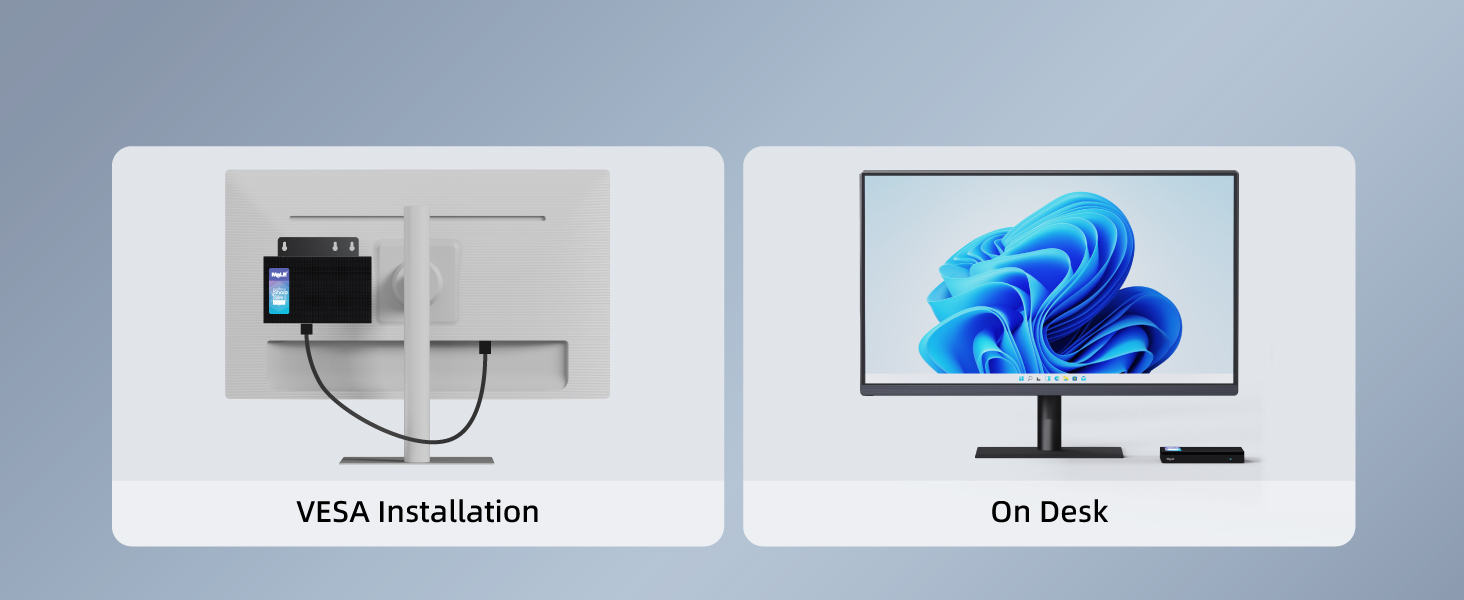
Figure 10: VESA mount and on-desk setup options.
Video 1: Instructions on how to install a VESA-mounted bracket for your mini PC.
5. אַפּערייטינג ינסטרוקטיאָנס
5.1 אַפּערייטינג סיסטעם ינסטאַלירונג
Your MeLE Quieter3C comes with Windows 11 Pro pre-installed. If you need to reinstall Windows or install another operating system like Ubuntu, follow the instructions below.
Video 2: Guide to installing Ubuntu 23.04 on your MeLE mini PC with N5105 CPU.
Video 3: Instructions for installing Windows on an SSD for your mini PC.
5.2 Auto Power On Setup
Configure your mini PC to automatically power on when connected to power.
Video 4: Steps to set up Auto Power On for your MeLE N5105 mini PC.
5.3 HDR סעטטינגס
Enable High Dynamic Range (HDR) for enhanced visual experience on compatible displays.
Video 5: How to turn on HDR on Quieter3C mini PCs.
6. וישאַלט
The fanless design of the Quieter3C minimizes maintenance needs by preventing dust accumulation and eliminating moving parts. However, it is important to ensure adequate airflow around the device to facilitate heat dissipation. Avoid placing the mini PC in enclosed spaces or directly on soft surfaces that could obstruct ventilation. Periodically clean the exterior with a soft, dry cloth.
7. טראָובלעשאָאָטינג
7.1 Boot Option Issues
If your mini PC encounters issues with its first boot option, you may need to adjust settings in the BIOS.
Video 6: What to do when the first boot option is changed on your mini PC.
7.2 נעץ קאָנעקטיוויטי פּראָבלעמען
If you experience network issues, resetting the network settings can often resolve the problem.
Video 7: Guide on how to reset network settings on your mini PC.
8. ספּעסאַפאַקיישאַנז
| שטריך | דעטאַל |
|---|---|
| פּראַסעסער | אינטעל סעלעראן N5105 (2.9 GHz) |
| באַראַן | 8 גיגאבייט LPDDR4 (2933 מעגהערץ) |
| אינערלעכער סטאָרידזש | 128 גיגאבייט eMMC |
| גראַפיקס | Intel UHD גראַפיקס |
| מאַקסימום סקרין האַכלאָטע | 4096 רענטגענ 2160 פּיקסעלס |
| ווירעלעסס קאַנעקטיוויטי | 802.11ax (WiFi 5), Bluetooth 5.1 |
| וסב פּאָרץ | 3x USB 3.0, 1x Full-Function USB-C |
| ווידעא רעזולטאַט | 2x HDMI 2.0, 1x USB-C (4K@60Hz) |
| אַודיאָ רעזולטאַט | 3.5 מם אַודיאָ דזשאַק |
| סטאָרידזש יקספּאַנשאַן | Micro SD Card Slot (up to 1TB), M.2 NVMe 2280 Slot (up to 4TB) |
| אָפּערייטינג סיסטעם | OS (Windows 11 Pro pre-installed) |
| דימענשאַנז (LxWxH) | 5.12 X 3.15 X 0.79 אינטשעס |
| וואָג | 8.1 אונסעס |
9. וואָראַנטי און שטיצן
MeLE offers a one-year warranty for the Quieter3C Mini PC. For any inquiries or support needs, please contact MeLE customer service. MeLE is committed to protecting customer privacy and complies with all applicable laws on privacy protection and personal data security. MeLE promises that it will never collect or take advantage of personal data.
MeLE's manufacturing adheres to standards set by FCC, CE, UKCA, IC, and TELEC. Customer service replies are typically provided within 24 hours.


