1. הקדמה
Thank you for choosing the COMAOGO T002-W Mini Projector. This manual provides essential information for setting up, operating, and maintaining your projector to ensure optimal performance and longevity. The T002-W is a versatile projector featuring 9500 Lumens brightness, 1080P support, 5G WiFi, and Bluetooth 5.1 connectivity, designed for an immersive viewדערפאַרונג אַרויף צו 220 אינטשעס.
2. פּעקל אינהאַלט
ביטע טשעק די פּאַקעט פֿאַר די פאלגענדע זאכן:
- 1 x COMAOGO T002-W Mini Projector
- 1 x רימאָוט קאָנטראָל
- 1 x מאַכט קאַבלע
- 1 x HDMI קאַבלע
- קסנומקס רענטגענ אַוו קאַבלע
- 1 x באַניצער מאַנואַל
3. פּראָדוקט איבערview
מאַכט זיך באַקאַנט מיט די פּראָיעקטאָר'ס קאָמפּאָנענטן און אינטערפייסיז.

Image: COMAOGO T002-W Projector with 5G and 2.4G WiFi capabilities, showing wireless screen synchronization with a tablet and smartphone.
The projector features various ports for connectivity, including HDMI, USB, VGA, AV, and a TF card slot, along with a 3.5mm audio output. It also supports dual-band 5G and 2.4G WiFi for stable wireless connections and Bluetooth 5.1 for audio devices.

Image: COMAOGO T002-W Projector connected to various devices including a laptop, game console, and streaming stick, highlighting its multiple input ports (AV, HDMI, USB, TF, VGA).
4. סעטאַפּ
4.1 פּלייסמאַנט
Position the projector on a stable, flat surface or mount it on a tripod. Ensure there are no obstructions to the ventilation vents. For optimal viewing, the projection distance should be between 1.5 meters and 5.5 meters, yielding a screen size from 45 inches to 220 inches.
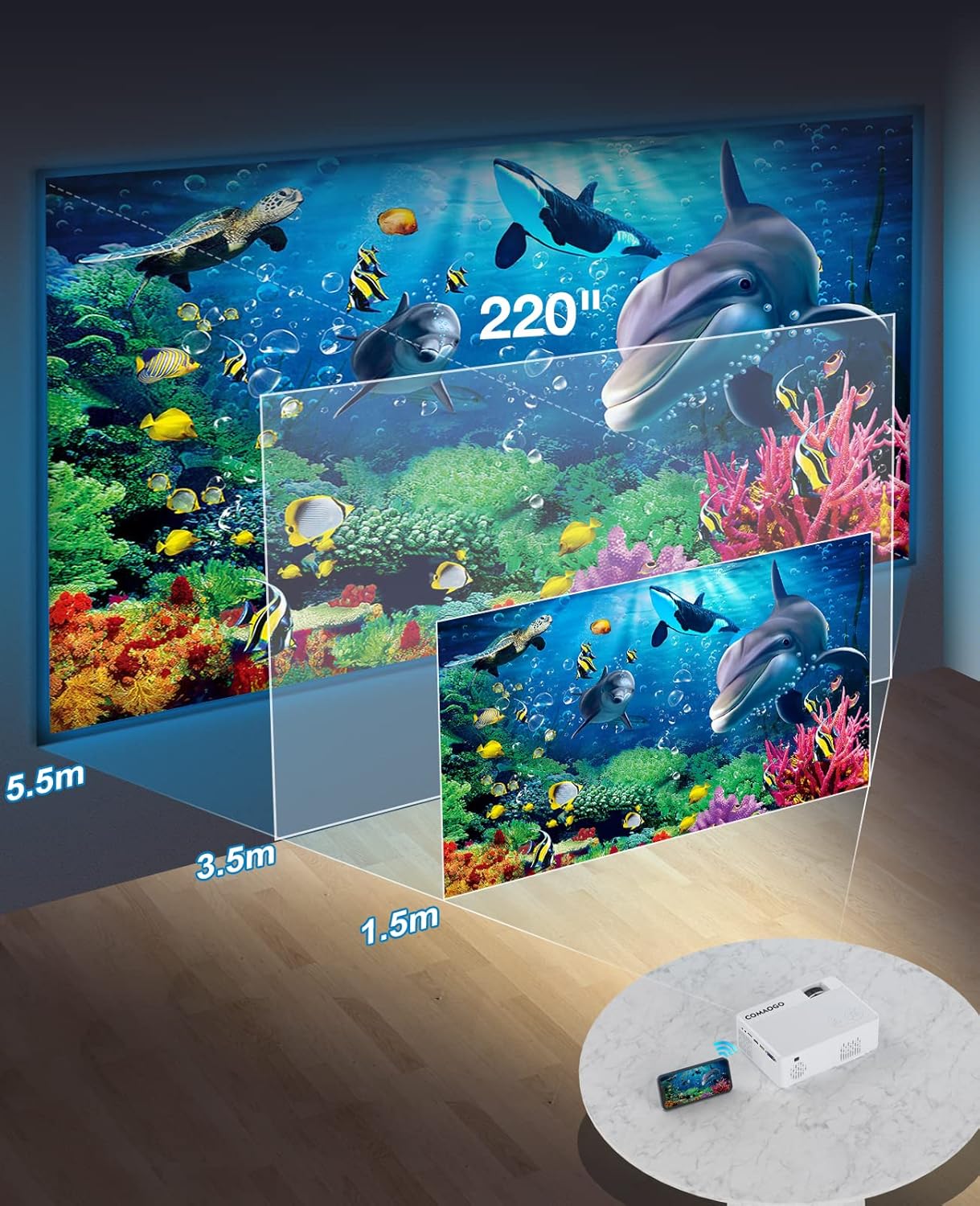
Image: Diagram illustrating the projection distances (1.5m to 5.5m) and corresponding screen sizes (45 to 220 inches) for the COMAOGO T002-W Projector.
4.2 מאַכט קאַנעקשאַן
Connect the power cable to the projector's power input and then plug it into a power outlet (AC 220V).
4.3 פאָקוס און קיסטאָון קאָרעקציע
צו דערגרייכן א קלאר און רעכטעקיג בילד:
- פאָקוס אַדזשאַסטמאַנט: Rotate the focus ring on the projector lens until the image appears sharp.
- Keystone Correction: Adjust the keystone correction dial (if available, or via menu settings) to correct trapezoidal distortion, ensuring the image is rectangular. The projector supports ±15° keystone correction.

Image: Illustration of keystone correction and focus adjustment for the COMAOGO T002-W Projector, showing how to achieve a clear, rectangular image.
5. אַפּערייטינג ינסטרוקטיאָנס
5.1 מאַכט אויף / אַוועק
- מאַכט אויף: דרוק די מאַכט קנעפּל אויף די פּראַדזשעקטער אָדער די ווייַט קאָנטראָל.
- מאַכט אַוועק: דריק נאכאמאל דעם פאוער קנעפל צו אויסלעשן דעם פראיעקטאר.
5.2 אויסוואל פון איינגאבע מקור
Use the "Source" button on the remote control or the projector's control panel to select the desired input source (e.g., HDMI, USB, VGA, AV).
5.3 וויירלעסע קאָנעקטיוויטי (WiFi)
The projector supports dual-band 5G and 2.4G WiFi for stable screen mirroring.
- Navigate to the WiFi settings on the projector's menu.
- Select your desired WiFi network (5G for faster, more stable connection; 2.4G for longer range and better penetration).
- אַרייַן די פּאַראָל צו פאַרבינדן.
- For screen mirroring, select the appropriate option (e.g., "iOS Cast" or "Android Cast") on the projector and follow the on-screen instructions to connect your smartphone or tablet.
5.4 בלועטוט קאָנעקטיוויטי
Connect external Bluetooth audio devices like speakers or headphones.

Image: COMAOGO T002-W Projector demonstrating Bluetooth 5.1 connection with a speaker and headphones.
- גייט צו די בלועטוט סעטטינגס אין די פּראָיעקטאָר'ס מעניו.
- מאַכן זיכער אַז דיין בלועטאָאָטה מיטל איז אין פּערינג מאָדע.
- אויסקלייבן אייער דעווייס פון דער ליסטע צו פארבינדן.
- Note: The projector's Bluetooth function is for connecting output devices (speakers, headphones) only.
5.5 ווייערד קאַנעקשאַנז
פֿאַרבינדט פֿאַרשידענע דעווײַסעס מיט די פֿאַראַן פּאָרטן:
- הדמי: Connect laptops, PCs, game consoles (Xbox), TV sticks (Roku, Chromecast), DVD players.
- וסב: שפּיל מעדיע files directly from USB drives.
- ווגאַ: פֿאַרבינדט עלטערע קאָמפּיוטערס אָדער לאַפּטאַפּס.
- פון: Connect legacy video devices.
- TF קאָרט: Insert a TF card to play media files.
- Important: Copyright-protected content from services like Netflix or Disney+ is not directly supported via screen mirroring. For these services, use an HDMI connection with a compatible adapter (e.g., Lightning Digital AV Adapter for iOS devices) or a streaming stick.
6. וישאַלט
6.1 רייניקן די לינז
Use a soft, lint-free cloth or lens cleaning paper to gently wipe the projector lens. Avoid using abrasive materials or harsh chemicals that could damage the lens coating.
6.2 קאָאָלינג סיסטעם
The projector features an updated cooling system designed to reduce noise and maintain optimal operating temperature. Ensure the ventilation vents are clear of dust and obstructions to prevent overheating. Regular cleaning of the vents with a soft brush or compressed air is recommended.
7. טראָובלעשאָאָטינג
If you encounter issues with your projector, refer to the following common solutions:
- קיין בילד:
- Check power connection and ensure the projector is turned on.
- Verify the input source selection matches your connected device.
- Ensure all cables (HDMI, VGA, etc.) are securely connected.
- Adjust focus and keystone correction.
- קיין קול:
- Adjust the projector's volume.
- אויב איר ניצט עקסטערנע רעדנערס, זאָרגט אַז זיי זענען ריכטיק פארבונדן און אנגעצונדן.
- Check Bluetooth connection for external audio devices.
- Ensure the audio output from your source device is enabled.
- WiFi/Screen Mirroring Issues:
- Ensure both the projector and your device are connected to the same WiFi network.
- Check for strong WiFi signal.
- Restart both the projector and your source device.
- For Android devices, ensure "Wireless Projection" or "Screen Mirroring" is enabled. For iOS, use "Screen Mirroring" from Control Center.
- בילד איז פארשוואומען:
- אַדזשאַסטירן דעם פאָקוס רינג אויף דער לענס.
- זיכער מאַכן אַז די פּראַיעקציע דיסטאַנץ איז אין די רעקאָמענדירטע קייט.
- בילד איז טראַפּעזאָידאַל:
- Adjust the keystone correction dial or setting.
For further assistance or software updates, please contact COMAOGO customer support.
8. ספּעסאַפאַקיישאַנז
| שטריך | באַשרייַבונג |
|---|---|
| סאָרט | COMAOGO |
| מאָדעל | ט002-וו |
| ברייטנאַס | 9500 לומענס (220 אַנסי) |
| קאַנטראַסט פאַרהעלטעניש | 6000:1 |
| געבוירן האַכלאָטע | 1280 X 720 |
| שטיצט רעסאָלוטיאָן | 1080 פּ |
| פּרויעקציע גרייס | 45" - 220" |
| פּרויעקציע דיסטאַנסע | 1.5 מעטער - 5.5 מעטער |
| קייסטאָנע קערעקשאַן | ±15° |
| וויפי קאַנעקטיוויטי | Dual-band (5G + 2.4G) |
| בלועטאָאָטה | בלועטאָאָטה 5.1 |
| ייַזנוואַרג צובינד | 3.5mm Audio, TF Card, USB 2.0, VGA, HDMI |
| געבויט-אין רעדנער | יא |
| ראַש מדרגה | 45 Decibel |
| מאַכט קאַנסאַמשאַן | 48 וואטס |
| דימענשאַנז | 20.32 X 15.24 X 7.62 סענטימעטער |
| וואָג | 1 קילאָ |
9. אפיציעלע פּראָדוקט ווידעאָ
Watch this video for a visual guide on the COMAOGO T002-W Mini Projector's features and operation.
Video: An official product video demonstrating the features and usage of the COMAOGO T002-W Mini Projector, including connectivity and display capabilities.
10. וואָראַנטי און שטיצן
The COMAOGO T002-W Mini Projector comes with a standard manufacturer's warranty. For warranty claims, technical support, or inquiries regarding software updates, please contact COMAOGO customer service through the retailer where you purchased the product or visit the official COMAOGO webפּלאַץ.
SOFTWARE UPDATES can be provided; please contact us if needed.


