1. הקדמה
This manual provides detailed instructions for the safe and efficient operation of your Pyle PWMA1299A 12-inch Portable Wireless Bluetooth Speaker System. Please read this manual thoroughly before using the device and retain it for future reference. This system is designed for versatile audio playback and amplification, featuring Bluetooth connectivity, USB/Micro SD card readers, FM radio, and microphone inputs.
2. זיכערקייַט אינסטרוקציעס
- שטעלט נישט אויס דעם אַפּאַראַט צו רעגן אָדער פייכטקייט צו פאַרמייַדן פייער אָדער שאָק געפאַרן.
- עפֿנט נישט דעם קאַבינעט. עס זענען נישטאָ קיין טיילן וואָס דער באַניצער קען סערוויסן אינעווייניק. לאָזט איבער אַלע סערוויסינג צו קוואַליפֿיצירטע פּערסאָנעל.
- זיכער מאַכן אַז די ווענטילאַציע איז ריכטיק. נישט פאַרשפּאַרן די ווענטילאַציע עפענונגען.
- פֿאַרמײַדט צו שטעלן דעם אַפּאַראַט לעבן היץ־קוואַלן ווי ראַדיאַטאָרן, היץ־רעגיסטערס, אויוון אָדער אַנדערע אַפּאַראַטן וואָס פּראָדוצירן היץ.
- באַשיצן די מאַכט שנור פון גיין אויף אָדער פּינטשט, ספּעציעל אין די פּלאַגז, קאַנוויניאַנס רעסאַפּיז און די פונט ווו זיי אַרויסגיין פון די אַפּאַראַט.
- אָפּשטויסן די אַפּאַראַט בעשאַס בליץ סטאָרמז אָדער ווען אַניוזד פֿאַר לאַנג פּיריאַדז.
- ניצן בלויז אַטאַטשמאַנץ / אַקסעסעריז ספּעסיפיעד דורך דער פאַבריקאַנט.
- Dispose of batteries properly. Do not expose batteries to excessive heat.
3. פּעקל אינהאַלט
באַשטעטיקן אַז אַלע זאכן זענען פאַראַן אין פּעקל:
- Pyle PWMA1299A Portable PA Speaker System
- (2) ווירעלעסס כאַנדכעלד מיקראָפאָנעס
- מאַכט קאַבלע
- ווייַט קאָנטראָל

Image: The Pyle PWMA1299A speaker system, shown with its included two wireless handheld microphones and remote control. The speaker features a retractable handle and wheels for portability.
4. פּראָדוקט פֿעיִקייטן
- סאָליד און פּאָרטאַטיוו פּלאַן: פֿעיִקייטן אַ באַקוועם טראָגן שעפּן און ראָולינג רעדער פֿאַר גרינג טראַנספּאָרט.
- ווירעלעסס בלועטאָאָטה סטרימינג: Connects to smartphones, tablets, laptops, and other Bluetooth-enabled devices.
- געבויט-אין קריקאָנלאָדלעך באַטערי: Provides up to 3+ hours of operation on a single charge.
- עפעם ראַדיאָ: Integrated FM tuner with a digital LED display.
- USB Flash & Micro SD Memory Card Readers: Supports MP3 digital audio file פּלייבאַק.
- Audio Recording Function: Allows recording audio directly to USB/Micro SD.
- מיקראָפאָן ינפּוץ: Includes 1/4'' microphone input and support for two wireless microphones.
- אוקס (3.5 מ״מ) אריינגאנג דזשעק: פֿאַר קאַנעקטינג פונדרויסנדיק אַודיאָ דעוויסעס.
- Full Range Stereo Sound: Equipped with a 12'' mid-range speaker and a 3'' tweeter for clear audio.
- אַדזשאַסטאַבאַל אַודיאָ קאָנטראָלס: Features Echo, Bass, and Volume adjustments.
- Karaoke Microphone Talk-Over Mode: Automatically lowers background music when microphone is in use.

בילד: אן עקספלאדירטע view of the speaker's internal components, highlighting the 12-inch mid-range speaker and the 3-inch tweeter, which contribute to the system's sound reproduction.
5. סעטאַפּ
5.1 ערשט טשאַרדזשינג
Before first use, fully charge the speaker's built-in rechargeable battery. Connect the power cable to the AC input on the rear panel of the speaker and plug it into a standard wall outlet (120/240V). The charging indicator light will illuminate. Charging typically takes several hours. Once fully charged, the indicator may change color or turn off, depending on the model. A full charge provides approximately 3+ hours of battery life.

Image: The rear control panel of the Pyle speaker, showing various inputs and controls, including the power input for charging the internal battery.
5.2 פּאַוערינג אויף / אַוועק
Locate the power switch on the rear panel of the speaker. Flip the switch to the "ON" position to power on the unit. The digital LED display will light up. To power off, flip the switch to the "OFF" position. It is recommended to turn off the power with the ON/OFF switch when not in use to prevent battery damage from standby mode.
6. אַפּערייטינג ינסטרוקטיאָנס
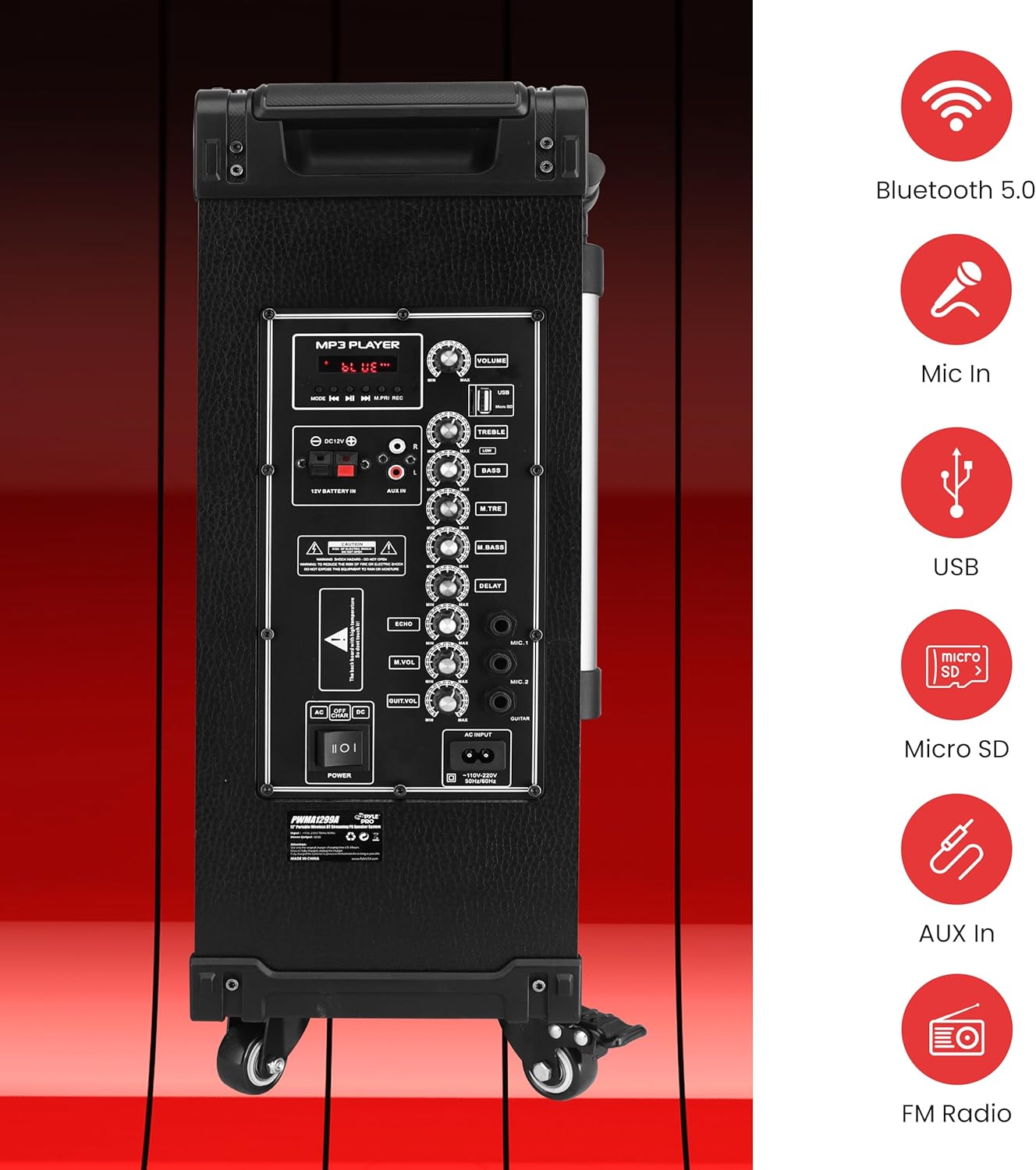
בילד: א דעטאַלירטע view of the speaker's rear control panel, illustrating the layout of the MP3 player section, volume and tone controls, microphone inputs, and auxiliary connections.
6.1 בלועטאָאָטה פּערינג
- מאַכט די רעדנער.
- Press the "MODE" button on the control panel or remote control until "BLUE" appears on the digital LED display, indicating Bluetooth mode.
- אויף אייער בלוטוט-פארשטארקטע דעווייס (סמאַרטפאָן, טאַבלעט, אאז"וו), אַקטיווירט בלוטוט און זוכט פֿאַר פֿאַראַן דעווייסעס.
- Select "PYLE" from the list of devices.
- Once paired, the speaker will emit a confirmation tone, and you can begin streaming audio wirelessly. The Bluetooth wireless range is approximately 33+ feet.
The Pyle speaker supports Bluetooth version 5.0 for stable wireless connections.
6.2 USB/מיקראָ SD שפּיל
- אַרײַנשטעלן אַ USB פלאַש דרייוו אָדער מיקראָ SD קאַרטל אין דעם קאָרעספּאָנדירנדיקן שפּאַלט אויף דער קאָנטראָל פּאַנעל.
- The speaker will automatically switch to USB/SD mode and begin playing MP3 files. If it does not switch automatically, press the "MODE" button to select USB/SD mode.
- Use the playback controls (Play/Pause, Next, Previous) on the control panel or remote control to manage your music.
6.3 עפעם ראַדיאָ
- Press the "MODE" button until "FM" appears on the digital LED display.
- Press and hold the Play/Pause button to initiate an automatic scan for FM stations. The speaker will save all found stations.
- Use the Next/Previous buttons to navigate through the saved FM stations.
6.4 מיקראָפאָן באַניץ
The system includes two wireless handheld microphones and a 1/4'' wired microphone input.
- ווירעלעסס מיקראָפאָן: Ensure the wireless microphones have fresh 'AA' batteries (2 per microphone). Power on the microphones. They should automatically connect to the speaker.
- ווייערד מיקראָפאָן: Plug a 1/4'' microphone into the "MIC IN" jack on the control panel.
- Adjust the "MIC VOL" knob to control the microphone volume.
- Use the "ECHO", "M.BASS" (Mic Bass), and "M.TRE" (Mic Treble) knobs to fine-tune the microphone's sound.
- The Karaoke Microphone Talk-Over Mode automatically lowers background music when you speak into the microphone.
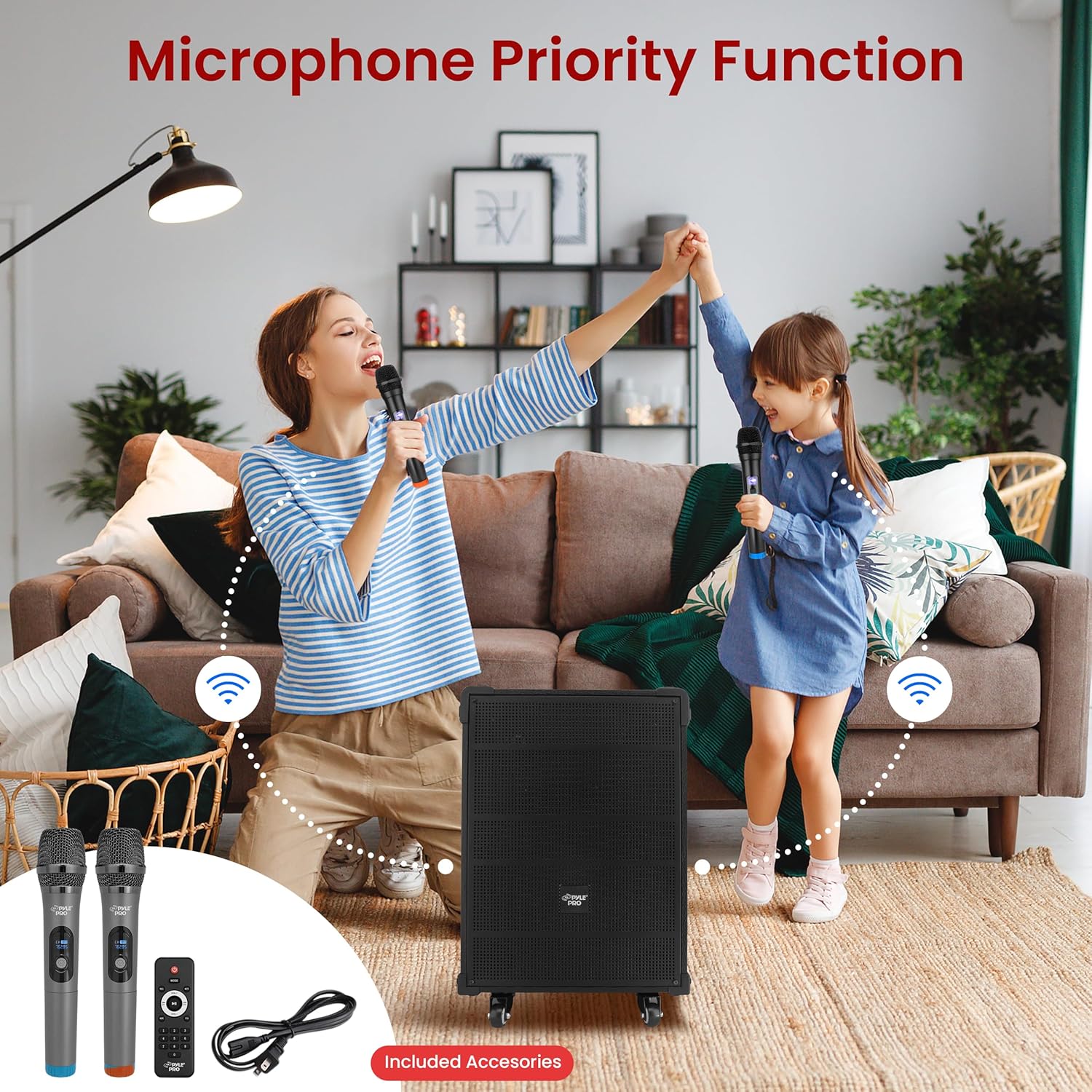
Image: Two individuals using the wireless microphones with the Pyle speaker system, demonstrating its use for vocal performances or public speaking.
6.5 Audio Recording Function
To record audio from the microphone or auxiliary input directly to a USB drive or Micro SD card:
- זייט זיכער אַז אַ USB דרייוו אָדער מיקראָ SD קאַרטל איז אַרײַנגעשטעלט אין רעדנער.
- Connect your microphone or auxiliary device.
- Press the "REC" button on the control panel or remote control to start recording.
- דריק "REC" נאכאמאל צו אפשטעלן די רעקארדירונג. די רעקארדירטע file וועט ווערן געראַטעוועט אויף די USB דרייוו אדער מיקראָ SD קאַרטל.
6.6 אוקס (3.5 מ״מ) אריינגאנג
Connect external audio devices (e.g., MP3 players, CD players) using a 3.5mm audio cable to the "AUX IN" jack on the control panel. Press the "MODE" button to select AUX input mode.
6.7 קאָנטראָל פּאַנעל איבערview
The rear control panel features various knobs and buttons for adjusting audio settings:
- באַנד: Master volume control for overall sound output.
- טרעבל: אַדזשאַסטירט די הויך-פרעקווענץ רעאַקציע.
- באַס: אַדזשאַסטירט די נידעריק-פרעקווענץ רעאַקציע.
- ECHO: קאָנטראָלירט דעם עקאָ־עפֿעקט פֿאַר מיקראָפֿאָנען.
- MIC VOL: אַדזשאַסטירט דעם באַנד פון פֿאַרבונדענע מיקראָפאָנען.
- M.BASS: Adjusts the bass for microphones.
- M.TRE: Adjusts the treble for microphones.
- פאַרהאַלטן: Controls the delay effect for microphones.
7. וישאַלט
- רייניקונג: ניצט אַ ווייכע, טרוקענע שטאָף צו רייניקן די אויסערלעכע זייט פון דעם רעדנער. ניצט נישט קיין שרײַבנדיקע רייניגערס אדער סאָלווענטן.
- באַטערי זאָרגן: To prolong battery life, fully charge the unit before storing it for extended periods. Avoid completely draining the battery frequently.
- סטאָרידזש: האַלט דעם רעדנער אין אַ קיל, טרוקן אָרט אַוועק פון דירעקט זונשייַן און עקסטרעמע טעמפּעראַטורן.
8. טראָובלעשאָאָטינג
| פּראָבלעם | מעגלעך סיבה | לייזונג |
|---|---|---|
| קיין מאַכט | Battery is depleted; Power cable not connected; Power switch is off. | Charge the battery; Ensure power cable is securely connected and plugged into a live outlet; Turn the power switch to "ON". |
| קיין געזונט רעזולטאַט | Volume is too low; Incorrect input mode selected; Audio cable not connected properly. | Increase the master volume; Press "MODE" to select the correct input (Bluetooth, USB, SD, FM, AUX); Check audio cable connections. |
| בלועטאָאָטה איז נישט קאַנעקטינג | Speaker not in Bluetooth mode; Device too far; Device already connected to another speaker. | Ensure speaker is in Bluetooth mode ("BLUE" on display); Move device closer to speaker; Disconnect from other Bluetooth devices. |
| מיקראָפאָן טוט נישט אַרבעטן | Microphone volume too low; Wireless microphone batteries depleted; Wired microphone not connected. | Increase "MIC VOL" knob; Replace 'AA' batteries in wireless microphones; Ensure wired microphone is securely plugged into "MIC IN". |
If you experience issues with charging, ensure the power cable is firmly connected to both the speaker and a working power outlet. If the issue persists, consult the support section.
Video: This video demonstrates the Pyle 12'' Portable Wireless Bluetooth Speaker system, showcasing its features and portability. It provides a visual overview of the product's design and functionality.
9. ספּעסאַפאַקיישאַנז
| שטריך | דעטאַל |
|---|---|
| מאָדעל נומער | PWMA1299A |
| מאַקסימום מאַכט רעזולטאַט | 800 וואט |
| געזונט סיסטעם | 12'' Mid-Range Speaker + 3'' Tweeter |
| ימפּידאַנס | 4 Ohm |
| S/N פאַרהעלטעניש | 60dB |
| בלועטאָאָטה ווערסיע | 5.0 |
| בלועטאָאָטה ווירעלעסס קייט | 33'+ פֿוס |
| געבויט-אין קריקאָנלאָדלעך באַטערי | 12V/7AH Lead-Acid Battery |
| באַטערי לעבן | אַרויף צו 3+ שעה |
| מאַכט צושטעלן | 120/240 וו |
| Mic Nominal Current Drain | <100 מאַה |
| Microphone Battery Requirement | (2) x 'AA' Batteries (Each) |
| פּראָדוקט דימענשאַנז (L x W x H) | 18.50'' x 11.22'' x 25.59'' אינטשעס |
| פּונקט וואָג | 28.3 פונט |
| UPC | 842893147017 |
10. וואָראַנטי און שטיצן
Pyle products are designed for reliability and performance. For warranty information, technical support, or service inquiries, please refer to the official Pyle webזייטל אדער קאנטאקט זייער קאסטומער סערוויס דעפארטמענט. האלט אייער קויף קוויטל אלס באווייז פון קויפן פאר גאראנטיע קליימס.
פֿאַר נאָך רעסורסן און פּראָדוקט אינפֿאָרמאַציע, באַזוכט די פּייל סטאָר אויף עמעזאָן.


