1. הקדמה
Thank you for choosing the ErGear Height Adjustable Electric Standing Desk. This desk is designed to enhance your workspace with dependable, scientifically-designed ergonomic features, promoting a healthier and more productive work environment. It allows for seamless transitions between sitting and standing positions, offering optimal comfort and productivity throughout your day.
This manual provides essential information for the safe and efficient use of your new electric standing desk, including setup, operation, maintenance, and troubleshooting.
2. זיכערקייַט אינפֿאָרמאַציע
ווארענונג: ביטע ליינט אלע זיכערהייט אינסטרוקציעס קערפול איידער איר שטעלט עס צונויף און ניצט עס. אויב איר פאלגט נישט די אינסטרוקציעס קען דאס פירן צו שאָדן אדער שאָדן צום פּראָדוקט.
- The desk has a maximum weight limit of 176 לבס (80 קג). Do not exceed this weight capacity.
- Proper assembly is required for stability and safety. Ensure all screws and fasteners are securely tightened.
- If the desk is used in an environment with children, consider anchoring the desk to the wall to prevent tipping.
- Keep hands and objects clear of the lifting mechanism during operation to prevent pinching or damage.
- Ensure all cables connected to devices on the desk have sufficient slack to accommodate height adjustments.
- זיצט נישט אדער שטייט נישט אויפן טיש.
- Do not disassemble or modify the motor or control box. Contact customer support for any repairs.
3. פּעקל אינהאַלט
Please verify that all components are present and undamaged. A detailed list of all parts and hardware is provided in the separate installation manual included with your purchase. Key components include:
- Desktop (Two-Piece)
- Lifting Columns (Legs)
- קאָנטראָל באָקס
- כאַנדסעט קאָנטראָללער
- מאַכט אַדאַפּטער און קאַבלע
- Dual Cable Access Holes
- סטאָרידזש כוקס
- פֿאַרזאַמלונג האַרדווער און מכשירים
4. סעטאַפּ און אַסעמבלי
The ErGear Electric Standing Desk is designed for straightforward assembly. Most users report an average assembly time of 30 minutes. For detailed, step-by-step instructions, please refer to the dedicated Installation Manual (PDF) provided with your product or available online via the link in the Support section.
שליסל פֿאַרזאַמלונג עצות:
- לייג אויס אַלע קאָמפּאָנענטן און האַרדווער איידער איר אָנהייבט.
- Follow the numbered steps in the installation manual precisely.
- Ensure all connections are secure before plugging in the desk.
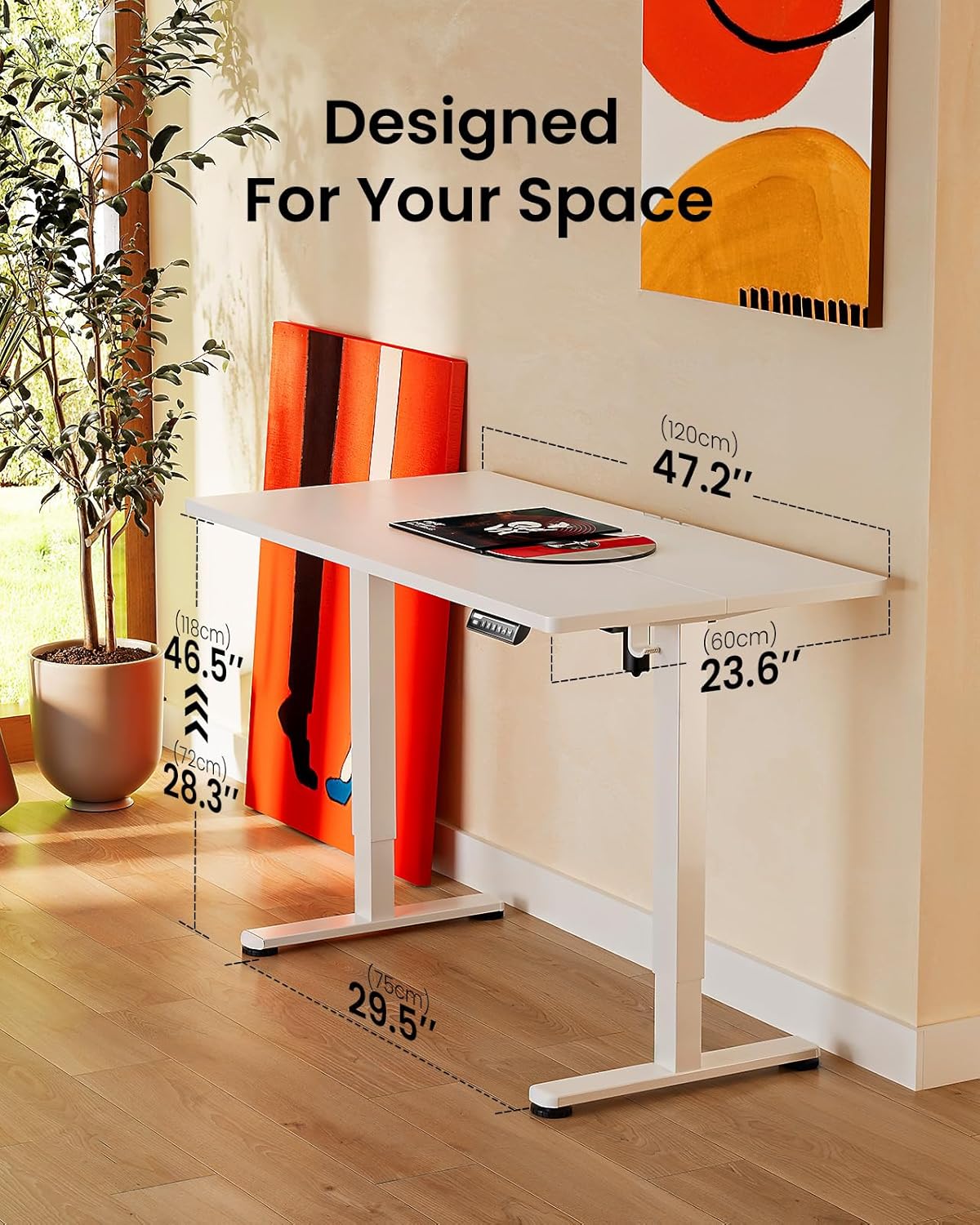
Image: ErGear standing desk with dimensions showing 47.2 inches width, 23.6 inches depth, and height adjustable from 28.3 to 46.5 inches. This illustrates how the desk is designed to fit various spaces.

Image: Diagram illustrating the simplified assembly process of the ErGear standing desk, highlighting an average assembly time of 30 minutes.
5. אַפּערייטינג ינסטרוקטיאָנס
Your ErGear Electric Standing Desk features an intuitive control panel for easy height adjustment and memory settings.
הייך אַדזשאַסטמאַנט
The desk's height can be freely adjusted from 28.35 אינטשעס (72 ס״מ) ביז 46.79 אינטשעס (118.8 ס״מ). Use the up and down arrows on the control panel to manually adjust the desk to your desired height. The motor provides powerful and smooth lifting performance.
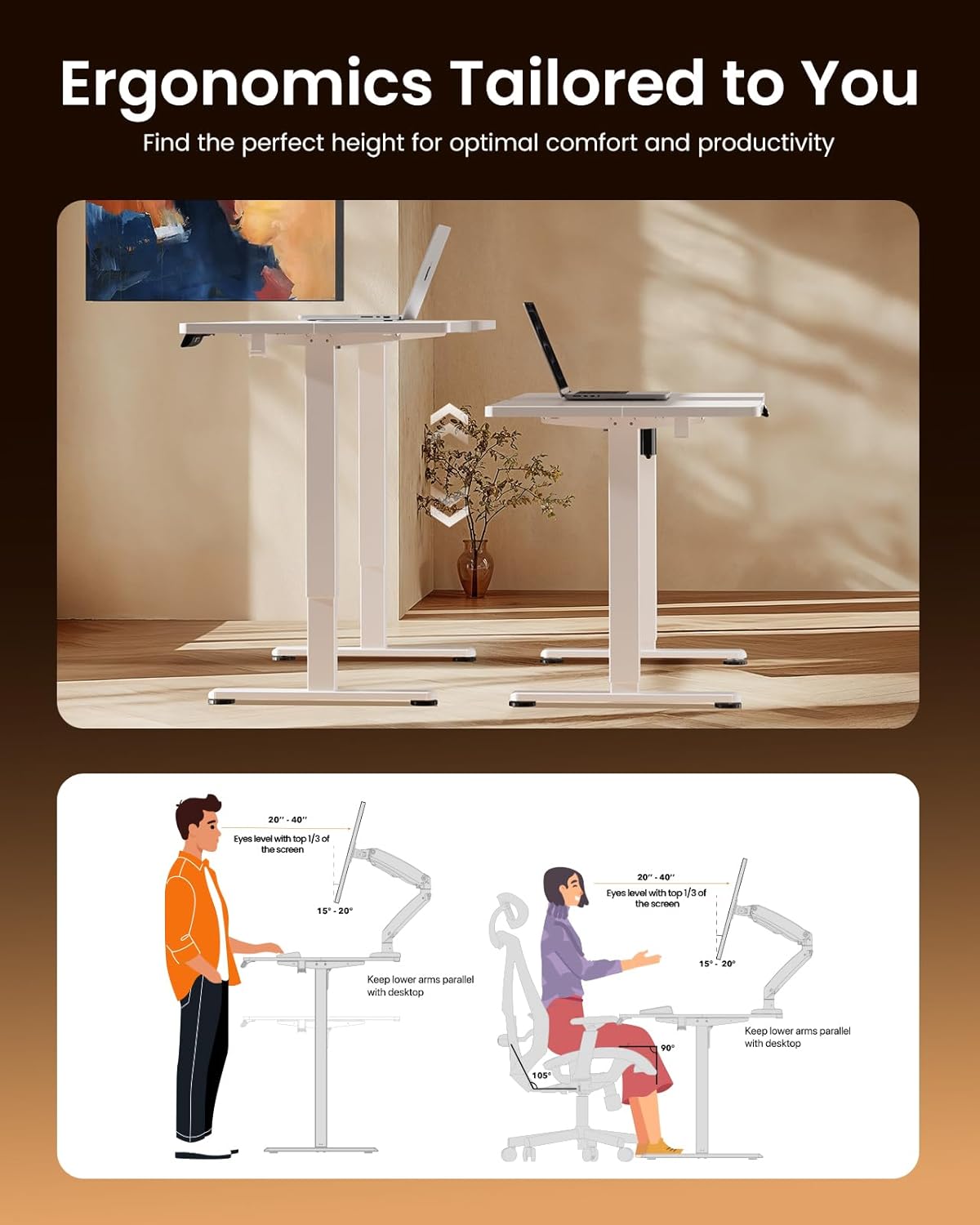
Image: Illustrations demonstrating proper ergonomic postures for both sitting and standing positions when using the ErGear desk, emphasizing ideal screen height and arm placement for comfort and productivity.
זכּרון פּרעסעץ
The control panel includes three memory preset buttons (1, 2, and 3). These allow you to save your favorite sitting and standing heights for quick and convenient adjustment.
- צו ראַטעווען אַ הייך: Adjust the desk to your desired height using the up/down arrows. Press the 'M' button (or 'Set' button, if present) followed by the desired number button (1, 2, or 3). The display will confirm the setting is saved.
- צו געדענקען א הייך: Simply press the corresponding number button (1, 2, or 3). The desk will automatically move to the saved height.

Image: A person sitting on the edge of the ErGear standing desk, illustrating its robust construction and ability to smoothly lift loads up to 176 lbs with ease and reliability.
6. וישאַלט
כדי צו זיכער מאַכן די לאַנגלעבעדיקייט און אָפּטימאַלע פאָרשטעלונג פון דיין ErGear עלעקטריש שטייענדיק טיש, נאָכפאָלגן די פּשוט וישאַלט גיידליינז:
- רייניקונג: The desk surface is easy to clean. Use a soft, damp cloth with a mild cleaner to wipe down the desktop and frame. Avoid abrasive cleaners or harsh chemicals that could damage the finish.
- רעגולער טשעקס: קאָנטראָלירט פּעריִאָדיש אַלע שרויפן און פֿאַרשטאַרקער צו זיכער מאַכן אַז זיי בלייבן פֿעסט. פֿעסטשטײַערט ווידער אויב נייטיק.
- קאַבלע פאַרוואַלטונג: Utilize the integrated cable access holes and storage hooks to keep cables organized and prevent tangling, especially during height adjustments.
- מאָטאָר קער: The uprated motor is designed for long-term operation (tested 50,033 times). No special maintenance is required for the motor itself, but avoid overloading the desk beyond its 176 lbs capacity.
7. טראָובלעשאָאָטינג
If you encounter any issues with your ErGear Electric Standing Desk, please refer to the following common troubleshooting tips:
- שרייַבטיש ניט מאָווינג: Check if the power cable is securely plugged into both the desk and the wall outlet. Ensure there are no obstructions preventing the desk from moving freely.
- אומגלייכע באַוועגונג/וואָקלען: Verify that the desk is assembled correctly and all fasteners are tightened. Ensure the desk is placed on a flat, stable surface.
- קאָנטראָל פּאַנעל ניט ריספּאַנדינג: Unplug the desk from the power outlet for 30 seconds, then plug it back in. This can reset the control system.
- ומגעוויינטלעך נויזיז: A slight humming sound during operation is normal. If you hear loud grinding or unusual noises, discontinue use and contact customer support. One user reported a loud coil whining noise from the power adapter; if this occurs, contact support for a replacement.
For more complex issues or if the problem persists, please contact ErGear Customer Support.
8. ספּעסאַפאַקיישאַנז
| שטריך | באַשרייַבונג |
|---|---|
| סאָרט | ErGear |
| פּראָדוקט דימענשאַנז (ד רענטגענ וו רענטגענ ה) | 24"ד רענטגענ 48"וו רענטגענ 28.35"ה |
| קאָליר | ווייַס |
| סטייל | מאָדערן |
| באַזע מאַטעריאַל | אַללוי סטיל |
| ענדיקן טיפּ | פּאַינטעד |
| ספּעציעלע שטריך | Height adjustable electric standing desk |
| אָרט טיפּ | אָפיס |
| רעקאָממענדעד ניצט | ארבעטן |
| מאַונטינג טיפּ | שטאָק בארג |
| עלטער ראַנגע באַשרייַבונג | דערוואַקסן |
| פּראָדוקט גראַד | ניו |
| פאַבריקאַנט | ErGear |
| נומער הייך | 46.46 אינטשעס |
| שפּיץ מאַטעריאַל טיפּ | ענדזשאַנירד האָלץ |
| מעבל פוס מאַטעריאַל | אַללוי סטיל |
| ליפטינג מעקאַניזאַם | עלעקטריק |
| נומער פון הייך שטעלעס | 3 (זכּרון פּרעסעטס) |
| פאָרעם | רעקטאַנגגיאַלער |
| דעסק פּלאַן | שטייענדיק דעסק |
| פוס סטייל | האַרטע שטאָל ראַם |
| Top קאָליר | ווייַס |
| באַזע קאָליר | ווייַס |
| טאַבלעטאָפּ גרעב | 0.67 אינטשעס |
| מאַקסימום הייך | 46.46 אינטשעס |
| מינימום הייך | 28.35 אינטשעס |
| מאַקסימום וואָג רעקאָממענדאַטיאָן | 176 פונט |
| פארלאנגט אַסעמבלי | יא |
9. וואָראַנטי און שטיצן
ErGear stands behind the quality of its products. Your electric standing desk comes with the following warranty coverage:
- 5-יאָר שוץ: On desktop and desk frame.
- 2-יאָר שוץ: On motors and electrical components.
For any questions, technical assistance, or warranty claims, please contact ErGear Customer Support. You can also find additional resources, including the full installation manual, on the official ErGear brand store or by visiting the user guide link below:
אפיציעלע באַניצער גייד (PDF): אראפקאפיע דאָ
Visit the ErGear Store: ErGear Official Store


