1. הקדמה
Thank you for choosing the KAIDI KD-771 TWS Smart Touch V5.1 Wireless Earbuds. This manual provides essential information for the proper use, setup, and maintenance of your new earbuds. Please read it carefully before use and retain it for future reference.
פּעקל אינהאַלט:
- 1 Pair of KAIDI KD-771 Wireless Earbuds
- 1 טשאַרדזשינג קאַסע
- 1 USB טשאַרדזשינג קאַבל (טיפּ-C)
- 1 באַניצער מאַנואַל

Image 1.1: KAIDI KD-771 Wireless Earbuds with their retail packaging.
2. זיכערקייַט אינפֿאָרמאַציע
- Do not disassemble, repair, or modify the product. This may cause fire, electronic breakdown, or complete product damage.
- האַלט דעם אַפּאַראַט אַוועק פון עקסטרעמע טעמפּעראַטורן, דירעקט זונשייַן און הויכער הומידיטי.
- Avoid exposing the earbuds to water or other liquids. While rated IPX4 for splash resistance, they are not waterproof and should not be submerged.
- ניצט נאָר דעם צוגעשטעלטן טשאַרדזשינג קאַבל אָדער אַ סערטיפיצירטן עקוויוואַלענט.
- ניצט נישט די אויערקנעפּלעך מיט צו הויכע קולות פאר לענגערע צייטן כדי צו פארמיידן שאדן צו די הערן.
- האַלטן אויס פון דערגרייכן פון קינדער.
3. פּראָדוקט איבערview
The KAIDI KD-771 earbuds feature a compact design with intuitive touch controls and a portable charging case.

Image 3.1: The KAIDI KD-771 Wireless Earbuds alongside their closed charging case.

בילד 3.2: דעטאַלירט view of the earbuds and charging case, highlighting the USB Type-C charging port and earbud design.
קאַמפּאָונאַנץ:
- עאַרבודז: Left and Right earbuds with Smart Touch sensors.
- טשאַרדזשינג קאַסע: Stores and charges the earbuds. Features a battery indicator LED and a USB Type-C charging port.
- מיקראָפאָן: אינטעגרירט אין יעדן אויערקנעפל פאר רופן.
4. סעטאַפּ
4.1 אויפלאָדן די אויערקנעפּלעך און קעסטל
פארן ערשטן באַנוץ, לאָדן די אויערקנעפּלעך און די טשאַרדזשינג קעסטל גאָר אויף.
- לייגט די אויערן-קנעפּלעך אין דעם טשאַרדזשינג קעסטל. מאַכט זיכער אַז זיי זענען ריכטיק אײַנגעזעצט.
- Connect the USB Type-C charging cable to the charging port on the case and the other end to a USB power source (e.g., wall adapter, computer).
- דער LED אינדיקאַטאָר אויף דער טשאַרדזשינג קעסטל וועט זיך אָנצינדן צו ווײַזן דעם טשאַרדזשינג סטאַטוס. אַמאָל גאָר אָנגעלאָדן, קען דער אינדיקאַטאָר טוישן קאָליר אָדער זיך אויסלעשן.
- A full charge provides approximately 4 hours of earbud usage, with additional charges available from the case.
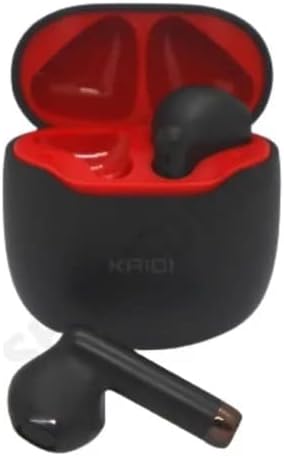
Image 4.1: Earbuds placed inside the charging case, ready for charging.
4.2 פּערינג מיט אַ מיטל
The earbuds use Bluetooth V5.1 for a stable and low-latency connection.
- מאַכט אויף: עפֿנט דעם טשאַרדזשינג קעסטל. די אויערקנעפּלעך וועלן זיך אויטאָמאַטיש אָנצינדן און אַרײַן אין פּערינג מאָדע. איר קענט הערן אַן אָפֿענעם פּראָמפּט.
- אַקטאַווייט בלועטאָאָטה: On your smartphone or other Bluetooth-enabled device, go to the Bluetooth settings and ensure Bluetooth is enabled.
- אויסקלייַבן דיווייס: In the list of available Bluetooth devices, locate and select "KD-771".
- באַשטעטיקן קשר: אַמאָל פארבונדן, וועט איר הערן אַ באַשטעטיקונג גערויש, און די אויערקנעפּלעך וועלן זיין גרייט פֿאַר נוצן.
- אָטאַמאַטיק ריקאַנעקשאַן: After initial pairing, the earbuds will automatically connect to the last paired device when removed from the case, provided Bluetooth is active on the device.
5. אַפּערייטינג ינסטרוקטיאָנס
The KAIDI KD-771 earbuds feature Smart Touch controls for easy management of audio and calls.
5.1 קלוגע ריר קאָנטראָלס
- שפּיל / פּויזע: איין צאַפּן אויף יעדער עאַרבוד.
- ווייַטער שפּור: צאַפּ צוויי מאָל אויף די רעכטע אויערקנעפּל.
- פֿריִערדיקע שפּור: צאַפּ צוויי מאָל אויף די לינקע אויערקנעפּל.
- ענטפֿערן / סוף רופן: איין צאַפּ אויף יעדן אויערקנעפּל בעת אַן אינקאַמינג רוף אָדער אַקטיוון רוף.
- אָפּוואַרפן רופן: דריק און האלט איינע פון די אויערקנעפל פאר 2 סעקונדעס בעת אן אנקומענדיקן רוף.
- אַקטאַווייט קול אַססיסטאַנט: דריק דריי מאָל אויף יעדן אויערקנעפּעל (למשל, סירי, גוגל אַסיסטאַנט).
- באַנד קאָנטראָל: Volume adjustments must be made directly on the connected device (smartphone, tablet, etc.). The earbuds do not have integrated volume controls.
5.2 מאַכט אויף / אַוועק
- מאַכט אויף: Open the charging case, or press and hold the touch area on both earbuds for 3 seconds if they are outside the case and off.
- מאַכט אַוועק: לייגט די אויערקנעפּלעך צוריק אין די טשאַרדזשינג קעסטל און מאַכט צו דעם דעקל. אַנדערש, דריקט און האַלט די ריר-געגנט אויף ביידע אויערקנעפּלעך פֿאַר 5 סעקונדעס.
6. וישאַלט
6.1 רייניקונג
- ווישט די אויערקנעפּלעך און די טשאַרדזשינג קעסטל מיט אַ ווייכן, טרוקענעם, לינט-פֿרייע שטאָף.
- ניצט נישט קיין שרײַבנדיקע רייניגער, אַלקאָהאָל, אדער כעמישע סאָלווענטן.
- זיכער מאַכן אַז די טשאַרדזשינג קאָנטאַקטן אויף ביידע אויערקנעפּלעך און קעסטל זענען ריין און פריי פון שמוץ.
6.2 סטאָרידזש
- ווען נישט אין באַנוץ, לייגט די אויערן-קנעפּלעך אין זייער טשאַרדזשינג קעסטל צו באַשיצן זיי און האַלטן זיי טשאַרדזשד.
- קראָם אין אַ קיל, טרוקן אָרט, אַוועק פון דירעקט זונשייַן און עקסטרעם טעמפּעראַטורעס.
6.3 וואַסער קעגנשטעל
The KAIDI KD-771 earbuds are rated IPX4, meaning they are resistant to splashes of water from any direction. This makes them suitable for workouts or light rain. However, they are not designed for submersion in water, showering, or swimming. Avoid exposing them to heavy rain or direct streams of water.
7. טראָובלעשאָאָטינג
| פּראָבלעם | מעגלעך סיבה | לייזונג |
|---|---|---|
| די אויערקנעפּלעך גייען נישט אן. | נידעריק באַטאַרייע. | לאָדט אויף די אויערקנעפּלעך און די טשאַרדזשינג קעסטל גאָר. |
| די אויערקנעפּלעך פאַרבינדן זיך נישט מיטן אַפּאַראַט. | Bluetooth is off on device; earbuds not in pairing mode; device list cluttered. | Ensure Bluetooth is on. Place earbuds in case, close, then open to re-enter pairing mode. Forget "KD-771" on your device and try pairing again. |
| קיין קול פון די אויערקנעפלעך. | די קול איז צו נידעריג; די אויערקנעפּלעך זענען נישט פארבונדן; די מעדיע איז פּויזירט. | Increase volume on your device. Check Bluetooth connection. Ensure media is playing. |
| איין אויערקנעפל הערט נישט קיין קול. | Earbuds not properly synced; low battery on one earbud. | Place both earbuds back in the case, close the lid, then open again. Ensure both earbuds are charged. |
| די טשאַרדזשינג קעיס טשאַרדזשט זיך נישט. | דעפעקטיווער קאַבל אָדער מאַכט מקור. | Try a different USB Type-C cable and/or power adapter. Ensure connections are secure. |
8. ספּעסאַפאַקיישאַנז
- מאָדעל נאָמען: KD-771
- קאַנעקטיוויטי טעכנאָלאָגיע: דראָטלאָז (בלוטוט V5.1)
- ווירעלעסס קאָמוניקאַציע טעכנאָלאָגיע: בלועטאָאָטה
- קאָנטראָל אופֿן: ריר
- ספּעציעלע פֿעיִקייטן: Volume control (via device), Lightweight, Microphone included, IPX4 Splash Resistant
- אויער אָרט: אין אויער
- מאַטעריאַל: פּלאַסטיק
- אָפטקייַט ענטפער: 20 Hz - 20 kHz (implied from 20000 Hz spec)
- Sound Responsiveness: 115 דעציבעלן
- ימפּעדאַנסע: 32 Ohm
- אָפטקייַט קייט: 2.400 - 2.485 גיגאהערץ
- מאַכט מקור: באַטערי
- Average Battery Life (Earbuds): 4 שעה
- באַטאַרייע זאַץ: ליטהיום-יאָן
- טשאַרדזשינג פּאָרט: וסב טיפּ-C
- פּראָדוקט וואָג: 100 ג
- ANATEL סערטיפיקאציע: 18583-21-14467
9. וואָראַנטי און שטיצן
9.1 פאַבריקאַנט'ס גאַראַנטיע
דאָס פּראָדוקט קומט מיט אַ פאַבריקאַנט'ס וואָראַנטי פון 3 חדשים פֿון דעם קויפֿדאַטום. די וואָראַנטי דעקט פֿאַבריקאַציע חסרונות אונטער נאָרמאַל נוצן. עס דעקט נישט שעדיקן געפֿירט דורך אומרעכט נוצן, אַקסאַדענטן, נישט-אָטעריזירטע מאָדיפֿיקאַציעס, אָדער נאָרמאַל טראָגן און טרער.
9.2 קונה שטיצן
For technical assistance, warranty claims, or further inquiries, please contact your retailer or the KAIDI customer support channel provided at the point of purchase. Please have your proof of purchase and product model number (KD-771) ready when contacting support.