1. איבערview
The Hoco ES61 Manner Sports Wireless Bluetooth Headset is designed for active lifestyles, offering a blend of comfort, long battery life, and versatile connectivity. This manual provides detailed instructions to help you get the most out of your headset.
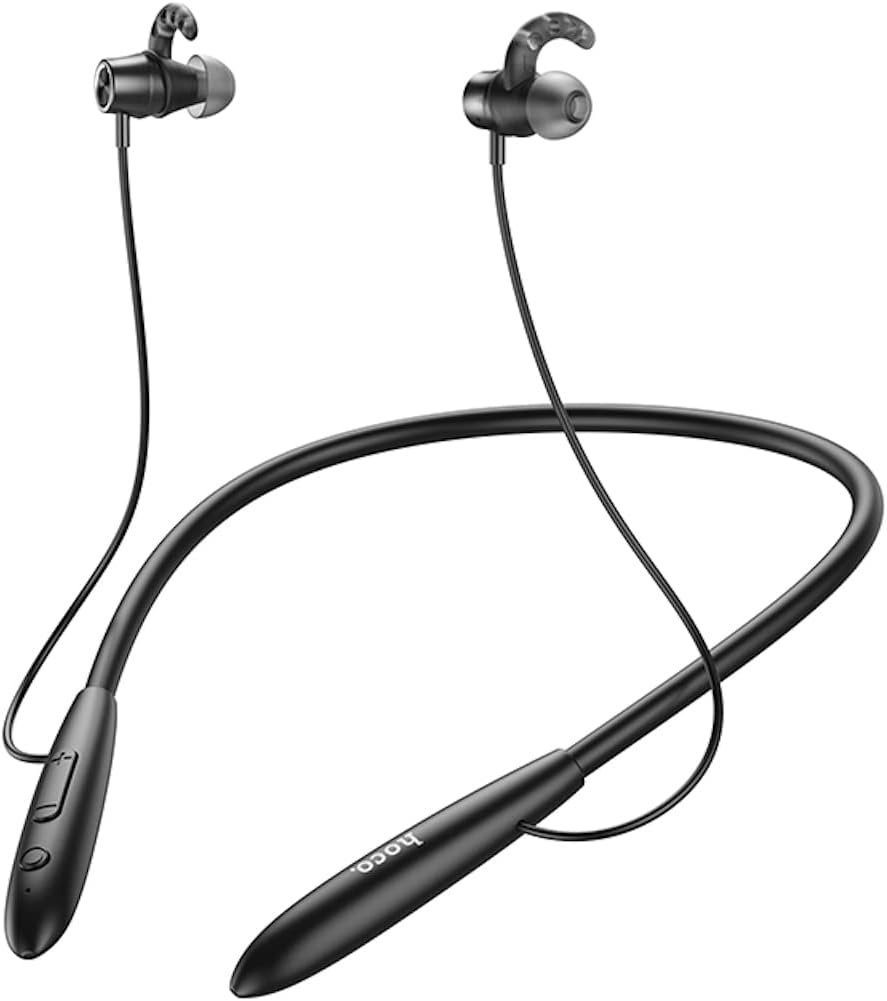
בילד: פראָנט view of the Hoco ES61 headset, showcasing its neckband design and in-ear earbuds.
2. פּראָדוקט פֿעיִקייטן
- בלועטאָאָטה 5.1 קאַנעקטיוויטי: Equipped with JL AC7006 chip for stable and efficient wireless connection.
- עקסטענדעד באַטאַרייע לעבן: Features a 200mAh battery, providing up to 20 hours of music/talk time and an impressive 330 hours of standby time.
- שנעל טשאַרדזשינג: גאָר טשאַרדזשיז אין בעערעך 2 שעה.
- לייטווייט און באַקוועם פּלאַן: The earphone cord measures 85cm in length, and the headset weighs only 22g, ensuring comfort during extended wear.
- ווערסאַטאַל פּלייבאַק אָפּציעס: Supports Bluetooth audio streaming and TF card playback (up to 32GB) for direct music listening.
- Multi-language Voice Prompts: Offers voice prompts in both Chinese and English for user convenience.
- ברייט קאַמפּאַטאַבילאַטי: Compatible with a broad range of devices including iPhone, Samsung, OnePlus, Huawei, Xiaomi, and Oppo smartphones.

בילד: נאָענט-אַרויף view of the Hoco ES61 headset, highlighting the integrated TF card slot for direct music playback.
ווידעא: אן אפיציעלע פראדוקט ווידעא ווייזונגasing the Hoco ES61 Bluetooth Headset's features, including its 20-hour battery life, voice prompts, and compatibility with iOS and Android devices.
3. סעטאַפּ גייד
3.1 אויפלאָדן דעם כעדסעט
Before first use, fully charge the headset. Use a standard USB charger (not included) to connect the charging port on the headset to a power source.
- The LED indicator will typically show a red light during charging.
- Once fully charged (approximately 2 hours), the LED indicator will turn blue or off.
3.2 בלועטאָאָטה פּערינג
To connect your Hoco ES61 headset to a Bluetooth-enabled device:
- מאַכן זיכער אַז די כעדסעט איז אויסגעדרייט אַוועק.
- Press and hold the multi-function button (usually the power button) for approximately 3-5 seconds until the LED indicator flashes red and blue alternately. This indicates pairing mode.
- אויף אייער דעווייס (סמאַרטפאָן, טאַבלעט, אאז"וו), אַקטיווירט בלועטוט און זוכט פֿאַר פֿאַראַן דעווייסעס.
- Select "Hoco ES61" from the list of found devices.
- Once connected, the LED indicator on the headset will typically flash blue slowly or turn off, and you will hear a voice prompt confirming the connection.
3.3 TF קאַרטל פּלייבאַק
The Hoco ES61 supports direct music playback from a TF (MicroSD) card.
- Carefully insert a TF card (up to 32GB) with your music files into the designated TF card slot on the headset.
- The headset will automatically switch to TF card playback mode if a card is detected and contains playable audio files.
- Use the headset controls to manage playback (play, pause, skip tracks).
4. אַפּערייטינג ינסטרוקטיאָנס
4.1 יקערדיק קאָנטראָלס
| קנעפּל / קאַמף | פֿונקציע |
|---|---|
| מולטי-פונקציע קנעפּל (MFB) | מאַכט אויף/אויס, שפּילן/פּויזע, ענטפֿערן/ענדיגן רוף |
| באַנד אַרויף (+) | פֿאַרגרעסערן די באַנד, נעקסטע ליד (לאַנג דריקן) |
| באַנד אַראָפּ (-) | פֿאַרקלענערן די באַנד, פֿריִערדיקע ליד (לאַנג דריקן) |
4.2 מוזיק פּלייבאַק
- שפּיל / פּויזע: קורץ דריקן די MFB.
- ווייַטער שפּור: לאַנג דריקן די באַנד אַרויף (+) קנעפּל.
- פֿריִערדיקע שפּור: לאַנג דריקן די באַנד אַראָפּ (-) קנעפּל.
- באַנד אַדזשאַסטמאַנט: דריק קורץ די באַנד אַרויף (+) אָדער באַנד אַראָפּ (-) קנעפּלעך.
4.3 רוף פאַרוואַלטונג
- ענטפֿערן / סוף רופן: Short press the MFB during an incoming call.
- אָפּוואַרפן רופן: Long press the MFB during an incoming call.
- ריאַל די לעצטע נומער: Double-click the MFB when not on a call.

Image: The Hoco ES61 headset resting on a smartphone, illustrating its use with mobile devices for music and calls.
5. וישאַלט און קער
- האַלט די כעדסעט טרוקן. שטעלט עס נישט אויס צו עקסטרעמע טעמפּעראַטורן אָדער הומידיטי.
- Clean the earbuds and charging port regularly with a soft, dry cloth to prevent dust and debris buildup.
- ויסמיידן ניצן האַרב קעמיקאַלז אָדער אַברייסיוו קלינערז.
- סטאָר די כעדסעט אין אַ קיל, טרוקן אָרט ווען ניט אין נוצן.
- פרובירט נישט צו צענעמען אדער מאדיפיצירן דעם כעדסעט, ווייל דאס וועט בטל מאכן די גאראנטיע און קען שאפן שאדן.

Image: The Hoco ES61 headset shown with different sizes of silicone ear tips, emphasizing the importance of proper fit for comfort and sound quality.
6. טראָובלעשאָאָטינג
6.1 Headset Not Turning On
- Ensure the headset is fully charged. Connect it to a charger and check the LED indicator.
- Press and hold the multi-function button for a few seconds to power on.
6.2 קען נישט פארבינדן מיטן אפאראט
- Make sure the headset is in pairing mode (LED flashing red and blue alternately).
- זיכער מאַכן אַז בלועטוט איז ענייבאַלד אויף דיין מיטל און עס איז אין דער ראַנגע (געווענליך 10 מעטער).
- Forget/delete "Hoco ES61" from your device's Bluetooth list and try pairing again.
- ריסטאַרט ביידע די כעדסעט און דיין דעווייס.
6.3 קיין קלאַנג אָדער נידעריקע באַנד
- פֿאַרגרעסערט דעם קול אויף ביידע די כעדסעט און אייער פֿאַרבונדענעם מיטל.
- זיכער מאַכן אַז די כעדסעט איז ריכטיק פארבונדן צו דיין מיטל.
- אויב איר ניצט אַ TF קאַרטל, זאָרגט אַז די קאַרטל איז ריכטיק אַרײַנגעשטעלט און ענטהאַלט שפּילבארע אַודיאָ. files.
- Check for any obstructions in the earbud nozzles and clean if necessary.
6.4 קורצע באַטעריע לעבן
- פאַרזיכערן אַז די כעדסעט איז גאָר באפוילן איידער נוצן.
- Battery life can vary based on volume level and usage patterns.
- ויסמיידן יקספּאָוזינג די באַטאַרייע צו עקסטרעם טעמפּעראַטורעס.
7. ספּעסאַפאַקיישאַנז
| שטריך | דעטאַל |
|---|---|
| בלועטאָאָטה ווערסיע | 5.1 |
| בלועטאָאָטה טשיפּ | JL AC7006 |
| באַטאַרייע קאַפּאַציטעט | 200 מאַה |
| טשאַרדזשינג צייט | בעערעך. 2 שעה |
| מוזיק / טאַלק צייט | אַרויף צו 20 שעה |
| סטאַנדביי צייט | אַרויף צו 330 שעה |
| Earphone Cord Length | 85 סענטימעטער |
| וואָג | 22ג |
| TF קאַרטל שטיצע | יאָ, אַרויף צו 32 גיגאבייט |
| קול פּראַמפּס | כינעזיש און ענגליש |
| קאַמפּאַטאַבילאַטי | iPhone, Samsung, OnePlus, Huawei, Xiaomi, Oppo |
8. וואָראַנטי און שטיצן
For warranty information and customer support, please refer to the product packaging or contact your retailer. Keep your purchase receipt as proof of purchase for any warranty claims.


