1. הקדמה
This manual provides comprehensive instructions for the Naxa NDS-6501 Portable Dual 6.5-inch Bluetooth Speaker. Please read this manual thoroughly before operating the device to ensure proper use and to maximize your experience. Keep this manual for future reference.
2. פּעקל אינהאַלט
באַשטעטיקט אַז אַלע זאכן וואָס זענען אויסגערעכנט אונטן זענען אַרייַנגערעכנט אין אייער פּעקל:
- Naxa NDS-6501 Portable Bluetooth Speaker
- ווייערד מיקראָפאָן
- וסב טשאַרדזשינג קאַבלע
- באַניצער מאַנואַל (דעם דאָקומענט)
3. פּראָדוקט פֿעיִקייטן
The Naxa NDS-6501 speaker offers a range of functionalities designed for portable audio entertainment:
- Dual 6.5-inch full-frequency speakers for clear audio output.
- Bluetooth connectivity for wireless audio streaming from compatible devices.
- Integrated multi-color flame lights with various lighting effects.
- True Wireless Stereo (TWS) function for connecting two NDS-6501 speakers wirelessly.
- Wired microphone input for vocal use.
- Built-in FM radio tuner for local station access.
- USB port and MicroSD/TF card slot for playing audio fileס פון עקסטערנעם סטאָרידזש.
- Auxiliary (3.5mm) input for wired audio connections.
- Rechargeable battery providing up to 2 hours of playback time.
4. קאָנטראָלן און פּאָרטן
The speaker features various controls and input/output ports. A typical layout includes a power button, volume controls, mode selection, playback controls (play/pause, skip tracks), microphone input, USB port, MicroSD card slot, auxiliary input, and a charging port. Refer to the diagram below for specific locations.
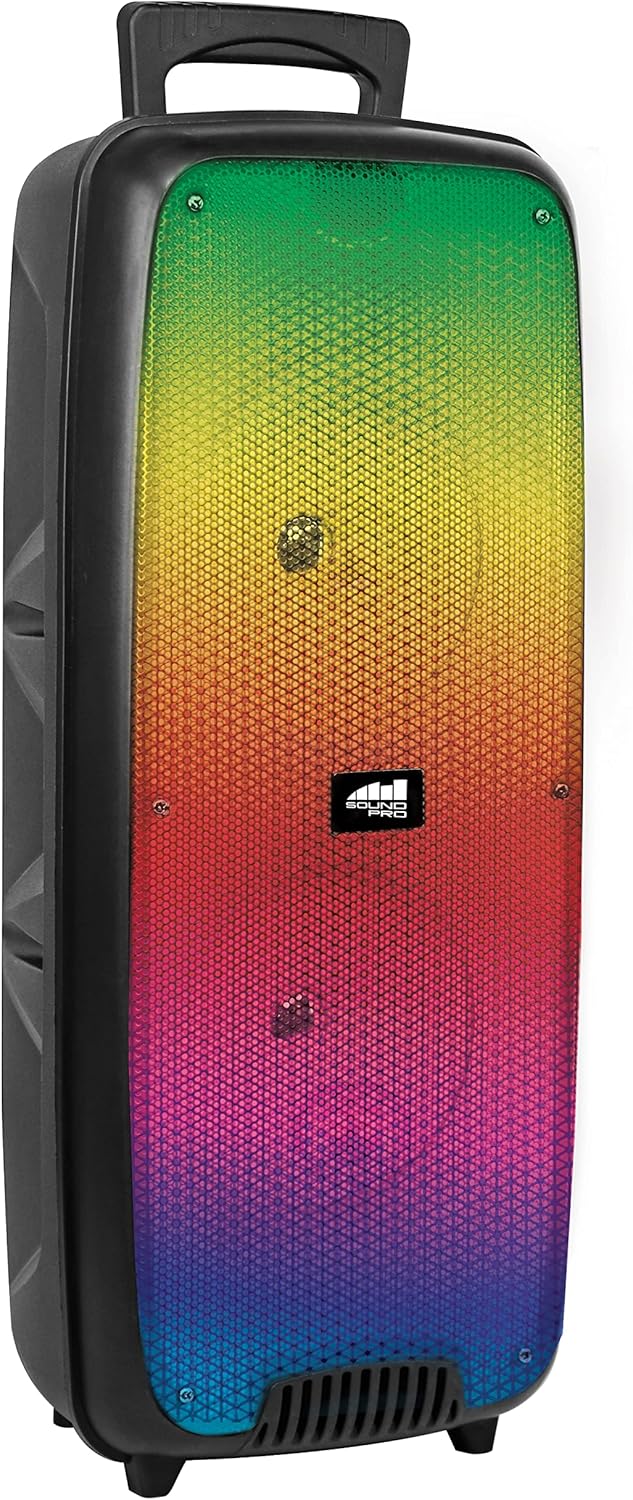
פיגורע 4.1: פראָנט view of the Naxa NDS-6501 speaker, showcasing the dual 6.5-inch drivers and multi-color flame lights.

פיגורע 4.2: זייַט view of the Naxa NDS-6501 speaker, illustrating its portable design with an integrated handle.
5. סעטאַפּ
5.1 אויפלאָדן דעם רעדנער
- פֿאַרבינדט דעם צוגעשטעלטן USB טשאַרדזשינג קאַבל צום רעדנער'ס טשאַרדזשינג פּאָרט.
- פֿאַרבינדט דעם אַנדערן עק פֿונעם USB קאַבל צו אַ קאָמפּאַטיבלע USB מאַכט אַדאַפּטער (נישט אַרייַנגערעכנט) אָדער אַ קאָמפּיוטער'ס USB פּאָרט.
- The charging indicator light will illuminate, typically red, during charging.
- Once fully charged, the indicator light will change color or turn off (refer to specific LED behavior in your product). A full charge provides approximately 2 hours of playback.
5.2 פּאַוערינג אויף / אַוועק
- To power on: Press and hold the Power button for a few seconds until the speaker activates.
- To power off: Press and hold the Power button again until the speaker shuts down.
6. אַפּערייטינג ינסטרוקטיאָנס
6.1 בלועטאָאָטה פּערינג
- Ensure the speaker is powered on and in Bluetooth mode. If not, press the Mode button to switch to Bluetooth. The speaker will indicate it is ready for pairing (e.g., a flashing LED or an audible prompt).
- אויף אייער בלוטוט-ענייבאַלד מיטל (סמאַרטפאָן, טאַבלעט, אאז"וו), גייט צו די בלוטוט סעטטינגס.
- זוכן פֿאַר available devices. You should see "NDS-6501" or a similar name in the list.
- Select "NDS-6501" to initiate pairing.
- Once successfully paired, the speaker will provide an audible confirmation, and the Bluetooth indicator light will become solid.
6.2 אמתע ווירעלעס סטערעאָ (TWS) פּאָרינג
The TWS function allows you to connect two NDS-6501 speakers for a stereo sound experience.

פיגורע 6.1: Illustration of the True Wireless Stereo (TWS) function, enabling two speakers to connect wirelessly from a single Bluetooth source.
- Ensure both NDS-6501 speakers are powered on and in Bluetooth mode, but not yet paired to any device.
- On one of the speakers (this will be the primary speaker), press and hold the TWS button (or a designated pairing button) for a few seconds.
- דער הויפּט רעדנער וועט זוכן דעם צווייטן רעדנער. אַמאָל פֿאַרבונדן, וועלן ביידע רעדנערס געבן אַן אָודבאַרע באַשטעטיקונג.
- Now, pair your Bluetooth device to the primary speaker as described in Section 6.1. Audio will play through both speakers in stereo.
6.3 FM ראַדיאָ אָפּעראַציע
- דריק דעם מאָדע קנעפּל צו באַשטימען צו FM ראַדיאָ מאָדע.
- דריק דעם שפּיל/פּויזע קנעפּל צו אויטאָמאַטיש סקענען און ראַטעווען פאַראַן FM סטאנציעס.
- ניצט די פריערדיקע/נעקסטע ליד קנעפּלעך צו נאַוויגירן צווישן געראַטעוועטע סטאַנציעס.
6.4 יו-עס-בי/מייקראָ-עס-די ווידערשפּיל
- Insert a USB flash drive or a MicroSD/TF card (with audio files) into the corresponding port.
- The speaker should automatically switch to USB or MicroSD mode and begin playing audio. If not, press the Mode button to select the correct input.
- Use the playback controls (Play/Pause, Previous/Next) to manage your music.
6.5 מיקראָפאָן נוצן
- Connect the wired microphone to the microphone input jack on the speaker.
- Adjust the microphone volume control (if available) on the speaker to your desired level.
- The microphone audio will be mixed with any music playing through the speaker.
6.6 ליגהטינג עפפעקץ
- The speaker features integrated multi-color flame lights.
- Press the Light button (if available) to cycle through different lighting modes or to turn the lights on/off.
- The lights may synchronize with the music playback.
7. וישאַלט
- רייניקונג: ניצט אַ ווייכע, טרוקענע שטאָף צו רייניקן די אויסערלעכע זייט פון דעם רעדנער. ניצט נישט קיין שרײַבנדיקע רייניגער, וואַקסן, אדער סאָלווענטן.
- סטאָרידזש: ווען נישט אין באַנוץ פֿאַר לענגערע פּעריאָדן, זאָל מען דעם רעדנער האַלטן אין אַ קיל, טרוקן אָרט, אַוועק פֿון דירעקטער זון און עקסטרעמע טעמפּעראַטורן.
- באַטערי זאָרגן: כדי צו פארלענגערן די לעבן פון די באַטעריע, זאָלט איר נישט אָפט אויסלאָדן די באַטעריע. לאָדט דעם רעדנער רעגולער אויף, אפילו אויב ער איז נישט אין באַנוץ.
- וואַסער ויסשטעלן: די רעדנער איז נישט וואַסערפּרוף. פֿאַרמייַדט עס אויסצושטעלן צו וואַסער אָדער צו פֿיל פֿײַכטקייט.
8. טראָובלעשאָאָטינג
| פּראָבלעם | מעגלעך סיבה | לייזונג |
|---|---|---|
| דער רעדנער גייט נישט אן. | באַטערי איז דיפּליטיד. | באַשולדיקן די רעדנער מיט די צוגעשטעלט וסב קאַבלע. |
| קיין קלאַנג פֿון רעדנער. | Volume is too low; incorrect input mode; device not paired. | Increase volume; press Mode button to select correct input; re-pair Bluetooth device. |
| בלוטוט דעווייס קען נישט געפֿינען רעדנער. | רעדנער נישט אין פּערינג מאָדע; דעווייס צו ווייט; שטערונג. | זיכער מאַכן אַז דער רעדנער איז אין בלועטוט פּערינג מאָדע; רוקט דעם מיטל נענטער; פֿאַרמייַדט שטערונגען. |
| TWS פּאָרינג פיילז. | Speakers already paired to a device; too far apart. | Ensure both speakers are unpaired from other devices; place speakers within 33 feet of each other. |
| מיקראָפאָן טוט נישט אַרבעטן. | Microphone not fully plugged in; microphone volume low. | Ensure microphone is securely connected; adjust microphone volume. |
9. ספּעסאַפאַקיישאַנז
| שטריך | באַשרייַבונג |
|---|---|
| מאָדעל נומער | NDS-6501 |
| רעדנער גרייס | Dual 6.5 inches |
| קאַנעקטיוויטי טעכנאָלאָגיע | Bluetooth, USB, MicroSD, Aux (3.5mm) |
| אַודיאָ אַרייַנשרייַב | ווייערד מיקראָפאָן |
| אַודיאָ רעזולטאַט מאָדע | סטערעאָ |
| מאַקסימום רעזולטאַט מאַכט | 3 וואטס |
| רעדנער Ampלאַפאַקיישאַן טיפּ | אַקטיוו |
| באַטערי טיפּ | Lithium Ion (rechargeable, included) |
| באַטערי דורכשניטלעך לעבן | אַרויף צו 2 שעה |
| פּראָדוקט דימענשאַנז (L x W x H) | 24.13 X 19.05 X 57.91 סענטימעטער (9.5 X 7.5 X 22.8 אינטשעס) |
| פּונקט וואָג | 2.81 קג (6.2 לבס) |
| קאָליר | שוואַרץ |
| UPC | 840005017555 |
10. וואָראַנטי און שטיצן
For warranty information or technical support, please refer to the warranty card included with your product or visit the official Naxa Electronics webזייטל. האַלט אייער קויף קוויטל ווי אַ באַווייַז פון קויפן פֿאַר קיין וואָראַנטי קליימז.


