הקדמה
This manual provides comprehensive instructions for the installation, operation, and maintenance of your Kensington SD4839P USB-C Triple Video Dock. Please read this manual thoroughly before using the product to ensure proper functionality and to prevent damage.
זיכערקייַט אינפֿאָרמאַציע
- שטעלט נישט אויס דעם אפאראט צו וואסער אדער איבעריגע הומידיטי.
- פרובירט נישט צו צענעמען אדער מאדיפיצירן דעם אפאראט. דאס וועט בטל מאכן די גאראנטיע און קען שאפן שאדן.
- Use only the power adapter supplied with the dock.
- Ensure proper ventilation around the dock to prevent overheating.
- האַלטן אויס פון דערגרייכן פון קינדער.
פּעקל אינהאַלט
באַשטעטיקן אַז אַלע זאכן זענען פאַראַן אין פּעקל:
- Kensington SD4839P USB-C Triple Video Dock
- וסב-C צו וסב-C קאַבלע
- מאַכט אַדאַפּטער
- שנעלער אָנהייב גייד (נישט אַרייַנגערעכנט אין דעם דיגיטאַלן מאַנואַל)
פּראָדוקט איבערview
The Kensington SD4839P is a USB-C triple video docking station designed to expand the connectivity of your laptop. It provides multiple video outputs, USB ports, and power delivery through a single USB-C connection.
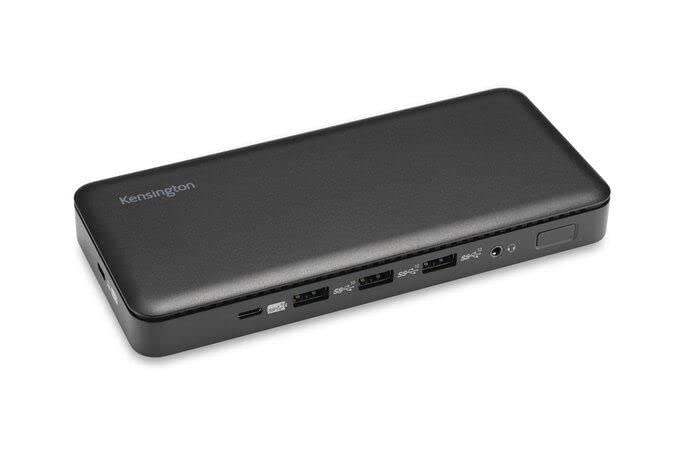
בילד 1: פראָנט view of the Kensington SD4839P USB-C Triple Video Dock. This image displays the compact design of the docking station, highlighting its various ports for connecting peripherals and displays.
פּאָרט אויסלייג:
- פראָנט: USB-A ports, USB-C data port.
- הינטן: Power input, USB-C host port (with power delivery), DisplayPort outputs, HDMI output, USB-A ports, Ethernet port, Audio jack.
סעטאַפּ
- פאַרבינדן מאַכט: Connect the included power adapter to the DC-in port on the back of the dock, then plug the adapter into a power outlet.
- פאַרבינדן צו האָסט מיטל: Connect one end of the supplied USB-C to USB-C cable to the USB-C host port on the back of the dock and the other end to a compatible USB-C port on your laptop. Ensure your laptop's USB-C port supports DisplayPort Alternate Mode and Power Delivery for full functionality.
- פֿאַרבינדן דיספּלייז:
- Connect your monitors to the available DisplayPort and/or HDMI ports on the dock using appropriate cables.
- The dock supports up to three external displays, depending on your host device's capabilities and operating system.
- פאַרבינדן פּעריפעראַלס: Connect your USB devices (keyboard, mouse, external drives, etc.) to the USB-A and USB-C data ports on the dock.
- פֿאַרבינדן נעץ (אָפּציאָנאַל): For a wired network connection, connect an Ethernet cable from your router or network switch to the Ethernet port on the dock.
אַפּערייטינג
ערשט קשר:
Upon initial connection, your operating system (Windows, macOS, Chrome OS) should automatically detect the dock and connected devices. The SD4839P is designed to be driverless for most basic functions.
ווייַז קאַנפיגיעריישאַן:
- Windows: Right-click on the desktop and select "Display settings" to arrange your monitors, change resolution, and set display modes (extend, duplicate, second screen only).
- macOS: גיין צו סיסטעם סעטטינגס (אָדער סיסטעם פּרעפֿערענצן) > דיספּלייז to configure your external monitors.
מאַכט עקספּרעס:
The dock provides power delivery to your connected laptop through the USB-C host cable, charging it while you work. The wattage provided is listed in the specifications section.
וישאַלט
- רייניקונג: Disconnect the dock from power and all devices before cleaning. Use a soft, dry, lint-free cloth to wipe the exterior. Do not use liquid cleaners or aerosols.
- סטאָרידזש: Store the dock in a cool, dry place away from direct sunlight and extreme temperatures when not in use for extended periods.
- קאַבלע פאַרוואַלטונג: פֿאַרמײַדן שאַרפֿע בייגן אָדער קנייטשן אין קאַבלען כּדי צו פֿאַרמײַדן שאָדן.
טראָובלעשאָאָטינג
| פּראָבלעם | מעגלעך לייזונג |
|---|---|
| No power to the dock or laptop. |
|
| No display on external monitors. |
|
| USB דעווייסעס נישט דערקענט. |
|
| נעץ פֿאַרבינדונג פּראָבלעמען. |
|
ספּעסאַפאַקיישאַנז
- מאָדעל נומער: K33480EU
- פּראָדוקט דימענשאַנז: 19.69 X 19.69 X 11.02 אינטשעס
- נומער וואָג: 2.29 פונט (1.04 קילאָגראַמס)
- סאָרט: קענסינגטאן
- ייַזנוואַרג צובינד: וסב טיפּ C
- גאַנץ וסב פּאָרץ: 3 (plus 1 USB-C data port)
- נומער פון פּאָרץ: 5 (referring to primary functional ports)
- גאַנץ HDMI פּאָרץ: 1
- DisplayPort Outputs: 2 (for triple video output capability)
- וואָסtage (Power Delivery): 85 וואטס
- קאַמפּאַטאַבאַל דעוויסעס: Dell Precision 5510, Google Pixelbook, HP EliteBook Folio 9470m, MacBook Air, MacBook Pro, Microsoft Surface series, iPad, iPhone series, iPod series (See product page for full list)
וואָראַנטי און שטיצן
Kensington products are designed for reliability and performance. For warranty information, technical support, or to register your product, please visit the official Kensington webזייטל אדער קאנטאקט זייער קאסטומער שטיצע גלייך. האלט אייער באווייז פון קויפן פאר גאראנטיע קליימס.
Official Kensington Webפּלאַץ: www.kensington.com