הקדמה
This manual provides detailed instructions for the setup, operation, maintenance, and troubleshooting of your Xtrfy MZ1 Wireless Gaming Mouse. Please read this manual thoroughly before using the product to ensure optimal performance and longevity.
פּעקל אינהאַלט
באַשטעטיקן אַז אַלע זאכן זענען פאַראַן אין פּעקל:
- Xtrfy MZ1 Wireless Gaming Mouse
- 1.8 m Xtrfy EZcord Pro cable
- וסב-א צו וסב-C קאַבלע
- וסב אַדאַפּטער
- וסב דאָנגלע
- 500 mA battery (pre-installed or included separately)
- Second back shell (for adjustable shape)
פּראָדוקט איבערview
The Xtrfy MZ1 Wireless Gaming Mouse is designed for high-performance gaming, featuring a lightweight design, adjustable shape, and customizable settings without the need for software.
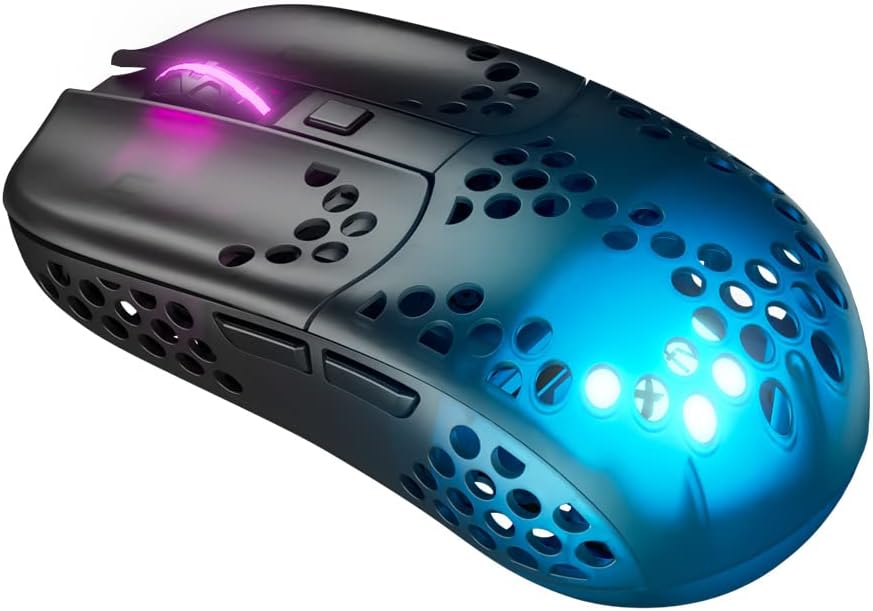
Figure 1: Xtrfy MZ1 Wireless Gaming Mouse, angled view מיט RGB לייטינג.
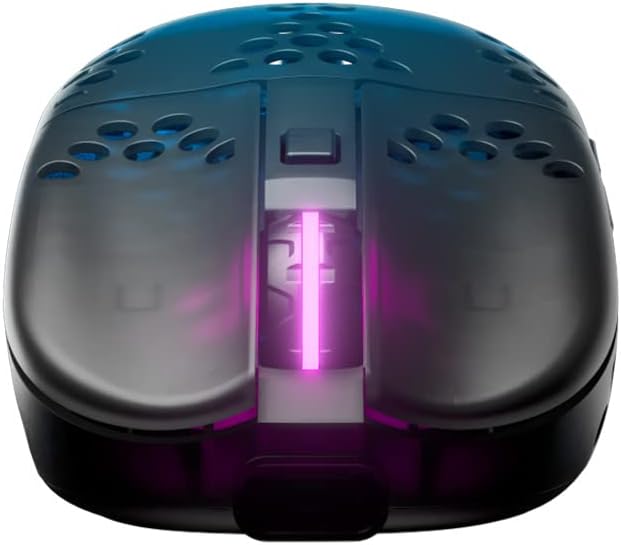
פיגורע 2: שפּיץ view of the Xtrfy MZ1 Wireless Gaming Mouse, highlighting the scroll wheel and main buttons.

Figure 3: The Xtrfy MZ1 Wireless Gaming Mouse shown with its two interchangeable back shells, allowing for shape adjustment.
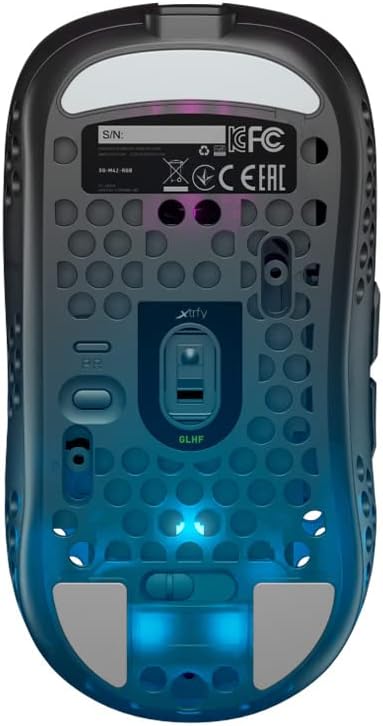
פיגורע 4: דנאָ view of the Xtrfy MZ1 Wireless Gaming Mouse, displaying the sensor, power switch, and configuration buttons.
סעטאַפּ
1. קאַנעקטינג די מאַוס
- Connect the USB dongle to your computer using the provided USB-A to USB-C cable and adapter.
- צינדט אן די מויז מיטן מאַכט קנעפּל וואָס געפינט זיך אויף דער אונטערשטער טייל פון דער מויז.
- The mouse should automatically connect to the dongle. If not, ensure the dongle is properly connected and the mouse is powered on.
2. ערשטע אויפלאָדונג
For first use, it is recommended to fully charge the mouse. Connect the Xtrfy EZcord Pro cable to the front of the mouse and to a USB power source. The mouse can be used while charging.
3. Adjusting the Back Shell
The MZ1 Wireless comes with two interchangeable back shells to customize the mouse shape to your preference. To change the back shell:
- Gently remove the currently installed back shell by lifting it from the rear.
- Align the desired back shell with the mouse body and press down until it clicks into place.
4. Adjusting Weight Balance
The battery position can be adjusted to fine-tune the mouse's weight balance. To do this:
- אַראָפּנעמען די צוריק שאָל.
- Carefully slide the battery forward or backward within its compartment to achieve your preferred balance.
- Replace the back shell.
אַפּערייטינג ינסטראַקשאַנז
The Xtrfy MZ1 Wireless Mouse allows for on-the-fly adjustments without software.
1. CPI (Counts Per Inch) Adjustment
The CPI setting controls the mouse sensitivity. Use the dedicated CPI button on the bottom of the mouse to cycle through preset CPI levels. The LED indicator will change color to show the current CPI setting.
2. שטימונג קורס אַדזשאַסטמענט
The polling rate determines how often the mouse reports its position to the computer. A higher polling rate results in smoother tracking. Adjust the polling rate using the switch on the bottom of the mouse, typically labeled 'PR' or similar.
3. אויפהייב-דיסטאַנץ (LOD) אַדזשאַסטמענט
LOD is the height at which the mouse sensor stops tracking when lifted from the surface. Adjust this setting using the switch on the bottom of the mouse, typically labeled 'LOD'.
4. Debounce Time Adjustment
Debounce time is the delay before a second click can be registered after the first, preventing accidental double-clicks. Adjust this setting using the switch on the bottom of the mouse, typically labeled 'DT'.
5. באַטעריע לעבן און טשאַרדזשינג
The mouse provides up to 75 hours of playtime on a single charge. When the battery is low, connect the EZcord Pro cable to the mouse and a USB power source to charge. The mouse can be used normally during charging.
6. Programmable Button ('PGDN')
The top button, after adjusting other settings, can be set to 'PGDN'. This allows you to bind it to any desired function within your games or applications.
וישאַלט
- רייניקונג: ניצט אַ ווייכע, טרוקענע שטאָף צו רייניקן די מויז. פֿאַרמייַדט ניצן שטרענגע כעמיקאַלן אָדער שרײַבנדיקע מאַטעריאַלן.
- סענסאָר זאָרגן: האַלט דעם אָפּטישן סענסאָר אויף דער אונטערשטער טייל פון דער מויז ריין און פריי פון שטויב אָדער דעבריס צו ענשור פּינקטלעכע טראַקינג.
- סטאָרידזש: When not in use for extended periods, store the mouse in a dry, cool place.
טראָובלעשאָאָטינג
| פּראָבלעם | מעגלעך לייזונג |
|---|---|
| מויז ניט ריספּאַנדינג |
|
| ינטערמיטאַנט קשר |
|
| טראַקינג ישוז |
|
| Buttons not responding correctly |
|
ספּעסאַפאַקיישאַנז
| שטריך | דעטאַל |
|---|---|
| מאָדעל נומער | MZ1W |
| פּראָדוקט דימענשאַנז | 4.37 X 2.3 X 1.33 אינטשעס |
| פּונקט וואָג | 2.15 אונס (בעערעך 61 גראַמז) |
| קאַנעקטיוויטי טעכנאָלאָגיע | דראָטלאָז (2.4 GHz) |
| באַוועגונג דעטעקטיאָן | אָפּטיש (פּיקסאַרט 3370 סענסאָר) |
| סוויטשיז | Kailh GM 8.0 (80 million clicks) |
| מיקראָקאָנטראָללער | ARM 32-bit |
| באַטערי | 1 Lithium Ion battery (500 mA, up to 75 hours playtime) |
| ספּעציעלע פֿעיִקייטן | Lightweight, Rechargeable, Adjustable Shape (interchangeable back shells), Adjustable Weight Balance, No Software Needed |
| קאָליר | שוואַרץ |
וואָראַנטי און שטיצן
For warranty information, technical support, or further assistance, please visit the official Xtrfy webזייטל אדער קאנטאקט זייער קאסטומער שטיצע גלייך. האלט אייער באווייז פון קויפן פאר גאראנטיע קליימס.


