1. הקדמה
The HyperX DuoCast is a versatile USB condenser microphone designed for clear audio capture across various applications, including gaming, streaming, podcasting, and voiceovers. It features customizable RGB lighting, multiple polar patterns, and convenient controls for an optimized user experience.

בילד 1.1: פראָנט view of the HyperX DuoCast microphone with its integrated stand and RGB light ring.
2. פּעקל אינהאַלט
באַשטעטיקן אַז אַלע זאכן זענען פאַראַן אין פּעקל:
- HyperX DuoCast USB Condenser Microphone
- וסב טיפּע C צו טיפּ A קאַבלע
- שנעל אָנהייב גייד

Image 2.1: Contents of the HyperX DuoCast retail package, including the microphone, USB cable, and documentation.
3. סעטאַפּ אינסטרוקציעס
3.1 פֿאַרבינדן דעם מיקראָפֿאָן
- Connect the USB Type-C end of the provided cable to the USB-C port on the back of the HyperX DuoCast microphone.
- Connect the USB Type-A end of the cable to an available USB port on your PC, PS5, PS4, or Mac.
- The microphone will automatically be detected by your operating system.
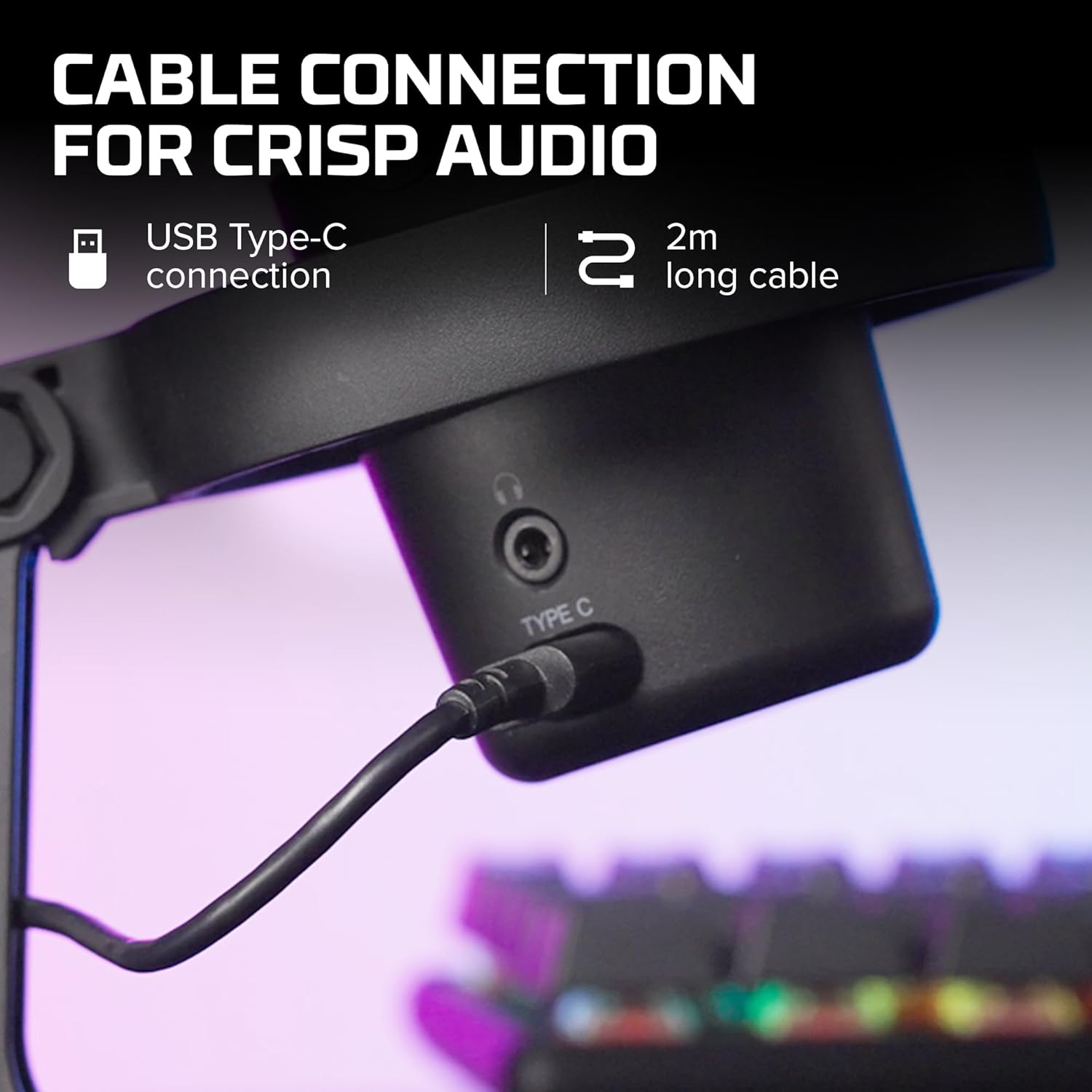
בילד 3.1: נאָענט־אַרויף view of the USB Type-C connection port on the HyperX DuoCast microphone.
3.2 Positioning the Microphone
The DuoCast features a low-profile shock mount to reduce unwanted vibrations. For optimal audio quality, position the microphone directly in front of you, approximately 6-12 inches (15-30 cm) from your mouth.

Image 3.2: HyperX DuoCast microphone positioned on a boom arm for optimal recording, with a user wearing headphones.
3.3 ווייכווארג אינסטאַלאַציע (אפציאָנעל)
For advanced customization of RGB lighting and other settings, download and install the HyperX NGENUITY Software from the official HyperX website. This software is compatible with Windows operating systems.

Image 3.3: User customizing the RGB lighting of the HyperX DuoCast microphone using the HyperX NGENUITY software interface on a computer screen.
4. אפערירן דעם מיקראָפאָן
4.1 Polar Patterns
The DuoCast offers two selectable polar patterns: Cardioid and Omnidirectional. Switch between these patterns using the button located on the microphone.
- קאַרדיאָיד: Ideal for single-person recording, such as streaming, podcasts, and voiceovers. It captures sound primarily from the front, reducing background noise.
- אָמנידירעקטיאָנאַל: Suitable for multi-person recordings, conference calls, or capturing ambient sounds, as it picks up sound equally from all directions.

Image 4.1: Diagram illustrating the Cardioid and Omnidirectional polar patterns and their recommended use cases.
4.2 Tap-to-Mute Sensor
The microphone features a convenient tap-to-mute sensor on the top. Tapping the top of the microphone will instantly mute or unmute your audio. The RGB light ring will change color to indicate the mute status.

Image 4.2: Close-up of the microphone's top showing the tap-to-mute sensor and the gain control knob.
4.3 Gain Control Adjustment
Adjust the microphone's input sensitivity (gain) using the control knob located on the microphone. Rotate the knob to increase or decrease the gain to achieve optimal audio levels and prevent distortion.
4.4 RGB לייטינג
The DuoCast features a customizable RGB light ring with two zones. The lighting can be personalized using the HyperX NGENUITY Software (Windows only) to match your setup or preference.
4.5 כעדפאָון רעזולטאַט
A 3.5mm headphone jack is integrated into the microphone for direct monitoring of your audio output. Connect your headphones to this port to hear your voice in real-time.
5. וישאַלט
To ensure the longevity and optimal performance of your HyperX DuoCast microphone, follow these maintenance guidelines:
- רייניקונג: Use a soft, dry cloth to clean the microphone's exterior. Avoid using harsh chemicals, solvents, or abrasive materials.
- סטאָרידזש: ווען נישט אין באַנוץ, האַלט דעם מיקראָפאָן אין אַ ריינער, טרוקענער סביבה אַוועק פון עקסטרעמע טעמפּעראַטורן און הומידיטי.
- האַנדלינג: באַהאַנדלט דעם מיקראָפאָן מיט פֿאָרזיכט. פֿאַרמײַדט עס צו לאָזן פֿאַלן אָדער אויסשטעלן עס צו שטאַרקע קלאַפּן, וואָס קענען שאַטן אינעווייניקסטע קאָמפּאָנענטן.
6. טראָובלעשאָאָטינג
If you encounter issues with your HyperX DuoCast microphone, refer to the following common solutions:
| פּראָבלעם | מעגלעך סיבה | לייזונג |
|---|---|---|
| קיין אַודיאָ אַרייַנשרייַב | מיקראָפאָן איז נישט קאָננעקטעד רעכט אומרעכטע איינגאַבע מיטל אויסגעקליבן מיקראָפאָן מיוטיד | זיכער מאַכן אַז דער USB קאַבל איז זיכער פארבונדן. Verify the DuoCast is selected as the default input device in your system settings. Tap the top of the microphone to unmute. |
| נידעריק אַודיאָ באַנד | געווינס איינשטעלונג צו נידעריג System input volume too low | Adjust the gain control knob on the microphone. Increase the microphone input volume in your system's sound settings. |
| פאַרקרימט אַודיאָ | Gain setting too high Microphone too close to sound source | Decrease the gain control knob on the microphone. מאַך די מיקראָפאָן ווייַטער אַוועק פון די געזונט מקור. |
| יבעריק הינטערגרונט ראַש | Incorrect polar pattern selected High gain setting | Switch to Cardioid polar pattern for single-person use. Reduce the gain setting. Ensure you are in a quiet environment. |
| RGB לייטינג טוט נישט אַרבעטן | ווייכווארג אַרויסגעבן USB connection problem | Ensure HyperX NGENUITY Software is installed and updated (Windows only). ריקאַנעקט די וסב קאַבלע. |
7. ספּעסאַפאַקיישאַנז
| שטריך | דעטאַל |
|---|---|
| מיקראָפאָן טיפּ | וסב קאַנדענסער |
| פּאָליאַר פּאַטערנז | קאַרדיאָיד, אָמנידירעקטיאָנאַל |
| אַודיאָ סענסיטיוויטי | 6 דעציבעלן |
| סיגנאַל-צו-נויז ראַטיאָ | 70 דב |
| אָפטקייַט ענטפער | 20 הערץ - 20 קילאָהערץ |
| רעקאָרדינג האַכלאָטע | 24-ביסל / 96 כז |
| קאַנעקטיוויטי | USB (Type-C to Type-A) |
| קאַמפּאַטאַבאַל דעוויסעס | פּיסי, PS5, PS4, מעק |
| ספּעציעלע פֿעיִקייטן | Customizable RGB Light Ring, Tap-to-Mute Sensor, Gain Control, Low-profile Shock Mount, Internal Pop Filter, 3.5mm Headphone Output |
| דימענסיעס (L X W X H) | 5.5 X 9.3 X 5 אינטשעס (140 X 236 X 127 מם) |
| פּונקט וואָג | 8.6 אונסעס (243.2 גראַמז) |
| מאָדעל נומער | 4P5E2AA |

Image 7.1: Diagram showing the physical dimensions (width, height, depth) and weight of the HyperX DuoCast microphone.
8. וואָראַנטי און שטיצן
For warranty information and technical support, please visit the official HyperX webזייטל אדער קאנטאקטירן HyperX קאסטומער סערוויס. האלט אייער באווייז פון קויפן פאר גאראנטיע פארלאנגען.
אָנליין שטיצן: www.hyperx.com/support


