1. הקדמה
This manual provides comprehensive instructions for the setup, operation, maintenance, and troubleshooting of your SteelSeries Arctis Nova 3 Multi-Platform Gaming Headset. Please read this manual thoroughly before using the product to ensure optimal performance and longevity.
The Arctis Nova 3 headset features the custom-designed Nova Acoustic System with High Fidelity Drivers, 360° Spatial Audio, and a 10-band Parametric EQ. It includes an AI-powered noise-cancelling ClearCast Gen 2 microphone and dynamic RGB lighting. Designed for multi-platform compatibility, it connects via USB-C to PC, PlayStation, Xbox Series X|S, Switch, and mobile devices.
2. פּראָדוקט איבערview
2.1 פּעקל אינהאַלט
- SteelSeries Arctis Nova 3 Gaming Headset
- וסב-C צו וסב-C קאַבלע
- וסב- C צו וסב-א אַדאַפּטער קאַבלע
- וסב-C צו 3.5 מם אַודיאָ קאַבלע
- דאָקומענטאַציע (דיזער מאַנואַל)
2.2 כעדסעט קאָמפּאָנענטן
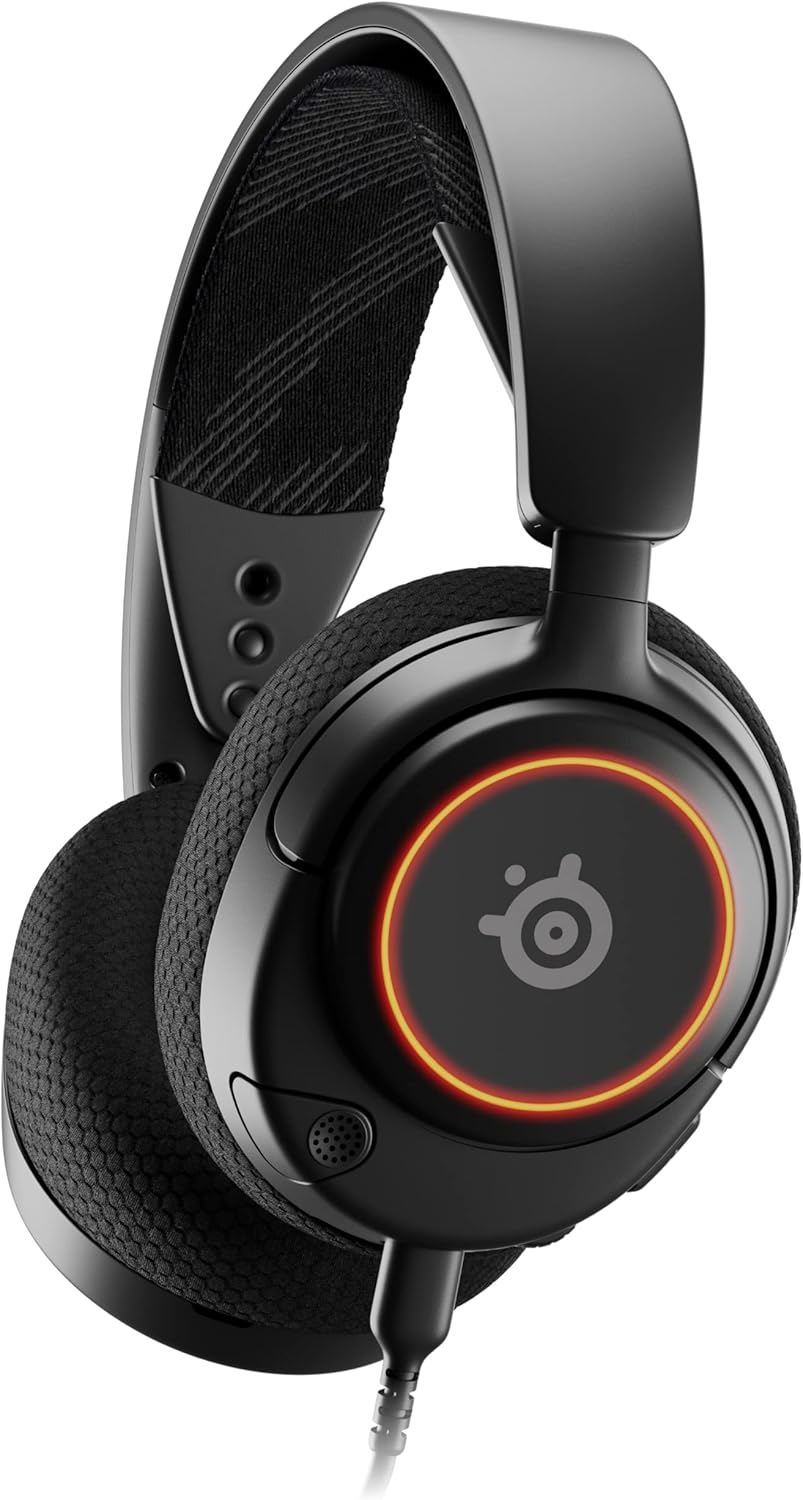
פיגורע 1: פראָנט view of the Arctis Nova 3 headset.

פיגורע 2: Key features of the Arctis Nova 3, including ComfortMAX System, 360° Spatial Audio, Dual-Zone RGB, Nova Acoustic System, ClearCast Gen 2 AI-Powered Noise-Cancelling Mic, and Multi-Platform Support.
- ComfortMAX System: Features height-adjusting, rotating earcups with AirWeave Memory Foam cushions and a stretchy band for comfortable wear.
- ClearCast Gen 2 Mic: AI-powered noise-cancelling microphone, fully retractable into the earcup.
- Dual-Zone RGB Lighting: Customizable 16.8 million color options on the earcups.
- Nova Acoustic System: Custom-designed with High Fidelity Drivers for superior sound.
- קאָנטראָלס: Volume wheel and microphone mute switch located on the earcup.
- Connectivity Port: USB-C port for various cable connections.
3. סעטאַפּ
3.1 פֿאַרבינדן די כעדסעט
The Arctis Nova 3 offers versatile connectivity options:
- USB-C קאַנעקשאַן: Use the provided USB-C to USB-C cable to connect directly to devices with a USB-C port (e.g., PC, PlayStation 5, Nintendo Switch, mobile devices).
- יו-עס-בי-א קאנעקשאן: For devices with only USB-A ports, use the USB-C to USB-A adapter cable. Connect the USB-C end to the headset and the USB-A end to your device.
- 3.5 מם אַודיאָ קאַנעקשאַן: For devices requiring a 3.5mm audio jack (e.g., Xbox controllers, older consoles, some mobile devices), use the USB-C to 3.5mm audio cable. Connect the USB-C end to the headset and the 3.5mm jack to your device.
ווידעא 1: פּראָדוקט איבערview demonstrating various connectivity options and features of the Arctis Nova 3 headset.
ווידעא 2: א 360-גראַד דריי view of the Arctis Nova 3 Black headset, showcasinג זײַן דיזײַן און פֿעיִקייטן פֿון אַלע ווינקלען.
3.2 צופּאַסן די פּאַסיקייט
The ComfortMAX System allows for personalized fit:
- כעדבאַנד אַדזשאַסטמאַנט: The elastic suspension band can be adjusted to different lengths using the three holes on each side of the headband, ensuring a comfortable fit that distributes weight evenly.
- Earcup Rotation: The earcups can rotate 90 degrees, allowing the headset to lay flat for storage or comfortable resting around the neck.

פיגורע 3: The adjustable headband and rotating earcups of the Arctis Nova 3 for a personalized and comfortable fit.

פיגורע 4: The super lightweight design (253g) of the Arctis Nova 3 with memory foam earcup cushions for extended comfort.
4. אַפּערייטינג ינסטרוקטיאָנס
4.1 אַודיאָ קאָנטראָלס
- באַנד ראָד: Rotate the wheel on the left earcup up or down to adjust the headset's audio volume.
- מיקראָפאָן מוט סוויטש: Slide the switch on the left earcup to mute or unmute the ClearCast Gen 2 microphone. An orange indicator will be visible when muted.
4.2 מיקראָפאָן באַניץ
- פארלענגערן/צוריקציען: The ClearCast Gen 2 microphone is fully retractable. Gently pull it out from the left earcup for use and push it back in for storage.
- פּאַזישאַנינג: שטעלט דעם מיקראָפאָן בערך 1-2 אינטשעס פון אייער מויל פֿאַר אָפּטימאַלער קלאַרקייט פון דער שטימע.

פיגורע 5: The ClearCast Gen 2 mic, which silences background noise and fully retracts into the earcup.
4.3 RGB Lighting Customization (PC Only)
Dynamic RGB lighting can be customized via the SteelSeries Engine software on PC. This allows for 16.8 million color options and reactive lighting effects.

פיגורע 6: Customizable PrismSync RGB lighting with 16.8 million colors on the Arctis Nova 3 headset.
5. וישאַלט
- רייניקונג: Use a soft, dry cloth to clean the headset. Avoid abrasive cleaners or solvents.
- סטאָרידזש: האַלט די כעדסעט אין אַ קיל, טרוקן אָרט אַוועק פון דירעקט זונשייַן און עקסטרעמע טעמפּעראַטורן.
- קאַבלע זאָרגן: פֿאַרמײַדט שאַרפֿע בייגן אָדער איבערגעטריבענע ציען אויף די קאַבלען כּדי צו פֿאַרמײַדן שאָדן.
6. טראָובלעשאָאָטינג
| פּראָבלעם | מעגלעך סיבה | לייזונג |
|---|---|---|
| קיין אַודיאָ פֿון כעדסעט | פאַלשע פֿאַרבינדונג, נידעריקע וואָלומען, שטיל געמאַכטע דעווייס. | Ensure cables are securely connected. Check headset volume wheel and device audio settings. Confirm device is not muted. |
| מיקראָפאָן טוט נישט אַרבעטן | Microphone muted, incorrect input device selected, mic not extended. | Check microphone mute switch (orange indicator means muted). Ensure microphone is fully extended. Verify correct input device is selected in your system's sound settings. |
| RGB lighting not working (PC) | Software issue, incorrect USB connection. | Ensure SteelSeries Engine software is installed and updated. Confirm headset is connected via USB-C or USB-A (RGB not supported via 3.5mm). |
| ומבאַקוועמקייַט בעשאַס נוצן | נישט פּאַסיק. | Adjust the elastic headband and earcup positions for optimal comfort. |
7. ספּעסאַפאַקיישאַנז
| שטריך | דעטאַל |
|---|---|
| מאָדעל נאָמען | SteelSeries Arctis Nova 3 Multi-Platform Gaming Headset |
| מאָדעל נומער | 61631 |
| קאַנעקטיוויטי טעכנאָלאָגיע | USB-C (includes USB-A and 3.5mm adapters) |
| אַודיאָ דרייווער טיפּ | Dynamic Driver (Nova Acoustic System) |
| אָפטקייַט ענטפער | 20-22000 הז |
| ימפּידאַנס | 36 Ohm |
| מיקראָפאָן | ClearCast Gen 2 AI-Powered Noise-Cancelling, Retractable |
| ספּיישאַל אַודיאָ | 360° Spatial Audio (compatible with Tempest 3D Audio for PS5 / Microsoft Spatial Sound) |
| וואָג | 8.3 אונסעס (בעערעך 235 ג) |
| דימענשאַנז (LxWxH) | 7.32 X 6.82 X 3.47 אינטשעס |
| מאַטעריאַל | Foam, Aluminum |
| RGB לייטינג | Dynamic 16.8 million color options (PrismSync RGB) |
| קאַמפּאַטאַבאַל דעוויסעס | PC, PlayStation 5|4, Xbox Series X|S, Switch, Mobile |
8. וואָראַנטי און שטיצן
For warranty information and technical support, please visit the official SteelSeries webזייטל אדער קאנטאקט זייער קאסטומער סערוויס. האלט אייער באווייז פון קויפן פאר גאראנטיע טענות.
Official SteelSeries Webפּלאַץ: SteelSeries Store on Amazon