1. הקדמה
This user manual provides detailed instructions for the LiNKFOR UHF Handheld Rechargeable Microphone System. This all-metal dual cordless microphone system is designed for various applications including karaoke, conferences, parties, and public speaking, offering clear sound and reliable wireless performance.

Figure 1: LiNKFOR UHF Handheld Rechargeable Microphone System
2. פּעקל אינהאַלט
ביטע קאָנטראָלירט דעם פּעקל קערפֿול צו זיכער מאַכן אַז אַלע זאַכן זענען דאָ און אין גוטן צושטאַנד:
- 1 רענטגענ ופנעמער
- 2 רענטגענ ווירעלעסס מיקראָפאָנעס
- 1 רענטגענ 6.35 מם אַודיאָ קאַבלע
- 2 x RCA Cables
- 1 x 6.35 מ״מ צו 3.5 מ״מ אַדאַפּטער
- 1 x 2-אין-1 טשאַרדזשינג קאַבל
- 1 x מאַכט אַדאַפּטער
- 1 x באַניצער מאַנואַל
- 2 x Microphone Sponges
- 2 x Microphones Anti-Rolling Rings
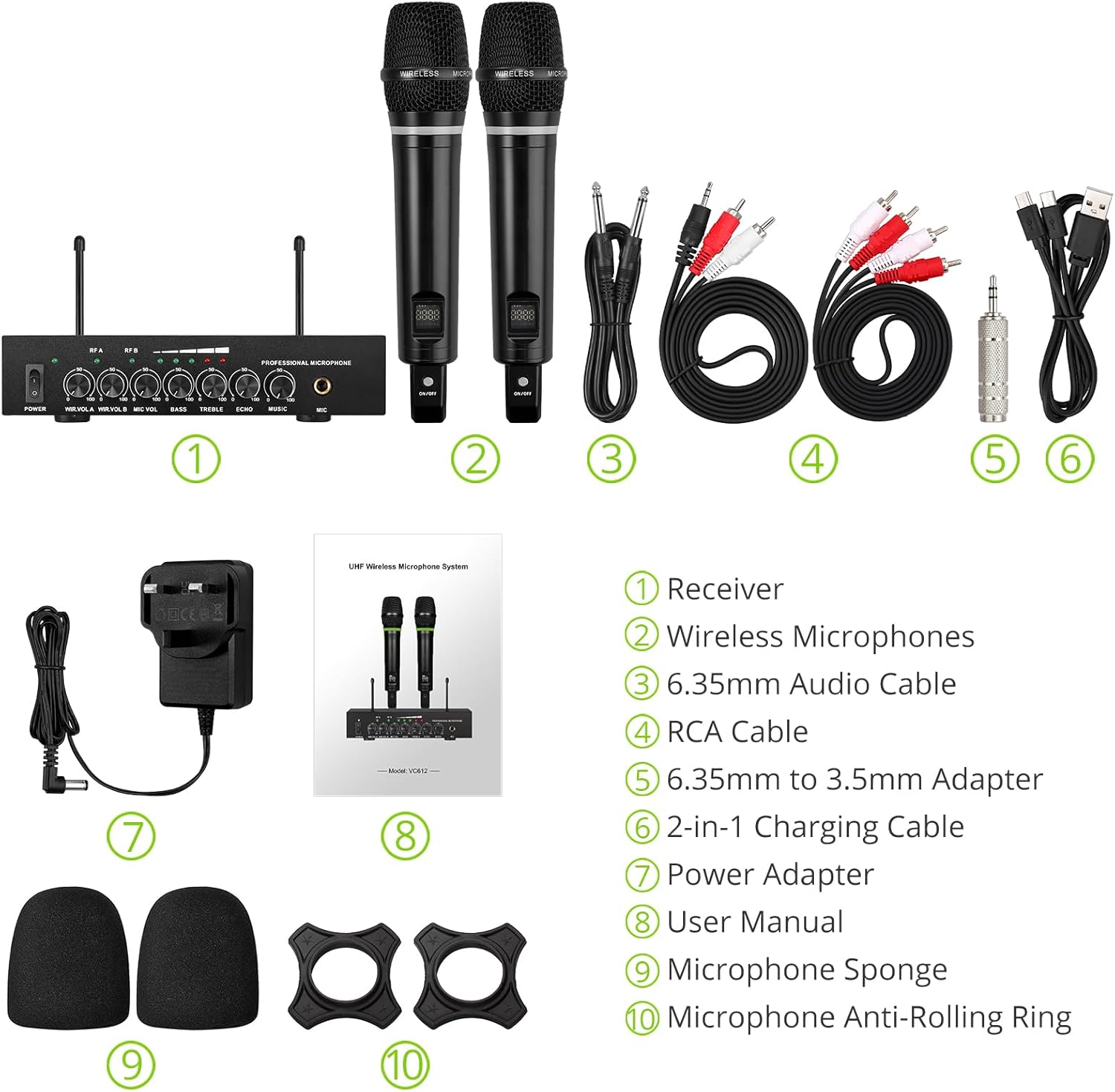
פיגור 2: פולשטענדיקער פּאַקעט אינהאַלט
3. סעטאַפּ אינסטרוקציעס
3.1 פֿאַרבינדן דעם ריסיווער
- מאַכט קשר: Connect the included power adapter to the DC 12V INPUT port on the receiver and plug it into a power outlet.
- אַודיאָ רעזולטאַט:
- For RCA connection: Use the provided RCA cables to connect the "OUTPUT" ports (L/R) on the receiver to the audio input (e.g., AUX, PC) of your sound system (soundbar, amplifier, mixer, or speakers).
- For 6.35mm connection: Use the 6.35mm audio cable to connect the "6.35mm MIC Output" on the receiver to a 6.35mm microphone input on your sound system.
- External Audio Input (Optional):
- For RCA input: Use RCA cables to connect external audio sources (e.g., DVD player, TV) to the "INPUT" ports (L/R) on the receiver.
- For Bluetooth input: Enable Bluetooth on your mobile device (smartphone, tablet) and search for "X168" to pair and connect.

Figure 3: Receiver Connections (RCA Input/Output, 6.35mm MIC Output)

Figure 4: Bluetooth Connection Setup
3.2 Preparing the Microphones
- טשאַרדזשינג: The microphones are rechargeable. Use the provided 2-in-1 charging cable to charge both microphones simultaneously. The LED light ring on the microphone will turn red when charging and green when fully charged or in use. A full charge takes approximately 3-4 hours and provides up to 10 hours of play time.
- מאַכט אויף / אַוועק: Locate the ON/OFF switch on each microphone and slide it to the "ON" position to power on. The display screen on the microphone will light up.
- Anti-Rolling Rings & Sponges: Attach the anti-rolling rings to the base of the microphones and place the microphone sponges over the mesh heads for protection and improved sound quality.

Figure 5: Charging the Microphones
4. אַפּערייטינג ינסטרוקטיאָנס
- מאַכט אויף סיסטעם: Ensure the receiver is powered on (POWER switch on the front panel). The indicator lights for RF A and RF B should illuminate when the corresponding microphone is turned on and connected.
- אַדזשאַסטינג באַנד: Use the "WIR.VOL A" and "WIR.VOL B" knobs on the receiver to adjust the individual volume levels of Microphone A and Microphone B.
- געזונט קאָנטראָל: The receiver features independent controls for BASS, TREBLE, and ECHO to customize the sound output. Adjust these knobs to achieve your desired audio effect.
- מוזיק באַנד: The "MUSIC" knob controls the volume of the external audio input (e.g., Bluetooth, RCA input).
- ווירעלעסס קייט: The UHF wireless range for the microphones is approximately 165 feet (50 meters). The Bluetooth range for audio input is approximately 32 feet (10 meters).

Figure 6: Wireless Range Overview

Figure 7: Sound Control Features
4.1 אפיציעלע פּראָדוקט ווידעאָ
Video 1: LiNKFOR Rechargeable UHF Wireless Microphone System Overview. This video demonstrates the setup, features, and usage of the microphone system, including connections and sound adjustments.
5. וישאַלט
- Keep the receiver and microphones clean by wiping them with a soft, dry cloth.
- פֿאַרמײַדן אויסצושטעלן די דעווײַסעס צו עקסטרעמע טעמפּעראַטורן, פֿײַכטקייט, אָדער דירעקטער זון.
- Store the system in a dry, cool place when not in use.
- Ensure microphones are fully charged before extended use to maximize battery life.
6. טראָובלעשאָאָטינג
| פּראָבלעם | מעגלעך סיבה | לייזונג |
|---|---|---|
| קיין געזונט רעזולטאַט. |
|
|
| מיקראָפאָן לאָדט זיך נישט אויף. |
|
|
| בלועטאָאָטה קשר ישוז. |
|
|

Figure 8: Compatibility and Common Questions
7. ספּעסאַפאַקיישאַנז
| שטריך | דעטאַל |
|---|---|
| סאָרט | LiNKFOR |
| מאָדעל נאָמען | S-105 |
| נומער מאָדעל נומער | ULKVC613us-US |
| קאַנעקטיוויטי טעכנאָלאָגיע | UHF Wireless, Bluetooth 5.0 |
| מיקראָפאָן פאָרם פאַקטאָר | כאַנדכעלד |
| מאַטעריאַל | מעטאַל |
| מאַכט מקור | באַטעריע געטריבן (ריטשאַרדזשאַבאַל ליטהיום יאָן) |
| שפּיל צייט | Up to 10 hours (after 3-4 hours charge) |
| UHF Wireless Range | בעערעך. 165 פט (50 עם) |
| בלועטאָאָטה קייט | בעערעך. 32 פט (10 עם) |
| סיגנאַל-צו-נויז ראַטיאָ | 95 דב |
| ימפּידאַנס | 600 Ohm |
| אָפטקייַט ענטפער | 1 KHz (Min/Max) |
| נומער פון טשאַנאַלז | 2 |
| נומער דימענשאַנז (L X W X H) | 16.54 X 12.99 X 3.31 אינטשעס |
| פּונקט וואָג | 4.84 פונט (2.2 קילאָגראַמס) |
| קאַמפּאַטאַבאַל דעוויסעס | Amplifier, Audio Mixer, Karaoke Machine, TV, Laptop, Smartphones (not Bluetooth Speakers) |

פיגור 9: פּראָדוקט דימענסיעס
8. וואָראַנטי און שטיצן
For warranty information or technical support, please refer to the contact details provided in your product packaging or visit the official LiNKFOR webפּלאַץ. האַלטן דיין קויפן קאַבאָלע פֿאַר וואָראַנטי קליימז.
LiNKFOR is committed to providing innovative products and reliable connectivity solutions. For further assistance, please contact customer service.