1. הקדמה
This manual provides detailed instructions for the setup, operation, maintenance, and troubleshooting of your Ducky One 3 Mini 60% Mechanical Keyboard. Please read this manual thoroughly to ensure proper use and to maximize your keyboard's performance and longevity.

Image: The Ducky One 3 Mini 60% Mechanical Keyboard, showcasinג זײַן קאָמפּאַקטן אויסלייג און לעבעדיקע RGB באַקלייטונג.
2. פּעקל אינהאַלט
Before proceeding with the setup, please verify that all items listed below are present in your package:
- Ducky One 3 Mini 60% Mechanical Keyboard
- אָפּנעמבאַרער געפלאָכטענער USB-C קאַבל
- קייקאַפּ פּולער
- דאַקי קאַנאַל סטיקער
- Accent Keycaps (additional colored keycaps for customization)
3. סעטאַפּ גייד
3.1 פֿאַרבינדן די קלאַוויאַטור
- Locate the USB-C port on the back of your Ducky One 3 Mini keyboard.
- פֿאַרבינדט דעם קלענערן עק פֿון דעם צוגעשטעלטן USB-C קאַבל צום USB-C פּאָרט פֿון דער קלאַוויאַטור.
- פֿאַרבינדט דעם גרעסערן USB-A עק פֿונעם קאַבל צו אַ פֿאַראַן USB פּאָרט אויף אייער קאָמפּיוטער.
- די קלאַוויאַטור וועט אויטאָמאַטיש דעטעקטירט ווערן דורך אייער אָפּערירן סיסטעם. קיין נאָך דרייווערס זענען טיפּיש נישט נויטיק פֿאַר גרונטלעכע פֿונקציאָנאַליטעט.

Image: The detachable braided USB-C cable being connected to the keyboard's port, illustrating the connection process.
3.2 אַדזשאַסטירן קלאַוויאַטור הייך
The Ducky One 3 Mini features 3-level adjustable feet to customize the typing angle for optimal comfort.
- Flip the keyboard over to access the feet on the underside.
- Extend the feet to your preferred height. There are two sets of feet for three different angles.

Image: The underside of the Ducky One 3 Mini keyboard, highlighting the adjustable feet that allow for three different typing angles.
4. אַפּערייטינג ינסטרוקטיאָנס
4.1 גרונטלעכע קלאַוויאַטור פונקציעס
The Ducky One 3 Mini is a 60% layout keyboard, meaning some keys share functions. The Fn key is used to access secondary functions printed on the front or side of keycaps.
- Primary Keys: Standard alphanumeric keys function as labeled.
- צווייטיק פאַנגקשאַנז: האַלטן אַראָפּ די Fn key and press the desired key to activate its secondary function (e.g., arrow keys, F-row keys, Home, End, Page Up/Down).
4.2 RGB לייטינג קאָנטראָל
The keyboard features per-key programmable RGB lighting. Specific key combinations (often involving Fn and other keys) are used to cycle through lighting modes, adjust brightness, and change colors. Refer to the Ducky official website or included quick guide for detailed RGB control commands.
4.3 מאַקראָ פּראָגראַמירן
The Ducky One 3 Mini supports macro programming, allowing you to assign complex sequences of key presses to a single key. The remapped macro layout provides flexibility for custom commands. Detailed instructions for macro recording and assignment can be found in the comprehensive Ducky software or online resources.
4.4 הייס-סוואַפּאַבל סוויטשיז
This keyboard is equipped with hot-swappable Kailh Yellow Sockets, allowing you to change mechanical switches without soldering. This feature enables customization of typing feel and sound.
- Use the included keycap puller to remove the keycap.
- Use a switch puller (not included, but often bundled with switches) to gently remove the switch from its socket.
- Align the pins of the new switch with the holes in the socket and press firmly until it clicks into place. Ensure pins are not bent.
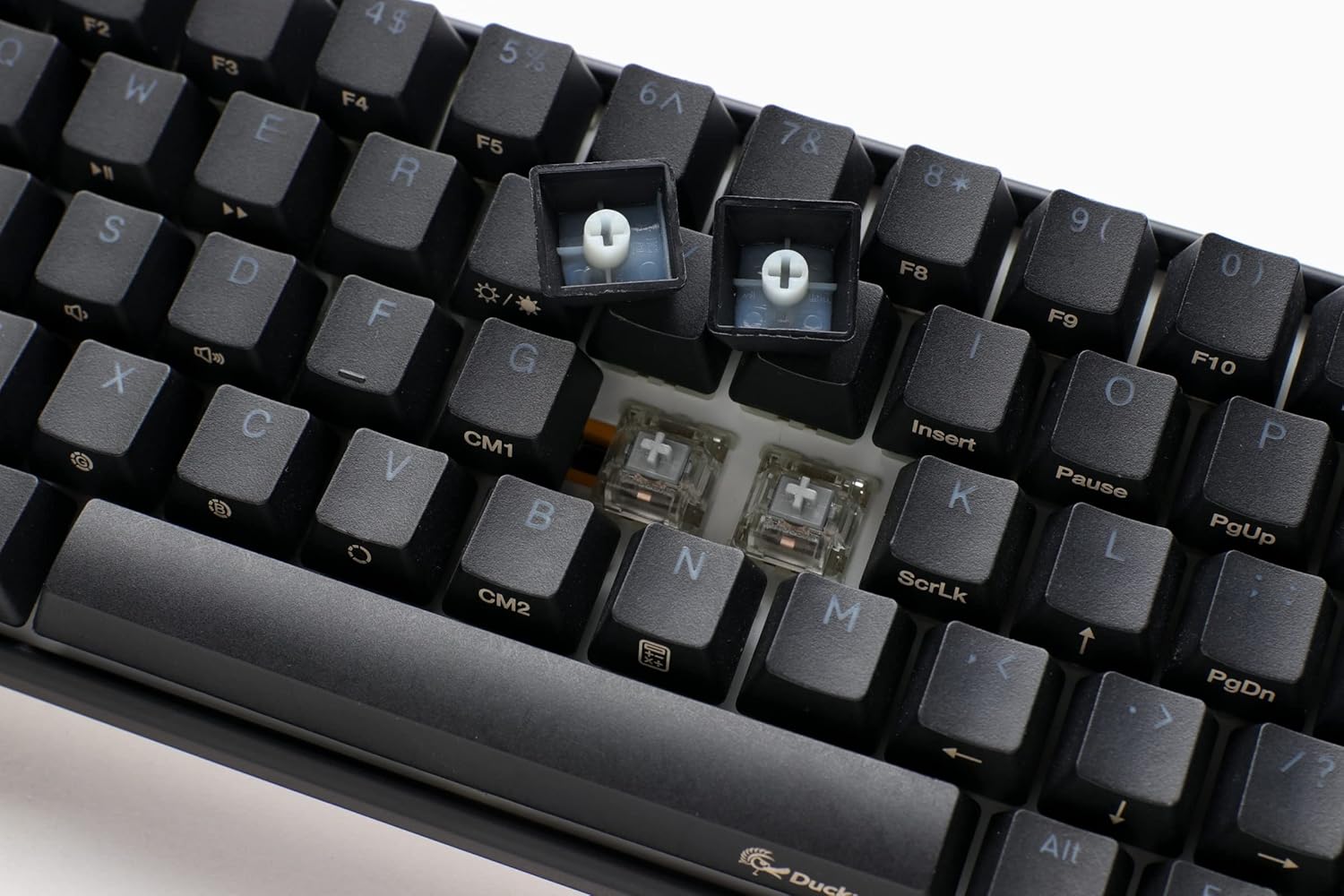
בילד: א נאָענטע בילד view of the keyboard with several keycaps removed, revealing the hot-swappable mechanical switches beneath, ready for replacement or customization.
4.5 פּראָדוקט איבערview ווידעא
פֿאַר אַ וויזועלע איבערבליקview of the Ducky One 3 series features and design philosophy, please watch the official product video below.
ווידעא: אן אפיציעלע איבערview of the Ducky One 3 keyboard series, detailing its design, features, and the 'QUACK Mechanics' philosophy. This video provides a visual guide to the product's capabilities.
5. וישאַלט
5.1 רייניקן די קלאַוויאַטור
רעגולערע רייניקונג העלפט אויפהאלטן די קלאַוויאַטור'ס אויסזען און פאַנגקשאַנאַליטעט.
- שליסל קאַפּס: Use the included keycap puller to carefully remove keycaps. Clean them with a mild soap solution and a soft cloth, then ensure they are completely dry before reattaching.
- קלאַוויאַטור גוף: ניצט אַ ווייכן, לינט-פֿרייע שטאָף, אַ ביסל ווייכערampened with water or a mild cleaning solution, to wipe down the keyboard body. Avoid excessive moisture.
- Between Switches: ניצט קאמפרעסט לופט צו באזייטיגן שטויב און דעבריס פון צווישן די סוויטשעס.

Image: The Ducky One 3 Mini keyboard featuring a custom spacebar with an intricate design, highlighting the potential for aesthetic customization and the ease of keycap removal for cleaning.
5.2 Switch and Stabilizer Care
The Ducky One 3 Mini features V2 stabilizers for improved stability and sound. While hot-swappable, proper care of switches and stabilizers can prevent issues.
- פֿאַרמײַדט צו פֿאַרגיסן פֿליסיקייטן אויף דער קלאַוויאַטור.
- When replacing switches, ensure they are inserted straight to prevent bending pins.
6. טראָובלעשאָאָטינג
If you encounter issues with your Ducky One 3 Mini keyboard, refer to the following common troubleshooting steps:
- קלאַוויאַטור ניט ריספּאַנדינג:
- זיכער מאַכן אַז דער USB-C קאַבל איז זיכער פארבונדן צו ביידע די קלאַוויאַטור און דעם קאָמפּיוטער.
- פרובירט צו קאנעקטן די קלאַוויאַטור צו אַן אַנדער USB פּאָרט אויף אייער קאָמפּיוטער.
- פּרובירט די קלאַוויאַטור אויף אַן אַנדער קאָמפּיוטער אויב מעגלעך צו אויסשליסן אַ סיסטעם-ספּעציפֿישן פּראָבלעם.
- RGB לייטינג נישט ארבעטן:
- Check the keyboard's manual or Ducky's website for the correct key combinations to activate and adjust RGB lighting.
- Ensure no software conflicts are interfering with the lighting controls.
- Keys Not Registering or Double-Typing (Chatter):
- Due to the hot-swappable design, try removing and re-inserting the affected switch to ensure proper seating.
- If the issue persists, consider replacing the switch with a new one.
- Ensure the keyboard is clean and free of debris that might obstruct switch operation.
- N-Key Rollover (NKRO) Issues:
- The Ducky One 3 Mini supports N-key rollover, meaning all key presses are registered simultaneously. If you experience issues, ensure your operating system and any gaming software are not interfering with this feature.
For further assistance, please visit the official Ducky support webפּלאַץ אָדער קאָנטאַקט זייער קונה דינסט.
7. ספּעסאַפאַקיישאַנז
| שטריך | דעטאַל |
|---|---|
| מאָדעל נומער | DKON2161ST-SUSPDCLAWSC1 |
| אויסלייג | 60% |
| באַשטימען טיפּ | Cherry MX Silent Red (Hot-Swappable) |
| קייקאַפּס | High-Density PBT Double-shot Seamless Keycaps |
| באַקלייט | פּער-קנעפל פּראָגראַמירבאַר RGB |
| קאַנעקטיוויטי | אָפּנעמבאַר USB-C |
| ספּעציעלע פֿעיִקייטן | QUACK Mechanics Design, Silicone Plate Dampener, EVA Foam Case Dampener, Ducky V2 Stabilizers, 3-Level Adjustable Feet, N-Key Rollover |
| פּראָדוקט דימענשאַנז | 12.2 X 4.33 X 1.57 אינטשעס |
| פּונקט וואָג | 1.31 פונט |
8. וואָראַנטי און שטיצן
Ducky products are manufactured to high-quality standards. This product is covered by a limited warranty against manufacturing defects. The specific terms and duration of your warranty may vary by region and retailer. Please retain your proof of purchase for warranty claims.
For technical support, warranty information, or service inquiries, please visit the official Ducky website or contact your local Ducky distributor or retailer. You can often find FAQs, driver downloads, and contact information on the official Ducky support pages.
אָנליין רעסורסן:
- דוקי באַאַמטער Webפּלאַץ: www.duckychannel.com.tw
- Ducky Store on Amazon: Visit the Ducky Store


