1. פּראָדוקט איבערview
This manual provides detailed instructions for the installation and care of your Ibywind Screen Protector kit, designed specifically for the Xiaomi 12/12X 5G 6.28-inch model. The kit includes a flexible TPU film screen protector, a metal camera lens protector, and a carbon fiber back film, offering comprehensive protection for your device.

Image: Complete Ibywind Screen Protector kit, including screen protector, camera lens protector, and back film.
1.1 Confirm Your Model
Before installation, please verify your phone model. This screen protector (not glass) and camera lens protector are only compatible with Xiaomi 12/12X 5G 6.28". You can check your model in your phone's settings: Settings > About Phone > Model.

Image: Visual comparison showing compatibility with Xiaomi 12/12X 5G and incompatibility with Xiaomi 12 Pro 5G.
1.2 פּעקל אינהאַלט
Your Ibywind Screen Protector kit includes the following items:
- 2 x TPU Screen Protectors
- 1 x Metal Camera Lens Protector ("Hollow out" design)
- 1 x Back Carbon Fiber Skin Protector (transparent color)
- 1 x Easy Installation Frame
- 2 x Installation Accessory Kits (wet wipe, dry wipe, dust sticker)
- 1 x סקווידזשי
- 1 x Adhesive Rubber Pad
- 1 x Installation Instructions (User Manual)

Image: All components included in the Ibywind Screen Protector package laid out.
2. סעטאַפּ און ייַנמאָנטירונג
For best results, please watch the official installation video tutorial before beginning the process. Ensure you are in a dust-free environment.
Video: Official Ibywind Screen Protector installation guide for Xiaomi 12/12X 5G. This video demonstrates the step-by-step application process for the screen protector, back film, and camera lens protector, including cleaning, alignment, and bubble removal.
2.1 Screen Protector Installation
- צוגרייטן די ייבערפלאַך: Lay your phone on the adhesive rubber pad to prevent movement during installation.
- ריין די פאַרשטעלן: Use the wet wipe from the accessory kit to thoroughly clean the phone screen. Follow with the dry wipe to remove any residue.
- אַראָפּנעמען שטויב: Use the dust sticker to carefully remove any remaining dust particles from the screen.
- אויסגלייַכן דעם פּראָטעקטאָר: Plug the easy installation frame (locator tool) into the phone's charging port. Place the screen protector onto the locator tool, ensuring the camera hole aligns correctly.
- Apply Top Section: Bend the top section of the screen protector back to peel off the plastic side. Use the squeegee to push down the film protector onto the phone, moving from the top downwards with even pressure.
- Remove Locator Tool: Once the top section is applied, carefully remove the locator tool from the charging port.
- Apply Bottom Section: Repeat the peeling and squeegee process for the bottom section of the screen protector, pushing at an even speed without halting.
- זיכערע עדזשאַז: Press the edges of the screen protector firmly onto the phone with your fingers to ensure full adhesion.
- Final Clean: Handle any remaining air bubbles by gently pushing them towards the edges with the squeegee. Wipe the protector with the dry wipe if necessary to remove any smudges or dust.

Image: A hand using a squeegee to apply the screen protector film onto the phone screen.
2.2 Back Carbon Fiber Skin Protector Installation
The kit includes a transparent carbon fiber skin film for the back of your phone, providing additional protection and a unique texture.
- Clean the Back: Ensure the back of your phone is clean and free of dust or oils.
- Align the Film: Carefully align the carbon fiber back film with the phone's camera module and edges.
- צולייגן: Slowly peel off the backing and apply the film, smoothing it out with the squeegee or a soft cloth to remove any air bubbles.

Image: A hand carefully applying the carbon fiber skin film to the back of a smartphone.
2.3 Metal Camera Lens Protector Installation
Protect your phone's camera lenses with the included metal lens protector.
- ריין לענסעס: Ensure the camera lenses and surrounding area are clean and dry.
- יישרײַבן: Carefully align the metal camera lens protector with the camera module, ensuring the cutouts match the lenses and flash.
- צולייגן: Gently press down to secure the protector in place.
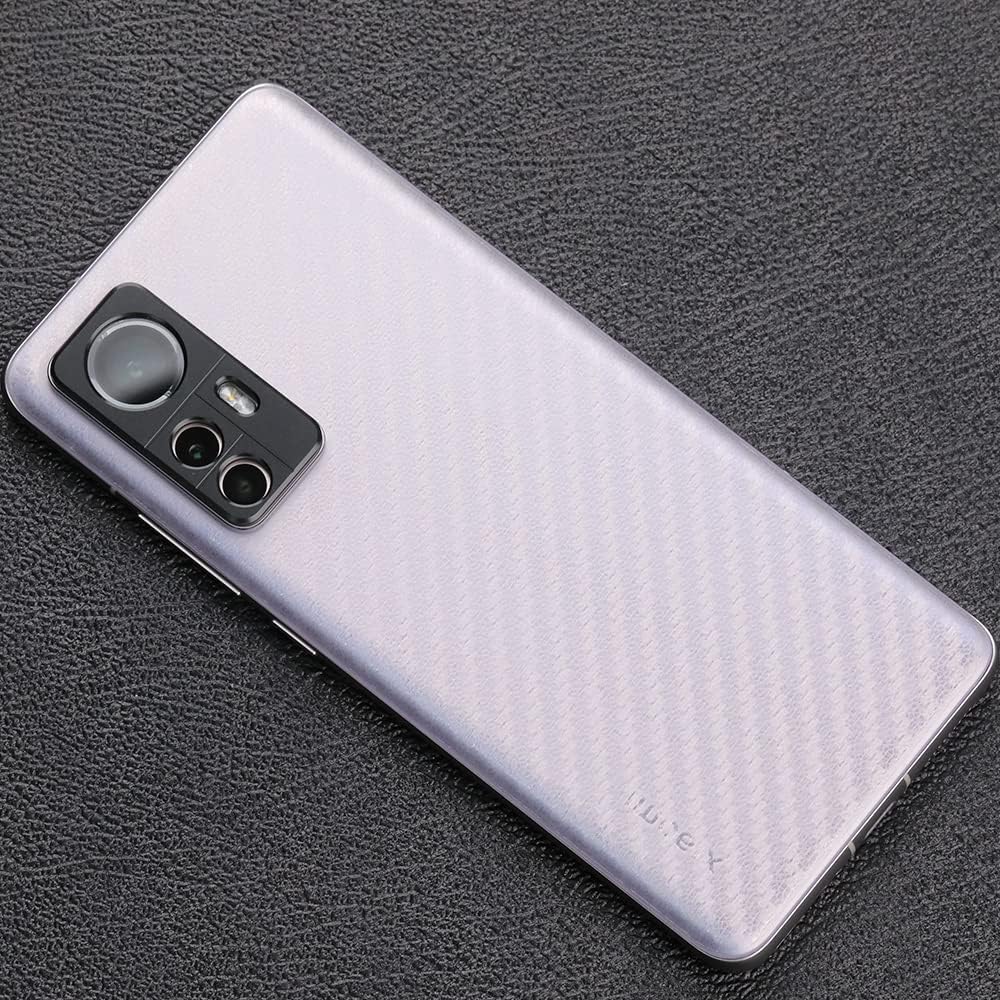
Image: Hands carefully placing the metal camera lens protector over the phone's camera module.
3. פּראָדוקט פֿעיִקייטן
The Ibywind screen protector offers several advanced features to enhance your phone's usability and protection:
- Case Friendly: Designed to leave enough space for the installation of most phone cases, providing maximum coverage without interference.
- High Quality TPU: Made from ultra-thin, high-quality Thermoplastic Polyurethane (TPU) for durable protection.
- 99.9% HD Clarity: Ensures the original color and clarity of your screen are maintained.
- Fingerprint Recognition Support: Fully compatible with in-screen fingerprint sensors, allowing for quick and accurate unlocking.
- Touch Sensitive & Responsive: Maintains the original touch experience of your screen.
- Fingerprint-Free & Dust-Free: Designed to resist fingerprints and dust accumulation.
- Oil Resistant: Features an anti-oil coating that allows for easy removal of smudges and marks.
- Self-Healing: The TPU material allows the protector to automatically recover from tiny scratches or bubbles within 24 hours.

Image: A graphic illustrating key product features: Easy Install Kit, Metal Camera Lens Protector, and Carbon Fiber Skin Film.
3.1 Performance Tests
The Ibywind screen protector has undergone various tests to ensure its quality and durability:
- Anti-oil Test: Demonstrates that pen ink and other oily substances can be easily removed from the protector's surface.
- Fingerprint Unlocked: Confirms seamless operation of in-screen fingerprint recognition.
- Drill Test: Proves the endurance and protective capabilities of the Ibywind protector against impacts.

Image: A graphic illustrating product performance tests: Anti-oil Test, Support Fingerprint Unlocked, and Drill Test.
4. וישאַלט
To ensure the longevity and optimal performance of your Ibywind screen protector, follow these simple maintenance tips:
- רעגולער רייניקונג: Wipe the screen protector regularly with a soft, lint-free cloth to remove dust, fingerprints, and smudges. For stubborn marks, slightly dampווישט דעם שטאָף מיט וואַסער אָדער אַ פאַרשטעלן רייניגער.
- ויסמיידן האַרב קעמיקאַלז: Do not use abrasive cleaners, alcohol, or ammonia-based solutions, as these can damage the protector's coating.
- באַשיצן פון שאַרף אַבדזשעקץ: While the protector offers good resistance, avoid direct contact with extremely sharp objects to prevent deep scratches.
- Allow Self-Healing: For minor scratches or small bubbles, allow 24 hours for the self-healing properties of the TPU film to work.
5. טראָובלעשאָאָטינג
If you encounter any issues during or after installation, please refer to the following common solutions:
5.1 Bubbles After Installation
- קליין באַבאַלז: Minor bubbles often disappear naturally within 24-48 hours due to the self-healing properties of the TPU film.
- Large Bubbles/Dust: If large bubbles persist or you see dust trapped underneath, carefully lift the nearest edge of the protector, use a dust sticker to remove the particle, and reapply using the squeegee.
- Edge Bubbles: Press firmly on the edges with your finger or the squeegee to ensure they are fully adhered.
5.2 Fingerprint Recognition Issues
- Re-register Fingerprint: After installing the screen protector, it is highly recommended to delete your old fingerprints and re-register them. This allows the phone to recognize your fingerprint through the new protector.
- פעסטער דרוק: Ensure you apply firm and consistent pressure when scanning your fingerprint.
5.3 Protector Not Sticking Properly
- גרונטיק רייניקונג: Ensure the screen was completely clean and dust-free before application. Any dust or oil can prevent proper adhesion.
- גלייכע דרוק: Apply the protector with slow, even pressure using the squeegee to ensure full contact.
6. ספּעסאַפאַקיישאַנז
| באַשרייַבונג | דעטאַל |
|---|---|
| סאָרט | Ibywind |
| מאָדעל נומער | ג-204 |
| קאַמפּאַטאַבאַל דעוויסעס | Xiaomi 12/12X 5G |
| פאַרשטעלן גרייס | 6.28 אינטשעס |
| מאַטעריאַל | טערמאָפּלאַסטיק פּאָליורעטאַן (TPU) |
| פּונקט כאַרדנאַס | B |
| קאָליר | טראַנספּעראַנט |
| ספּעציעלע פֿעיִקייטן | Bubble Proof, Fingerprint Recognition Support, Oil Resistant, Self-healing |
| פּראָדוקט דימענשאַנז | 5.82 X 2.66 X 0.5 אינטשעס |
| פּונקט וואָג | 0.529 אונסעס |
| פאַבריקאַנט | Ibywind |
| לאַנד פון אָריגין | כינע |
7. וואָראַנטי און שטיצן
Ibywind is committed to customer satisfaction and product quality.
7.1 וואָראַנטי פּאָליטיק
For non-manual product quality issues, Ibywind offers a replacement within three months of purchase.
7.2 קונה שטיצן
If you have any questions or require assistance, please contact Ibywind customer service. We aim to resolve inquiries within 24 hours on weekdays.


