הקדמה
This user manual provides essential information for the safe and efficient operation, maintenance, and troubleshooting of your SnapFresh 20V Cordless Impact Drill. Please read this manual thoroughly before using the tool to ensure proper handling and to maximize its lifespan. Keep this manual for future reference.
זיכערקייַט אינפֿאָרמאַציע
שטענדיק אָבסערווירן גרונטלעכע זיכערהייט מיטלען ווען איר ניצט עלעקטרישע מכשירים צו רעדוצירן דעם ריזיקאָ פון פייער, עלעקטרישן קלאַפּ און פערזענלעכע שאָדן.
- טראָגן צונעמען פערזענלעכע פּראַטעקטיוו עקוויפּמענט, אַרייַנגערעכנט זיכערקייַט ברילן, געהער שוץ און גלאַווז.
- זיכער מאַכן אַז אייער אַרבעטס־געגנט איז גוט באַלויכטן און ריין פֿון שטערונגען.
- האַלטן קינדער און בייסטאַנדערז אַוועק בשעת אַפּערייטינג די געצייַג.
- דו זאלסט נישט אַרבעטן מאַכט מכשירים אין יקספּלאָוסיוו אַטמאָספערעס, אַזאַ ווי אין דעם בייַזייַן פון ברענעוודיק ליקווידס, גאַסאַז אָדער שטויב.
- Always disconnect the battery pack from the tool before making any adjustments, changing accessories, or storing the tool.
- Use only the specified battery pack and charger for this tool.
- Do not expose battery packs or tools to fire or excessive temperature.
- Avoid accidental starting. Ensure the switch is in the off-position before inserting the battery pack, picking up or carrying the tool.
- האַלט די מכשירים מיט זאָרג. קאָנטראָלירט צי די באַוועגלעכע טיילן זענען נישט גלייך אָדער נישט בינדן, צי די טיילן זענען צעבראָכן און קיין אַנדערע צושטאַנד וואָס קען אַפעקטירן די אָפּעראַציע פון די מכשירים.
אַרייַנגערעכנט קאַמפּאָונאַנץ
Your SnapFresh 20V Cordless Impact Drill kit includes the following items:
- 1 x SnapFresh 20V Cordless Impact Drill
- 1 x 2.0Ah ליטהיום-יאָן באַטאַרייע
- 1 x Rapid Charger
- 34 קס שרויפנ - ציער ביץ
- 9 רענטגענ בויער ביץ

Figure 1: Complete SnapFresh 20V Cordless Impact Drill kit, showing the drill, battery, charger, and various drill and screwdriver bits.
סעטאַפּ
1. טשאַרדזשינג די באַטערי
The 2.0Ah Lithium-ion battery requires charging before first use. The rapid charger can fully charge the battery in approximately 1 hour.
- Connect the rapid charger to a standard power outlet.
- שטופּ די באַטעריע פּאַק אויף דעם טשאַרדזשער ביז עס קליקט אין פּלאַץ.
- The charger's indicator light will show the charging status. Refer to the charger's specific instructions for light indications (e.g., red for charging, green for fully charged).
- אַמאָל גאָר באפוילן, אַראָפּנעמען די באַטאַרייע פון די טשאַרדזשער.

Figure 2: The rapid charger for the 20V Lithium-ion battery. Ensure the battery is properly seated for charging.
2. אינסטאלירן און ארויסנעמען די באַטעריע פּאַק
- To install: Align the battery pack with the base of the drill handle and slide it in until it locks securely into place with a click.
- To remove: Press the battery release button (usually located on the front or sides of the battery pack) and slide the battery pack out of the tool.
3. Installing Drill Bits and Screwdriver Bits
The drill features a 1/2" keyless chuck for easy bit changes.
- Ensure the drill is off and the forward/reverse switch is in the center (locked) position.
- Grip the rear half of the chuck and rotate the front half counter-clockwise until the chuck jaws are open wide enough to insert the bit.
- שטעקט אריין דעם געוואונטשענעם בויער אדער שרויפנציהער אינגאנצן אין טשאַק.
- Rotate the front half of the chuck clockwise to tighten the jaws firmly around the bit. Ensure the bit is centered and secure.
- To remove a bit, reverse the process: rotate the front half counter-clockwise to loosen the jaws and pull the bit out.
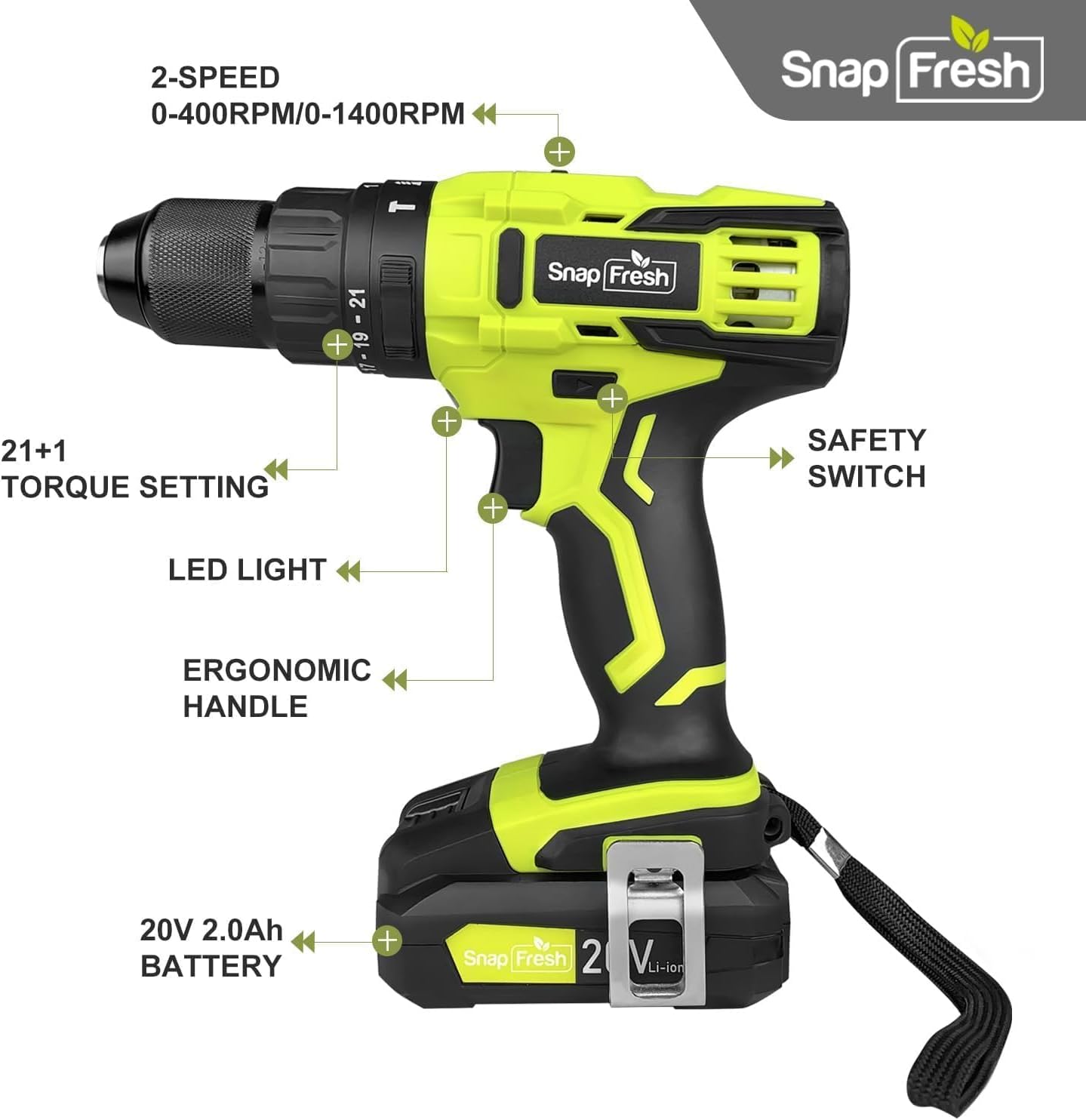
Figure 3: The drill features a durable 1/2" all-metal chuck for maximum durability and compatibility with various bits.
אַפּערייטינג ינסטראַקשאַנז
1. Power On/Off and Variable Speed Trigger
The drill is activated by pressing the trigger switch. The speed of the drill is variable, controlled by how much you depress the trigger. Pressing lightly results in lower speed, while pressing fully results in maximum speed.
2. מאָדע סעלעקציע
Your drill offers three powerful modes, selected by rotating the collar behind the chuck:
- דרילינג מאָדע (דריל ביט בילדל): For drilling holes in wood, metal, and plastic. Provides up to 445 in-lbs of torque.
- דרייווינג מאָדע (שרויף אייקאָן): For driving screws. Provides 0-445 in-lbs of torque, adjustable with the torque control collar.
- Hammer Mode (Hammer Icon): For drilling into masonry and concrete. Provides up to 445 in-lbs of torque with added hammering action.

Figure 4: The mode selection collar allows you to switch between Driving, Drilling, and Hammer modes for various applications.
3. Torque Control
The torque control collar allows you to adjust the amount of torque applied, preventing over-driving screws or damaging materials. Rotate the collar to select the desired torque setting (from 0 to 445 in-lbs). Lower numbers are for softer materials or smaller screws, higher numbers for harder materials or larger screws.
4. ספּיד סעלעקציע
The drill features a 2-speed transmission switch located on top of the tool:
- נידעריקע גיכקייט (0-400 רפּם): Ideal for high-torque applications like driving large screws or drilling large holes.
- הויך גיכקייט (0-1500 רפּם): Suitable for faster drilling in wood, metal, or for smaller screws.

Figure 5: The 2-speed transmission switch allows you to select between low speed (0-400 RPM) for high torque and high speed (0-1500 RPM) for faster drilling.
5. געפירט אַרבעט ליכט
A built-in LED light illuminates the work area when the trigger is pressed, improving visibility in dimly lit spaces.
6. פֿאָרווערטס/פאַרקערט סוויטש
The forward/reverse switch is located above the trigger. Push it to the left for forward rotation (drilling/driving) and to the right for reverse rotation (removing screws). When centered, the switch acts as a lock-off to prevent accidental starting.
וישאַלט
רעגולערע אויפהאלטונג גאראנטירט אפטימאלע פאָרשטעלונג און פארלענגערט די לעבן פון אייער געצייַג.
- רייניקונג: Keep the tool's air vents clean and free of debris to prevent overheating. Use a soft, damp טוך פֿאַר רייניקונג. ניצט נישט שטרענגע כעמיקאַלן אָדער שרײַבנדיקע רייניגער.
- באַטערי זאָרגן: Store battery packs in a cool, dry place away from direct sunlight and extreme temperatures. Do not store battery packs in a discharged state for extended periods.
- סטאָרידזש: ווען נישט אין באַנוץ, זאָל מען האַלטן דעם דריל און זיינע אַקסעסאָריעס אין אַ זיכערן, טרוקענעם אָרט, אַוועק פון קינדער.
טראָובלעשאָאָטינג
אויב איר טרעפט פּראָבלעמען מיט אייער דריל, זעט די פאלגענדע געוויינטלעכע פּראָבלעמען און לייזונגען:
| פּראָבלעם | מעגלעך סיבה | לייזונג |
|---|---|---|
| די דריל הייבט זיך נישט אן. | Battery not charged or not properly installed. Forward/reverse switch in locked position. | Ensure battery is fully charged and securely inserted. Move forward/reverse switch out of the center position. |
| פארמינדערטע מאַכט אָדער גיכקייט. | נידעריגע באַטעריע אָפּצאָל. אומרעכטע גיכקייט איינשטעלונג פֿאַר דער אַרבעט. | Recharge the battery. Switch to the appropriate speed setting (low speed for higher torque). |
| ביסל וואַקלט זיך אָדער פאַלט אַרויס. | טשאַק נישט גענוג צוגעצויגן. ביט שאַנק איז שמוציק אָדער צעבראָכן. | Ensure the chuck is tightened firmly around the bit. Clean or replace the bit if necessary. |
| Initial sparks from motor. | Normal for new carbon brush drills. | This is typical for new DC motor tools and will diminish over time. If sparks persist or are excessive, contact support. |
If the problem persists after attempting these solutions, please contact SnapFresh customer support.
ספּעסאַפאַקיישאַנז
| שטריך | באַשרייַבונג |
|---|---|
| סאָרט | SnapFresh |
| מאָדעל נומער | JOZ-YFT51 |
| מאַכט מקור | באַטאַרייע פּאַוערד |
| Voltage | 20V |
| באַטאַרייע קאַפּאַציטעט | 2.0 אַה ליטהיום-יאָן |
| מאַקסימום טאָרק | 445 אינטשעס פונט |
| קיין-לאָד גיכקייט (נידעריק) | 0-400 רפּם |
| נישט-לאסט גיכקייט (הויך) | 0-1500 רפּם |
| טשאַק גרייס | 1/2 Inch (Keyless) |
| נומער פון ספּידז | 2 |
| Drill Modes | Drilling, Driving, Hammer |
| פּונקט וואָג | 2.8 lbs (tool only) / 6.4 lbs (with battery) |
| פּראָדוקט דימענשאַנז | 8.67"ל x 3.15"בר x 9"ה |
וואָראַנטי און שטיצן
SnapFresh products are designed for reliability and performance. For warranty information, technical support, or service inquiries, please contact SnapFresh Official customer service. Refer to your purchase documentation for specific warranty terms and contact details.
You can often find support information on the official SnapFresh webוועבזייטל אדער דורך דעם פארקויפער וואו דער פראדוקט איז געקויפט געווארן.


