1. הקדמה
די WOOX סמאַרט סאָקעט R6087 איז אַ סמאַרט פּלאָג וואָס איז דיזיינד צו אינטעגרירן אייערע טראַדיציאָנעלע היים אַפּפּליאַנסעס אין אַ סמאַרט היים עקאָסיסטעם. עס דערמעגלעכט ווייַט קאָנטראָל, קול קאָנטראָל, סקעדזשולינג און גרופּע פאַרוואַלטונג פון קאָנעקטעד דעוויסעס, וואָס פֿאַרבעסערט באַקוועמלעכקייט און ענערגיע עפעקטיווקייט. די מאַנואַל גיט דעטאַלירטע אינסטרוקציעס פֿאַר די זיכערע און עפעקטיווע נוצן פון אייער WOOX סמאַרט סאָקעט R6087.
2. זיכערקייַט אינפֿאָרמאַציע
ביטע ליינט און פאלגט די זיכערהייט אינסטרוקציעס קערפול איידער איר ניצט די WOOX Smart Socket R6087:
- דו זאלסט נישט דיסאַסעמבאַל אָדער מאָדיפיצירן די מיטל.
- שטעלט נישט אויס דעם אפאראט צו וואסער, פייכטקייט, אדער עקסטרעמע טעמפעראטורן.
- זיכער מאַכן אַז די פֿאַרבונדענע אַפּאַראַט׳ס מאַכט קאָנסומאַציע איז נישט העכער ווי די סמאַרט סאָקעט׳ס מאַקסימום לאָוד קאַפּאַציטעט (16A / 3680W).
- נוצן בלויז אין טרוקן דרינענדיק ינווייראַנמאַנץ.
- האַלטן אויס פון דערגרייכן פון קינדער.
- דער פּראָדוקט איז TÜV-סערטיפיצירט, וואָס גאַראַנטירט זיכערקייט און קוואַליטעט סטאַנדאַרדן.
3. פּעקל אינהאַלט
אייער WOOX סמאַרט סאָקעט R6087 פּעקל כולל:
- 4 x WOOX קלוגע סאָקעט R6087
- 1 x באַניצער מאַנואַל (דאָס דאָקומענט)
4. פּראָדוקט איבערview
די WOOX סמאַרט סאָקעט R6087 איז אַ קאָמפּאַקט סמאַרט פּלאָג דיזיינד פֿאַר אייראָפּעיִשע טיפּ F סאָקעטס. יעדער פּלאָג פֿאַרמאָגט אַ מאַכט קנעפּל מיט אַן אינטעגרירטן LED אינדיקאַטאָר פֿאַר סטאַטוס באַמערקונגען.

דאס בילד ווייזט א פּאַק פון פיר ווייסע Woox Smart Socket R6087 פּלאַגז, יעדער מיט דעם Woox לאָגאָ און אַ מאַכט קנעפּל מיט אַן LED אינדיקאַטאָר. די פּלאַגז זענען דיזיינד פֿאַר אייראָפּעיִשע טיפּ F סאָקעץ.

דאס בילד פאָקוסירט אויף אַן איינציקן Woox Smart Socket R6087 וואָס איז אַרייַנגעשטופּט אין אַ וואַנט אַוטלעט. דער צוגעבונדענער טעקסט אונטערשטרייכט זיינע הויפּט פֿעיִקייטן: אַ מאַקסימום לאָוד קאַפּאַציטעט פון 16 Ampערעס, TUV זיכערהייט סערטיפיקאציע, טיימער און סקעדזשולינג מעגלעכקייטן, ווייַט קאָנטראָל דורך אַפּ, און די מעגלעכקייט צו טיילן מיטל אַקסעס מיט אנדערע.
5. סעטאַפּ גייד
פֿאָלגט די סטעפּס צו סעטאַפּן אייער WOOX Smart Socket R6087:
- דאַונלאָוד די WOOX היים אַפּ: זוכן פֿאַר "WOOX Home" אין די עפּל אַפּ סטאָר אָדער גוגל פּליי סטאָר און דאַונלאָוד די אַפּליקאַציע צו דיין סמאַרטפאָון.
- שטעק אריין די סמאַרט סאָקעט: שטעקט אריין די WOOX סמאַרט סאָקעט R6087 אין אַ נאָרמאַלער וואַנט אַוטלעט. די LED אינדיקאַטאָר אויף דעם פּלאָג זאָל אָנהייבן צו בלינקען, וואָס ווײַזט אַז עס איז אין פּערינג מאָדע.
- לייג צו אפאראט אין אפליקאציע: עפֿנט די WOOX Home אַפּ, רעגיסטרירט זיך אָדער לאָגט זיך איין, און פֿאָלגט די אינסטרוקציעס אויף דעם עקראַן צו לייגן צו אַ נייעם מיטל. סעלעקטירט דעם Smart Socket פֿון דער ליסטע פֿון דיווייסעס און פֿאַרבינדט עס צו אייער 2.4GHz Wi-Fi נעץ.

דאס בילד ווייזט די דריי איינפאכע טריט פארן אויפשטעלן דעם Woox Smart Socket R6087. טריט 1 ווייזט ווי מען דאונלאודט די 'Woox Home' אפליקאציע פון גוגל פלעי אדער דעם אפ סטאר. טריט 2 ווייזט ווי מען לייגט אריין דעם Smart Socket אין א וואנט ווענטיל. טריט 3 ווייזט ווי מען גייט נאך די אינסטרוקציעס אין דער 'Woox Home' אפליקאציע צו פארענדיגן דעם אויפשטעל פראצעס.
6. אַפּערייטינג ינסטרוקטיאָנס
6.1 רימאָוט קאָנטראָל
קאנטראלירט אייערע עלעקטרישע אפאראטן פון ערגעץ ניצנדיק די WOOX היים אפליקאציע. פשוט עפנט די אפליקאציע, סעלעקטירט אייער קלוגע סאקעט, און טוישט אן אדער אויס די מאכט.
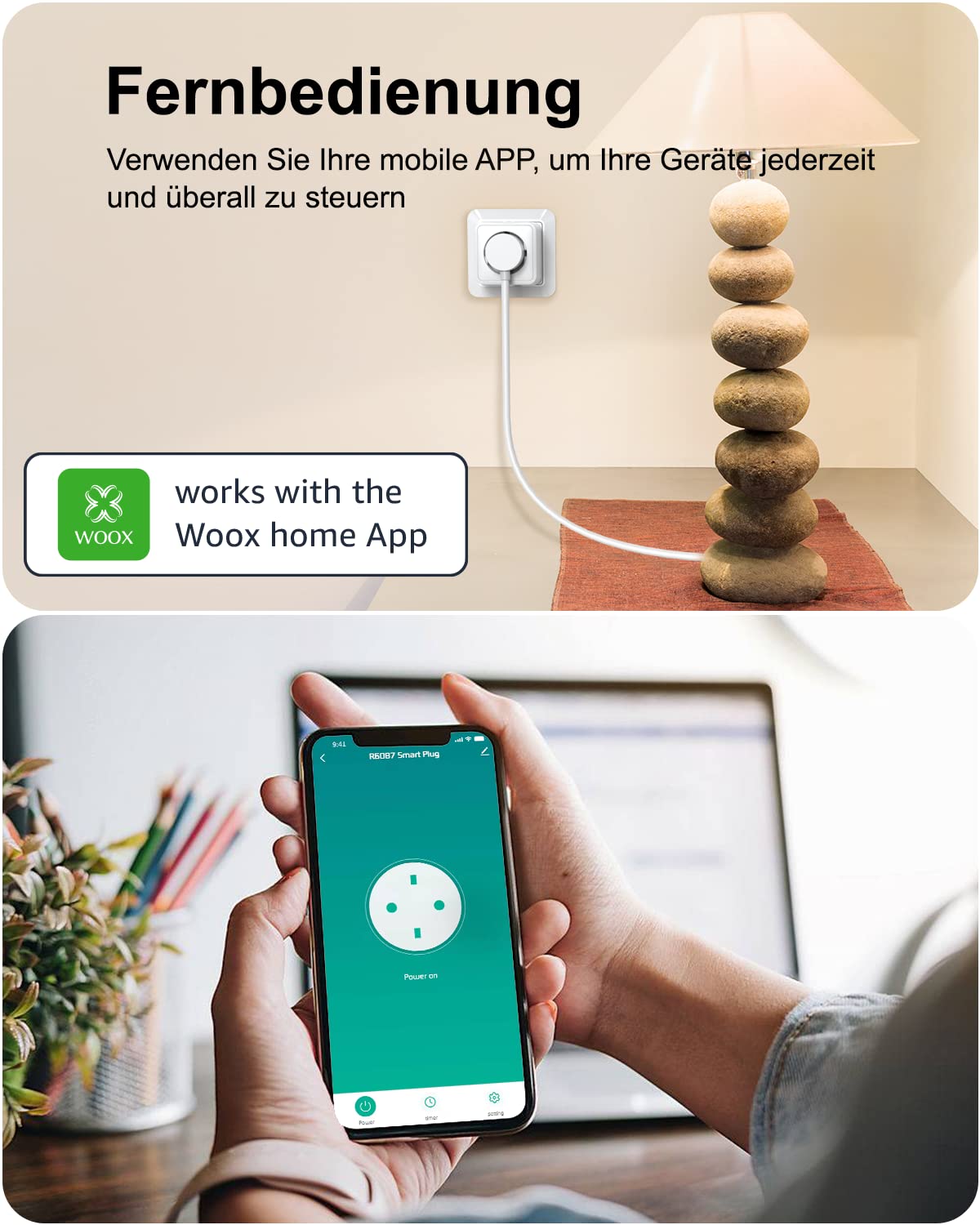
א וואָאָקס סמאַרט סאָקעט R6087 ווערט געוויזן איינגעשלאָסן אין אַ וואַנט אַוטלעט, וואָס מאַכט אַ טישampאונטן, ווייזט א סמאַרטפאָן די Woox Home אַפּ צובינד, דעמאָנסטרירנדיק די ווײַט קאָנטראָל פונקציאָנאַליטעט פֿאַר די סמאַרט פּלאָג.

א פּאָר ווערט געוויזן אַרויס פֿון אַ מאָדערנעם הויז, קוקנדיק אויף אַ סמאַרטפֿאָן. דער טעלעפֿאָן־עקראַן ווײַזט די Woox Home אַפּ, וואָס ווײַזט די מעגלעכקייט צו ווײַטן מאָניטאָרירן און קאָנטראָלירן פֿאַרבונדענע היים־אַפּאַראַטן, ווי ליכט אָדער קאַווע־מאַשינען, פֿון יעדער אָרט.
6.2 קול קאָנטראָל
די WOOX סמאַרט סאָקעט R6087 איז קאָמפּאַטיבל מיט אַמאַזאָן אַלעקסאַ און גוגל אַסיסטאַנט. פֿאַרבינדט אייער WOOX היים חשבון צו אייער שטימע אַסיסטאַנט אַפּ צו קאָנטראָלירן דעוויסעס מיט פּשוטע שטימע באַפֿעלן.
- Exampלע: "אַלעקסאַ, מאַך אויס די ליכט אין וואוינצימער."
- Exampלע: "היי גוגל, מאך אן די קאווע מאשין."

אין אַ קיך סעטינג, אַ וואָאָקס סמאַרט סאָקעט R6087 גיט כוח צו אַ קאַווע מאַשין. אַן אַמאַזאָן עקאָ מיטל איז קענטיק, וואָס אילוסטרירט ווי דער סמאַרט פּלאָג קען קאָנטראָלירט ווערן דורך שטימע קאָמאַנדעס ניצנדיק אַלעקסאַ, און דערמעגלעכט דעם באַניצער צו אנצינדן די קאַווע מאַשין הענט-פֿרייַ.

א פרוי רוט זיך אויס אויף א סאָפע, ניצנדיק שטימע קאָמאַנדעס צו קאָנטראָלירן א ווענטילאַטאָר פארבונדן צו א Woox Smart Socket R6087. די בילד אונטערשטרייכט קאָמפּאַטיביליטי מיט קלוגע שטימע סיסטעמען ווי Alexa און Google Assistant, וואָס ערמעגליכט באַקוועמע הענט-פֿריי אָפּעראַציע פון דעווייסעס.
6.3 סקעדזשולינג און טיימער
שטעלט איין אייגענע סקעדזשולז אדער קאַונטדאַון טיימערס פֿאַר אייערע עלעקטרישע אַפּאַראַטן צו אויטאָמאַטיזירן זייער אָפּעראַציע און שפּאָרן ענערגיע.
- סקעדזשולינג: פּראָגראַמיר ספּעציפֿישע אָן/אויס צייטן פֿאַר טעגלעכע אָדער וועכנטלעכע רוטינעס. למשלampל, קער אויף עלamp ביי זונ-אונטערגאַנג און עס אויסלעשן אין אַ באַשטימטער צייט.
- טיימער: ניצט די קאַונטדאַון טייַמער פונקציע פֿאַר צייטווייליגע קאָנטראָל, ווי למשל אויסלעשן אַ מיטל נאָך אַ באַשטימטע צייט.
אַן אינעווייניקסטע סצענע ווייזט אַ צימער מיט אַ טיש.amp און אַ קאָמפּיוטער סעטאַפּ. אַ סמאַרטפאָון עקראַן לייגט איבער דעם בילד, ווײַזנדיק די Woox Home אַפּ'ס סקעדזשולינג צובינד, וואו באַניצער קענען שטעלן ספּעציפֿישע ON/OFF צײַטן פֿאַר פֿאַרבונדענע דעוויסעס, ווי צום בייַשפּיל אויסלעשן אַלע...amp אן 7:00 אינדערפרי און אויס 7:30 אינדערפרי.
6.4 גרופע קאנטראל און דעווייס טיילן
פירן קייפל קלוגע סאָקעץ עפֿעקטיוו און טיילן קאָנטראָל מיט משפּחה מיטגלידער.
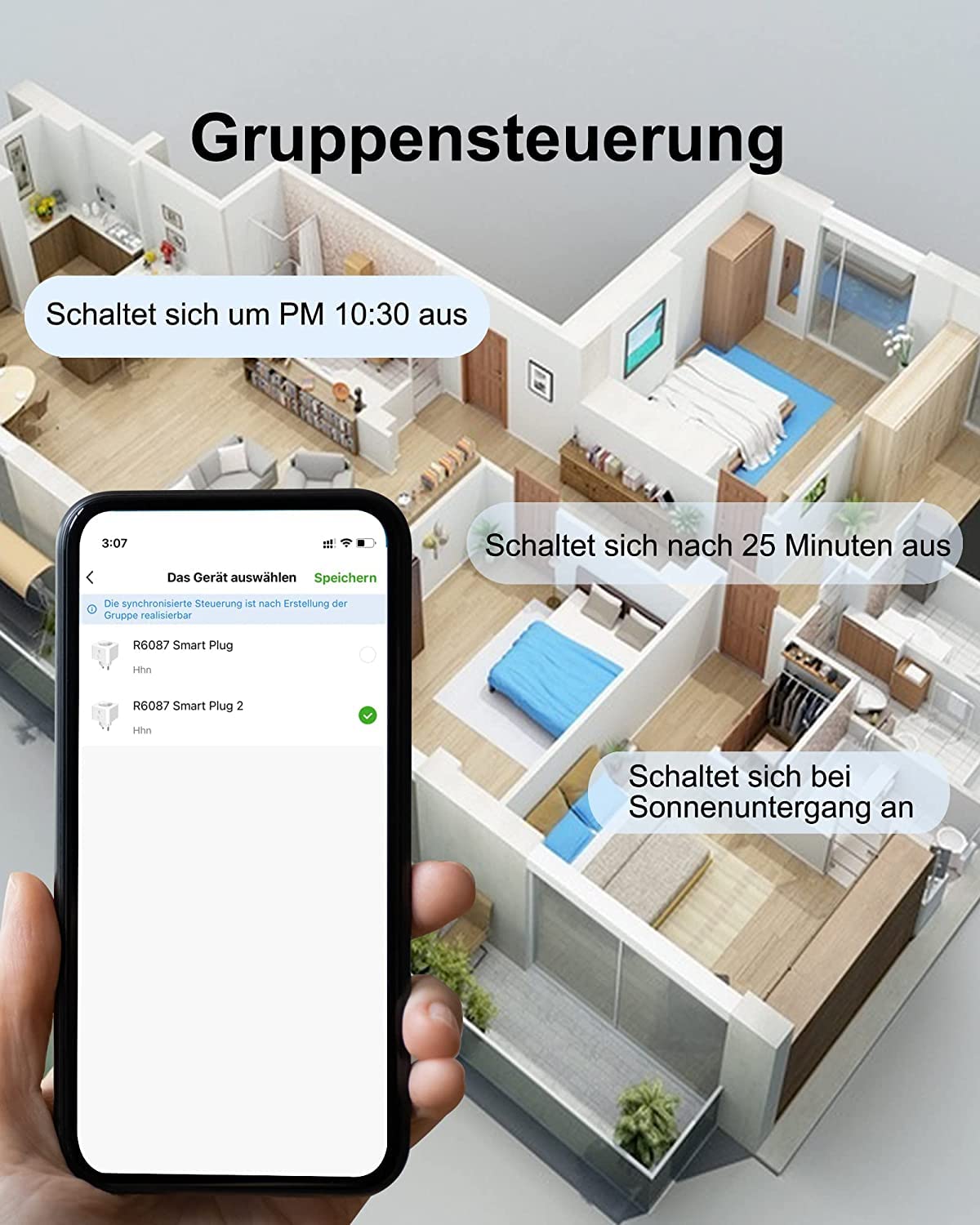
- גרופע קאָנטראָל: שאַפֿן גרופּעס אין דער WOOX היים אַפּ צו קאָנטראָלירן קייפל קלוגע סאָקעץ סיימאַלטייניאַסלי מיט איין באַפֿעל. למשלampלע, אויסלעשן אַלע ליכט אין אַ צימער אויף איין מאָל.
- דיווייס ייַנטיילונג: טיילט צוטריט צו אייערע קלוגע סאָקעטס מיט אַנדערע באַניצער דורך די WOOX Home אַפּ, און דאָס ערלויבט קייפל משפּחה מיטגלידער צו קאָנטראָלירן די דעוויסעס.

דאס בילד אילוסטרירט די גרופע קאנטראל אייגנשאפט פון די Woox Smart Socket R6087. א סטיליזירטער הויז פלאן ווערט געוויזן, מיט א סמארטפאן וואס ווייזט די Woox Home אפליקאציע. די אפליקאציע אינטערפייס ערלויבט באנוצער צו אויסקלויבן און קאנטראלירן קייפל קלוגע פלאגס אין דער זעלבער צייט, און ערמעגליכט אקציעס ווי אויסלעשן אלע דעווייסעס ביי 10:30 אין אוונט אדער זיי אקטיוויזירן ביי זונ-אונטערגאנג.

א פּאָר ווערט געוויזן באַקוועם זיצנדיק אויף אַ סאָפע, קוקנדיק אויף אַ סמאַרטפאָון. דער טעלעפאָן עקראַן ווייזט די Woox Home אַפּ, ספּעציעל ארויסהייבנדיק די 'Share Device' אָפּציע, וואָס ערלויבט באַניצער צו געבן צוטריט און קאָנטראָל פון זייערע סמאַרט פּלאַגז צו אַנדערע משפּחה מיטגלידער.
7. טראָובלעשאָאָטינג
אויב איר טרעפט פּראָבלעמען מיט אייער WOOX Smart Socket R6087, זעט די פאלגענדע געוויינטלעכע פּראָבלעמען און לייזונגען:
| פּראָבלעם | מעגלעך סיבה | לייזונג |
|---|---|---|
| די דעווייס קען זיך נישט פארבינדן צו Wi-Fi / די אפליקאציע ווייזט "אפליין" | אומרעכט Wi-Fi פּאַראָל, 5GHz Wi-Fi נעץ, שוואַך סיגנאַל, אָדער מיטל צו ווייט פֿון ראַוטער. | זייט זיכער אז איר ניצט א 2.4GHz Wi-Fi נעץ. קאָנטראָלירט דעם Wi-Fi פּאַראָל. רוקט דעם סמאַרט סאָקעט נענטער צום ראַוטער. באַשטעטיקט דעם סמאַרט סאָקעט און פּרוּווט ווידער צו פאַרבינדן. |
| קול קאָנטראָל איז נישט ארבעטן | פאַלשע פֿאַרבינדונג מיט אַלעקסאַ/גוגל אַסיסטאַנט, דיווייס נאָמען נישט דערקענט, אָדער שטימע אַסיסטאַנט דיווייס איז אָפפליין. | באַשטעטיקט אַז דער WOOX היים חשבון איז ריכטיק פֿאַרבונדן אין אייער Alexa/Google Home אַפּ. מאַכט זיכער אַז דער נאָמען פֿון דעם מיטל איז פּשוט און גרינג צו דערקענען. קאָנטראָלירט די אינטערנעט פֿאַרבינדונג פֿון דעם קול אַסיסטאַנט מיטל. |
| קלוגע סאָקעט רעאַגירט נישט | מאַכט אירtagע.ג., קלוגע סאָקעט נישט פּלאַגד, אָדער אַפּ קאַנעקטיוויטי פּראָבלעם. | קאָנטראָלירט צי די קלוגע סאָקעט איז ריכטיק איינגעשטעקט און באַקומט שטראָם. באַשטעטיקט אַז אייער היים Wi-Fi נעץ איז אַקטיוו. ריסטאַרט די WOOX היים אַפּ. |
| סקעדזשולינג נישט אַקטיוויזירט | נישט ריכטיקע סקעדזשול סעטינגס, אדער סמאַרט סאָקעט איז אָפפליין אין סקעדזשולד צייט. | Review די סקעדזשול סעטינגס אין די WOOX היים אַפּ פֿאַר אַקיעראַסי. זיכער מאַכן אַז די סמאַרט סאָקעט האט אַ סטאַביל Wi-Fi פֿאַרבינדונג אין דער סקעדזשולד צייט. |
8. ספּעסאַפאַקיישאַנז
| שטריך | דעטאַל |
|---|---|
| מאָדעל נומער | ר6087 |
| פּראָדוקט דימענשאַנז | 5.9 X 5.9 X 8.3 סענטימעטער |
| וואָג | 420 ג (פֿאַר 4 שטיקלעך) |
| קראַנט רייטינג | 16 Ampער |
| מאַקסימום מאַכט מאַסע | 3680 וו |
| אַפּערייטינג מאָדע | אנצינדן אויסלעשן |
| קאַנעקטער טיפּ | שרויף (טיפּ F) |
| באַשטימען טיפּ | שטימע קאנטראל, ווײַט קאנטראל, קלוג |
| מאַטעריאַל | פּלאַסטיק |
| סערטיפיקאַטיאָנס | TÜV סערטיפיצירט |
9. וואָראַנטי און שטיצן
WOOX אָפפערט פּראָדוקטן און סערוויסעס צו איבער 400,000 באַניצער איבער אייראָפּע. פֿאַר יעדע פּראָבלעם אָדער שטיצע באַדאַרף, איז 24/7 טעלעפאָן סערוויס בנימצא. ביטע קאָנטאַקט די WOOX באַאַמטער. webוועבזייטל אדער אייער קויפן דאקומענטאציע פאר ספעציפישע גאראנטיע באדינגונגען און קאנטאקט אינפארמאציע.


