פּראָדוקט איבערview
The FLEXISPOT Enhanced Standing Desk is an electric, motorized, height-adjustable desk designed to promote a healthy work-life balance. It features a robust dual-motor system and a three-section leg design, offering a wide height adjustment range from 62 cm to 127 cm. This desk is suitable for users ranging from 110 cm to 203 cm in height.
שליסל פֿעיִקייטן אַרייַננעמען:
- Wide Height Adjustment: From 62 cm to 127 cm, accommodating various user heights.
- Powerful Dual Motor System: Ensures smooth and quick height transitions with a lifting speed of 3.5 cm/s.
- הויך לאַסט קאַפּאַציטעט: Supports up to 160 kg, ideal for multiple monitors and heavy equipment.
- קלוגע קאָנטראָל פּאַנעל: Features three programmable memory height presets and a timed reminder function for regular movement.
- אַנטי-קאליזיע סיסטעם: Automatically stops and retracts when an obstacle is detected, preventing damage and injury.
- Durable and Certified Materials: FSC-certified desktop meeting E0 environmental standards, ensuring safety and sustainability.

Figure 1: FLEXISPOT Enhanced Standing Desk, highlighting its robust design and 160kg load capacity.
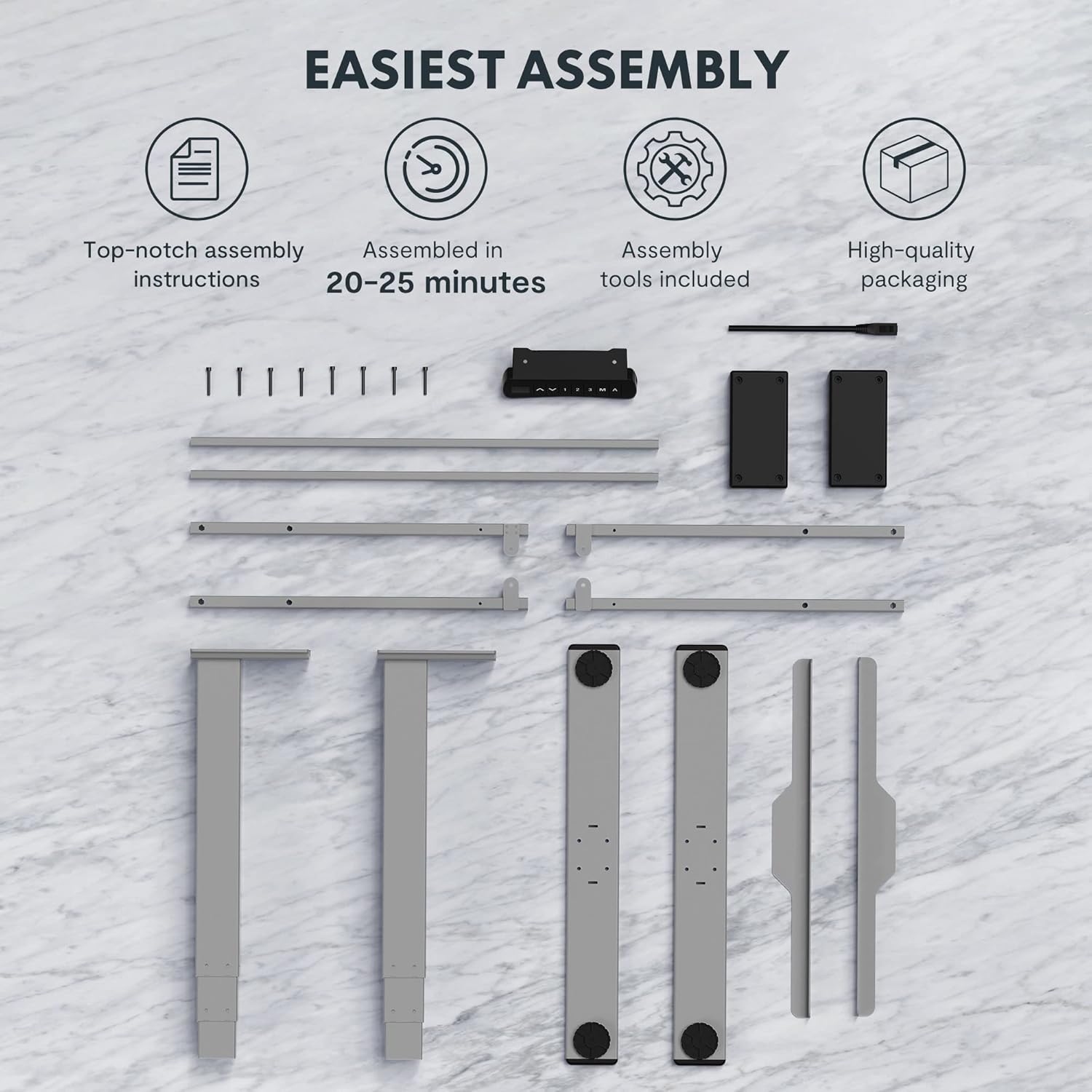
Figure 2: Available desktop options and material certifications, including FSC-certified wood.
זיכערקייַט וואָרנינגז
Please read and understand all safety warnings before operating the desk to prevent injury or damage to the product.
- קאָליזיע שוץ: The desk is equipped with an anti-collision system. If an obstacle is detected during movement, the tabletop will stop and retract slightly. Do not intentionally obstruct the desk's movement.
- ווארענונג אָווערלאָאַד: Do not exceed the maximum load capacity of 160 kg. Overloading can damage the motor and frame.
- קינדער און פּעץ: Keep children and pets away from the desk during operation. Moving parts can cause injury.
- מאַכט צושטעלן: Ensure the power cord is properly connected and not damaged. Do not operate the desk with a damaged cord or plug.
- מדרגה ייבערפלאַך: Always operate the desk on a stable and level surface to prevent tipping.
- רעשוס: Ensure there is adequate clearance around the desk when adjusting height to avoid pinching or crushing objects or body parts.
סעטאַפּ און אַסעמבלי
The FLEXISPOT Enhanced Standing Desk is designed for easy assembly. All necessary tools and detailed instructions are included in the packaging. Typical assembly time is approximately 20-25 minutes.
- אָפּלייגן קאַמפּאָונאַנץ: Carefully remove all parts from the packaging. Verify that all components listed in the assembly instructions are present.
- אַסעמבאַל ראַם: Follow the step-by-step instructions to assemble the desk frame, including the three-section lifting columns and crossbars.
- צוטשעפּען דעסקטאָפּ: Securely attach the desktop to the assembled frame using the provided screws.
- פֿאַרבינדן קאָנטראָל פּאַנעל און מאַכט: Connect the control panel and power supply according to the wiring diagram in the instructions.
- קאַבלע פאַרוואַלטונג: Use the included cable management accessories to organize and secure all cables.

Figure 3: Desk components laid out for assembly, illustrating the ease of setup with included tools and clear instructions.

Figure 4: Illustration of the desk's stable and durable design, featuring three lifting columns and a wide height adjustment range.
אַפּערייטינג ינסטראַקשאַנז
The smart control panel allows for easy and precise height adjustments and includes convenient memory functions.

Figure 5: The smart control panel, featuring a digital display, height adjustment buttons, and memory presets.
- אַדזשאַסטינג הייך: ניצן די אַרויף (▲) און אַראָפּ (▼) די פײַל קנעפּלעך אויף דער קאָנטראָל פּאַנעל צו הייבן אָדער נידעריגער מאַכן דעם טיש צו אייער געוואונטשענע הייך. די איצטיקע הייך וועט ווערן געוויזן אויף דעם דיגיטאַלן עקראַן.
- באַשטעטיקן זכּרון פּרעסעטס:
- Adjust the desk to your preferred height (e.g., sitting height).
- דרוק די "מ" קנעפל. דער עקראַן וועט ווייַזן "S-".
- Press one of the numbered memory buttons ("1", "2", אָדער "3") אינערהאלב 3 סעקונדעס. די הייך איז איצט געראַטעוועט צו יענעם פאָרסעט.
- צוריקרופן זכּרון פּרעסעטס: Press the desired numbered memory button ("1", "2", אָדער "3"דער טיש וועט זיך אויטאָמאַטיש באַוועגן צו דער געראַטעוועטער הייך.
- Timed Reminder Function: The control panel includes a reminder function to prompt you to change positions. Refer to the detailed assembly manual for instructions on how to activate and set the reminder interval.
- אַנטי-קאליזיע פֿונקציע: The desk will automatically stop and reverse slightly if it encounters an obstruction during height adjustment. This feature is designed for safety and cannot be disabled.
וישאַלט
רעגולערע אויפהאלטונג גאראנטירט די לאנגעוויטי און אפטימאלע פאָרשטעלונג פון אייער FLEXISPOT שטייענדיקן טיש.
- רייניקונג: ווישט אָפּ די טיש־איבערפֿלאַך און ראַם מיט אַ ווייכן, דamp שטאָף. פֿאַרמײַדט ניצן שאַרפֿע כעמיקאַלן אָדער אַברייסיוו רייניגער וואָס קענען שאַטן די ענדיקונג.
- קאַבלע פאַרוואַלטונג: Periodically check that all cables are securely routed and not pinched or tangled.
- פאַסטענערס: קאָנטראָלירט פון צייט צו צייט אַלע שרויפן און באָלטן צו זיכער מאַכן אַז זיי זענען פעסט. פֿעסטצושטעלן אויב נייטיק.
- מאָטאָר און ראַם: Keep the motor and lifting columns free from dust and debris. Do not lubricate the lifting columns unless specifically instructed by FLEXISPOT support.
טראָובלעשאָאָטינג
אויב איר טרעפט פראבלעמען מיט אייער טיש, זעט די פאלגנדע אלגעמיינע פראבלעם-פארלעשער טריט:
| פּראָבלעם | מעגלעך סיבה | לייזונג |
|---|---|---|
| דער טיש רירט זיך נישט. | Power cord disconnected, motor error, or overload. | Check power connection. Unplug and replug the desk. Reduce weight on the desk. Refer to the full manual for error codes. |
| דער טיש באוועגט זיך נישט גלייך. | Uneven load, loose connections, or calibration issue. | Distribute weight evenly. Check all frame connections. Perform a reset/calibration as per the detailed manual. |
| אַנטי-קאָליזיע אַקטיוויזירט זיך אָפט. | Obstruction in path, or sensitivity setting. | Ensure clear path for desk movement. Check the detailed manual for anti-collision sensitivity adjustment (if available). |
For more complex issues or error codes not listed, please consult the comprehensive user manual provided with your product or contact FLEXISPOT customer support.
ספּעסאַפאַקיישאַנז
Detailed technical specifications for the FLEXISPOT Enhanced Standing Desk (Model: EC5S-FR+PR1808-Black).
| שטריך | דעטאַל |
|---|---|
| סאָרט | FLEXISPOT |
| מאָדעל נומער | EC5S-FR+PR1808-Black |
| קאָליר | גרוי + שוואַרץ |
| מאַטעריאַל | מעטאַל (ראַם), אינזשענירטע האָלץ (אויבן) |
| דעסק פּלאַן | שטייענדיק דעסק |
| פאָרעם | רעקטאַנגגיאַלער |
| הייך אַדדזשוסטמענט ראַנגע | 62 ס״מ - 127 ס״מ |
| ליפטינג שפאלטן | 3 סעקשאַנז |
| מאָטאָר טיפּ | צווייענדיק מאָטאָר |
| מאַקסימום מאַסע קאַפּאַציטעט | 160 קג |
| ליפטינג ספּיד | 3.5 סענטימעטער / s |
| ספּעציעלע פֿעיִקייטן | Electric, Adjustable, Memory Presets, Reminder Function, Anti-Collision |
| סערטיפיקאַטיאָנס | IGR, CE, TÜV, FSC (for desktop) |
| Frame Width Compatibility | 110-170 סענטימעטער |
| Tabletop Compatibility (Width x Depth) | 120-200 cm x 60-80 cm |

Figure 6: Adjustable frame range and compatible tabletop dimensions.

Figure 7: Illustration of the upgraded load capacity, now supporting up to 160 kg.
וואָראַנטי און שטיצן
FLEXISPOT is committed to providing high-quality products. This desk has undergone extensive testing, including over 20,000 stress tests, and holds European certifications such as IGR, CE, and TÜV, ensuring its safety and durability.
For warranty information, technical support, or any inquiries, please contact FLEXISPOT customer service through their official website or the retailer where you purchased the product. Please have your model number (EC5S-FR+PR1808-Black) and purchase details ready when contacting support.


