פּראָדוקט איבערview
The typecase Touch Keyboard Case is designed to enhance the functionality and protection of your iPad Air. It features a full-size keyboard with a multi-gesture trackpad, offering a laptop-like experience. The case boasts a 360° rotatable hinge, allowing for multiple viewing angles and usage modes. An adjustable 11-color RGB LED backlight provides comfortable typing in various lighting conditions. Integrated smart features like auto sleep/wake help conserve battery life, and a dedicated holder keeps your Apple Pencil secure.
שליסל פֿעיִקייטן:
- קאַמפּאַטאַבילאַטי: Specifically designed for iPad Air 11-inch (M3 2025 / M2 2024), iPad Air 5th Gen (2022, 10.9"), and iPad Air 4th Gen (2020, 10.9").
- Integrated Trackpad: Supports multi-gesture controls for precise navigation.
- באַקלייט קלאַוויאַטור: 11 adjustable RGB backlight colors with laser-etched keys and a full row of iPadOS shortcuts.
- ווערסאַטאַל נוצן מאָדעס: 360° rotatable hinge for 7 different viewing modes (Laptop, Stand, Tent, Tablet, Corner, Share, Protect).
- קלוג שוץ: Premium hardshell design protects all sides of your iPad, with auto sleep/wake function.
- בלייַער האָלדער: Conveniently stores your Apple Pencil.
פּעקל אינהאַלט
ביטע באַשטעטיקן אַז אַלע זאכן זענען פאַראַן אין דעם פּעקל:
- 1 x typecase Touch Keyboard Case for iPad Air 5th/4th Gen (10.9 inch)
- 1 רענטגענ וסב- C טשאַרדזשינג קאַבלע
- 1 x באַניצער מאַנואַל
סעטאַפּ גייד
1. Charging the Keyboard Case
Before initial use, fully charge the keyboard case. Connect the provided USB-C charging cable to the charging port on the keyboard and to a USB power adapter (not included).
Charging indicator: The LED indicator will show charging status. Refer to the keyboard's specific LED behavior for full charge indication.
2. Inserting Your iPad into the Case
Carefully align your iPad with the protective shell of the keyboard case. Gently press the iPad into place, ensuring all corners are securely seated. The case is designed to protect all sides of your iPad.
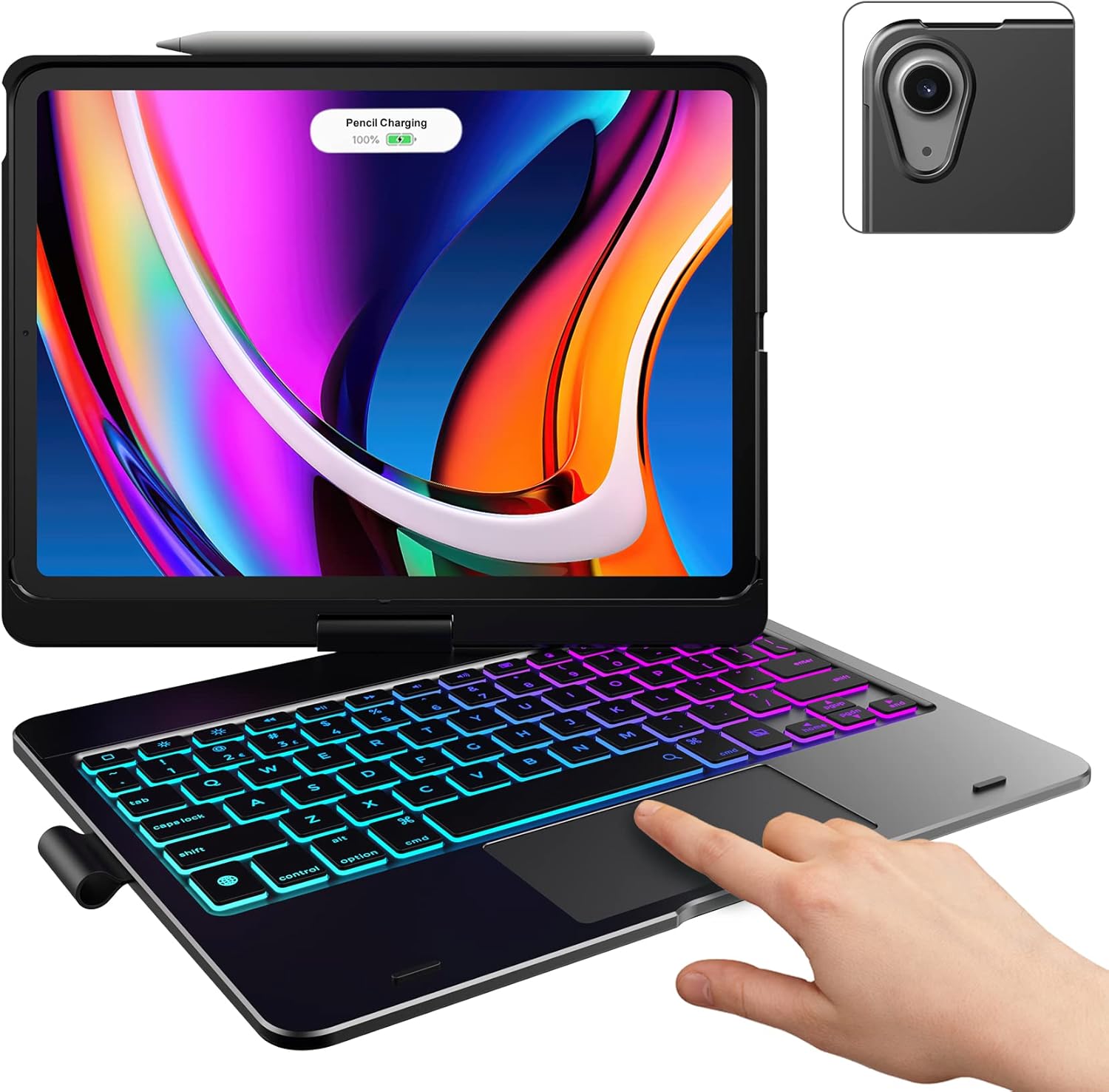
Image: The typecase keyboard case with an iPad securely inserted, ready for use. Note the integrated trackpad and backlit keys.

Image: Visual representation of the 7 versatile modes supported by the 360° rotatable hinge, including Laptop, Stand, and Tablet modes.
3. Pairing with Your iPad (Bluetooth)
- צינדט אָן די קלאַוויאַטור דורך שלעפּן דעם מאַכט קנעפּל צו די ON פּאָזיציע.
- דרוק די פאַרבינדן button (or a similar Bluetooth pairing button, usually indicated by a Bluetooth icon) on the keyboard. The Bluetooth indicator light will start blinking.
- אויף אייער אייפּאַד, גייט צו סעטטינגס > בלועטאָאָטה.
- זיכער מאַכן אַז בלועטוט איז אַקטיוויזירט On.
- Locate "typecase Keyboard" or a similar name in the "Other Devices" list and tap on it to pair.
- Once paired, the Bluetooth indicator light on the keyboard will stop blinking and remain solid, or turn off.
Note: The keyboard will automatically enter sleep mode after a period of inactivity to conserve battery. Press any key to wake it up.
אַפּערייטינג ינסטראַקשאַנז
קלאַוויאַטור פאַנגקשאַנז
The keyboard features a standard layout with 78 comfortably spaced keys and a dedicated row of iPadOS shortcut keys.

בילד: דעטאַלירט view of the backlit keyboard, highlighting the iPadOS shortcut keys and the vibrant 11-color RGB backlight.
iPadOS קורץ-קנעפּלעך:
| שליסל יקאָן | פֿונקציע |
|---|---|
| היים | קערט צו די היים פאַרשטעלן. |
| ברייטנאַס אַראָפּ | דיקריסאַז פאַרשטעלן ברייטנאַס. |
| ברייטנאַס אַרויף | ינקריסאַז פאַרשטעלן ברייטנאַס. |
| Keyboard Hide/Show | טוישט די אויף-סקרין קלאַוויאַטור. |
| זוכן | Activates iPad search. |
| פֿריִערדיקע שפּירט | Skips to the previous media track. |
| שפּיל / פּויזע | שפּילט אָדער פּויזירט מעדיע. |
| ווייַטער שפּור | סקיפּס צו דער ווייַטער מידיאַ שפּור. |
| שטום | שטומט אדער אנשטומט אודיאָ. |
| באַנד אַראָפּ | דיקריסאַז אַודיאָ באַנד. |
| באַנד אַרויף | ינקריסאַז אַודיאָ באַנד. |
| לאַק סקרין | פארשליסט דעם אייפּאַד עקראַן. |
טראַקפּאַד באַניץ
The integrated multi-gesture trackpad allows for precise control and navigation of your iPad. Ensure the trackpad is enabled in your iPad's settings if you experience issues.
Common Trackpad Gestures:
- איין פינגער טאַפּ: Click/Select.
- צוויי פינגער סקראל: מעגילע אַרויף אָדער אַראָפּ.
- קניפּ צו פארגרעסערן: פארגרעסערן אדער פארקלענערן אינהאַלט.
- דריי פינגער סווייפּ אַרויף: גיין צו היים פאַרשטעלן.
- דריי פינגער סווייפּ לינקס/רעכטס: באַשטימען צווישן עפֿענען אַפּפּס.
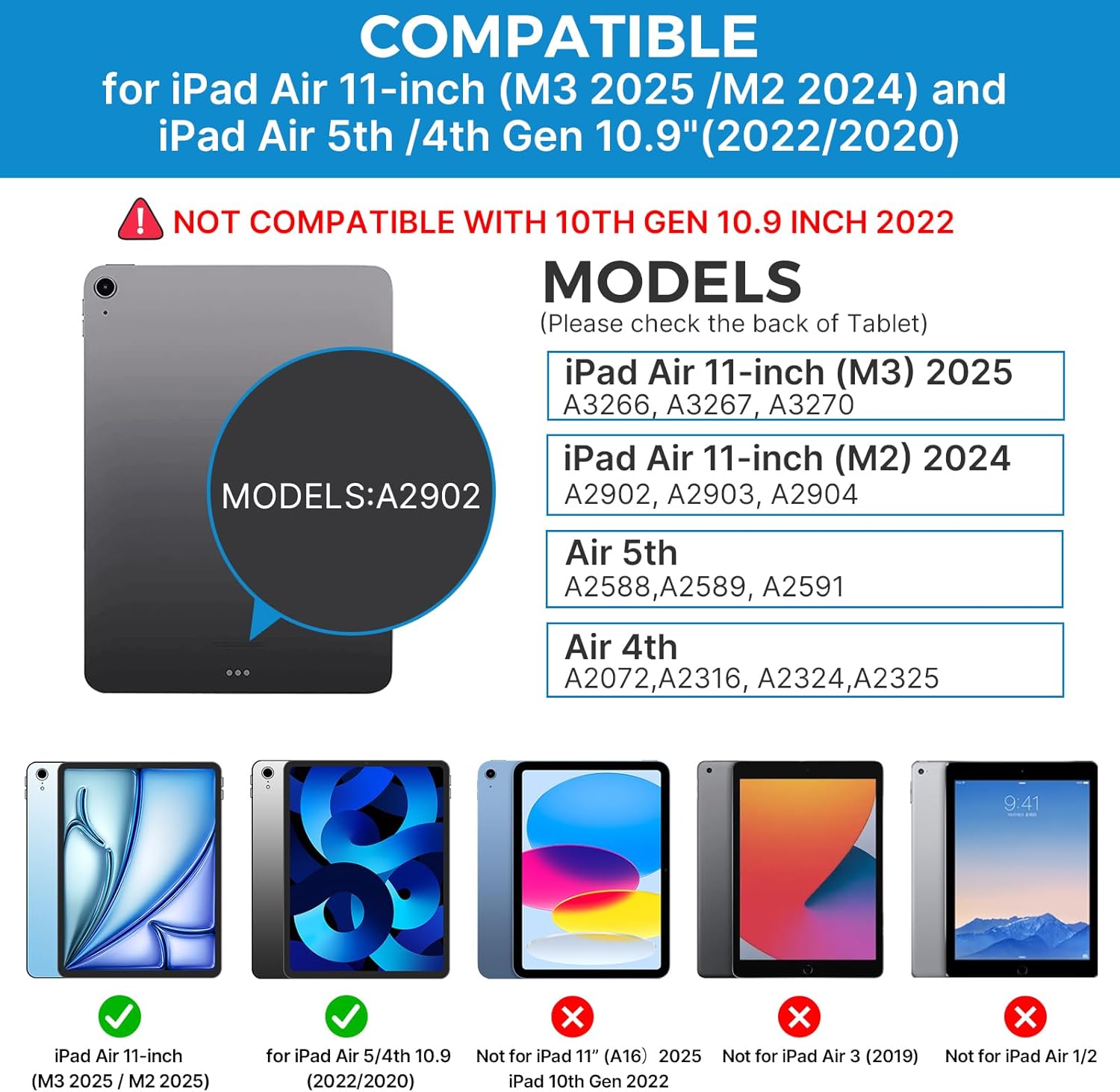
Image: A hand demonstrating the use of the multi-touch trackpad for precise cursor control on the iPad screen.
אַדזשאַסטירן באַקלייט
The keyboard features 11 adjustable RGB backlight colors and 3 levels of brightness. Use the dedicated backlight keys on the keyboard to cycle through colors and adjust brightness levels.
Video: This video demonstrates the 360-degree rotation feature of the typecase Touch Keyboard Case, showcasing its versatility in different viewינג מאָדעס.
Video: This video provides a step-by-step guide on how to properly install and remove your iPad from the typecase Touch Keyboard Case, ensuring a secure fit and preventing damage.
וישאַלט און זאָרג
- רייניקונג: ניצן אַ ווייך, דamp cloth to clean the exterior of the case and keyboard. Avoid harsh chemicals or abrasive materials.
- סטאָרידזש: When not in use for extended periods, store the keyboard case in a cool, dry place. Ensure the iPad is removed if storing for very long durations.
- באַטאַרייע לעבן: To maximize battery life, turn off the keyboard when not in use. The auto sleep/wake function helps conserve power.
- ויסמיידן ליקווידס: Do not expose the keyboard case to excessive moisture or liquids.
- שעפּן מיט זאָרג: While durable, avoid dropping the case or applying excessive force to the hinge or keyboard.
טראָובלעשאָאָטינג
If you encounter any issues with your typecase Touch Keyboard Case, please refer to the following common solutions:
Keyboard Not Connecting/Typing:
- זיכער מאַכן אַז די קלאַוויאַטור איז אנגעצינדן און גאָר אויפגעלאָדן.
- קאָנטראָלירט אייער iPad'ס בלועטוט סעטטינגס צו באַשטעטיקן אַז די קלאַוויאַטור איז געפּאָרט און קאָנעקטעד. אויב נישט, פּרוּווט ווידער צו פּאָרן.
- ריסטאַרט ביידע דיין iPad און די קלאַוויאַטור.
- זיכער מאַכן אַז קיין אַנדערע בלוטוט דעוויסעס שטערן נישט די פֿאַרבינדונג.
טרעקפּאַד רעאַגירט נישט:
- Verify the keyboard is connected via Bluetooth.
- Check iPad settings: סעטטינגס > אַקסעסאַביליטי > ריר > AssistiveTouch. Ensure "Mouse Keys" is off if it's causing interference.
- Clean the trackpad surface to remove any debris.
באַקלייט ניט ארבעטן:
- זייט זיכער אז די קלאַוויאַטור איז גענוג אויפגעלאָדן.
- Press the backlight adjustment keys to cycle through brightness levels and colors.
iPad Not Entering Sleep/Wake Mode:
- Ensure the iPad is correctly seated in the case.
- Check iPad settings: סעטטינגס > ווייַז & ברייטנאַס > לאַק / ופשליסן. Ensure this feature is enabled.
If problems persist, please contact typecase customer support for further assistance.
ספּעסאַפאַקיישאַנז
| שטריך | דעטאַל |
|---|---|
| מאָדעל | B09WVRD5JD |
| קאַמפּאַטאַבילאַטי | iPad Air 11-inch (M3 2025 / M2 2024), iPad Air 5th Gen (2022, 10.9"), iPad Air 4th Gen (2020, 10.9") |
| קאַנעקטיוויטי | בלועטאָאָטה |
| קלאַוויאַטור אויסלייג | 78-key standard with iPadOS shortcuts |
| באַקלייט | 11-קאָליר RGB, 3 ברייטקייט לעוועלס |
| טראַקקפּאַד | Multi-functional, multi-gesture |
| Hinge Rotation | 360° (20,000-cycle stress tested) |
| מאַכט מקור | באַטאַרייע פּאַוערד (1 ליטהיום פּאָלימער באַטאַרייע אַרייַנגערעכנט) |
| פּונקט וואָג | 1.52 פונט |
| פּראָדוקט דימענשאַנז (LxWxH) | 11.02 X 8.66 X 0.79 אינטשעס |
| מאַטעריאַל | Premium hardshell design |
וואָראַנטי און שטיצן
typecase offers a comprehensive warranty and support for your product:
- 1-יאָר פאַרבייַט סערוויס: Enjoy worry-free after-sales support with a 1-year replacement service for manufacturing defects.
- 30-Day Refund: If you are not satisfied with your purchase, you may be eligible for a refund within 30 days of purchase.
- קונה שטיצן: For any questions, technical assistance, or warranty claims, please contact typecase customer service. Refer to the contact information provided in the product packaging or on the official typecase webפּלאַץ.

בילד: איבערview of typecase's customer support and warranty policy, including 1-year replacement and 30-day refund.


