הקדמה
The Naxa NSH-3001 Wi-Fi Smart Camera provides reliable home security monitoring with 24/7 HD recording capabilities. This camera allows you to check in on your home remotely from anywhere using your smartphone. It features motion detection, two-way audio communication, night vision, and customizable activity alerts.
This manual provides detailed instructions for setting up, operating, and maintaining your Naxa NSH-3001 Wi-Fi Smart Camera to ensure optimal performance and security.
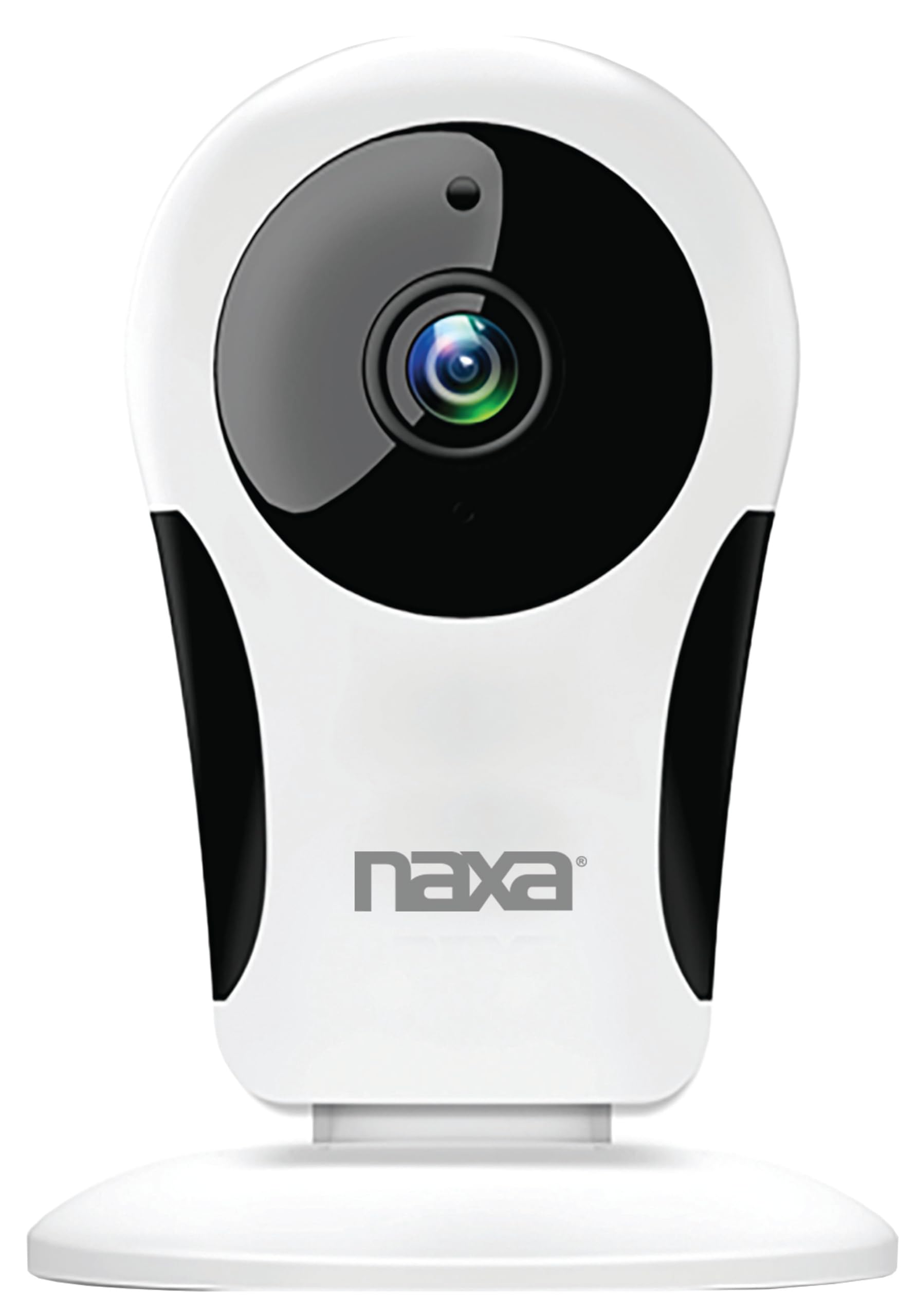
בילד: פראָנט view of the Naxa NSH-3001 Wi-Fi Smart Camera, showing the lens and Naxa logo.
וואָס איז אין די קעסטל
Upon unpacking your Naxa NSH-3001 Wi-Fi Smart Camera, please ensure all the following components are present:
- ווי-פי סמאַרט אַפּאַראַט
- אַק מאַכט אַדאַפּטער
- וסב קאַבלע
- באַניצער מאַנואַל (דעם דאָקומענט)
פּראָדוקט איבערview
Familiarize yourself with the main components of your Naxa NSH-3001 Wi-Fi Smart Camera.

Image: The Naxa NSH-3001 Wi-Fi Smart Camera displayed alongside icons representing its key features: HD Resolution, Encrypted ID, 2-Way Audio, Cloud Service, Motion Detection, IR Night Vision, Time Scheduling, and Hotspot capability.
- אַפּאַראַט לענס: קאַפּטשערז ווידעא פאָאָtage.
- אינפֿראַרויט (IR) לעדס: צושטעלן נאַכט זעאונג קייפּאַבילאַטיז.
- מיקראָפאָן: פֿאַר אַודיאָ אַרייַנגאַנג און צוויי-וועג קאָמוניקאַציע.
- רעדנער: פֿאַר אַודיאָ אַרויסגאַנג און צוויי-וועג קאָמוניקאַציע.
- מיקראָ וסב פּאָרט: פֿאַר מאַכט פֿאַרבינדונג.
- באַשטעטיק קנעפּל: געניצט צו צוריקשטעלן די קאַמעראַ צו די פֿאַבריק סעטטינגס.
- מיקראָ סד קאָרט שפּעלטל: פֿאַר לאָקאַלע סטאָרידזש פֿון רעקאָרדירטע עסןtage (Micro SD card not included).
סעטאַפּ גייד
1. פּאַוערינג אויף די קאַמעראַ
- Connect the provided USB cable to the camera's Micro USB port.
- פאַרבינדן די אנדערע סוף פון די וסב קאַבלע צו די אַק מאַכט אַדאַפּטער.
- שטעקט אריין דעם AC מאַכט אַדאַפּטער אין אַ נאָרמאַלן עלעקטרישן ווענטיל.
- The camera will power on, and an indicator light will show its status (refer to the camera's LED indicator guide for specific light patterns).
2. Downloading the Smart Life App
The Naxa NSH-3001 camera is controlled via the Smart Life app. Download it to your smartphone:
- For iOS devices, search for "Smart Life" in the Apple App Store.
- For Android devices, search for "Smart Life" in the Google Play Store.
- אינסטאלירט די אַפּ און שאַפֿט אַן אַקאַונט אויב איר האָט נאָך נישט איינס.

Image: The Naxa NSH-3001 Wi-Fi Smart Camera shown with the Smart Life app logo and icons for the Apple App Store and Google Play, indicating app compatibility.
3. קאַנעקטינג צו ווי-פי
Ensure your smartphone is connected to a 2.4 GHz Wi-Fi network. The NSH-3001 camera only supports 2.4 GHz Wi-Fi.
- Open the Smart Life app and tap "Add Device" or the "+" icon.
- אויסקלייבן "זיכערהייט און ווידעא אויפזיכט" און דערנאך "קלוגע קאַמעראַ".
- Follow the on-screen instructions in the app to connect your camera to your Wi-Fi network. This typically involves scanning a QR code generated by the app with the camera's lens.
- Once connected, the camera's indicator light will change (refer to the LED indicator guide), and you will see the camera added to your app.
4. מאָונטינג די קאַמעראַ
The NSH-3001 camera is designed for wall mount installation, but can also be placed on a flat surface. Choose a location that provides the desired viewing angle (105 degrees) and is within range of your Wi-Fi signal.

Image: The Naxa NSH-3001 Wi-Fi Smart Camera positioned on a nightstand in a bedroom, demonstrating a typical indoor placement.
- For wall mounting, use appropriate screws and anchors (not included) to secure the camera's base to the wall.
- אַדזשאַסטירן די קאַמעראַ'ס ווינקל צו דעקן די געוואונטשענע געגנט.
אַפּערייטינג ינסטראַקשאַנז
לעבן View און ווייטער צוטריט
Once connected, you can access your camera's live feed from anywhere using the Smart Life app on your smartphone.
- Open the Smart Life app and select your NSH-3001 camera from the device list.
- The live video stream will appear.
צוויי-וועג אַודיאָ קאָמוניקאַציע
The camera supports two-way audio, allowing you to hear and speak through the camera.
- אין דער לעבן view interface of the app, tap the microphone icon to speak.
- צאַפּן אויף דעם רעדנער בילדל צו הערן אַודיאָ פֿון דער קאַמעראַ'ס אָרט.
באַוועגונג דעטעקשאַן און אַלערץ
The camera can detect motion and send real-time push notifications to your phone.
- Navigate to the camera settings within the Smart Life app.
- אַקטיווירן "באַוועגונג דעטעקציע" און סטרויערן סענסיטיוויטי לעוועלס ווי נייטיק.
- Configure alert schedules and notification preferences.
נאַכט זעאונג
The NSH-3001 features an IR-cut filter for clear night vision, automatically switching between day and night modes based on ambient light.
- Night mode activates automatically in low-light conditions.
- The IR-cut filter ensures optimal clarity in both day and night recordings.
ווידעא רעקאָרדינג און סטאָרידזש
The camera supports 24/7 HD recording. Footage can be stored locally or via cloud service (subscription may be required).
- מיקראָ סד קאָרט סטאָרידזש: Insert a compatible Micro SD card (up to 128GB, not included) into the camera's SD card slot for continuous or event-based recording.
- וואָלקן סטאָרידזש: Check the Smart Life app for available cloud storage options and subscription details.
- Review רעקאָרדעד פוtage directly through the Smart Life app.
Video Tuning
Adjust video parameters directly from your smartphone for optimal image quality.
- Within the Smart Life app, access video settings to adjust contrast, brightness, saturation, and sharpness.
צייט סקעדזשולינג
Set schedules for camera operation, recording, or alerts.
- Use the Smart Life app's scheduling feature to define specific times for motion detection, recording, or other functions.
וישאַלט
Proper maintenance ensures the longevity and optimal performance of your Naxa NSH-3001 Wi-Fi Smart Camera.
- רייניקונג: ווישט אָפּ די קאַמעראַ לינז און קערפּער מיט אַ ווייכן, טרוקענעם שטאָף. פֿאַרמייַדט ניצן שטרענגע כעמיקאַלן אָדער שרײַבנדיקע רייניקונגסמיטלען.
- ווייכווארג דערהייַנטיקונגען: Regularly check the Smart Life app for firmware updates for your camera. Keeping the firmware updated ensures you have the latest features and security enhancements.
- אָרט: Ensure the camera is placed in a stable location and protected from extreme temperatures, direct sunlight, and moisture.
טראָובלעשאָאָטינג
If you encounter issues with your Naxa NSH-3001 Wi-Fi Smart Camera, refer to the following common solutions:
| פּראָבלעם | מעגלעך לייזונג |
|---|---|
| די אַפּאַראַט איז נישט קאַנעקטינג צו Wi-Fi |
|
| No video feed in the app |
|
| באַוועגונג וואָרענונגען נישט באַקומען |
|
| צוויי-וועג אַודיאָ איז נישט ארבעטן |
|
If problems persist, please contact Naxa customer support.
ספּעסאַפאַקיישאַנז
| שטריך | דעטאַל |
|---|---|
| מאָדעל נאָמען | NSH-3001 |
| סאָרט | Naxa |
| קאַנעקטיוויטי טעכנאָלאָגיע | ווי-פי (2.4 GHz) |
| ווידעא קאַפּטורע רעסאָלוטיאָן | 720 פּ |
| Viewינג אַנגלע | 105 דיגריז |
| ספּעציעלע שטריך | באַוועגונג סענסאָר, נאַכט זעאונג, צוויי-וועג אַודיאָ |
| דרינענדיק / דרויסנדיק באַניץ | Indoor, Outdoor (Note: IP54 rating suggests splash resistance, not full outdoor weatherproofing) |
| מאַכט מקור | קאָרדעד עלעקטריק |
| קאַמפּאַטאַבאַל דעוויסעס | Smartphone (via Smart Life App) |
| מאַונטינג טיפּ | וואנט בארג |
| סטאָרידזש | Micro SD Card (up to 128GB, not included), Cloud Storage (optional) |
| דימענסיעס (L X W X H) | 3.2 X 3.2 X 4.3 אינטשעס |
| פּונקט וואָג | 3.2 אונסעס |
| מאַטעריאַל | פּלאַסטיק |
| אינטערנאַציאָנאַלע פּראַטעקשאַן שאַץ | IP54 |
וואָראַנטי און שטיצן
Naxa Electronics, Inc. manufactures the NSH-3001 Wi-Fi Smart Camera. For specific warranty information, please refer to the warranty card included with your product or visit the official Naxa webפּלאַץ.
For technical support, troubleshooting assistance beyond this manual, or inquiries about your product, please contact Naxa customer service. Contact details can typically be found on the Naxa webוועבזייטל אדער אויף דער פּראָדוקט פּאַקאַדזשינג.
Naxa Official Webפּלאַץ: www.naxa.com


