הקדמה
This manual provides detailed instructions for the FACOI Smart Watch, Model 206. It covers setup, operation, maintenance, and troubleshooting to help you maximize your device's potential. This smart watch is designed for both men and women, offering comprehensive features including call management, activity tracking, and health monitoring, compatible with both Android phones and iPhones.
וואָס איז אין די קעסטל
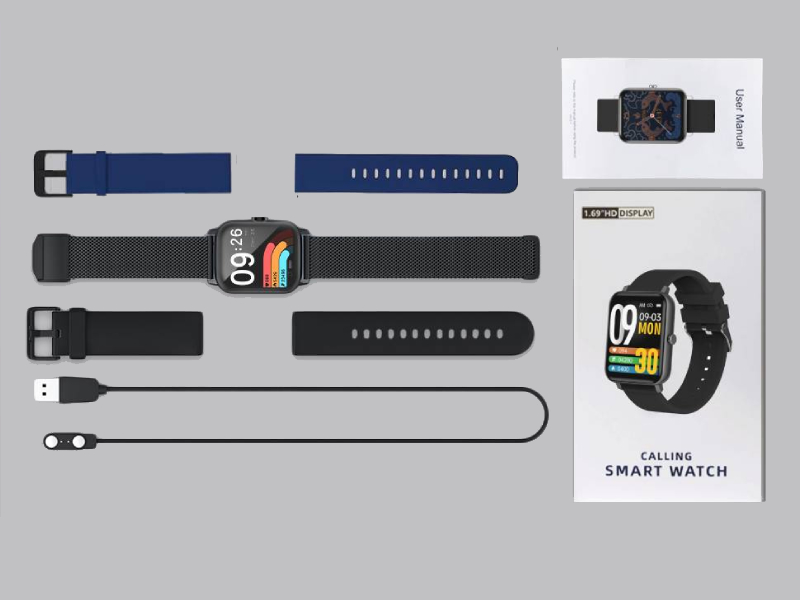
Image: The FACOI Smart Watch package contents, showing the smartwatch unit, a blue silicone strap, a black silicone strap, a black mesh strap, a magnetic charging cable, and the user manual.
- FACOI Smart Watch Unit
- Silicone Watch Straps (typically 2-3, e.g., black, blue)
- מאַגנעטיק טשאַרדזשינג קאַבלע
- באַניצער מאַנואַל
סעטאַפּ
1. אויפלאָדן דעם סמאַרט וואַך
Before first use, fully charge your smart watch. Connect the magnetic charging cable to the charging points on the back of the watch. Plug the USB end into a standard USB power adapter (not included) or a computer USB port. The watch display will indicate charging status. A full charge typically takes about 2 hours.
2. Installing Watch Straps
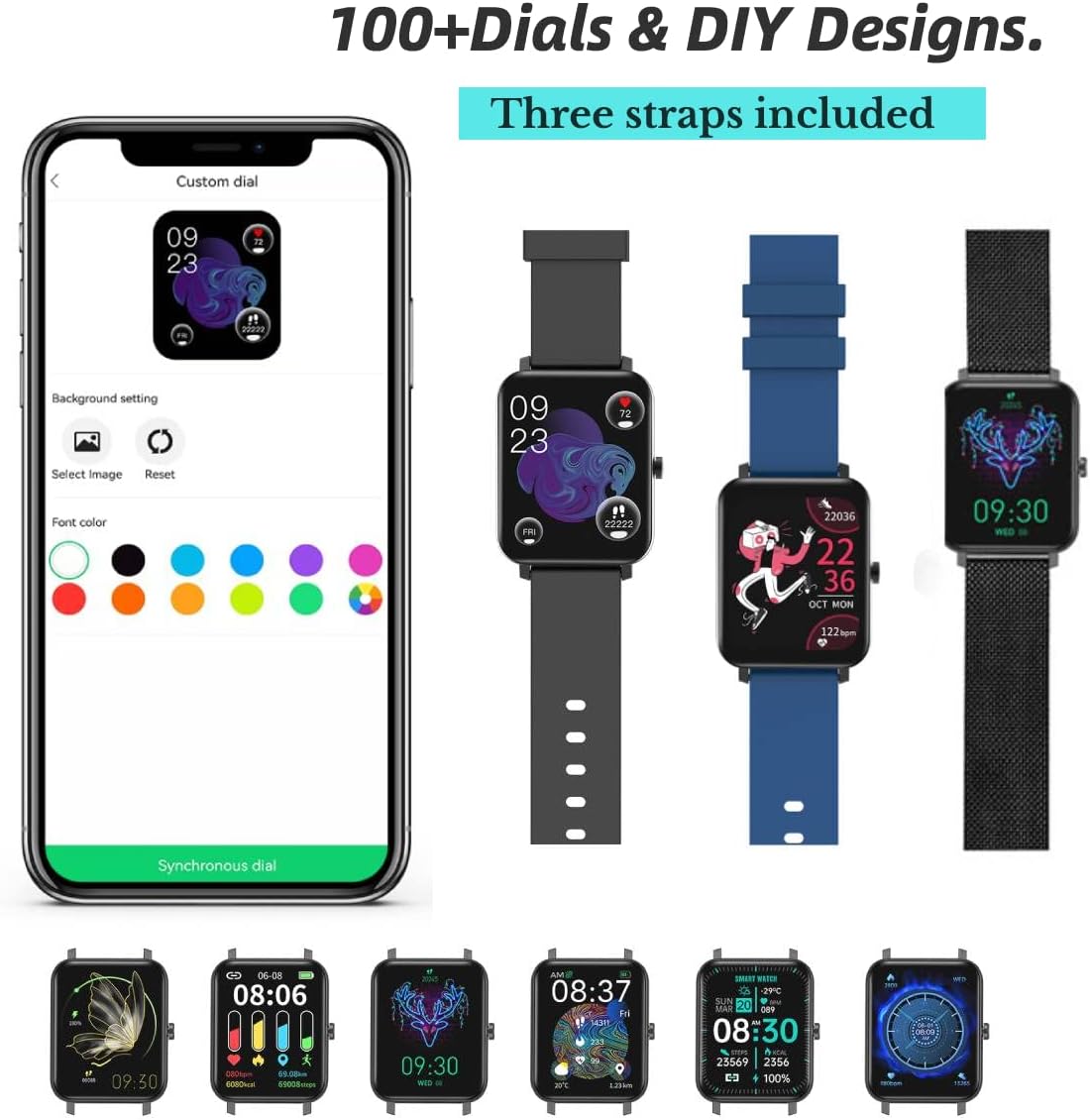
Image: The FACOI Smart Watch with multiple strap options, demonstrating how different straps can be attached to the watch body.
The FACOI Smart Watch comes with interchangeable straps. To attach a strap, align the spring bar with the lug holes on the watch body and push the pin inward to secure it. Release the pin once aligned in the hole. Ensure both ends of the strap are securely fastened before wearing.
3. פארבינדן מיט אייער סמאַרטפאָון
- אראפקאפיע די אַפּ: Scan the QR code provided in the quick start guide or search for "Glory Fit" in your smartphone's app store (App Store for iOS, Google Play Store for Android). Install the application.
- געבן בלועטאָאָטה: מאַכן זיכער אַז בלועטאָאָטה איז ענייבאַלד אויף דיין סמאַרטפאָנע.
- Open Glory Fit App: Launch the Glory Fit app and follow the on-screen instructions to create an account or log in.
- לייג דיווייס: In the app, navigate to the "Device" or "My Device" section and select "Add Device." The app will search for nearby smart watches.
- פאַרבינדן: Select "FACOI Smart Watch" or the corresponding device name from the list. Confirm the pairing request on both your phone and the watch if prompted.
- פּערמישאַנז: Grant necessary permissions (e.g., notifications, location, contacts) to the app for full functionality.
אַמאָל געראָטן צוזאַמענגעשטעלט, וועט די זייגער סינקראָניזירן צייט און דאַטן מיט דיין סמאַרטפאָון.
אַפּערייטינג ינסטראַקשאַנז
יקערדיק נאַוויגאַציע

Image: A visual representation of the smart watch's user interface, displaying different screens for various functions.
- טאָוטשסקרעען: Swipe left/right to navigate between main screens (e.g., activity data, heart rate). Swipe up/down to access quick settings or notifications. Tap to select an icon or option.
- זייַט קנעפּל: Press the side button to wake the screen, return to the main watch face, or access the app menu.
Bluetooth Call and Message Reminders

Image: The smart watch displaying an incoming call, a dialpad for making calls, and notifications from social media applications.
- מאַכן קאַללס: Once paired via Bluetooth, you can dial numbers directly from the watch's dialpad or select contacts synchronized from your phone.
- באַקומען קאַללס: When an incoming call arrives, the watch will display the caller ID. You can answer or reject calls directly from the watch. The watch features a built-in speaker and microphone for hands-free communication.
- אָנזאָג נאָטיפיקאַטיאָנס: The watch will display notifications from various apps (e.g., SMS, WhatsApp, Facebook, Twitter) once enabled in the Glory Fit app.
קאַסטאַמייזינג וואַך פנימער
The Glory Fit app offers over 100 watch faces and allows for DIY designs. In the app, navigate to the "Dial Settings" or "Watch Face" section to browse and apply new watch faces. You can also upload your own photos to create custom backgrounds.
געזונט מאָניטאָרינג

Image: The smart watch displaying real-time health metrics such as blood pressure, blood oxygen saturation, heart rate, and sleep duration, along with a graph of heart rate recording.
- האַרץ קורס מאָניטאָרינג: די זייגער מאָניטאָרט קעסיידער דיין האַרץ טעמפּאָ. View רעאַל-צייט דאַטן אויף דער זייגער אָדער דיטיילד היסטאָרישע דאַטן אין דער אַפּ.
- מאָניטאָרינג פון בלוט זויערשטאָף (SpO2): מעסט אייער בלוט זויערשטאָף לעוועלס אויף פארלאנג.
- מאָניטאָרינג פון בלוט דרוק: Provides an estimate of your blood pressure. Note: This device is not a medical device and should not be used for medical diagnosis or treatment.
- שלאָף טראַקינג: The watch automatically tracks your sleep patterns, including deep sleep, light sleep, and awake time. Review your sleep quality and duration in the Glory Fit app.
- זיציק דערמאָנונג: The watch can remind you to move if you have been inactive for too long.
טעטיקייט טראַקינג און ספּאָרט מאָדעס

Image: The smart watch being used during various activities, highlighting its waterproof capabilities and the extensive list of supported sports modes.
- פּעדאָמעטער: טראַקט אייערע טעגלעכע טריט, דיסטאַנץ באדעקט, און קאַלאָריעס פארברענט.
- ספּאָרט מאָדעס: The watch supports 24 different sports modes, including Running, Walking, Cycling, Jump Rope, Badminton, Table Tennis, Tennis, Mountain Climbing, Basketball, Football, Baseball, Volleyball, Cricket, Rugby, Hockey, Dancing, Spinning, Yoga, Sit-ups, Indoor Run, Gymnastics, Rowing, Jumping Jacks, and Free Training. Select the appropriate mode before starting your workout for accurate tracking.
אנדערע פֿעיִקייטן
- סטאַפּוואַטש: Access the stopwatch function from the watch menu for timing activities.
Image: The stopwatch interface on the smart watch.
- ווייַט אַפּאַראַט קאָנטראָל: ניצט דעם זייגער ווי אַ ווייַט לאָדן פֿאַר דיין טעלעפאָן'ס קאַמעראַ.

Image: The smart watch displaying the camera shutter icon, used to remotely trigger a phone's camera.
- וועטער פאָרעקאַסט: View current weather conditions and forecasts directly on your watch after synchronization with the app.
Image: The smart watch screen showing the current temperature and weather conditions.
- מוזיק קאָנטראָל: קאָנטראָלירט מוזיק ווידערשפּיל אויף אייער סמאַרטפאָון (שפּילן, פּויזירן, איבערשפּרינגען טראַקס) גלייך פֿון דער זייגער.
וישאַלט
- וואַסער קעגנשטעל (IP67): The watch is IP67 waterproof, meaning it is resistant to splashes, rain, and brief immersion in water (up to 1 meter for 30 minutes). It is suitable for daily use and activities like washing hands or light rain. It is not recommended for hot showers, saunas, or diving. Avoid prolonged exposure to water.
- רייניקונג: Regularly clean the watch and straps with a soft, dry cloth. If necessary, use a slightly damp שטאָף און מילדע זייף, און דערנאָך טרוקן גוט אויס. פֿאַרמייַדן שטרענגע כעמיקאַלן אָדער אַברייסיוו מאַטעריאַלן.
- באַטערי זאָרגן: כדי צו פארלענגערן די לעבן פון די באַטעריע, זאָלט איר נישט אָפט אויסלאָדן די זייגער. לאָדט זי אויף ווען די באַטעריע איז נידעריק. האַלט די זייגער אין אַ קיל, טרוקן אָרט ווען זי ווערט נישט גענוצט פֿאַר לענגערע צייטן.
טראָובלעשאָאָטינג
| פּראָבלעם | מעגלעך לייזונג |
|---|---|
| די זייגער צינדט זיך נישט אן און רעאגירט נישט. | Ensure the watch is fully charged. Connect it to the charger for at least 30 minutes. If unresponsive, try a soft reset by pressing and holding the side button for 10-15 seconds. |
| קען נישט פאַרבינדן מיטן סמאַרטפאָן. |
|
| Inaccurate health data (HR, BP, SpO2). | Ensure the watch is worn snugly on your wrist, about one finger's width from the wrist bone. Avoid excessive movement during measurements. Remember, this device is not a medical instrument. |
| נאָוטאַפאַקיישאַנז זענען נישט באקומען. |
|
| קורץ באַטאַרייע לעבן. | Frequent use of features like Bluetooth calls, continuous heart rate monitoring, and bright screen settings can drain the battery faster. Reduce screen brightness, disable unnecessary notifications, and turn off continuous monitoring if not needed. |
ספּעסאַפאַקיישאַנז
| שטריך | דעטאַל |
|---|---|
| מאָדעל נאָמען | T8pro (Item model number: 206) |
| סאָרט | FACOI |
| פאַרשטעלן גרייס | 1.69 אינטשעס (זיכטיק פאַרשטעלן דיאַגאָנאַל: 2" / 5 ס"מ) |
| אָפּערייטינג סיסטעם | Android (Compatible with Android and iOS) |
| קאַנעקטיוויטי טעכנאָלאָגיע | בלועטאָאָטה |
| ספּעציעלע פֿעיִקייטן | Sleep Monitor, 3 Watch Straps, Multisport Tracker, Sedentary Reminder, Phone Call |
| וואַסער קעגנשטעל | IP67 |
| באַטערי טיפּ | ליטיום יאָן (1 פארלאנגט, אַרייַנגערעכנט) |
| פּראָדוקט דימענשאַנז | 9.64 X 1.38 X 0.46 אינטשעס |
| פּונקט וואָג | 0.176 ounces / 5 Grams |
וואָראַנטי און שטיצן
For warranty information and technical support, please refer to the official FACOI website or contact their customer service directly. You may also find additional resources and FAQs on the product's Amazon listing page or within the Glory Fit application.
א דיגיטאַלע ווערסיע פון די באַניצער מאַנואַל איז בנימצא פֿאַר דאַונלאָודינג: באַניצער מאַנואַל (פּדף)


