הקדמה
Thank you for choosing the Senicare Digital LED Alarm Clock. This manual provides detailed instructions for setting up, operating, and maintaining your new alarm clock. Please read this manual thoroughly before use to ensure proper functionality and to maximize your experience with its features, including dual alarms, a 7-color night light, a dimmable display, and a convenient USB charging port.
זיכערקייַט אינפֿאָרמאַציע
- Ensure the power adapter is compatible with your local power supply (100-240V AC).
- שטעלט נישט אויס דעם אפאראט צו וואסער אדער איבעריגע הומידיטי.
- פֿאַרמײַדט צו שטעלן דעם זייגער אין דירעקטער זון אָדער לעבן היץ־קוואַלן.
- ניצן בלויז די צוגעשטעלט מאַכט אַדאַפּטער.
- האַלטן אויס פון דערגרייכן פון קליין קינדער.
- פרובירט נישט צו צענעמען אדער פאררעכטן דעם אפאראט אליין. קאנטאקטירט קאסטומער סופארט אויב פראבלעמען קומען אויף.
- Insert batteries correctly, observing polarity (+/-).
פּעקל אינהאַלט
- Senicare Digital LED Alarm Clock (Model KT279)
- מאַכט אַדאַפּטער
- וסב טשאַרדזשינג קאַבלע
- באַניצער מאַנואַל (דעם דאָקומענט)

Figure 1: Senicare Digital LED Alarm Clock and included accessories.
פּראָדוקט איבערview
פראָנט View
The front of the clock features a large LED display for time, and indicators for PM, Alarm 1, and Alarm 2.
Top View (קאָנטראָלס)
The top panel houses the main control buttons and the integrated night light bar.
- ALT SET: Alarm 1 Set button.
- AL2 SET: Alarm 2 Set button.
- צייט: Time setting button.
- קאָליר: Night light color selection button.
- SNOOZE / LIGHT: Snooze function and night light on/off.
- HOUR +: Adjusts hour, increases alarm volume.
- MIN -: Adjusts minute, decreases alarm volume.
זייַט View (Ports & Dimmer)
The side of the clock includes the power input, USB charging port, and display dimmer slider.
- DC 5V מאַכט פּאָרט: קאַנעקץ צו די מאַכט אַדאַפּטער.
- USB Charging Port (5V-1A): פֿאַר טשאַרדזשינג עקסטערנע דעוויסעס.
- DISPLAY DIMMER: Slider to adjust the brightness of the time display (0-100%).
דנאָ View (Battery Compartment)
The bottom of the clock contains the battery compartment for backup power.

פיגורע 2: דערציען view highlighting the USB charging port and power input.

Figure 3: Battery compartment for backup power.
סעטאַפּ
1. מאַכט קאַנעקשאַן
- Connect the provided power adapter to the DC 5V Power Port on the back of the clock.
- Plug the power adapter into a standard 100-240V AC wall outlet.
- The LED display will light up, indicating the clock is powered on.
2. באַטעריע באַקאַפּ (אָפּציאָנעל)
פֿאַר מאַכטtage protection, install 2 x AAA batteries (not included) into the battery compartment on the bottom of the clock. This will preserve time and alarm settings during a power interruption, though the display will go black.

Figure 4: The clock retains settings during power outages with battery backup.
אַפּערייטינג ינסטראַקשאַנז
1. באַשטעטיקן די צייט
- דריקן און האַלטן די צייט קנעפּל ביז די שעה ציפערן הייבן אן צו בלינקען.
- דרוק די HOUR + קנעפּל צו סטרויערן די שעה.
- דרוק די MIN - קנעפּל צו סטרויערן די מינוט.
- דרוק די צייט קנעפּל נאכאמאל צו באשטעטיגן און ארויסגיין פון צייט איינשטעלונג מאָדע.
2. Setting Dual Alarms (Alarm 1 & Alarm 2)
The clock features two independent alarms for different schedules.

פיגורע 5: עקסample of dual alarm functionality.
- צו שטעלן אַלאַרם 1: דריקן און האַלטן די ALT SET button until the hour digits for Alarm 1 flash.
- ניצן די HOUR + און MIN - קנעפּלעך צו שטעלן די געוואונטשענע שרעק צייט.
- דרוק ALT SET again to confirm and activate Alarm 1. The Alarm 1 indicator will appear on the display.
- צו שטעלן אַלאַרם 2: גיי נאך די זעלבע טריט ניצנדיק די אַל2 סעט קנעפּל.
- To turn an alarm on or off, briefly press the corresponding ALT SET or אַל2 סעט קנעפּל. דער אַלאַרם אינדיקאַטאָר וועט דערשייַנען/פאַרשווינדן.
3. שלאָף פונקציע
ווען אַן אַלאַרם קלינגט, דריק די גרויסע קנעפּל סנאָוז / ליכט button on top of the clock to activate the 9-minute snooze function. The alarm will sound again after 9 minutes.

Figure 6: The SNOOZE / LIGHT button for snooze functionality.
4. אַדזשאַסטירן די ברייטקייט פון דעם עקראַן
The clock features a 0-100% full-range dimmer for the LED time display. Use the אַרויסווייַזן דיממער slider located on the side of the clock to adjust the brightness to your preference.

Figure 7: Adjusting display brightness with the dimmer slider.
5. נאַכט ליכט פֿעיִקייטן
The integrated night light offers 7 different colors and adjustable brightness.

Figure 8: The 7-color night light feature.
- טשאַנגינג פארבן: דריקט דעם קנעפּל קורץ קאָליר button to cycle through the 7 available colors.
- Color Loop Mode: דריקן און האַלטן די קאָליר button for 2 seconds to enter a continuous color-changing loop.
- Turning Off Night Light: דרוק די סנאָוז / ליכט button to turn the night light off.
- Adjusting Night Light Brightness: The night light brightness can also be adjusted from 0-100% using the אַרויסווייַזן דיממער slider, similar to the main display.
6. אַדזשאַסטירן אַלאַרם באַנד
The alarm volume has 5 adjustable levels, ranging from 45dB to 85dB.
- While an alarm is sounding, or when setting an alarm, press the HOUR + קנעפּל צו פאַרגרעסערן די באַנד.
- דרוק די MIN - קנעפּל צו פאַרמינערן די באַנד.

Figure 9: Volume adjustment using HOUR + and MIN - buttons.
7. וסב טשאַרדזשינג פּאָרט
The clock includes a 5V-1A USB charging port on its side, allowing you to charge small electronic devices like smartphones or tablets while the clock is plugged into power.
וישאַלט
- רייניקט די זייגער מיט אַ ווייכן, טרוקענעם שטאָף. ניצט נישט קיין שרײַבנדיקע רייניגערס אדער סאָלווענטן.
- Keep the clock away from dust and moisture.
- אויב נישט אין באַנוץ פֿאַר אַ לענגערע צייט, אַרויסנעמען די באַקאַפּ באַטעריעס צו פאַרמייַדן ליקאַדזש.
טראָובלעשאָאָטינג
| פּראָבלעם | מעגלעך סיבה | לייזונג |
|---|---|---|
| די זייגער אַרויסווייַזונג איז אויסגעלאָשן. | No power, or display dimmer set to 0%. | Check power connection. Adjust DISPLAY DIMMER slider. |
| דער אַלאַרם קלינגט נישט. | אַלאַרם נישט געשטעלט, אַלאַרם וואָלומען צו נידעריק, אָדער אַלאַרם אויסגעלאָשן. | Ensure alarm is set and activated (indicator visible). Increase alarm volume. |
| צייט/סעטינגס פארלוירן נאכן אויסשטרעקן דעם עלעקטרישן מאשיןtage. | No backup batteries installed, or batteries are dead. | Install fresh 2 x AAA batteries for backup. |
| USB טשאַרדזשינג אַרבעט נישט. | Clock not powered by AC, or device requires more than 1A. | Ensure clock is plugged into AC power. Check device's charging requirements. |
ספּעסאַפאַקיישאַנז
| שטריך | דעטאַל |
|---|---|
| מאָדעל | KT279 |
| ווייַז טיפּ | געפירט |
| מאַכט מקור | Corded Electric (100-240V AC) |
| באַטאַרייע באַקקופּ | 2 X AAA באַטעריז (ניט אַרייַנגערעכנט) |
| וסב טשאַרדזשינג פּאָרט | 5וו-1אַ |
| נאַכט ליכט קאָלאָרס | 7 פארבן |
| ווייַז דיממער | 0-100% אַדזשאַסטאַבאַל |
| שרעק באַנד | 5 לעוועלס (45dB ביז 85dB) |
| סנאָוז געדויער | קסנומקס מינוט |
| פּראָדוקט דימענשאַנז | 5.91" ברייט x 3.15" הויך (אומגעפער 150 מ״מ x 80 מ״מ) |
| פּונקט וואָג | 11.7 אונסעס |
| מאַטעריאַל | פּלאַסטיק |
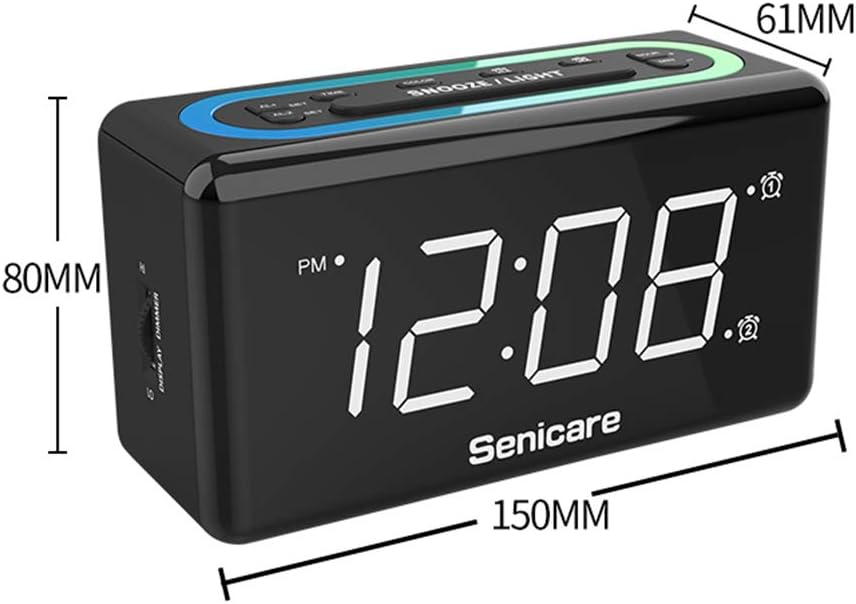
פיגור 10: פּראָדוקט דימענסיעס.
וואָראַנטי און שטיצן
The Senicare Digital LED Alarm Clock comes with a איין יאָר וואָראַנטימיר אָפֿערן אויך אַ 30-טאָג געלט-צוריק גאַראַנטירן. For any questions or assistance, please contact our customer service team, available 24 שעה a day. Your satisfaction is our priority.