1. הקדמה
Thank you for choosing the TeleAdapt LCD Display Alarm Clock. This device is designed to provide accurate timekeeping, reliable alarm functions, and convenient charging for your mobile devices. Its compact design and intuitive features make it an ideal addition to any bedside table, office, or living space. This manual will guide you through the setup, operation, and maintenance of your new alarm clock.
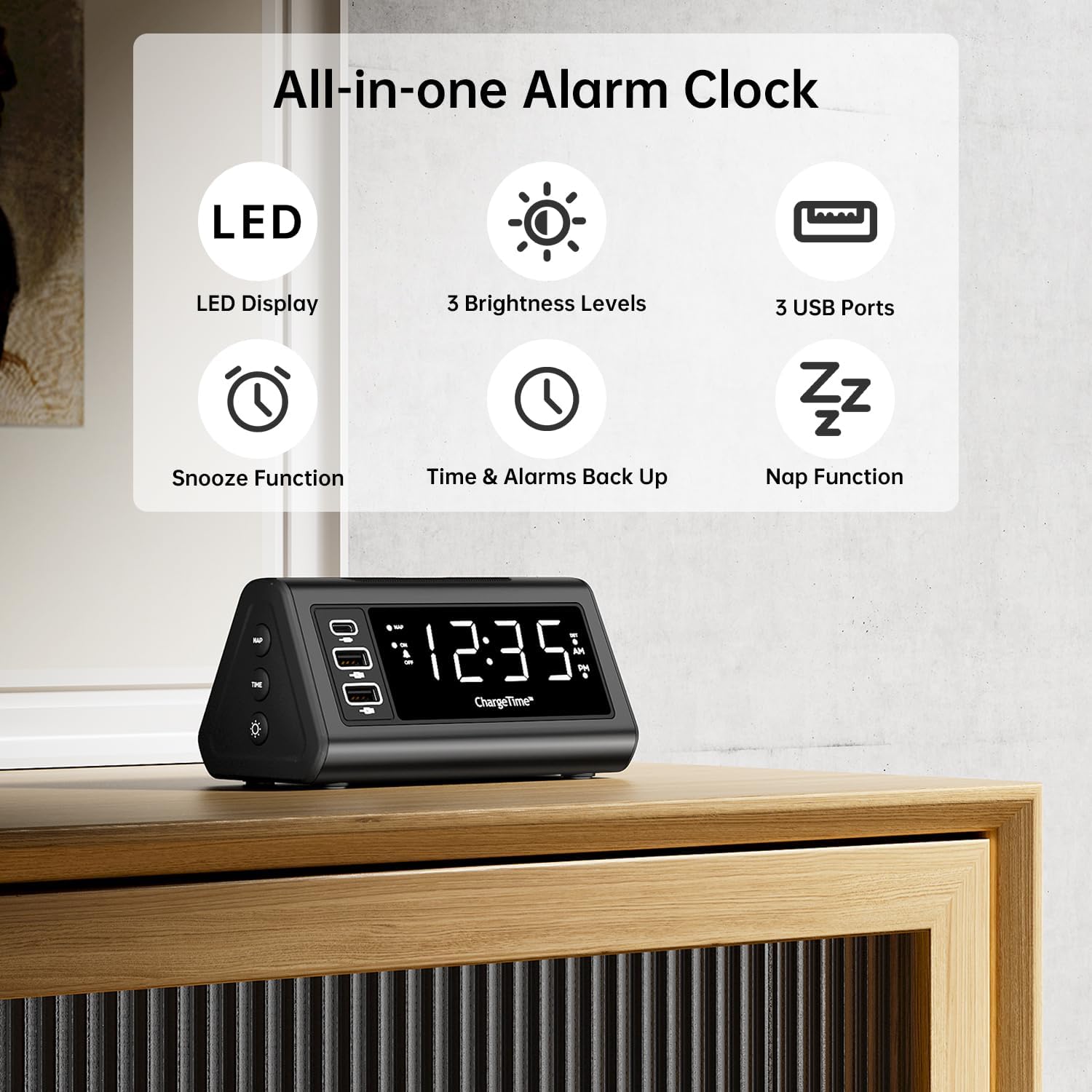
פיגורע 1: איבערview of TeleAdapt Alarm Clock features.
2. וויכטיק סאַפעטי אינפֿאָרמאַציע
Please read all safety instructions carefully before using this product. Failure to follow these instructions may result in electric shock, fire, or damage to the device.
- שטעלט נישט אויס דעם אפאראט צו וואסער אדער איבעריגע פייכטקייט.
- נישט צענעמען, פאררעכטן אדער מאדיפיצירן דאס אפאראט. איבערגעבן אלע סערוויסינג צו קוואליפיצירטע פערסאנעל.
- Use only the provided AC power adapter. Using an incompatible adapter may damage the device.
- Ensure proper ventilation around the device. Do not cover ventilation openings.
- האַלט דעם אַפּאַראַט אַוועק פון דירעקטער זונשייַן, היץ־קוואַלן און אָפֿענע פֿלאַמען.
- אַוועקוואַרפן באַטעריז רעכט לויט די היגע רעגיאַליישאַנז.
3. פּעקל אינהאַלט
באַשטעטיקן אַז אַלע זאכן זענען פאַראַן אין פּעקל:
- TeleAdapt LCD Display Alarm Clock
- AC Power Adapter with interchangeable plugs
- 2 x AAA Batteries (for backup)
- ינסטרוקטיאָן מאַנואַל (דעם דאָקומענט)
4. פּראָדוקט איבערview
Familiarize yourself with the various parts and controls of your alarm clock:
Front Display and USB Ports:
- גרויס געפירט ווייַז: Shows current time, AM/PM indicator, and DST status.
- USB-C Port (1x): For fast charging compatible devices (5V/3A output).
- USB-A פּאָרץ (2x): For charging various devices (5V/2.4A each output).
- NAP Indicator: Lights up when Nap function is active.
- שרעק גראדן: Lights up when alarm is set.
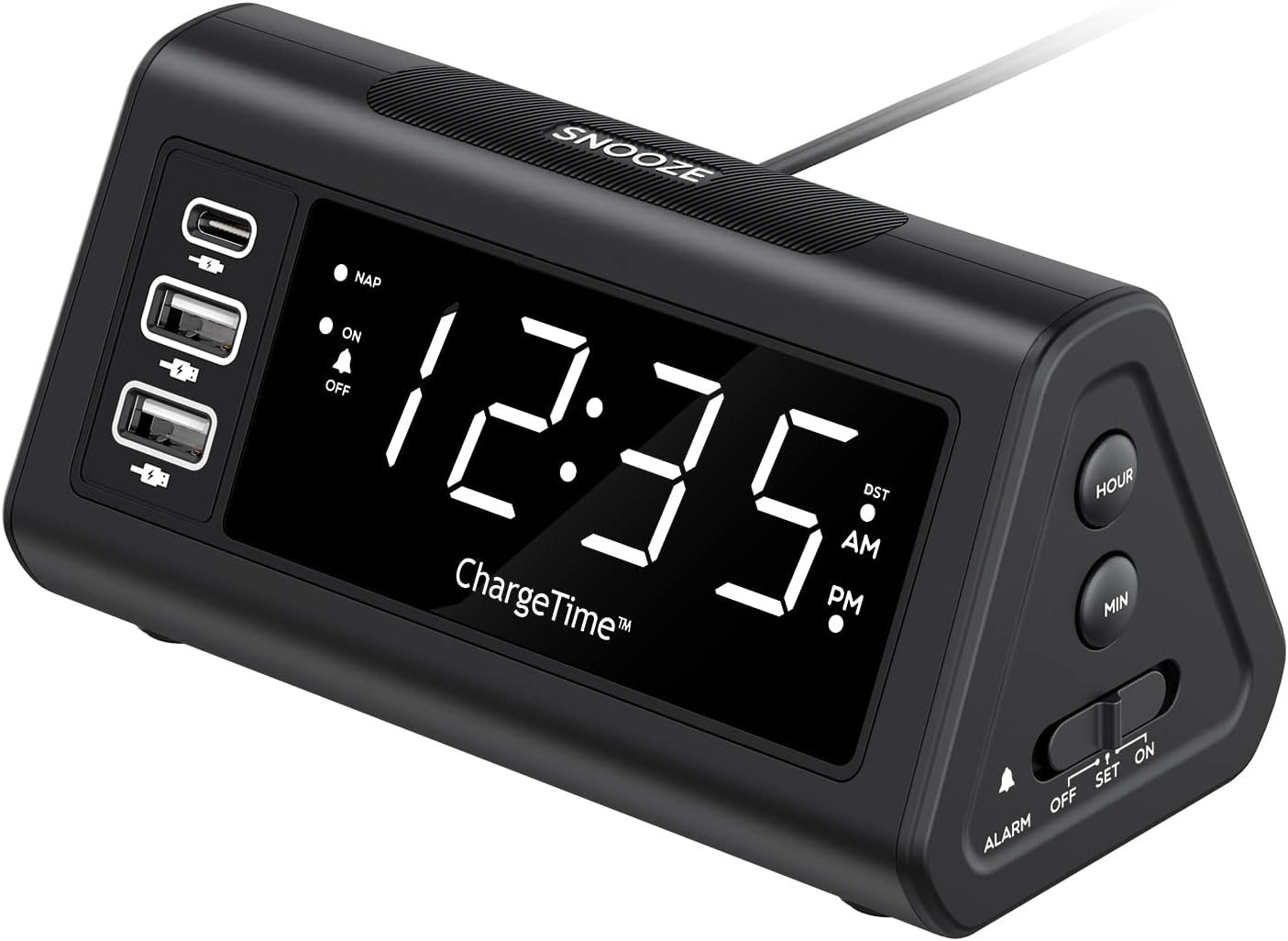
פיגורע 2: פראָנט view with display and USB ports.
זייט קאָנטראָלס:
- NAP Button: Activates and adjusts the nap timer.
- ON-OFF קנעפּל: Toggles the alarm on or off.
- TIME קנעפּל: Used in conjunction with SNOOZE to set time.
- DIMMER Button: Adjusts display brightness (Off, Low, High).

Figure 3: Side controls for various functions.
שפּיץ און צוריק:
- SNOOZE קנעפּל: Large button on top for snooze and dimmer adjustment.
- ALARM Switch (OFF/SET/ON): Slider switch to control alarm setting and activation.
- שעה קנעפּל: Adjusts hour during time/alarm setting.
- MIN קנעפּל: Adjusts minute during time/alarm setting.
- באַטערי אָפּטייל: Holds 2 x AAA batteries for backup power.
- DC 12V/5A Input: מאַכט אַרייַנגאַנג פֿאַר די AC אַדאַפּטער.
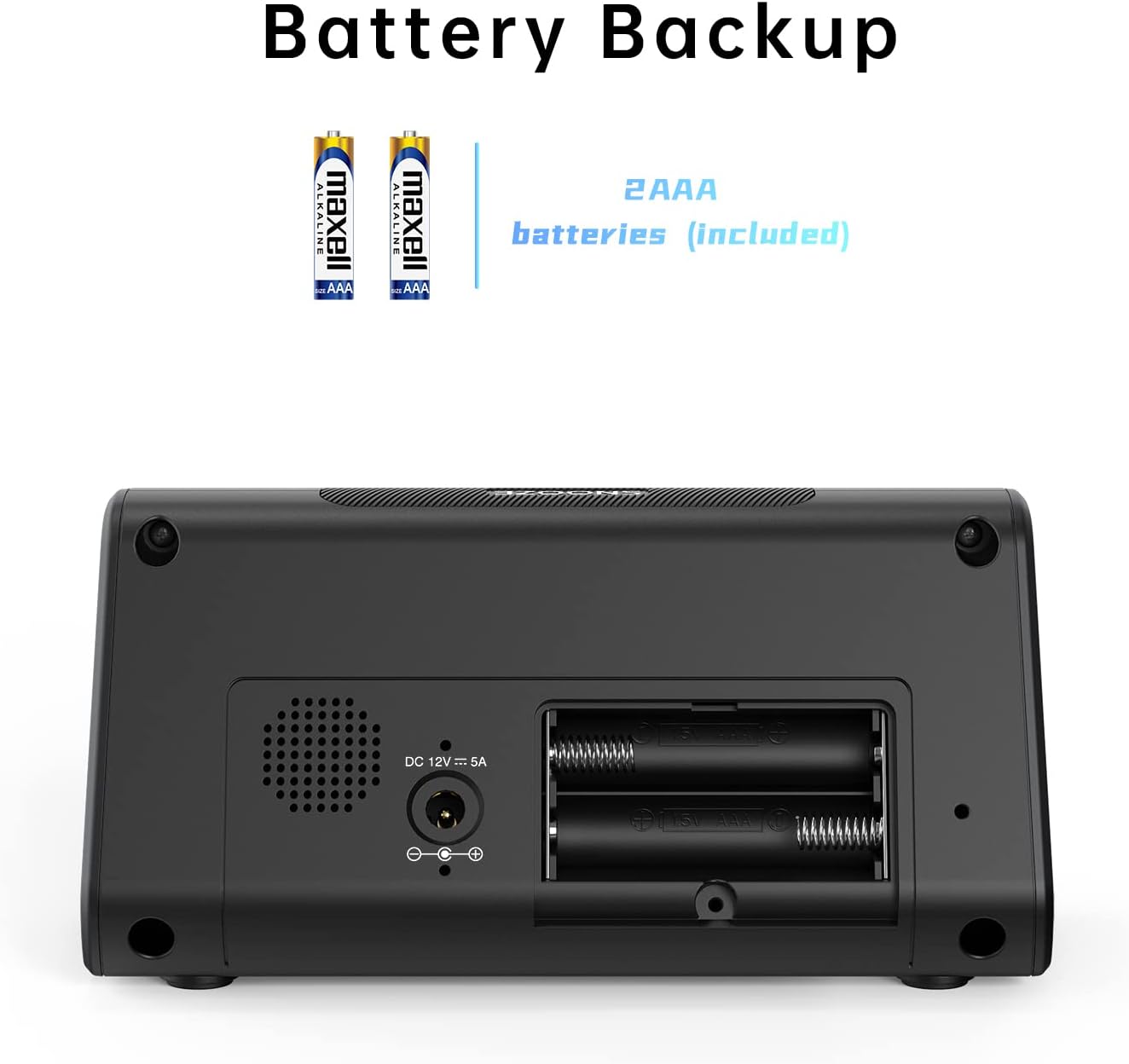
פיגורע 4: צוריק view with battery compartment and power input.
5. סעטאַפּ
5.1. מאַכט קאַנעקשאַן
- Insert the 2 x AAA batteries into the battery compartment on the back of the alarm clock. Ensure correct polarity. These batteries provide backup power to retain time and alarm settings during a power outage.
- Connect the provided AC power adapter to the DC 12V/5A input port on the back of the alarm clock.
- Plug the AC power adapter into a standard wall outlet. The display will light up.

פיגור 5: פארבינדן דעם AC מאַכט אַדאַפּטער.
5.2. שטעלן די איצטיקע צייט
- דריקן און האַלטן די צייט קנעפּל און די SNOOZE button simultaneously for 3 seconds. The display will begin to flash, indicating time setting mode.
- ניצן די שעה און MIN buttons on the side to adjust the year, month, and date in sequence. Press the צייט button to confirm each setting and move to the next.
- After setting the date, adjust the current hour and minute using the שעה און MIN קנעפּלעך.
- דרוק די צייט קנעפּל ווידער צו באַשטעטיקן די צייט.
- You can enable or disable the Auto DST (Daylight Saving Time) feature in this menu. Use the שעה or MIN buttons to select ON or OFF, then press צייט to confirm. (Note: Auto DST is only available in US time zones).

Figure 6: Setting the time on the alarm clock.
6. אַפּערייטינג ינסטרוקטיאָנס
6.1. באַשטעטיקן די שרעק
- רוק די שרעק switch on the side to the שטעלן position. The time display will flash.
- ניצן די שעה און MIN buttons to set your desired wake-up time.
- רוק די שרעק באַשטימען צו די ON position to activate the alarm. The alarm indicator light will illuminate on the display.
6.2. שלאָף פונקציע
ווען דער אַלאַרם קלינגט, דריק די גרויסע קנעפּל SNOOZE button on top to temporarily silence the alarm. The alarm will sound again after the set snooze duration.
To set the snooze duration (5, 10, or 15 minutes):
- דריקן און האַלטן די SNOOZE button for 3 seconds. The current snooze time will flash on the display.
- ריפּיטידלי דריקן די SNOOZE button to cycle through 5, 10, or 15 minutes.
- דרוק די SNOOZE קנעפּל ווידער צו באַשטעטיקן דיין סעלעקציע.

Figure 7: Using the Snooze function.
6.3. Nap Function
The Nap function allows you to set a short-term alarm for a nap without affecting your main alarm setting.
- דרוק די NAP button on the side of the clock. The display will show a nap duration (e.g., 90, 75, 60, 45, 30, 15 minutes) or OFF.
- פאָרזעצן דרינגלעך די NAP button to cycle through the desired nap times or select OFF to disable. The “NAP” indicator will light when active.
- To stop the nap alarm when it sounds, press either the SNOOZE or NAP קנעפּל.

Figure 8: Utilizing the Nap function.
6.4. אַדזשאַסטירן די ברייטקייט פון דעם עקראַן
The alarm clock features three levels of display brightness: Off, Low, and High.
- ריפּיטידלי דריקן די SNOOZE / DIMMER button on the top of the clock to cycle through the brightness levels.

Figure 9: Display brightness options.
6.5. טשאַרדזשינג דעוויסעס
The alarm clock includes three USB charging ports for your convenience:
- 1 x USB-C Port: Provides 5V/3A output for fast charging compatible devices.
- 2 x USB-A פּאָרטן: Provide 5V/2.4A output each for charging various smartphones, tablets, and other USB-powered devices.
Simply connect your device's charging cable to the appropriate USB port on the alarm clock. No additional charging station is required.
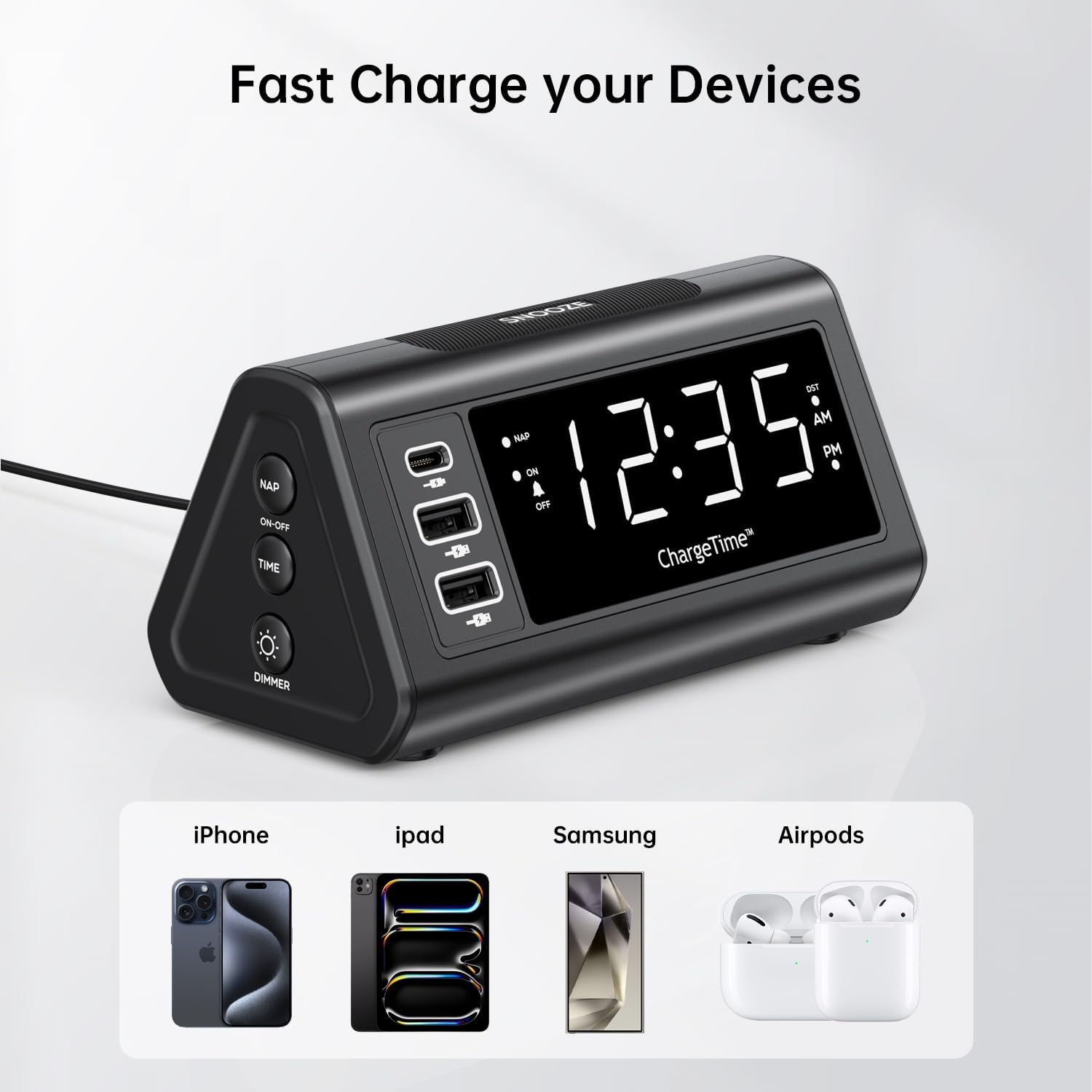
Figure 10: Charging devices via USB ports.
7. וישאַלט
7.1. רייניקונג
To clean the alarm clock, gently wipe the surface with a soft, dry cloth. Do not use abrasive cleaners, waxes, or solvents as they may damage the finish. Ensure the device is unplugged from the power outlet before cleaning.
7.2. באַטערי פאַרבייַט
The 2 x AAA batteries are for backup only and do not power the main functions. Replace them periodically (e.g., once a year) to ensure settings are retained during power outages. To replace, open the battery compartment on the back, remove old batteries, and insert new ones with correct polarity.
8. טראָובלעשאָאָטינג
| פּראָבלעם | מעגלעך סיבה | לייזונג |
|---|---|---|
| דער עקראַן איז ליידיק אָדער ליכט זיך נישט אָן. | No power, power adapter not connected, or display brightness set to OFF. | Ensure AC adapter is securely plugged into the clock and wall outlet. Press the SNOOZE/DIMMER button repeatedly to adjust brightness. |
| דער אַלאַרם קלינגט נישט. | Alarm is not set, alarm switch is OFF, or volume is too low (if applicable). | Verify alarm time is set correctly. Slide the ALARM switch to the ON position. |
| צייט סעטינגס גייען פארלוירן נאכן אויסשטראמען דעם עלעקטרישן מאשיןtage. | באַקאַפּ באַטעריעס זענען טויט אָדער נישט אינסטאַלירט. | Ensure 2 x AAA batteries are installed correctly and are not depleted. Replace if necessary. |
| קען נישט שטעלן צייט/אַלאַרם. | Incorrect button combination or sequence. | Refer to Section 5.2 for time setting (TIME + SNOOZE for 3 seconds) and Section 6.1 for alarm setting (ALARM switch to SET). |
| Devices not charging via USB ports. | Device not compatible, cable faulty, or clock not powered. | Ensure the alarm clock is powered by the AC adapter. Try a different USB cable or device to confirm functionality. |
9. ספּעסאַפאַקיישאַנז
- סאָרט: TeleAdapt
- מאָדעל: ChargeTime USB-C (TA-7835)
- קאָליר: שוואַרץ
- ווייַז טיפּ: דיגיטאַל געפירט
- מאַכט מקור: Corded Electric (AC mains), Battery Powered (backup)
- USB-C רעזולטאַט: 5V/3A
- וסב- א רעזולטאַט: 5V/2.4A (יעדער פּאָרט)
- באַטאַרייע באַקאַפּ: 2 X AAA באַטעריז (אַרייַנגערעכנט)
- דימענסיעס: בעערעך 7.48 X 5.35 X 3.43 אינטשעס
- נומער וואָג: בעערעך 1.54 פונט
- ספּעציעלע פֿעיִקייטן: 3-level display brightness, Snooze function (5/10/15 min), Nap timer (15-90 min), Auto-DST (US time zones only)
10. וואָראַנטי און שטיצן
For warranty information or technical support, please contact TeleAdapt customer service. Details can typically be found on the manufacturer's official webזייטל אדער דורך אייער קויפן-פונקט. ביטע באַהאַלטן אייער קויפן-באַווייַז פֿאַר וואָראַנטי-קליימז.
פאַבריקאַנט: TeleAdapt
Webפּלאַץ: www.teleadapt.com (ביטע באַמערקן: דאָס איז אַ פּלאַץ האָלדער URLזעט אייער פּראָדוקט פּאַקאַדזשינג אָדער באַאַמטער דאָקומענטאַציע פֿאַר די ריכטיקע שטיצע קאָנטאַקט אינפֿאָרמאַציע.)


