1. פּראָדוקט איבערview
The Oladance OWS1 Open Ear Headphones offer a unique open-ear design for comfort and situational awareness. These wireless Bluetooth 5.2 headphones feature dual 16.5mm drivers for high-quality sound and extended battery life, making them suitable for various activities.
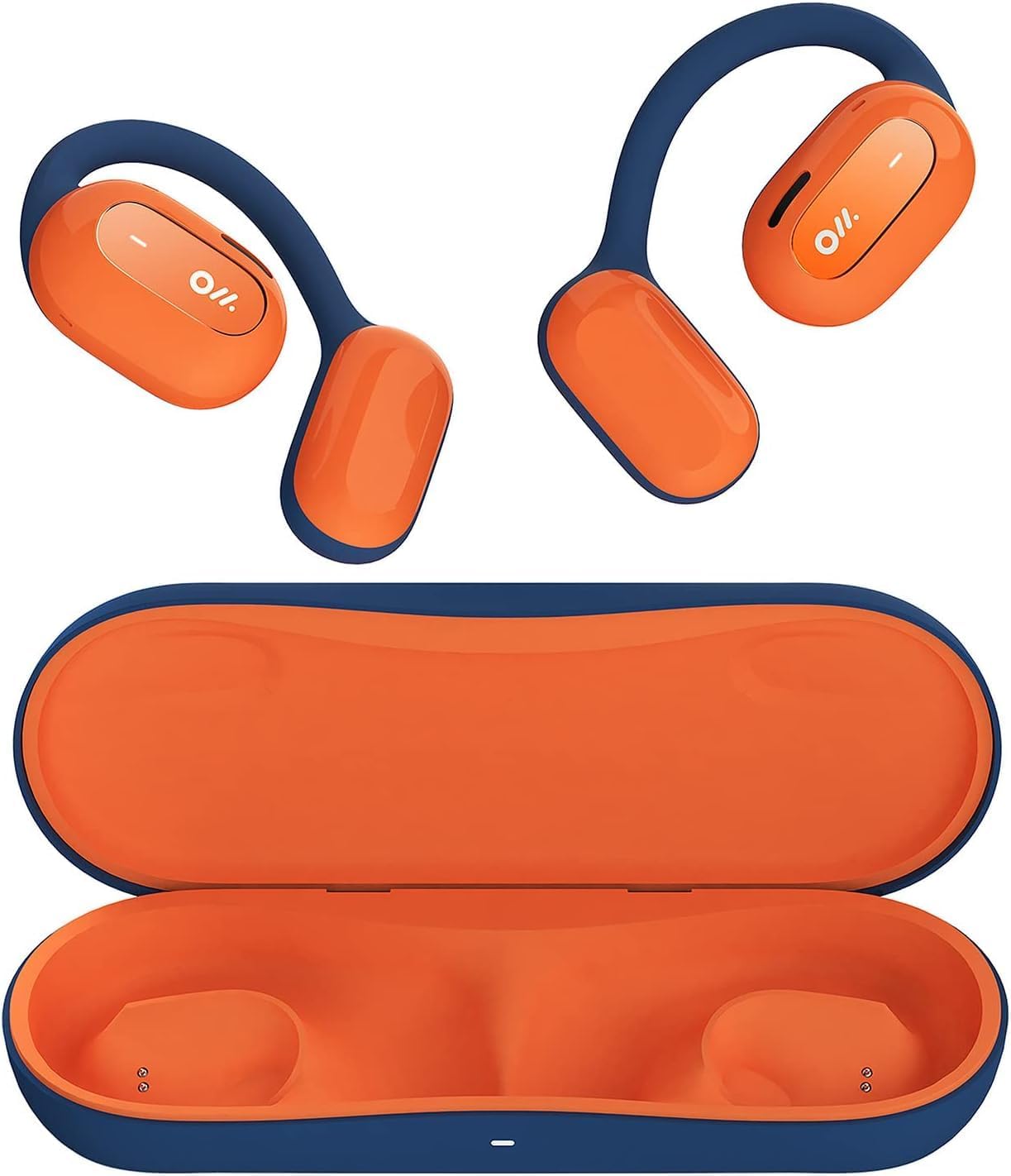
Image 1: Oladance OWS1 Open Ear Headphones and their carry case.
2. וואָס איז אין דער קעסטל
- 1 × Oladance Wearable Stereo (Pair of Open Ear Headphones)
- 1 × Non-charging Carry Case
- 1 × טיפּ-C קאַבלע
- 1 × באַניצער מאַנואַל
3. שליסל פֿעיִקייטן
- True Open Ear Design: Earbuds rest gently on top of the ear, avoiding insertion into the ear canal for enhanced comfort and situational awareness.
- 360° Superior Sound: Equipped with dual powerful 16.5mm dynamic drivers and bio-diaphragm technology for rich, clear audio across all volume levels.
- Anti-Hearing Loss Focus: Designed to prevent common health issues associated with traditional earbuds by not blocking the ear canal, reducing pressure and potential hearing damage.
- Extended 16-Hour Playtime: Features a built-in 160mAh battery and low-consumption algorithms, providing up to 16 hours of continuous playback on a single charge. Note: A separate charging case is required for extended playtime beyond the included carry case.
- זיכער און באַקוועם פּאַסיק: Multi-point support system distributes weight evenly across the ear, ensuring a stable and comfortable fit for various activities.

Image 2: The Oladance OWS1 headphones are designed for a secure and comfortable fit, ideal for activities like yoga.
4. סעטאַפּ גייד
4.1 ערשט טשאַרדזשינג
Before first use, fully charge your Oladance OWS1 headphones. Connect the provided Type-C cable to the charging port on the headphones and a compatible USB power source. The LED indicator will show charging status.
4.2 פּאַוערינג אויף / אַוועק
- צו מאַכט אויף: Press and hold the power button (location typically on one of the earbud units) for approximately 2-3 seconds until you hear an audible prompt or see an LED indicator light up.
- צו מאַכט אַוועק: Press and hold the power button for approximately 3-5 seconds until you hear an audible prompt or the LED indicator turns off.
4.3 בלועטאָאָטה פּערינג
- מאַכן זיכער אַז די כעדפאָונז זענען פּאַוערד אַוועק.
- Press and hold the power button for approximately 5-7 seconds until the LED indicator flashes red and blue alternately. This indicates the headphones are in pairing mode.
- אויף אייער דעווייס (סמאַרטפאָן, טאַבלעט, קאָמפּיוטער), גייט צו די בלועטוט סעטטינגס.
- זוכן פֿאַר "Oladance OWS1" in the list of available devices.
- Select "Oladance OWS1" to connect. Once connected, the LED indicator will typically flash blue slowly or turn off, and you will hear a confirmation tone.

Image 3: The Oladance OWS1 headphones are designed for an ergonomic and stable fit during various activities.
5. אַפּערייטינג ינסטרוקטיאָנס
5.1 יקערדיק קאָנטראָלס
| פֿונקציע | קאַמף |
|---|---|
| שפּיל / פּויזע מוזיק | דריק איין מאל דעם מולטי-פונקציע קנעפל. |
| ווייַטער שפּור | דריקט צוויי מאָל דעם מולטי-פונקציע קנעפּל. |
| פֿריִערדיקע שפּירט | דריק דריי מאָל דעם מולטי-פונקציע קנעפּל. |
| באַנד אַרויף | Single press the Volume + button. |
| באַנד אַראָפּ | Single press the Volume - button. |
| ענטפֿערן / סוף רופן | דריק איין מאל דעם מולטי-פונקציע קנעפל בעת אן אנקומענדיקן רוף אדער אקטיוון רוף. |
| אָפּוואַרפן רופן | דריק און האלט דעם מולטי-פונקציע קנעפל פאר 2 סעקונדעס בעת אן אנקומענדיקן רוף. |
| אַקטאַווייט די קול אַססיסטאַנט | דריקן און האַלטן די מולטי-פונקציע קנעפּל פֿאַר 2 סעקונדעס. |
5.2 מולטי-פוינט קאַנעקשאַן
The Oladance OWS1 headphones support multi-point connection, allowing them to be connected to two Bluetooth devices simultaneously. This enables seamless switching between devices without re-pairing.
- Ensure the headphones are paired with the first device.
- Put the headphones into pairing mode again (usually by holding the power button until the LED flashes red and blue).
- On the second device, search for "Oladance OWS1" in the Bluetooth settings and connect.
- The headphones should now be connected to both devices. Audio will automatically switch to the device playing content or receiving a call.

Image 4: The open-ear design allows for comfortable extended wear, even during work or calls.
6. קער און וישאַלט
- רייניקונג: Use a soft, dry cloth to wipe the headphones. Avoid using harsh chemicals or abrasive materials.
- סטאָרידזש: Store the headphones in their provided non-charging carry case when not in use to protect them from dust and damage.
- וואַסער קעגנשטעל: The headphones are water-resistant (IPX4 rated). Avoid submerging them in water or exposing them to high-pressure water jets. Dry thoroughly if they get wet.
- טעמפּעראַטור: פֿאַרמײַדט אויסשטעלן די כעדפאָונז צו עקסטרעמע טעמפּעראַטורן (הייס אָדער קאַלט) אָדער הויכע פֿײַכטקייט.

Image 5: The included carry case protects your Oladance OWS1 headphones during transport and storage.
7. טראָובלעשאָאָטינג
- קענען ניט מאַכט אויף
- Ensure the headphones are fully charged. Connect them to a power source using the Type-C cable.
- קענען ניט פאַרבינדן מיט דיווייס
- Ensure the headphones are in pairing mode (LED flashing red and blue).
- אויסלעשן און אן די בלועטוט פון אייער דעווייס.
- ויסמעקן פריערדיקע בלועטוט קאַנעקשאַנז אויף דיין מיטל.
- ריקט די כעדפאָונז נענטער צו אייער דעווייס.
- קיין סאָונד אָדער נידעריק באַנד
- קאָנטראָלירט די וואָלומען לעוועלס אויף ביידע די כעדפאָונז און אייער פֿאַרבונדענע מיטל.
- זיכער מאַכן אַז די כעדפאָונז זענען ריכטיק פארבונדן צו דיין מיטל.
- פרובירט צו שפּילן אַודיאָ פֿון אַן אַנדער אַפּליקאַציע אָדער מקור.
- ינטערמיטאַנט קאַנעקשאַן
- זיכער מאַכן אַז עס זענען נישטאָ קיין שטערונגען צווישן די כעדפאָונז און דיין מיטל.
- פֿאַרמײַדן שטאַרקע עלעקטראָמאַגנעטישע שטערונגען.
- Keep the headphones within the effective Bluetooth range (typically 10 meters).
8. פּראָדוקט ספּעסאַפאַקיישאַנז
| שטריך | דעטאַל |
|---|---|
| מאָדעל נומער | OLA02 |
| סאָרט | אָלאַדאַנסע |
| קאַנעקטיוויטי טעכנאָלאָגיע | ווירעלעס (בלוטוט 5.2) |
| אויער פּלייסמאַנט | עפענען אויער |
| פאָרם פאַקטאָר | עפענען אויער |
| דרייווער גרייס | צווייענדיקע 16.5 מ״מ דינאַמישע דרייווערס |
| באַטעריע לעבן (דורכשניטלעך) | אַרויף צו 16 שעה |
| טשאַרדזשינג צייט | בעערעך 2 שעה |
| וואַסער קעגנשטעל מדרגה | וואַסער קעגנשטעליק (IPX4) |
| מיקראָפאָן פֿאָרמאַט | געבויט-אין |
| קאָנטראָל טיפּ | מעדיע קאָנטראָל (קנעפּלעך) |
| מאַטעריאַל | פּלאַסטיק |
| פּראָדוקט דימענשאַנז | 13 X 11 X 457.2 סענטימעטער |
| פּונקט וואָג | 260 ג |

Image 6: A close-up of the Oladance OWS1 headphones, highlighting their design and color.
9. וואָראַנטי און שטיצן
Oladance products are covered by a limited warranty. For detailed warranty information, product support, or service inquiries, please refer to the official Oladance webזייטל אדער קאנטאקט זייער קאסטומער סערוויס גלייך. האלט אייער באווייז פון קויפן פאר גאראנטיע פארלאנגען.
פֿאַר ווייַטער הילף, ביטע באַזוכן: www.oladance.com


