1. הקדמה
The Amazon Echo Show 5 (3rd Gen) is a smart display designed to integrate seamlessly into your daily life. It features a 5.5-inch screen and enhanced audio capabilities, providing visual and auditory interactions with Alexa. This device is refurbished, tested, and certified to function like a new unit, and comes with the same limited warranty.
The device is constructed with sustainability in mind, utilizing 100% post-consumer recycled polyester yarn for its fabric and 100% recycled aluminum. Its packaging is also 100% recyclable.
2. וואָס איז אין דער קעסטל
Upon unboxing your Amazon Echo Show 5 (3rd Gen), you should find the following items:
- Echo Show 5 (3rd Gen) device
- Power adapter (22W) and cable (4.9ft)
- שנעל אָנהייב גייד
3. סעטאַפּ גייד
פֿאָלגט די סטעפּס צו שטעלן אויף אייער עקאָ שאָו 5:
- מאַכט אויף: Connect the included power adapter to your Echo Show 5 and plug it into a wall outlet. The device will automatically power on.
- גיי די אינסטרוקציעס אויף דער סקרין: The device will guide you through the initial setup process on its 5.5-inch touch screen.
- פאַרבינדן צו Wi-Fi: Select your Wi-Fi network from the list and enter the password. The Echo Show 5 supports dual-band Wi-Fi (802.11a/b/g/n/ac). It does not support ad-hoc (peer-to-peer) networks.
- Log in to Amazon Account: Enter your Amazon account credentials when prompted.
- פערזענליכען סעטינגס: Configure your time zone, location, and other preferences.
- ויספאָרשן פֿעיִקייטן: Once setup is complete, you can begin interacting with Alexa and exploring the device's capabilities.
The device utilizes Amazon Wi-Fi Simple Setup technology for an easier connection process to your Wi-Fi network.
4. אפערירן אייער עקאָ שאָו 5
The Echo Show 5 allows for various interactions through voice commands and its touch screen.
4.1. ווייַז פֿעיִקייטן
The 5.5-inch touch screen provides visual information and controls:
- אינפֿאָרמאַציע אין אַ בליק: View news headlines, weather forecasts, and calendar events.
- פאָטאָ אַרויסווייַזונג: Set the background to a rotating slideshow of your favorite photos. You can invite family and friends to share photos.
- אינהאַלט Viewינג: Stream shows, view song titles, and follow along with recipes.

4.2. אַודיאָ פֿעיִטשערז
The device features a full-range 1.75-inch built-in speaker, offering enhanced bass and clearer vocals for audio playback.
- מוזיק און פּאָדקאַסטן: Stream audio content from services like Amazon Music and Spotify.
- בלועטאָאָטה קאַנעקטיוויטי: Supports Advanced Audio Distribution Profile (A2DP) for streaming audio from your mobile device to the Echo Show 5, or from the Echo Show 5 to a Bluetooth speaker. Audio/Video Remote Control Profile (AVRCP) allows voice control of connected mobile devices. Bluetooth speakers requiring PIN codes are not supported.


4.3. קאַמעראַ פֿעיִקייטן
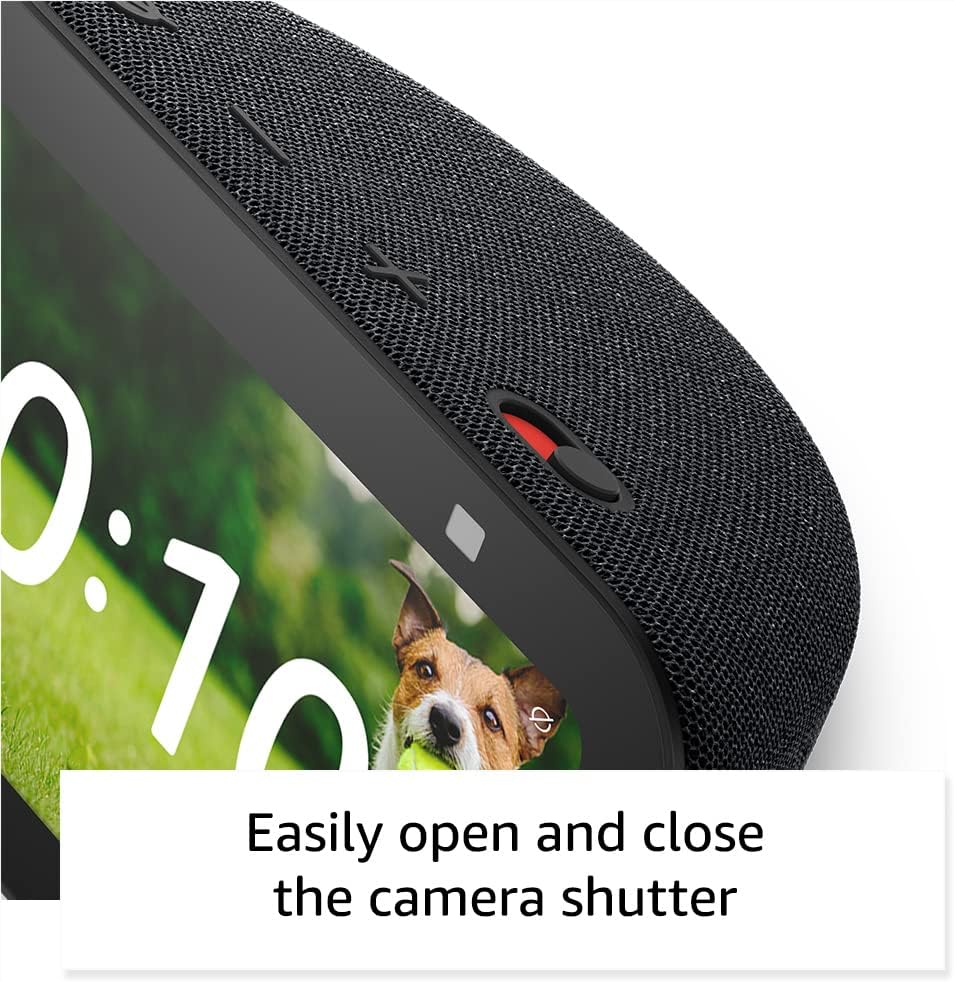
The Echo Show 5 includes a 2 MP camera with a built-in shutter.
- ווידעא רופן: Use the camera to make video calls to friends and family who have the Alexa app or another Echo device with a screen.
- היים מאָניטאָרינג: Check in on your home, family, or pets using the built-in camera. You can also view compatible video doorbells.


4.4. קלוגע היים קאנטראל
Control compatible smart devices such as lights and thermostats using voice commands or the touch screen, even when you are away from home. The device supports Wi-Fi, Bluetooth Low Energy Mesh, and Matter for smart home compatibility.
4.5. פּריוואַטקייט פֿעיִטשערז
The Echo Show 5 incorporates multiple layers of privacy controls:
- Mic/Camera Off Button: A physical button to electronically disconnect the microphone and camera.
- איינגעבויטע קאַמעראַ שאַטער: א פיזישער סליידער צו דעקן די קאַמעראַ לינז.
- וועק ווארד טעכנאָלאָגיע: דער אפאראט הייבט ערשט אן אויפנעמען און שיקן אודיא צום וואלקן נאכדעם וואס עס דעטעקטירט דאס וועק ווארט (למשל, "אלעקסא").
- סטרימינג אינדיקאַטאָרן: Visual indicators show when the device is actively streaming to the cloud.
- שטימע רעקאָרדינג פאַרוואַלטונג: פיייקייט צו view און אויסמעקן אייערע שטימע רעקארדירונגען.
- Ring Video Encryption: שטיצט viewing end-to-end encrypted Ring video.
4.6. אַקסעסאַביליטי פֿעיִקייטן
The Echo Show 5 includes various accessibility features to personalize Alexa to your abilities. These can be accessed via סעטטינגס → צוטריטלעכקייט.
- צאַפּן צו אַלעקסאַ: צוטריט אַלעקסאַ דורך פאַרבינדן דורך אויף-פאַרשטעלן טיילז אָדער אַ קלאַוויאַטור.
- אַדאַפּטיוו צוהערן: גיט מער צייט צו ענדיגן רעדן איידער אַלעקסאַ ענטפערט.
- בילכער רעדן קורס: קאָנטראָליר ווי שנעל אָדער פּאַמעלעך אַלעקסאַ רעדט.
- אונטערשריפטן: Alexa Captioning, Call Captioning, and Closed Captioning provide text captions for supported content.
- ווייזן און דערציילן: Helps users who are blind or visually impaired identify products by saying "Alexa, what am I holding."
- קולView סקרין לייענער: Enables access for users who are blind or visually impaired.
- סקרין פֿאַרגרעסערער: ערמעגליכט זומען אריין/אויס און פאנען ארום דעם עקראן.
- מעלדן ווען נאָענט: שפּילט אָנזאָג קלאַנגען ווען עס ווערט דעטעקטירט לעבן דעם מיטל.
- קינדל לייען הויך: Alexa can read Kindle books aloud.
- טעקסט אין רעאל-צייט: Enables typing live text in a video call.
- Additional features include Color Inversion, Color Correction, and Request Sound.
5. וישאַלט
כדי צו זיכער מאַכן די לאַנגלעבעדיקייט און אָפּטימאַלע פאָרשטעלונג פון אייער Echo Show 5, נאָכפאָלגן די וישאַלט גיידליינז:
- רייניקונג: Use a soft, lint-free cloth to gently wipe the screen and exterior. Avoid abrasive cleaners, solvents, or aerosol sprays.
- אָרט: שטעלט דעם אפאראט אויף א סטאבילן, פלאכן אויבערפלאך ווייט פון דירעקטן זונשייַן, היץ-קוועלער, און איבעריגע פייכטקייט. זיכערט זיך אז עס איז דא גענוג ווענטילאציע ארום דעם אפאראט.
- ווייכווארג דערהייַנטיקונגען: The device receives guaranteed software security updates for at least four years after its last availability for purchase as a new unit. Ensure your device is connected to Wi-Fi to receive these updates automatically.
- מאַכט ציקל: If the device becomes unresponsive, unplug it from the power outlet, wait for 10 seconds, and then plug it back in.
6. טראָובלעשאָאָטינג
אויב איר טרעפט פּראָבלעמען מיט אייער Echo Show 5, פּרוּווט די פאלגענדע לייזונגען:
- קיין מאַכט: זיכער מאַכן אַז דער מאַכט אַדאַפּטער איז זיכער פארבונדן צו ביידע דעם מיטל און אַ אַרבעטנדיק וואַנט אַוטלעט. פּרוּווט אַן אַנדער אַוטלעט.
- Wi-Fi קאַנעקטיוויטי ישוז:
- Check if your Wi-Fi router is working correctly.
- ריסטאַרט דיין ראַוטער און מאָדעם.
- On the Echo Show 5, go to Settings → Network and try reconnecting to your Wi-Fi network.
- זיכער מאַכן אַז די דעווייס איז אין דער ראַנגע פון דיין Wi-Fi ראַוטער.
- אַלעקסאַ ענטפֿערט נישט:
- Ensure the microphone is not muted (the light ring will be red). Press the mic/camera off button if it is.
- רעדט קלאָר און גלייך צום אַפּאַראַט.
- Try restarting the device by unplugging and replugging it.
- ווייַז ישוז: If the screen is unresponsive or frozen, try restarting the device.
- געזונט פּראָבלעמס:
- Check the volume level on the device.
- Ensure no external Bluetooth speakers are connected if you intend to use the internal speaker.
- קאַמעראַ אַרבעט נישט: Ensure the camera shutter is open and the camera is not disabled via the mic/camera off button.
פֿאַר ווייטערדיקע הילף, זעט די אַמאַזאָן שטיצע webפּלאַץ אָדער קאָנטאַקט קונה דינסט.
7. ספּעסאַפאַקיישאַנז
| שטריך | דעטאַל |
|---|---|
| מאָדעל | עקאָ שאָו 5 (3טע דור) - 2023 אויסגאבע |
| דימענשאַנז (ב x ד x ה) | 5.8 "רענטגענ 3.6" רענטגענ 3.2 "(147 מם רענטגענ 91 מם רענטגענ 82 מם) |
| וואָג | 16.1 אַז (456 גראַמז) |
| ווייַז | 5.5" פאַרבינדן פאַרשטעלן |
| אַפּאַראַט | 2 MP with built-in shutter |
| פּראַסעסער | מעדיעטעק MT 8169 B |
| Wi-Fi קאַנעקטיוויטי | Dual-band 802.11a/b/g/n/ac (does not support ad-hoc networks) |
| בלועטאָאָטה קאַנעקטיוויטי | A2DP support for audio streaming, AVRCP for voice control (Bluetooth speakers requiring PIN codes not supported) |
| אַודיאָ | פול-רעינדזש 1.75” איינגעבויטער רעדנער |
| סמאַרט היים קאַמפּאַטאַבילאַטי | Wi-Fi, בלועטוט נידעריק ענערגיע מעש, מאַטער |
| שפּראַך שטיצן | ענגליש און שפּאַניש |
8. וואָראַנטי און שטיצן
Your Amazon Echo Show 5 (3rd Gen) comes with a 1-year limited warranty and service. As a refurbished device, it receives the same limited warranty as a new device.
For detailed warranty information and terms of service, please refer to the documentation provided with your device or visit the official Amazon support website. Information regarding software security updates is also available through Amazon's official channels.


