1. הקדמה
The XTAR VC4H is an advanced 4-bay universal battery charger designed for a wide range of rechargeable batteries. It features a smart LCD display that provides real-time information on charging status, current, voltage, and charged capacity. With its USB-C input and QC 3.0 compatibility, the VC4H offers efficient and convenient charging for various battery types and sizes.
2. פּעקל אינהאַלט
Upon opening your XTAR VC4H package, you should find the following items:
- 1 x XTAR VC4H 4-Bay Universal Battery Charger
- 1 x באַניצער מאַנואַל
- 1 קס וסב-C קאַבלע
- 1 x סטאָרידזש באַג

Image: Contents of the XTAR VC4H package, including the charger, USB-C cable, and user manual.
3. פֿעיִקייטן
- וניווערסאַל קאַמפּאַטאַבילאַטי: Supports 3.6V/3.7V Li-ion/IMR/INR/ICR batteries (10440 to 32650) and 1.2V Ni-MH/Ni-CD batteries (AAAA, AAA, AA, A, SC, C, D).
- קלוגע על-סי-די דיספּלעי: Shows real-time charging current, battery voltage, charged capacity, battery type, and channel.
- אַדזשאַסטאַבאַל טשאַרדזשינג קראַנט: Selectable charging currents of 2A, 1A, or 0.5A. (Note: QC3.0 power source recommended for maximum efficiency).
- קאַפּאַציטעט ווייַז: Accurately displays the real charging capacity of your batteries.
- USB-C Powered: Compatible with all 5V USB power sources.
- קייפל שוץ: Includes overcharge, overvoltage, overcurrent, short-circuit, overheating, and reverse polarity protection.
- Temperature Monitoring Design: Ensures safe operation by monitoring internal temperature.
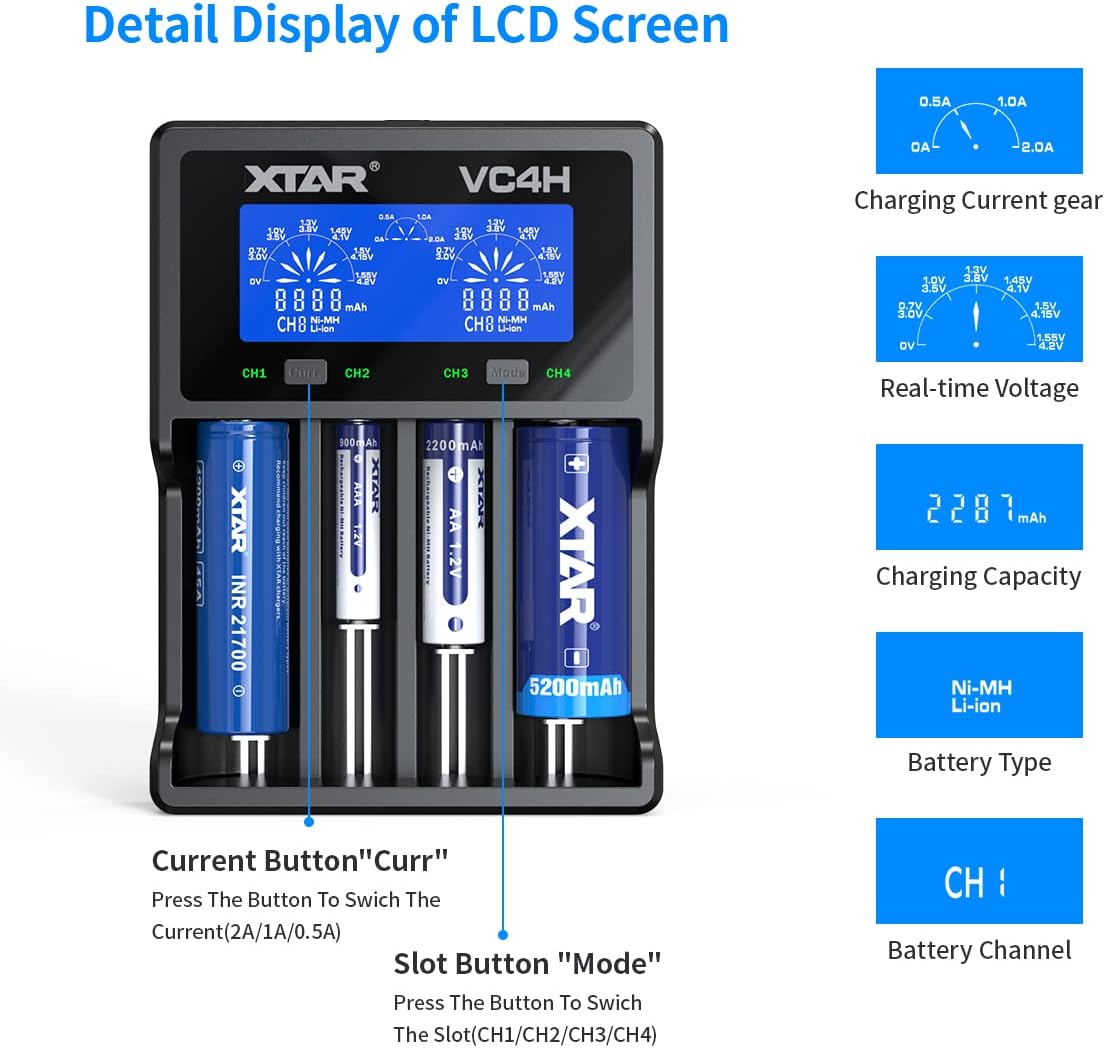
בילד: דעטאַלירט view of the XTAR VC4H LCD screen showing charging current, real-time voltage, charging capacity, battery type, and battery channel.

Image: Visual representation of the multiple protection features of the XTAR VC4H charger, including overcharge, overvoltage, overcurrent, short-circuit, overheating, and reverse polarity protection.
4. סעטאַפּ
- פאַרבינדן צו מאַכט: Connect the provided USB-C cable to the charger's Type-C input port and plug the other end into a 5V USB power source (e.g., QC 3.0 adapter, power bank, laptop).
- אַרייַנלייגן באַטעריז: Carefully insert your rechargeable batteries into the charging bays, ensuring correct polarity (+/-). The charger will automatically detect the battery type (Li-ion or Ni-MH/Ni-CD) and begin charging.

Image: Close-up of the XTAR VC4H charger showing the Type-C input port and a USB-C cable being connected.

Image: The XTAR VC4H charger with various battery types inserted, illustrating its compatibility and different power source options like car charger, power bank, and laptop.
5. אַפּערייטינג ינסטרוקטיאָנס
5.1. טשאַרדזשינג מאָדע
The charger defaults to charging mode when batteries are inserted. The LCD screen will display real-time information for each channel.
5.2. Adjusting Charging Current
דרוק די "Curr" button to switch between available charging currents (2A, 1A, 0.5A). The selected current will be applied to the corresponding channel.

Image: Close-up of the XTAR VC4H control panel, highlighting the 'Curr' button for current selection and 'Mode' button for slot switching.
5.3. Switching Display Content
In charging mode, press the "מאָדוס" button to switch the display content between channels (CH1, CH2, CH3, CH4) or to view different parameters like charging capacity (Cap) or internal resistance (IR).
5.4. Grad Mode (Capacity Measurement)
To enter Grad mode for capacity measurement, long-press the "מאָדוס" button. This mode charges the battery to full, then discharges it to measure its actual capacity, and finally recharges it to full. This process helps assess the battery's true health.
5.5. Store Mode
לאנג דריקן די "מאָדוס" button again to cycle to Store mode. This mode is used to charge or discharge batteries to an optimal storage voltage, preserving their lifespan.
5.6. Automatic Energy Saving
When no batteries are inserted or no operations are performed within about 60 seconds, the screen will go dim to save energy. If a battery is inserted or any button is pressed, the screen will reactivate.
Video: An official XTAR video demonstrating the features and operation of the VC4H Li-ion battery charger, including battery insertion and display functions.
6. קאַמפּאַטאַבילאַטי
The XTAR VC4H charger is designed for broad compatibility with various battery chemistries and sizes:
| באַטערי טיפּ | קאַמפּאַטאַבאַל סיזעס |
|---|---|
| 3.6V/3.7V Li-ion/IMR/INR/ICR | 10440, 14500, 14650, 16340, 17335, 17500, 17670, 18350, 18490, 18500, 18650, 18700, 20700, 21700, 22650, 25500, 32650 (Note: Can charge protected 20700/21700 batteries) |
| 1.2V Ni-MH/Ni-CD | AAAA, AAA, AA, A, SC, C, D |

Image: A table detailing the XTAR VC4H's compatibility with various battery models and types, including Li-ion and Ni-MH/Ni-CD.
7. ספּעסאַפאַקיישאַנז
| באַשרייַבונג | ווערט |
|---|---|
| מאָדעל | VC4H |
| אַרייַנשרייַב וואָלtage | 5 Volts (USB-C, QC3.0 recommended) |
| רעזולטאַט חלקtage | 5 וואלטס (דק) |
| Constant Charging Current (Li-ion) | 3Ax1 / 2Ax2 / 1Ax4 / 0.5Ax4 / 0.25Ax4 |
| Constant Charging Current (Ni-MH/Ni-CD) | 1Ax1 / 1Ax2 / 1Ax4 / 0.5Ax4 |
| דורכשניט-אוף חלקtage (לי-יאָן) | 4.2 וו ± 0.05 וו |
| דורכשניט-אוף חלקtage (Ni-MH/Ni-CD) | 1.45 וו ± 0.1 וו |
| Charging Cut-Off Current | ≤ 150 מאַ |
| אַפּערייטינג טעמפּעראַטור | -10 צו 40 °C |
| פּונקט וואָג | 13.3 אונסעס |
| פּעקל דימענשאַנז | 8.7 X 4.88 X 1.69 אינטשעס |
| סערטיפיקאַטיאָנס | UL, FCC, CE |
8. זיכערקייַט פּריקאָשאַנז
- Use only with compatible rechargeable batteries as listed in the compatibility section.
- Do not charge damaged or inferior batteries.
- Ensure correct battery polarity when inserting batteries into the charger.
- ויסמיידן יקספּאָוזינג די טשאַרדזשער צו וואַסער אָדער עקסטרעם טעמפּעראַטורעס.
- האַלטן אויס פון דערגרייכן פון קינדער.
- דו זאלסט נישט דיסאַסעמבאַל אָדער מאָדיפיצירן די טשאַרדזשער.
- Always use a recommended power source, preferably a QC 3.0 adapter, to ensure optimal performance and safety.
9. טראָובלעשאָאָטינג
- טשאַרדזשער איז נישט פּאַוערינג: Ensure the USB-C cable is securely connected to both the charger and the power source. Try a different USB-C cable or power adapter.
- באַטעריעס לאָדענען זיך נישט: Verify that batteries are inserted with correct polarity. Check if the batteries are compatible with the charger. Ensure the power source is providing sufficient power.
- Incorrect display readings: Remove and reinsert the battery. If the issue persists, ensure the battery type is correctly identified by the charger.
- איבערהייצונג: If the charger or batteries become excessively hot, immediately disconnect the power and remove the batteries. Ensure adequate ventilation around the charger.
10. וואָראַנטי און שטיצן
The XTAR VC4H battery charger comes with lifetime maintenance. For any support inquiries or issues, please refer to the contact information provided in the original product packaging or visit the official XTAR webפּלאַץ.


