הקדמה
This manual provides essential information for setting up, operating, maintaining, and troubleshooting your Acer Veriton X4680G Desktop Computer. Please read this document thoroughly before using the product to ensure proper function and longevity. Keep this manual for future reference.
פּעקל אינהאַלט
באַשטעטיקן אַז אַלע זאכן זענען פאַראַן אין פּעקל:
- Acer Veriton X4680G Desktop PC
- וסב קיבאָרד
- וסב מאַוס
- מאַכט שנור
- דאָקומענטאַציע (שנעל אָנהייב גייד, וואָראַנטי קאַרטל)
פּראָדוקט איבערview
Familiarize yourself with the physical components of your desktop computer.
פראָנט View
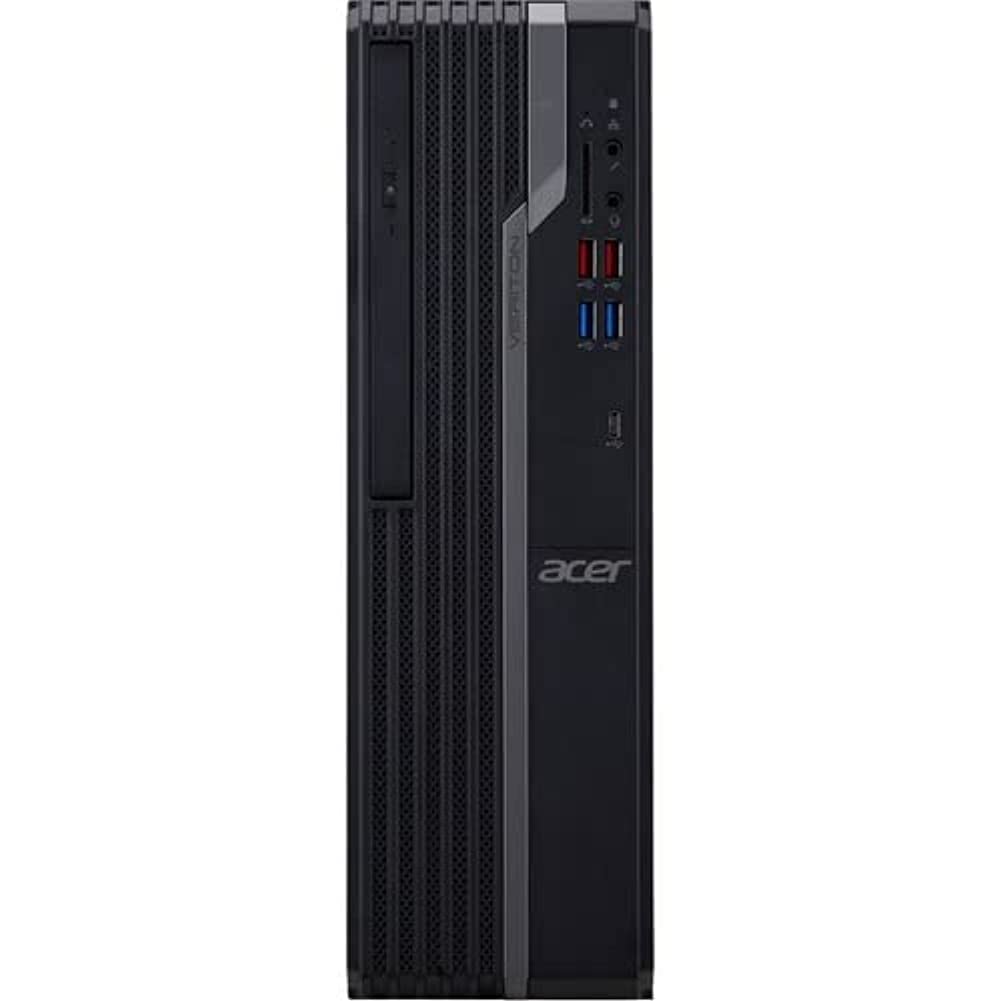
This image displays the front of the Acer Veriton X4680G desktop computer, highlighting the optical drive, front USB ports (including USB 3.2 and USB 2.0), audio jacks, and the power button. The 'Veriton' branding and Acer logo are visible on the chassis.
דערציען View

This image shows the rear panel of the Acer Veriton X4680G, detailing the various input/output ports. These include multiple USB ports, Ethernet port, audio jacks, video output ports (VGA, DisplayPort), and the power input connector. Expansion slots are also visible.
סעטאַפּ
Follow these steps to set up your new desktop computer.
1. קאַנעקטינג פּעריפעראַלס
- מאָניטאָר: Connect your monitor to one of the video output ports (VGA or DisplayPort) on the rear of the computer using the appropriate cable.
- קלאַוויאַטור און מויז: Connect the USB keyboard and mouse to any available USB ports on the front or rear of the computer.
- נעץ: For a wired internet connection, connect an Ethernet cable from your router or modem to the Ethernet port on the rear of the computer. For wireless, ensure your system has Wi-Fi enabled.
- אַודיאָ: Connect speakers or headphones to the audio output jack on the front or rear panel.
2. מאַכט קאַנעקשאַן
- Connect the power cord to the power input on the rear of the computer.
- צאַפּן די אנדערע סוף פון די מאַכט שנור אין אַ גראָונדעד עלעקטריקאַל ווענטיל.
3. ערשטע איינשאַלטונג
- Press the power button located on the front panel of the computer.
- The computer will boot up, and the Windows 10 Pro operating system will load. Follow any on-screen instructions for initial setup, such as language selection and user account creation.
אַפּערייטינג ינסטראַקשאַנז
Guidance for basic operation of your Acer Veriton X4680G.
Windows 10 פּראָ
Your computer comes pre-installed with Windows 10 Pro. This operating system provides a familiar interface for managing files, running applications, and browsing the internet. Utilize the Start Menu for quick access to programs and settings.
Using the Optical Drive (DVD-Writer)
The integrated DVD-Writer allows you to read and write CDs and DVDs.
- To open the tray, press the eject button on the drive face.
- Place a disc onto the tray with the label side facing up.
- Gently push the tray back into the computer until it clicks shut.
- The operating system will typically prompt you for action or automatically play media.
וסב פּאָרץ
The computer features multiple USB 2.0 and USB 3.2 ports for connecting external devices such as external hard drives, printers, and other peripherals. USB 3.2 ports offer faster data transfer speeds.
וישאַלט
Regular maintenance helps ensure optimal performance and extends the lifespan of your computer.
רייניקונג
- עקסטעריע: ניצן אַ ווייך, דamp cloth to wipe the exterior surfaces. Avoid harsh chemicals.
- ווענץ: Periodically use compressed air to clear dust from the ventilation grilles to prevent overheating.
- פאַרשטעלן: For monitors, use a specialized screen cleaner and a microfiber cloth.
ווייכווארג דערהייַנטיקונגען
האַלט אייער אָפּערייטינג סיסטעם און דרייווערס אַפּדייטיד צו ענשור זיכערהייט און פאָרשטעלונג.
- ווינדאָוס דערהייַנטיקונגען: Regularly check for and install Windows updates via the Settings app.
- דרייווער דערהייַנטיקונגען: Visit the Acer support webוועבזייטל פֿאַר די לעצטע דרייווערס פֿאַר דיין ספּעציפֿישן מאָדעל.
דאַטאַ באַקקופּ
קעסיידער צוריק אַרויף דיין וויכטיק fileס צו אַן עקסטערנאַל דרייוו אָדער וואָלקן סטאָרידזש צו פאַרמייַדן דאַטן אָנווער.
טראָובלעשאָאָטינג
די סעקציע באהאנדלט אלגעמיינע פראבלעמען וואס איר קענט באגעגענען.
קיין מאַכט
- Ensure the power cord is securely connected to both the computer and the electrical outlet.
- באַשטעטיקן אַז די עלעקטרישע אַוטלעט אַרבעט דורך אַרײַנשטעקן אַן אַנדער אַפּאַראַט.
- Check the power supply unit (PSU) switch on the rear of the computer, if present, to ensure it is in the 'On' position.
קיין אַרויסווייַזונג אויף מאָניטאָר
- באַשטעטיקן אַז דער מאָניטאָר'ס מאַכט קאַבל איז פארבונדן און אַז דער מאָניטאָר איז אנגעצינדן.
- Check that the video cable (VGA or DisplayPort) is securely connected to both the computer and the monitor.
- Ensure the monitor's input source is set correctly (e.g., VGA, DisplayPort).
סיסטעם פארלאנגזאמונג
- שליסט אומנייטיקע אַפּליקאַציעס וואָס לויפן אין הינטערגרונט.
- Check disk space; a full drive can impact performance.
- לויפט א ווירוס סקען צו קאָנטראָלירן פֿאַר מאַלוואַרע.
- זייט זיכער אז ווינדאָוס און דרייווערס זענען אַרויף צו דאַטע.
ספּעסאַפאַקיישאַנז
Detailed technical specifications for the Acer Veriton X4680G Desktop Computer.
| שטריך | באַשרייַבונג |
|---|---|
| פּראַסעסער | Intel Core i7-11700 Octa-core (8 Core) 2.50 GHz |
| באַראַן | 8 גיגאבייט DDR4 SDRAM |
| סטאָרידזש | 256 GB PCI Express SSD |
| אָפּערייטינג סיסטעם | Windows 10 פּראָ |
| גראַפיקס קאַרד | Intel Iris Xe גראַפיקס |
| אָפּטיש דרייוו | ווי-רייטער |
| ווירעלעסס קאַנעקטיוויטי | 802.11ax, בלועטוט |
| וסב 2.0 פּאָרץ | 4 |
| דימענשאַנז (LxWxH) | 16.34 X 19.49 X 6.69 אינטשעס |
| פּונקט וואָג | 14.52 פונט |
| קאָליר | שוואַרץ |
וואָראַנטי און שטיצן
Your Acer Veriton X4680G Desktop Computer is covered by a limited warranty. Please refer to the warranty card included in your package for specific terms and conditions, including warranty period and coverage details.
פֿאַר טעכנישע שטיצע, דרייווער דאַונלאָודז, אָדער ווייטערדיקע הילף, ביטע באַזוכט די אָפֿיציעלע Acer שטיצע website or contact Acer customer service. Have your product model number (DT.VWEAA.003) and serial number ready when seeking support.
באַמערקונג: וואָראַנטי טערמינען קענען זיין אַנדערש לויט געגנט.


